

Партнерка на США и Канаду по недвижимости, выплаты в крипто
- 30% recurring commission
- Выплаты в USDT
- Вывод каждую неделю
- Комиссия до 5 лет за каждого referral
Оглавление
Introduction. 4
Editions. 4
Editions for specific markets. 5
Languages. 6
New and updated features. 6
User interface. 6
Service packs. 7
Service Pack 1. 7
Service Pack 2. 8
Service Pack 3. 8
New features in Service Pack 3. 8
Previously released updates. 9
Support lifecycle. 9
Common criticisms. 9
Security issues. 10
User interface performance. 10
Integration of operating system features. 10
Backward compatibility. 10
Перевод текста. 11
Введение. 11
Издания. 11
Выпуски для специальных торговых залов. 12
Языки. 12
Новые и обновленные функции. 12
Пользовательский интерфейс. 12
Пакеты обновлений. 13
Service Pack 1. 13
Service Pack 2. 13
Service Pack 3. 14
Новые функции в Service Pack 3. 14
Ранее выпущенные обновления. 14
Общественная критика. 14
Проблемы безопасности. 14
Работа пользовательского интерфейса. 14
Обратная совместимость. 14
Conclusion. 15
Questions. 17
Dictionary. 18
Introduction
The object of this paper is operating system Windows XP by Microsoft. The article concern editions, new and update features, service packs and common criticisms of Windows XP.
The text begins with short description.
Windows XP is a line of operating systems produced by Microsoft for use on personal computers running x86 and IA-64 processors, including home and business desktops, notebook computers, and media centers. The name "XP" is short for "experience". Windows XP is the successor to both Windows 2000 Professional and Windows Me, and is the first consumer-oriented operating system produced by Microsoft to be built on the Windows NT kernel and architecture. Windows XP was first released on 25 October 2001, and over 400 million copies were in use in January 2006, according to an estimate in that month by an IDC analyst. It is succeeded by Windows Vista, which was released to volume license customers on 8 November 2006, and worldwide to the general public on 30 January 2007. Direct OEM and retail sales of Windows XP ceased on 30 June 2008, although it is still possible to obtain Windows XP from System Builders (smaller OEMs who sell assembled computers) until 31 July 2009 or by purchasing Windows Vista Ultimate or Business and then downgrading to Windows XP.
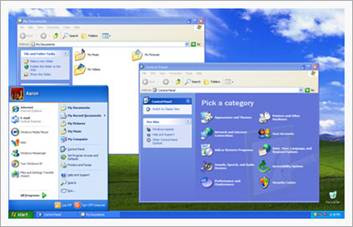
 The most common editions of the operating system are Windows XP Home Edition, which is targeted at home users, and Windows XP Professional, which offers additional features such as support for Windows Server domains and two physical processors, and is targeted at power users, business and enterprise clients. Windows XP Media Center Edition has additional multimedia features enhancing the ability to record and watch TV shows, view DVD movies, and listen to music. Windows XP Tablet PC Edition is designed to run stylus applications built using the Tablet PC platform. Windows XP was eventually released for two additional architectures, Windows XP 64-bit Edition for IA-64 (Itanium) processors and Windows XP Professional x64 Edition for x86-64. There is also Windows XP Embedded, a componentized version of the Windows XP Professional, and editions for specific markets such as Windows XP Starter Edition.
Windows XP is known for its improved stability and efficiency over the 9x versions of Microsoft Windows. It presents a significantly redesigned graphical user interface, a change Microsoft promoted as more user-friendly than previous versions of Windows. A new software management facility called Side-by-Side Assembly was introduced to avoid the "DLL hell" that plagued older consumer-oriented 9x versions of Windows. It is also the first version of Windows to use product activation to combat illegal copying, a restriction that did not sit well with some users and privacy advocates. Windows XP has also been criticized by some users for security vulnerabilities, tight integration of applications such as Internet Explorer 6 and Windows Media Player, and for aspects of its default user interface. Later versions with Service Pack 2, and Internet Explorer 7 addressed some of these concerns.
During development, the project was codenamed "Whistler", after Whistler, British Columbia, as many Microsoft employees skied at the Whistler-Blackcomb ski resort.
As of the end of February 2009, Windows XP is the most widely used operating system in the world with a 63.53% market share, having peaked at 85% in December 2006.
The next paragraphs deal with editions, new and updated features, service packs of Windows XP.
Editions
The two major editions are Windows XP Home Edition, designed for home users, and Windows XP Professional, designed for business and power-users. XP Professional contains advanced features that the average home user would not use. However, these features are not necessarily missing from XP Home. They are simply disabled, but are there and can become functional. These releases were made available at retail outlets that sell computer software, and were pre-installed on computers sold by major computer manufacturers. As of mid-2008, both editions continue to be sold. A third edition, called Windows XP Media Center Edition was introduced in 2002 and was updated every year until 2006 to incorporate new digital media, broadcast television and Media Center Extender capabilities. Unlike the Home and Professional edition, it was never made available for retail purchase, and was typically either sold through OEM channels, or was pre-installed on computers that were typically marketed as "media center PCs".
Two different 64-bit editions were made available, one designed specifically for Itanium-based workstations, which was introduced in 2001 around the same time as the Home and Professional editions, but was discontinued a few years later when vendors of Itanium hardware stopped selling workstation-class machines due to low sales. The other, called Windows XP Professional x64 Edition, supports the x86-64 extension of the Intel IA-32 architecture. x86-64 is implemented by AMD as "AMD64", found in AMD's Opteron and Athlon 64 chips, and implemented by Intel as "Intel 64" (formerly known as IA-32e and EM64T), found in Intel's Pentium 4 and later chips.
Windows XP Tablet PC Edition was produced for a class of specially designed notebook/laptop computers called tablet PCs. It is compatible with a pen-sensitive screen, supporting handwritten notes and portrait-oriented screens.
Microsoft also released Windows XP Embedded, an edition for specific consumer electronics, set-top boxes, kiosks/ATMs, medical devices, arcade video games, point-of-sale terminals, and Voice over Internet Protocol (VoIP) components. In July 2006, Microsoft released Windows Fundamentals for Legacy PCs, a thin client version of Windows XP Embedded which targets older machines (as early as the original Pentium). It is only available to Software Assurance customers. It is intended for corporate customers who would like to upgrade to Windows XP to take advantage of its security and management capabilities, but can't afford to purchase new hardware.
Editions for specific markets
Windows XP Starter Edition is a lower-cost edition of Windows XP available in Thailand, Turkey, Malaysia, Indonesia, Russia, India, Colombia, Brazil, Argentina, Peru, Bolivia, Chile, Mexico, Ecuador, Uruguay and Venezuela. It is similar to Windows XP Home, but is limited to low-end hardware, can only run 3 programs at a time, and has some other features either removed or disabled by default. Each country's edition is also customized for that country, including desktop backgrounds of popular locations, localized help features for those who may not speak English, and other default settings designed for easier use than typical Windows XP installations. The Malaysian version, for example, contains a desktop background of the Kuala Lumpur skyline.
In March 2004, the European Commission fined Microsoft €497 million (US$603 million) and ordered the company to provide a version of Windows without Windows Media Player. The Commission concluded that Microsoft "broke European Union competition law by leveraging its near monopoly in the market for PC operating systems onto the markets for work group server operating systems and for media players". After unsuccessful appeals in 2004 and 2005, Microsoft reached an agreement with the Commission where it would release a court-compliant version, Windows XP Edition N. This version does not include the company's Windows Media Player but instead encourages users to pick and download their own media player. Microsoft wanted to call this version Reduced Media Edition, but EU regulators objected and suggested the Edition N name, with the N signifying "not with Media Player" for both Home and Professional editions of Windows XP. Because it is sold at the same price as the version with Windows Media Player included, Dell, Hewlett-Packard, Lenovo and Fujitsu Siemens have chosen not to stock the product. However, Dell did offer the operating system for a short time. Consumer interest has been low, with roughly 1,500 units shipped to OEMs, and no reported sales to consumers.
In December 2005, the Korean Fair Trade Commission ordered Microsoft to make available editions of Windows XP and Windows Server 2003 that do not contain Windows Media Player or Windows Messenger. Like the European Commission decision, this decision was based on the grounds that Microsoft had abused its dominant position in the market to push other products onto consumers. Unlike that decision, however, Microsoft was also forced to withdraw the non-compliant versions of Windows from the South Korean market. This decision resulted in Microsoft's releasing "K" and "KN" variants of the Home and Professional editions in August 2006.
That same year, Microsoft also released two additional editions of Windows XP Home Edition directed towards subscription-based and pay-as-you-go pricing models. These editions, released as part of Microsoft's FlexGo initiative, are used in conjunction with a hardware component to enforce time limitations on the usage of Windows. Its target market is emerging economies such as Brazil and Vietnam.
Languages
Windows XP is available in many languages. In addition, MUI packs and Language Interface Packs translating the user interface are also available for certain languages.
New and updated features
Windows XP introduced several new features to the Windows line, including:
§ Faster start-up and hibernation sequences
§ The ability to discard a newer device driver in favor of the previous one (known as driver rollback), should a driver upgrade not produce desirable results
§ A new, arguably more user-friendly interface, including the framework for developing themes for the desktop environment
§ Fast user switching, which allows a user to save the current state and open applications of their desktop and allow another user to log on without losing that information
§ The ClearType font rendering mechanism, which is designed to improve text readability on Liquid Crystal Display (LCD) and similar monitors
§ Remote Desktop functionality, which allows users to connect to a computer running Windows XP Pro from across a network or the Internet and access their applications, files, printers, and devices
§ Support for most DSL modems and wireless network connections, as well as networking over FireWire, and Bluetooth.
User interface
Windows XP features a new task-based graphical user interface. The Start menu and search capability were redesigned and many visual effects were added, including:
§ A translucent blue selection rectangle in Explorer
§ Drop shadows for icon labels on the desktop
§ Task-based sidebars in Explorer windows ("common tasks")
§ The ability to group the taskbar buttons of the windows of one application into one button
§ The ability to lock the taskbar and other toolbars to prevent accidental changes
§ The highlighting of recently added programs on the Start menu
§ Shadows under menus (Windows 2000 had shadows under mouse pointers, but not menus)
Windows XP analyzes the performance impact of visual effects and uses this to determine whether to enable them, so as to prevent the new functionality from consuming excessive additional processing overhead. Users can further customize these settings. Some effects, such as alpha blending (transparency and fading), are handled entirely by many newer video cards. However, if the video card is not capable of hardware alpha blending, performance can be substantially hurt, and Microsoft recommends the feature should be turned off manually. Windows XP adds the ability for Windows to use "Visual Styles" to change the user interface. However, visual styles must be cryptographically signed by Microsoft to run. Luna is the name of the new visual style that ships with Windows XP, and is enabled by default for machines with more than 64 MiB of video RAM. Luna refers only to one particular visual style, not to all of the new user interface features of Windows XP as a whole. Some users "patch" the uxtheme. dll file that restricts the ability to use visual styles, created by the general public or the user, on Windows XP.

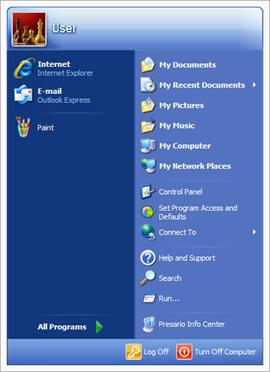 In addition to the included Windows XP themes, there is one previously unreleased theme with a dark blue taskbar and window bars similar to Windows Vista titled "Royale Noir" available for download, albeit unofficially. Microsoft officially released a modified version of this theme as the "Zune" theme, to celebrate the launch of its Zune portable media player in November 2006. The differences are only visual with a new glassy look along with a black taskbar instead of dark blue and an orange start button instead of green. Additionally, the Media Center "Royale" theme, which was included in the Media Center editions, is also available to download for use on all Windows XP editions.
The default wallpaper, Bliss, is a BMP photograph of a landscape in the Napa Valley outside Napa, California, with rolling green hills and a blue sky with stratocumulus and cirrus clouds.
The Windows 2000 "classic" interface can be used instead if preferred. Several third party utilities exist that provide hundreds of different visual styles. Microsoft licensed technology from WindowBlinds creator Stardock to create its visual styles in XP.
Service packs
Microsoft occasionally releases service packs for its Windows operating systems to fix problems and add features. Each service pack is a superset of all previous service packs and patches so that only the latest service pack needs to be installed, and also includes new revisions. Older service packs need not be removed before application of the most recent one.
The service pack details below only apply to the 32-bit editions. Windows XP Professional x64 Edition was based on Windows Server 2003 Service Pack 1 and claimed to be "SP1" in system properties from the initial release. It is updated by the same service packs and hotfixes as the x64 edition of Windows Server 2003.
 Service Pack 1
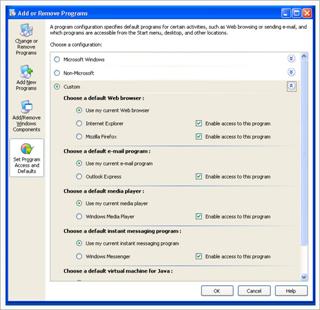
 Service Pack 1 (SP1) for Windows XP was released on 9 September 2002. It contains post-RTM security fixes and hot-fixes, compatibility updates, Framework support, enabling technologies for new devices such as Tablet PCs, and a new Windows Messenger 4.7 version. The most notable new features were USB 2.0 support and a Set Program Access and Defaults utility that aimed at hiding various middleware products. Users can control the default application for activities such as web browsing and instant messaging, as well as hide access to some of Microsoft's bundled programs. This utility was first brought into the older Windows 2000 operating system with its Service Pack 3. This Service Pack supported SATA and hard drives that were larger than 137GB (48-bit LBA support) by default. The Microsoft Java Virtual Machine, which was not in the RTM version, appeared in this Service Pack. Support for IPv6 was also introduced in this Service Pack.
On 3 February 2003, Microsoft released Service Pack 1a (SP1a). This release removed Microsoft's Java virtual machine as a result of a lawsuit with Sun Microsystems.
Service Pack 2
Service Pack 2 (SP2) (codenamed "Springboard") was released on 6 August 2004 after several delays, with an emphasis on security. Unlike the previous service packs, SP2 added new functionality to Windows XP, including an enhanced firewall, improved Wi-Fi support, such as WPA encryption compatibility, with a wizard utility, a pop-up ad blocker for Internet Explorer 6, and Bluetooth support. The new welcome screen during the kernel boot removes the subtitles "Professional", "Home Edition" and "Embedded" since Microsoft introduced new Windows XP editions prior to the release of SP2. The green loading bar in Home Edition and the yellow one in Embedded were replaced with the blue bar, seen in Professional and other versions of Windows XP, making the boot-screen of operating systems resemble each other. Colours in other areas, such as Control Panel and the Help and Support tool, remained as before.

 Service Pack 2 also added new security enhancements, which included a major revision to the included firewall that was renamed to Windows Firewall and is enabled by default, Data Execution Prevention, which can be weakly emulated, gains hardware support in the NX bit that can stop some forms of buffer overflow attacks. Also raw socket support is removed (which supposedly limits the damage done by zombie machines). Additionally, security-related improvements were made to e-mail and web browsing. Windows XP Service Pack 2 includes the Windows Security Center, which provides a general overview of security on the system, including the state of antivirus software, Windows Update, and the new Windows Firewall. Third-party anti-virus and firewall applications can interface with the new Security Center.
On 10 August 2007, Microsoft announced a minor update to Service Pack 2, called Service Pack 2c (SP2c). The update fixes the issue of the diminishing number of available product keys for Windows XP. This update will only be available to system builders from their distributors in Windows XP Professional and Windows XP Professional N operating systems. SP2c was released in September 2007.
Service Pack 3
Windows XP Service Pack 3 (SP3) was released to manufacturing on April 21, 2008 and to the public via both the Microsoft Download Center and Windows Update on May 6, 2008.
It began being automatically pushed out to Automatic Update users on July 10, 2008. A feature set overview which details new features available separately as standalone updates to Windows XP, as well as backported features from Windows Vista has been posted by Microsoft. A total of 1,174 fixes have been included in SP3. Service Pack 3 can be installed on systems with Internet Explorer versions 6 or 7, and Windows Media Player versions 9 and above. Internet Explorer 7 is not included as part of SP3.
New features in Service Pack 3
§ Turns black hole router detection on by default
§ Network Access Protection client
§ Credentials Security Service Provider
§ Descriptive Security options in Group Policy/Local Security Policy user interface
§ An updated version of the Microsoft Kernel Mode Cryptographic Module that is FIPS 140-2 certified
§ Installing without requiring a product key during setup for retail and OEM versions
Previously released updates
Service Pack 3 also incorporated several previously released key updates for Windows XP, which were not included up to SP2 including:
§ Windows Imaging Component
§ IPSec Simple Policy Update for simplified creation and maintenance of IPSec filters
§ Background Intelligent Transfer Service (BITS) 2.5
§ MSXML 6.0 SP2
§ Microsoft Management Console 3.0
§ Credential Roaming service (Digital Identity Management Service) update
§ Remote Desktop Protocol 6.1
§ Peer Name Resolution Protocol 2.1
§ Network Diagnostics update
§ WPA2 Update (KB893357)
Slipstreamed retail and OEM versions of Windows XP with SP3 can be installed and run with full functionality for 30 days without a product key, after which time the user will be prompted to enter a valid key and activate the installation. Volume license key (VLK) versions still require entering a product key before beginning installation.
Although service packs have, until now, been cumulative, installing SP3 on an existing installation of Windows XP requires that the computer must at least be running with Service Pack 1 installed. However, it is possible to slipstream SP3 into the Windows XP setup files at any service pack level—including the original RTM version—without any errors or issues. Slipstreaming SP3 into Windows XP Media Center Edition 2005 is not supported.
Service Pack 3 contains updates to the operating system components of Windows XP Media Center Edition (MCE) and Windows XP Tablet PC Edition, and security updates Framework version 1.0, which is included in these Windows XP SKUs. However, it does not include update rollups for the Windows Media Center application in Windows XP MCE 2005. SP3 also omits security updates for Windows Media Player 10, although the player is included in Windows XP MCE 2005. The Address Bar DeskBand on the Taskbar is no longer included due to legal restrictions. It also includes Windows Installer 3.1.
Support lifecycle
Support for Windows XP without a service pack ended on 30 September 2004 and support for Windows XP Service Pack 1 and 1a ended on 10 October 2006.
Windows XP Service Pack 2 will be retired on 13 July 2010, almost six years after its general availability. As per Microsoft's posted timetable, the company stopped general licensing of Windows XP to OEMs and terminated retail sales of the operating system on 30 June 2008, 17 months after the release of Windows Vista. However, an exception was announced on 3 April 2008, for OEMs installing to ultra low-cost PCs (ULCPCs) either until 30 June 2010, or one year after the availability of the next client version of Windows, Windows 7—whichever date comes later.
On 14 April 2009, Windows XP will begin its "Extended Support" period that will last for 5 years until 8 April 2014.
Common criticisms
The final paragraph ends with common criticisms.
Security issues
Windows XP has been criticized for its susceptibility to malware, viruses, trojan horses, and worms. Security issues are compounded by the fact that users, by default, receive an administrator account that provides unrestricted access to the underpinnings of the system. If the administrator's account is broken into, there is no limit to the control that can be asserted over the compromised PC.
Windows, with its large market share, has historically been a tempting target for virus creators. Security holes are often invisible until they are exploited, making preemptive action difficult. Microsoft has stated that the release of patches to fix security holes is often what causes the spread of exploits against those very same holes, as crackers figured out what problems the patches fixed, and then launch attacks against unpatched systems. Microsoft recommends that all systems have automatic updates turned on to prevent a system from being attacked by an unpatched bug, but some business IT departments need to test updates before deployment across systems to predict compatibility issues with custom software and infrastructure. This deployment turn-around time also lengthens the time that systems are left unsecure in the event of a released software exploit.
User interface performance
Critics have claimed that the default Windows XP user interface (Luna) adds visual clutter and wastes screen space while offering no new functionality and running more slowly. Users can revert to the Windows Classic theme.
Integration of operating system features
In light of the United States v. Microsoft case which resulted in Microsoft being found liable for abusing its operating system monopoly to overwhelm competition in other markets, Windows XP has drawn fire for integrating user applications such as Windows Media Player and Windows Messenger into the operating system, as well as for its close ties to the Windows Live ID service.
Backward compatibility
Some users switching from Windows 9x to XP disliked its lack of DOS support. Although XP comes with the ability to run DOS programs in a virtual DOS machine, it still has trouble running many old DOS programs. This is largely because it is a Windows NT system and does not use DOS as a base OS, and that the Windows NT architecture is different from Windows 9x. Some DOS programs that cannot run natively on XP, notably programs that rely on direct access to hardware, can be run in emulators, such as DOSBox, or virtual machines, like VMware, Microsoft Virtual PC or VirtualBox.
Перевод текста
Введение
Объект этой статьи – операционная система Windows XP от Microsoft. В статье рассмотрены выпуски, новые и обновленные функции, пакеты обновлений и общественная критика Windows XP.
Текст начинается с короткого описания.
Windows XP – линия ОС от Microsoft для использования на ПК с процессорами X86 и IA-64, включающие настольные компьютеры, ноутбуки и media центры. Название “XP” от слова “experience”(опыт). Windows XP – приемник от Windows 2000 Professional и Windows Me, первая, ориентированная на потребителя, ОС от Microsoft, построенная на ядре и архитектуре Windows NT. Windows XP была впервые выпущена 21 октября 2001 года, и свыше 400 миллионов копий уже было в пользовании в январе 2006. Розничная продажа Windows XP прекратилась 30 июня 2008, хотя ещё возможно приобрести Windows XP вместе с собранными компьютерами до 31 июля 2009 или покупая Windows Vista Ultimate или Business и затем понижая ее до Windows XP.
Большинство выпусков этой операционной системы: это Windows XP Home Edition, которая нацелена на домашних пользователей, и Windows XP Professional, которая предлагает дополнительные возможности, такие как поддержка доменов Windows Server и 2 процессора, и нацелена на продвинутых пользователей, бизнесов и предприятий. Windows XP Media Center Edition имеет дополнительные мультимедийные функции, расширяющие возможности записи и просмотра TV, показа DVD фильмов, и прослушивания музыки. Windows XP Tablet PC Edition разработана для выполнения графических приложений используя платформу Tablet PC. Windows XP был в конечном счете выпущен для двух дополнительных архитектур, Windows XP 64-bit Edition для IA-64 (Itanium) и Windows XP Professional x64 Edition для x86-64. Также есть Windows XP Embedded, и выпуски для торговых залов, такие как Windows XP Starter Edition.
Windows XP отличается улучшенной стабильностью и эффективностью над версиями Windows 9x. Это преподносит переоформленный графический интерфейс, изменения Microsoft способствуют удобству пользователю по сравнению с ранними версиями Windows. Windows XP также первая версия Windows, использующая активацию продукта для борьбы с незаконным копированием. Windows XP также критикуется некоторыми пользователями из-за уязвимостей, строгой интеграцией приложений, таких как Internet Explorer 6 и Windows Media Player, и из-за интерфейса пользователя по умолчанию.
На конец февраля 2009, Windows XP наиболее широко используемая ОС в мире с 63.53% общих продаж, и имеющая максимум 85% в декабре 2006.
Следующие параграфы рассматривают выпуски, новые и обновленные функции, пакеты обновлений Windows XP.
Издания
Два главных выпуска: Windows XP Home Edition, разработанный для использования дома, и Windows XP Professional, разработанный для бизнесов, и продвинутых пользователей. XP Professional содержит расширенные возможности, которые средним числом домашних пользователей не используются. Тем не менее, эти функции не обязательно отсутствуют в XP Home. Они просто отключены, но и здесь могут стать работающими. Эти выпуски были сделаны доступными при розничных продажах компьютеров, и были предварительно установлены на компьютеры, главных компьютерных изготовителей. В середине 2008, оба выпуска продолжали продаваться. Третий выпуск, названный Windows XP Media Center Edition был представлен в 2002 году и обновлялся каждый год до 2006-го года. Он включал в себя способность к новой цифровой мультимедии, телевизионной передаче и к Media Center Extender.
Два различных 64-битных выпуска были сделаны доступными, один разработан специально для рабочих станций Itanium, которые были представлены в 2001 году как те же Home и Professional editions, но были прекращены через несколько лет, когда поставщик аппаратного обеспечения Itanium остановил продажу рабочих станций. Другой, названный Windows XP Professional x64 Edition, поддерживает расширение x86-64 архитектуры Intel IA-32.
Windows XP Tablet PC Edition был разработан для специально созданных ноутбуков названных “Tablet PCs”. Он совместим с сенсорным экраном.
Microsoft также выпустила Windows XP Embedded, выпуск для определенных потребностей электроники, абонентских установок, банкоматов, медицинских устройств, видео приставок, торговых терминалов, и для Voice over Internet Protocol(VoIP) компонентов. В июле 2006-го, Microsoft выпустила Windows Fundamentals для устаревших ПК, слабую клиент-версию Windows XP Embedded, которая нацелена на старые машины. Она предназначено для корпоративных заказчиков, которые хотели бы усовершенствовать безопасность и управление Windows XP, но не могут позволить купить себе новое аппаратное обеспечение.
Выпуски для специальных торговых залов
Windows XP Starter Edition – низкой стоимостью выпуск Windows XP, доступный в Таиланде, Турции, Малайзии, Индонезии, России, Индии, Колумбии, Бразилии, Аргентине, Перу, Боливии, Чили, Мексике, Эквадоре, Уругвае и Венесуэле. Он похож на Windows XP Home, но ограничен минимальным аппаратным обеспечением, может только выполнять 3 программы одновременно, и имеет несколько либо удаленных либо отключенных по умолчанию функций. Выпуски для других стран специализированы для данной страны, а именно включают обои рабочего стола популярных их мест, локализованы функции помощи для тех, кто не может говорить по-английски, и другие настройки по умолчанию использовать легче чем в обычном Windows XP.
Языки
Windows XP доступен во многих языках. В дополнении, пакеты MUI и Языковые Пакеты Интерфейса, переводящие пользовательский интерфейс, также доступны для определенных языков.
Новые и обновленные функции
Windows XP представила различные новые функции в линейке Windows, включая:
§ Быстрее загружается и спящий режим
§ Способность откатывать новые драйвера
§ Новый, возможно более дружеский интерфейс
§ Быстрое переключение пользователей, что позволяет пользователю сохранить текущее состояние открытых приложений его рабочего стола и позволяет другим пользователям войти в систему без потери этой информации
§ Шрифт ClearType предоставляет механизм, который улучшил разборчивость текста на LCD мониторах
§ Функциональность удаленного рабочего стола, которая позволяет пользователям на компьютерах которых Windows XP Pro через сеть или интернет получить доступ к приложениям, файлам, принтерам и устройствам друг друга
§ Поддержка большинства DSL модемов и беспроводных сетей
Пользовательский интерфейс
Windows XP представляет новый графический интерфейс. Start меню и поиск были переоформлены и добавлено много визуальных эффектов, включая:
§ Выделение в Windows Explorer осуществляется прозрачным синим прямоугольником.
§ Падающая тень от ярлычков на рабочем столе
§ Боковая ориентированная на выполнение задач вспомогательная панель в окне проводника («common tasks»).
§ Группирование кнопок одного приложения на панели задач в одну кнопку, при определённом количестве разных запущенных приложений, что позволяет часто избегать необходимости её «прокрутки»
§ Появилась возможность заблокировать панель задач и вспомогательные панели, для избегания их случайного изменения
§ Цветовое выделения элементов в меню «Пуск», принадлежащих недавно добавленным программам
§ Меню отбрасывают тени (в Windows 2000 тень отбрасывал указатель мыши, но не элементы меню)
Windows XP анализирует производительность системы определёнными визуальными эффектами и в зависимости от падения или роста производительности активирует их или нет. Пользователи также могут изменять данные параметры, используя диалоговые окна настройки, при этом можно либо гибко выбрать активность тех или иных визуальных эффектов, либо отдать это на управление системе или же выбрать максимальную производительность или лучший вид графического интерфейса. Некоторые эффекты, такие как альфа-смешение и т. п., требуют наличия производительной графической подсистемы, на старых видеокартах производительность может сильно упасть и Microsoft рекомендует отключить эти возможности в таком случае. В Windows XP появилась возможность использовать «Visual Styles» позволяющие изменить графический интерфейс пользователя. Luna — новый стиль графического интерфейса, входящий в поставку XP и являющийся интерфейсом по умолчанию для ПК, имеющих более 64 мегабайт RAM.
Пакеты обновлений
Microsoft периодически выпускает пакеты обновлений для своих операционных систем, устраняющие выявленные проблемы и добавляющие новые возможности.
Service Pack 1
Service Pack 1 (SP1) для Windows XP был выпущен 9 сентября 2002 года. Наиболее важными новшествами стали поддержка USB 2.0, утилита, позволяющая выбирать программы по умолчанию для просмотра веб, обмена мгновенными сообщениями. Этот Service Pack поддерживает SATA и жесткие диски объёмом больше чем 137GB. Microsoft Java Virtual Machine, которой не было в RTM версии, появилась в этом Service Pack. Поддержка IPv6 также была представлена в этом Service Pack.
3 февраля 2003, Microsoft выпустила Service Pack 1a (SP1a). Этот выпуск удалил Microsoft's Java virtual machine из-за результата судебного процесса с Sun Microsystems.
Service Pack 2
Service Pack 2 (SP2) (кодовое название „Springboard“) был выпущен 6 августа 2004 года. SP2 добавил в Windows XP новые возможности, включая улучшенный firewall, поддержку Wi-Fi с мастером настройки и Bluetooth, а также улучшения в IE6 — например, возможность блокировать „всплывающие“ окна.
Данный Service Pack внес значительные изменения в безопасность Windows XP. Так, значительным изменениям подвергся встроенный firewall, который был переименован в Windows Firewall и теперь активирован для всех создаваемых соединений по умолчанию. Появилась расширенная защита памяти, в частности, от атак переполнения буфера как с использованием технологии NX бит, так и рядом других приемов. Изменения в области безопасности затронули и почтовую программу Outlook Express и браузер IE. Windows XP Service Pack 2 включает в себя Windows Security Center, который позволяет облегчить наблюдение за безопасностью системы, следя и напоминая пользователю о необходимости установить или обновить антивирус и его базы, активировать встроенный или сторонний firewall, произвести обновление операционной системы или изменить настройки веб-браузера. Сторонние антивирусы и файрволлы имеют возможность взаимодействовать с ним.
Service Pack 3
Windows XP Service Pack 3 (SP3) был выпущен 21 апреля 2008-го и стал доступным 6 мая 2008. Общее число исправлений включенных в SP3 – 1,174.
Новые функции в Service Pack 3
§ улучшенное обнаружение так называемых маршрутизаторов - «черных дыр»
§ функция защиты сетевого доступа (Network Access Protection)
§ Credentials Security Service Provider
§ обновленная версия модуля шифровки ядра Microsoft - FIPS 140-2
§ Новая модель активации
Ранее выпущенные обновления
SP3 также включает различные ранее выпущенные ключевые обновления для Windows XP, которые не были включены в SP2.
Общественная критика
Последний параграф заканчивается общественное критикой Windows XP.
Проблемы безопасности
Windows XP подвергся критике из-за чувствительности к вирусам, троянам и червям. Проблемы безопасности связаны с тем, что пользователю по умолчанию, предоставляются права администратора, что обеспечивает неограниченный доступ к основе системы.
Windows, с его большими ресурсами общего доступа, исторически заманчивая цель для создателей вирусов.
Работа пользовательского интерфейса
Критики утверждают что пользовательский интерфейс по умолчанию (Luna) загромождает пространство экрана, и при этом ухудшает быстродействие.
Обратная совместимость
Некоторые пользователи переходят с Windows 9x на XP из-за недостатка поддержки DOS. Хотя XP способна выполнить DOS программы в виртуальной DOS машине, это всё равно затрудняет выполнение многих старых DOS программ. Это в значительной степени потому, что это Windows NT система и она не использует DOS как основу системы, архитектура Windows NT также отличается и от Windows 9x.
Conclusion
The object of this paper is operating system Windows XP by Microsoft. The article concern editions, new and update features, service packs and common criticisms of Windows XP.
The text begins with short description.
Windows XP is a line of operating systems produced by Microsoft for use on personal computers running x86 and IA-64 processors, including home and business desktops, notebook computers, and media centers. The name "XP" is short for "experience". Windows XP is the successor to both Windows 2000 Professional and Windows Me, and is the first consumer-oriented operating system produced by Microsoft to be built on the Windows NT kernel and architecture. Windows XP was first released on 25 October 2001, and over 400 million copies were in use in January 2006. Direct OEM and retail sales of Windows XP ceased on 30 June 2008, although it is still possible to obtain Windows XP from System Builders (smaller OEMs who sell assembled computers) until 31 July 2009 or by purchasing Windows Vista Ultimate or Business and then downgrading to Windows XP.
The next paragraphs deal with editions, new and updated features, service packs of Windows XP.
The most common editions of the operating system are Windows XP Home Edition, which is targeted at home users, and Windows XP Professional, which offers additional features such as support for Windows Server domains and two physical processors, and is targeted at power users, business and enterprise clients. Windows XP Media Center Edition was introduced in 2002 and has additional multimedia features enhancing the ability to record and watch TV shows, view DVD movies, and listen to music Windows XP Tablet PC Edition was produced for a class of specially designed notebook/laptop computers called tablet PCs. It is compatible with a pen-sensitive screen, supporting handwritten notes and portrait-oriented screens. Windows XP was eventually released for two additional architectures, Windows XP 64-bit Edition for IA-64 (Itanium) processors and Windows XP Professional x64 Edition for x86-64. Microsoft also released Windows XP Embedded, an edition for specific consumer electronics, set-top boxes, kiosks/ATMs, medical devices, arcade video games, point-of-sale terminals, and Voice over Internet Protocol (VoIP) components. In July 2006, Microsoft released Windows Fundamentals for Legacy PCs, a thin client version of Windows XP Embedded which targets older machines (as early as the original Pentium). It is only available to Software Assurance customers. It is intended for corporate customers who would like to upgrade to Windows XP to take advantage of its security and management capabilities, but can't afford to purchase new hardware.
Windows XP introduced several new features to the Windows line, including: faster start-up and hibernation sequences, the ability to discard a newer device driver in favor of the previous one, a new, arguably more user-friendly interface, fast user switching, which allows a user to save the current state and open applications of their desktop and allow another user to log on without losing that information, the ClearType font rendering mechanism, which is designed to improve text readability on Liquid Crystal Display (LCD) and similar monitors, Remote Desktop functionality, which allows users to connect to a computer running Windows XP Pro from across a network or the Internet and access their applications, files, printers, and devices, support for most DSL modems and wireless network connections, as well as networking over FireWire, and Bluetooth.
Microsoft occasionally releases service packs for its Windows operating systems to fix problems and add features. Service Pack 1 (SP1) for Windows XP was released on 9 September 2002. The most notable new features were USB 2.0 support and a Set Program Access and Defaults utility that aimed at hiding various middleware products. Users can control the default application for activities such as web browsing and instant messaging, as well as hide access to some of Microsoft's bundled programs. This Service Pack supported SATA and hard drives that were larger than 137GB. Service Pack 2 (SP2) (codenamed "Springboard") was released on 6 August 2004 after several delays, with an emphasis on security. Unlike the previous service packs, SP2 added new functionality to Windows XP, including an enhanced firewall, improved Wi-Fi support, such as WPA encryption compatibility, with a wizard utility, a pop-up ad blocker for Internet Explorer 6, and Bluetooth support. Windows XP Service Pack 3 (SP3) was released to manufacturing on April 21, 2008 and to the public via both the Microsoft Download Center and Windows Update on May 6, 2008. SP3 added new functionality to Windows XP, including turns black hole router detection on by default, Network Access Protection client, Descriptive Security options in Group Policy/Local Security Policy user interface, an updated version of the Microsoft Kernel Mode Cryptographic Module that is FIPS 140-2 certified, installing without requiring a product key during setup for retail and OEM versions.
The final paragraph ends with common criticisms.
Windows XP has been criticized for its susceptibility to malware, viruses, trojan horses, and worms. Security issues are compounded by the fact that users, by default, receive an administrator account that provides unrestricted access to the underpinnings of the system. Critics have claimed that the default Windows XP user interface (Luna) adds visual clutter and wastes screen space while offering no new functionality and running more slowly. Some users switching from Windows 9x to XP disliked its lack of DOS support. Although XP comes with the ability to run DOS programs in a virtual DOS machine, it still has trouble running many old DOS programs. This is largely because it is a Windows NT system and does not use DOS as a base OS, and that the Windows NT architecture is different from Windows 9x.
In my opinion Windows XP is good operating system, because it is known for its improved stability. But Windows XP has very large defect: users, by default, receive an administrator account that provides unrestricted access to the underpinnings of the system.
Questions
1. What does name “XP” mean?
2. What kernel does Windows XP use?
3. When was Windows XP released?
4. What difference do Home Edition and Professional Edition have?
5. What do devices use Windows XP Embedded?
6. How many programs can Windows XP Starter Edition run at a time?
7. What name does multimedia Windows XP have?
8. Why is Windows XP sensitive to viruses, trojan horses, and worms?
9. Why do many people not like user interface?
10. Why does Windows XP not run many old DOS programs?
11. What last did service pack release?
12. Can we buy Windows XP now?
Dictionary
word | translation | word | translation |
concern successor according estimate analyst succeed cease assemble offer enterprise enhancing ability eventually componentized significantly promote facility avoid plague combat restriction vulnerability address employee resort advanced average necessarily missing outlets incorporate capability discontinue extension implement intend advantage afford customized fined order concluded competition appeal reach agreement instead ship refer particular restrict albeit celebrate landscape preferred occasionally superset revision recent claim initial notable aimed bundle delay emphasis encryption wizard prior resemble weakly emulated gain raw supposedly overview minor diminishing via separately standalone detection descriptive policy | касаться преемник соответственно оценивать аналитик иметь успех прекращать собирать предлагать предприятие улучшение способность в конечном счете разбивать на отдельные компоненты существенно способствовать оборудование избегать изводить противодействовать ограничительный уязвимость обращаться обращаться улучшенный составлять в среднем обязательно недостающий фирменные магазины включать способность прекращать добавочный реализовывать предназначать способствовать позволять себе специализированный оштрафовать приказывать заключать конкуренция обращаться достигать соглашение вместо этого поставляться направлять специфический ограничивать хотя праздновать пейзаж привилегированный иногда надмножество проверка недавний утверждать подписывать известный направленный связывать задержка акцент шифрование мастер предшествующий напоминать слабо следовать усиление сырой возможно общий обзор младший уменьшение через отдельно автономный обнаружение наглядный политика | encourages own suggest stock roughly ship decision abuse dominant forced withdraw compliant towards initiative conjunction enforce limitation emerging certain discard favor rollback desirable arguably rendering translucent sidebar taskbar prevent recently performance impact determine whether prevent consuming excessive overhead further blending transparency fading handled entirely substantially hurt cryptographically signed underpinning assert tempting preemptive stated cause spread against deployment predict lengthen event clutter waste liable abusing overwhelm competition unrestricted compound susceptibility extended whichever announce exception availability almost retired lifecycle omit least cumulative prompt maintenance simplify incorporated | поощрять особенный предлагать снабжать примерно отправлять решение злоупотреблять доминирующий принудительный извлекать совместимый к начальный союз осуществлять ограничение находящийся на стадии становления определенный откатывать одобрять откат желательный возможно предоставление прозрачный боковое меню панель задач предотвращать недавно выполнение воздействовать решать ли предотвращать потребление чрезмерный наверху далее смешивание прозрачность исчезновение ручной полностью существенно повреждать подписывать основа утверждать привлечение приоритетный установленный вызывать распространять напротив развертывание предсказывать удлинять событие загромождать тратить ответственный злоупотребление подавлять конкуренция неограниченный составлять чувствительность расширенный какой бы ни объявлять исключение доступность почти отставной жизненный цикл опускать менее совокупный запрашивать поддержка упрощать включенный |
