

Партнерка на США и Канаду по недвижимости, выплаты в крипто
- 30% recurring commission
- Выплаты в USDT
- Вывод каждую неделю
- Комиссия до 5 лет за каждого referral
3.5 Variants
Variants may be created for executable ABAP programs. They are sub-objects of a program and are not shared with any other program. Variants allow you to save sets of input values for programs that you often start with the same selections.
The naming conventions for variants are found in NASA Core Financials Development Naming Standards.
4 Style Guidelines
4.1 ABAP Style Guidelines
The SAP Style Guide found on the online help, menu path “Help Ю SAP Library”, provides guidelines for developing the user interface for R/3 applications. The aim of the Style Guide is to support developers when creating user-friendly and standard software for the SAP System.
The goals of Style Guide are:
· higher user productivity
· greater user satisfaction with the product
· lower user error rate
The Style Guide concerns all the applicable SAP design guidelines. The SAP Style Guide is based on platform-specific style guides such as the IBM CUA Guidelines, the Windows Style Guide or the Apple Macintosh Human Interface Guidelines, which have been adapted and added to meet SAP’s business needs.
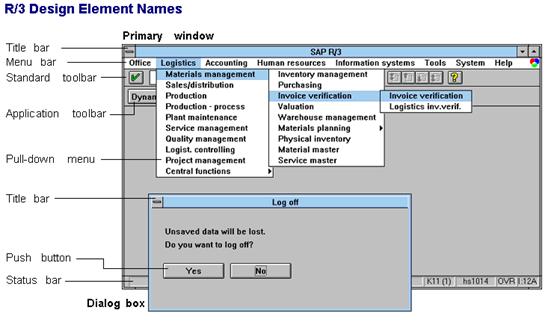
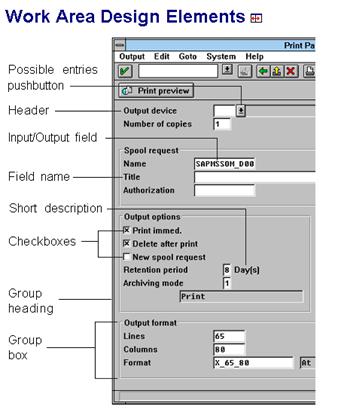
Stated another way, the Style Guide concerns design guidelines for the graphical user interface (GUI) or, the presentation and interaction of the application with the active user. These guidelines primarily pertain to the screen (window) components shown below and window navigation.
4.1.1 R/3 Design Elements
4.1.2 Work Area Design Elements
4.2 NASA Style Guidelines
NASA style guidelines are content focused, concerning the presentation of information in selection screens, custom transaction screens and the report output generated.
Specific guidelines will be prepared for each application area and attached to these guidelines as appendices. General guidelines follow.
4.2.1 Window Titles
Custom transaction and program selection screens must identify their ownership and purpose.
Example
NASA MSFC PROJECT STS100 MATERIAL REQUIREMENTS
4.2.2 Selection Screens
Fields should be grouped and arranged in order of importance from upper left to bottom right.
4.2.3 Transaction Screens
See ergonomic examples found under menu path ‘Environment Ю Ergonomic examples Ю Screens’.
4.2.4 Online Help
Each custom program / transaction must have sufficient online help for the user to effectively use the function. Additionally, field level help and ‘Possible entries’ support should be utilized whenever possible.
4.2.5 Report Titles
Report titles should appear at the top of each page and include title line(s) centered in the page and the date at the right, top margin. If the report is for a specific business object (ie. Purchase Order, Cost Center), this should be included in the title.
Example
Purchasing Documents Per Vendor 03/29/2001
4.2.6 Report Headings and List Format
See ergonomic examples found under menu path ‘Environment Ю Ergonomic examples Ю Lists’.
4.2.7 Report Footings
Footings should appear on each page and include the program name at the left margin and the page number at the right margin.
Example
ZMM_PUR_VENDOR_POS Page 1
5 ABAP Programming Advanced Techniques
5.1 Message Classes
User and system messages used during program or report processing are organized in SAP by Message Class and Message Number. Transaction SE91 is used to create and maintain these Message Classes and Messages. Refer to ‘NASA Core Financials Development Naming Standards’ for details.
Messages should be used in all dialog processing and in conveying errors or processing status in an online program execution to the user.
5.2 Views
A view is a virtual table. This is a table that is not physically stored but is instead derived from one or more other tables.
This derivation process might involve simply transferring only certain records from a base table to the view. More complex views can be assembled from several tables.
A view can be tailored to the needs of a specific report, making it possible to directly access specific data. The structure of such a view is defined by specifying the tables and fields to be contained in the virtual table. If a table contains many fields and only a few of these fields has to be read by a report, access to the data can be simplified by creating a view containing only these accessing the view instead of the table, significant performance enhancements can be made.
To ensure that only semantically meaningful views are created, only tables linked by foreign key relationships in the ABAP Dictionary can be connected in a view.
The first table to be selected is the primary table of the view. Other tables can be added. These tables must be connected to the primary table by foreign keys. The fields to be contained in the view can then be selected from the Base tables defined for the view.
5.3 Internal Tables:
The main purpose of this section is to examine ABAP performance and how that relates to overall system requirements and constraints. As is most often the case, the majority of processing time for custom developed ABAP’s, (upwards of 90% in most cases), is spent in database accesses.
This is usually a result of
1. nested select statements,
2. inefficient where clauses in select statements, or
3. simply functional requirements that do not match well with SAP’s table relationships.
Regardless of the cause, the use of internal tables can drastically reduce database access, and thus, reduce report run time.
5.4 Possible Uses Of Internal Tables
5.4.1 A Large Number Of Database Accesses Are Foreseen
In situations where a large number of database accesses are foreseen on a given table or where certain information from a table may be needed more than once, it may be a good idea to move all (or a significant portion) the necessary fields into an internal table in one statement. This information will then be available to the program as many times as is necessary and will require no further database accesses.
5.4.2 Replacing Nested Selects
Another very beneficial use of internal tables is to replace one or many levels of nested selects in report selection logic. Loop processing can then be performed on this internal table for subsequent selects into other tables. The key benefit in this approach is that the number of accesses to the higher level table in the database is significantly reduced. This also takes away the risk that Oracle will lose track of the database cursor in its’ roll area. (A problem for some larger reports.)
5.5 Performance Concerns: Internal looping vs. Nested selects
Available memory for reporting per user is the main risk in the extensive use of large internal tables versus standard nested select answering several questions, the developer should be able to determine which method is appropriate.
1. What is the probable size requirement for the internal table in a production environment?
2. How many times will this data be needed?
3. Will all of this data be needed?
5.5.1 The tradeoff
If you will only need the data once and it is a small amount of data, (number of accesses) the use of an internal table is not necessary. If there is a lot of data and several selects based on that data, use an internal table.
Common sense is key, i. e. It does not make sense to load the entire material master into an internal table, but a specific list of materials, transactions, or documents from which to start looping is an ideal situation for internal tables.
The primary goal is to fill this table with the most finite list of data that can be constructed from the select statement that will be used to populate it. In terms of nesting, each record at a high level table can result in hundreds of records that relate to it in subsequent lower level select statements, which is why it is so necessary to be specific.
5.5.2 Methods Of Internal Table Population
Select statements that query only the necessary columns from a table are more efficient than select * from table. Only the fields that are needed for report functionality are selected and stored for later use.
Selecting directly into an internal table also reduces run time and negates the need for an end select and an append. (This is not conducive to loop processing since the table is populated instantly) When selecting by columns into an internal table or structure, the order in which the columns appear in the database must correspond to the order in the select statement, as well as the order of the fields in the internal table/structure data declaration.
Example:
Data: begin of i_tab occurs 10,
kunnr like kna1-kunnr,
name1 like kna1-name1,
telf1 like kna1-telf1,
end of i_tab.
Select kunnr name1 telf1 from kna1 into table i_tab
where land1 eq ‘USA’.
Or
Select kunnr name1 telf1 from kna1 into i_tab where land1 eq ‘USA’.
Append i_tab.
Endselect.
Sort i_tab by kunnr.
The data contained in this table can now either be looped through, or read one line at a time by the statement:
Read table i_tab with key kunnr binary search.
This will move the values within the selected line into the header of the table and make it available for use within the program.
5.6 Free System Resources
As a final note on the usage of internal tables, it is important to free up the space reserved for the tables after the data contained within is no longer needed. Each user has a predefined limit concerning memory usage and availability. This amount is reserved at the application server freeing up this space, there is less risk of surpassing the memory capacity of the roll area that would result in paging of the held data.
Retrieving data that has been paged is more time consuming than data held in the roll area. The free command is usually issued immediately after the last line of code that processes the internal table. This will keep the roll area that is reserved for that particular user to a minimum level. Example of Free Command:
Loop at i_tab.
Select vbeln posnr from vbak into xvbak
where kunnr eq i_tab-kunnr.
Append xvbak.
Endselect.
Endloop.
Free I_tab. (if fields in i_tab are no longer needed.)
5.7 Field Groups
A field group combines several existing fields together under one name. You use the INSERT statement to determine which fields belong to a field group at runtime
Example:
FIELD-GROUPS: HEADER, ORDER, PRODUCT.
Neither defining a field group (statically) using FIELD-GROUPS nor filling a field group (dynamically) with INSERT generates more memory. Rather, there exists for each field group element a pointer to an (existing) field.
The use of field groups is an alternative method to internal tables for data storage and loop processing. Data selection itself does not vary whether you are using internal tables or field groups.
Some distinguishing characteristics are the method in which they are populated, and the manner in which you can process them. An internal table is declared through explicit definition of the structure and an occurs statement, and is populated through appending. Field groups are declared, then specific fields are inserted into each field group for definition. At field group population time, the term Extract <field group> populates all fields in the field group with the current value for those fields from within the report. There is no tangible table to see, as SAP stores the information internally in existing SAP tables.
5.7.1 INSERT f1 f2 ... INTO fg.
Inserts one or more fields into the field group fg.
1. This basic form of INSERT is not a declarative, but an operational, statement, i. e. it must be executed at runtime.
2. A field group can only accept global data objects, not data objects which have been defined locally in a FORM or FUNCTION.
3. The actual data transport is performed by EXTRACT.
4. As soon as the first dataset for a field group has been extracted with EXTRACT, the field group can no longer be extended with INSERT. The field group HEADER cannot be extended at all after the first EXTRACT (regardless of the field group).
5.7.2 Extract <fg>.
Writes all fields of the field group fg as one record to a sequential dataset (paging). If a field group HEADER has been defined, its fields prefix each record to form a sort key. You can sort this dataset with SORT and process it with LOOP... ENDLOOP. After this, EXTRACT cannot be execuuted again
As soon as the first dataset for a field group has been extracted with EXTRACT, the field group cannot be expanded using INSERT. The field group HEADER, in particular, cannot be expanded after the first EXTRACT (regardless of field group).
5.7.3 Field Group Processing
Loop processing for field groups is similar to loop processing for internal tables. This is accomplished through the use of ‘Loop…Endloop’ construct. Some key differences are that field group processing allows more flexibilty regarding sorting, resorting, control breaks, and subtotaling and totaling functionality. A field group can be sorted and resorted by any field or combination of fields that are declared in the header field group.
These fields are also the ones available for control breaks, i. e. at new company code, at end of customer number…These are all accomplished through the use of the ‘At…Endat’ construct. The fields referenced in the At statement must be contained in the Header field group.
5.7.4 Sample of Field Group usage in a program:
Field-groups: header, detail.
Insert: kna1-kunnr
vbak-vbeln into header,
vbak-vbtyp
vbak-netwr
vbak-knkli into detail.
Select kunnr from kna1 into xkna1 where land1 eq ‘USA’.
Select vbeln vbtyp netwr knkli from vbak into xvbak where
kunnr eq xkna1-kunnr.
Extract: Header, Detail.
Endselect.
Endselect.
Sort by kunnr vbeln. (Always qualify sort comment with specific sort order only)
Loop.
At first.
(write heading…)
endat.
At new kunnr.
(write customer number or subheading…)
endat.
At Detail.
(Write detail information for the specific customer in current loop pass, this includes document information from vbak that is within the detail field group…)
Endat.
At end of kunnr.
(Write total of documents for that particular customer…)
Endat.
At Last.
Write total of all documents pulled for this report…)
Endat.
Endloop.
5.8 General Use Function Modules
SAP is delivered with numerous general use function modules that can reduce the development effort when dealing with common issues. These functions are documented on the SAP Library in folder ‘Basis Components Ю ABAP Workbench Ю BS Extended Applications Function Library’. The following is a list and brief description of some example function modules that may be used on a regular basis:
5.8.1 Date Oriented Function Modules:
These call functions are a convenient for taking a calendar date and converting it into a period, creating date ranges based on fiscal period, and vise versa. These are essential because the system classifies transactions according to calendar date, period in which they occur, or both.
DATE_TO_PERIOD_CONVERT
Pass the module a calendar date (YYYYMMDD) and it returns the corresponding fiscal year and fiscal period.
FIRST_DAY_IN_PERIOD_GET
Pass the function module the desired fiscal period, fiscal year, and fiscal year variant, and the function module returns the calendar date of the first day of the required period.
LAST_DAY_IN_PERIOD_GET
Pass the function module the desired fiscal period, fiscal year, and fiscal year variant, and the function module returns the calendar date of the last day of the required period.
LAST_DAY_IN_YEAR_GET
Pass the function module the desired fiscal year and fiscal year variant, and the function module returns the calendar date of the last day of the fiscal year.
WEEK_GET_FIRST_DAY
Pass the function module the 2 digit week identifier and calendar year of concern, and the function module returns the date of the first day of that particular week.
5.9 Logical Database:
A logical database is a predefined view of the database. This path provides a link to records that are physically separate but functionally link. The use of logical databases in ABAP programming takes away the need for manually creating the linking of tables through select statements, providing all of the necessary tables are contained in the structure of the logical database.
Although these provide a major time savings for the developer, they can often pull far more data than is actually necessary since there is no discrimination of data that is selected. When a logical database is entered in the attributes section of the report, a predefined selection screen for the report is generated. Additional selections can be added below the standard selection screen by the developer and can be referenced between the appropriate Get statements for the logical database.
5.10 Use of Indices:
The creation of or use of an index is recommended when it is not possible to supply a fully qualified primary key in a select statement. An index is updated each time the actual table is updated, and thus requires some amount of system resources during transaction creation. For this reason, it is important to create them sparingly.
The fields in the where clause of the select statement must be in the same order as they appear in the index. This is necessary since it is Oracle that decides whether or not to use the successfully using an index, one can avoid a whole table search, and thus reduce significantly the time spent in database access.
6 Customer Enhancements – Enhancement Projects
SAP has anticipated certain customer requirements for enhancements to the SAP standard system. These potential enhancements are at pre-planned locations within dialog (screen) or program logic. They allow the customer to modify predefined, empty or unused programs, screens or screen function codes.
Using customer exits is preferred over options to modify SAP code or create custom transactions as the upward compatibility is guaranteed by SAP. This is because jumps to exits are predefined in the standard software and the validity of the call interface are both retained, even in future release upgrades.
When an enhancement requirement to a standard SAP transaction has been identified, the technical designer should consider this alternative, provided SAP has a pre-defined an enhancement that can potentially meet the need.
To create a customer enhancement, you must first create an enhancement project. To do this use transaction CMOD which will prompt you for the enhancement project name and description.
Once the enhancement project is created, use transaction CMOD again to assign the pre-defined enhancement to the project and work with the enhancement components and finally activate the enhancement project.
7 Changing SAP Code
Changes to SAP programs are usually recommended by SAP via SAP OSS Notes to solve specific customer issues. Although, the customer may also may the determination after reviewing all options, that changes to SAP programs are needed.
Whatever the source, there must be tight controls when making changes to SAP code and such changes must first be approved by NASA Core Financials management.
It is critical that any code changes to the SAP code are clearly documented. The standard is to create a section in the Program Header (see below), detailing the date the changes were made, who made the changes, the Repair number, the issue number the change relates to (found in the Change Management Logs), the OSS Note Number and a short description.
Example
*
* Modification Log:
* Date Programmer Correction Description
* 01/29/2001 B Johnson DEVK900012 OSS 1234567 repair
* RFC errors
*
The code changes made in the SAP Standard Programs must follow the documentation standards used by SAP, with the addition of the correction number in the comments.
Example
*>> BEGIN OF INSERT OSS 1234567 DEVK900012
IF SY-SUBRC<> 0.
PERFORM CHECK_RFC.
ENDIF.
*<< END OF INSERT OSS 1234567 DEVK900012
8 APPENDIX A: Programming Guidelines
This section is an overview of general programming guidelines intended for less experienced ABAP programmers.
8.1 Writing Maintainable Code
The ABAP programming language is an event-driven language. This means that it does not necessarily process statements in sequential order as they occur. However, you can combine this feature with some solid housekeeping and organization of your code, and develop very powerful and maintainable code.
To do this, keep related blocks of code together and in the order they will normally be processed. Don’t just write code as you find the specifications and rely on ABAP to sort things out and process them in the proper order.
8.1.1 Program Structure
Start all programs with a documentation header containing:
· Client Information
· ABAP Name
· author’s name
· create date
· version number
· Comments (purpose, use, design, structure, testing hints, etc)
· Modification Log with date, programmer, CTS number and Description
Next, place all data declarations at the top of your program. This does two important things. The code becomes easy to read and search for table or field definitions. And the data becomes globally available, should you need to add routines later in the program. Data that is defined throughout the program without any forethought can cause problems when something gets reused or redefined unnecessarily. It also breaks your train of thought when debugging complex logic.
Following the data declarations are the event elements of the program. They should be placed in the following order:
· INITIALIZATION
· AT SELECTION-SCREEN
· START-OF-SELECTION
· GET / GET LATE or SQL statements
· END-OF-SELECTION
· TOP-OF-PAGE
· END-OF-PAGE
· TOP-OF-PAGE DURING LINE-SELECTION
· AT LINE-SELECTION
· AT PFnn
· AT USER-COMMAND
After the event elements are the local subroutines (FORM routines) performed by the event processing logic or from other FORMs.
8.1.2 Modularization
Usually, the main processes of an ABAP program occur at the START-OF-SELECTION or at the END-OF-SELECTION events. Design your code so that the main processing section, or client, controls all program action. Organize all remaining code into logical groups or subroutines that are executed, called, performed, or passed temporary control by the client. That is, they should all work as servers to the main processing section, of your program. Control should always return to the client, unless errors occur that need to be amended immediately, or in rare instances, when you need to pass explicit control to the next module.
Place the server sections of code after all event elements of the program in the normal order they will be processed. This will make your code more readable. If a section of code is called by several subroutines, place it after the last subroutine that calls it. When it does not make sense to separate the code into subroutines, separate the functionally related code via comments and blank lines to logically group sections of code that will be processed and/or maintained together.
8.1.3 Statement Format
Avoid using comments on statement lines. Use separate and distinct comment lines at the beginning of the form/module containing the code. If you are writing a particularly complex statement (IF, CASE, etc.), place your comments just prior to the code being described / executed.
Although ABAP allows multiple commands on the same line, place each command on a separate line for readability. This also makes it easier to update / delete code.
After you have checked your program via syntax ‘Check’ and successfully saved it, use pretty printer to align statements and make the code more readable. If you have aligned all of the statements yourself, make sure you have saved the program and compared the before and after product. Your own indentations, etc. may be preferable to the pretty printer output.
Do not keep blocks of dead code in custom developed programs, as they can be confusing. Use version management to create a backup version of source code if you feel you may need the code and a version has not been generated by prior transport(s) of the program.
8.1.4 Pre-defined Coding Blocks
Use the ready-made patterns or structures available via the editor “Pattern” function to insert tailored ABAP statement structures or, comment or coding blocks into your program.
To insert ready-made patterns:
1. Place the cursor on the line following where you want the pattern and click on the “Pattern” function or press CNTL-F6.
2. In the pop-up window, select the appropriate radio button for the statement or pattern desired.
3. Enter the development object name (ie. Function Module, Database Table, Authorization Object, etc) or, the comment or coding block name.
4. Click “Continue” or press <ENTER>.
5. Choose the specific field names, conditions or qualifications relative to the ABAP statement being inserted.
6. Click “Copy”.
Example
In your program, you need to determine the first day in the fiscal period. To do this you choose to use the ‘FIRST_DAY_IN_PERIOD_GET’ function module.
The screen below shows the Pattern Insert screen with the needed selections to insert this function call.
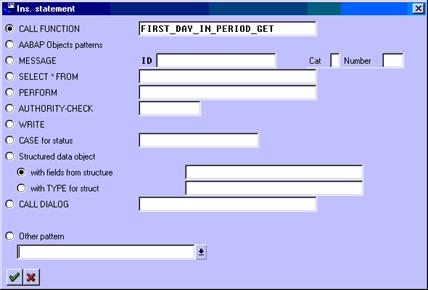
This results in the following coding block being inserted into the program with all the interface parameters identified and basic return code check coding.
CALL FUNCTION 'FIRST_DAY_IN_PERIOD_GET'
EXPORTING
I_GJAHR =
* I_MONMIT = 00
I_PERIV =
I_POPER =
* IMPORTING
* E_DATE =
* EXCEPTIONS
* INPUT_FALSE = 1
* T009_NOTFOUND = 2
* T009B_NOTFOUND = 3
* OTHERS = 4
.
IF SY-SUBRC <> 0.
* MESSAGE ID SY-MSGID TYPE SY-MSGTY NUMBER SY-MSGNO
* WITH SY-MSGV1 SY-MSGV2 SY-MSGV3 SY-MSGV4.
ENDIF.
8.1.5 Performance Considerations
Remember to free the data spaces (see the FREE command in your ABAP manual or refer to Performance and Tuning Guidelines in a later chapter) for large tables or field strings that are no longer needed.
When performance is a major concern, organize your program into distinct modules that can define the data needed, process it, and free the space. In these situations, it may make sense to separate your code into include modules or external function modules for clarity of code and possibly performance (different rule sets apply for tuning modules and calls). If properly organized, you can write code in this fashion, so that data is defined throughout the program, rather than all at the top. When coding in this fashion, use liberal comments to explain what is going on and when and why data can be defined and freed.
If the data is to be used only within a function module or subroutine, place the definition at the top of the routine and free the space at the end. Remember to pay close attention to rules for global and local data definitions for programs with sub-routines, especially external routines.
8.1.6 Version Management
Version management of the ABAP editor allows you to keep historical versions of your program throughout it’s life, from initial development through the layered testing and approval staging to production, and, ongoing maintenance and enhancement.
Each time you release your program for transport, a new version is created. You can also choose to generate a version yourself if, for example, you are at a major mile stone in the development and new requirements have been identified, which are a substantive change. In both cases the version created becomes backup copy of the program.
8.1.7 DEFINING DATA FIELDS AND TABLES
If you use a constant frequently, do not define it as an explicit literal value over and over. Set up an internal field with the CONSTANTS statement with the VALUE option. If the value changes, you will only need to change the constant once to effect the change. If the value changes over time, consider using PARAMETER, SELECT-OPTION, dynamic TVAR variable, etc. to avoid program maintenance.
Example
MOVE ‘150’ TO MY_SCREEN_NUM.
. . .
MOVE ‘150’ TO MY_SCREEN_NUM.
. . .
MOVE ‘150’ TO MY_SCREEN_NUM.
==> Will work, but requires changes be make in several places when the screens are renumbered.
CONSTANTS: SCREEN_LITERAL(3) TYPE N VALUE 150.
. . .
MOVE SCREEN_LITERAL TO MY_SCREEN_NUM.
. . .
MOVE SCREEN_LITERAL TO MY_SCREEN_NUM.
. . .
MOVE SCREEN_LITERAL TO MY_SCREEN_NUM.
==> Will require only one change when the screen numbers change.
If you need extra work fields for database fields, use SAP field names whenever possible and use the LIKE option to ensure the data attributes match. This will also avoid maintenance problems should the data base field change.
When naming fields, avoid the use of hyphens, since they indicate field strings and ABAP keywords.
Instead of hard-coding text literals, use Text Elements for headers, report titles, column headings, selection texts and numbered texts. They are easier to find and change, and only need to be changed in one place - one time. When the same literals are used in several programs, they are easy to copy from one program to the other, rather then cut-and-paste or retyping of hard-coding.
When defining customer tables or internal tables:
Use the same field names as any existing SAP tables - e. g. Use MANDT, not CLIENT.
If the SAP name is confusing, use the short text (in table/DD) and comments in DATA(ABAP) to clarify. The SELECTs, Ifs, CASE, etc. will be much easier to understand and debug when all data fields match.
Use the same DATA ELEMENT, TYPE, DOMAIN, etc. for any fields where comparisons will take place. Although the system will perform automatic type conversions, they are CPU/DB intensive and results can not be guaranteed for all comparisons after data conversion.
8.1.8 Field symbols
Field symbols are symbolic fields or structures that can be assigned dynamically to other fields and field structures at runtime using the ASSIGN statement. Field symbols can dramatically reduce the amount of code used in a routine, therefore reducing execution time. However, because the code becomes symbolic, it can be difficult to read later and becomes less maintainable.
Example
Code using absolute field names
get cursor field v_field.
case v_field.
when ‘ZSCRFLD-WEEK01’.
perform f_process_week using zscrfld-week01.
when ‘ZSCRFLD-WEEK02’.
perform f_process_week using zscrfld-week02.
when ‘ZSCRFLD-WEEK03’.
perform f_process_week using zscrfld-week03.
when ‘ZSCRFLD-WEEK04.
perform f_process_week using zscrfld-week04.
. . .
. . .
when ‘ZSCRFLD-WEEK51’.
perform f_process_week using zscrfld-week51.
when ‘ZSCRFLD-WEEK52’.
perform f_process_week using zscrfld-week52.
when others.
endcase.
Code using field symbols
field symbols: <fs_week>
get cursor field v_field.
if v_field cs ‘ZSCRFLD-WEEK’.
assign (v_field) to <fs_week>.
perform f_process_week using <fs_week>.
endif.
8.1.9 Example Program
REPORT ZRIM01 .
*****
*** AUTHOR: JOHN DOE.
*** DATE: .
*** DESCRIPTION: THIS IS A SAMPLE PROGRAM THAT READS DATA, BUILD A TABLE
*** AND PRINTS THE DATA. SEE “SAMPLE SYSTEMS MANUAL”
*** SPECIFICATION #4804, PAGE 12.
*** USER AREA: THIS PROGRAM WAS WRITTEN FOR ACCOUNTS PAYABLE.

|
Из за большого объема этот материал размещен на нескольких страницах:
1 2 3 4 5 6 7 |
