


Партнерка на США и Канаду по недвижимости, выплаты в крипто
- 30% recurring commission
- Выплаты в USDT
- Вывод каждую неделю
- Комиссия до 5 лет за каждого referral
Новосибирский государственный технический университет
Кафедра вычислительной техники
Лабораторная работа 3
по дисциплине «Технология программирования и разработка
Тема: «РАЗРАБОТКА GUI. СОЗДАНИЕ SDI-ПРИЛОЖЕНИЙ
ОБРАБОТКА СОБЫТИЙ»
Группа: АВТ-909
Выполнила:
Преподаватель:
Новосибирск 2011
1. Примеры кода
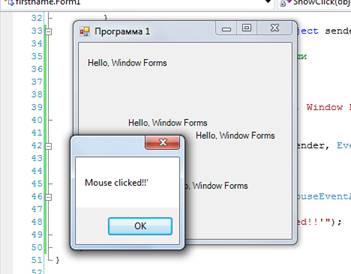
2. Два обработчика событий для MouseClick
namespace firstname
{
public partial class Form1 : Form
{
float x, y;//координаты
Brush pStdBrush;//кисть
Graphics poGraphics;
public Form1()
{
InitializeComponent();
x = 10;
y = 20;
pStdBrush = new SolidBrush(Color. Black);
poGraphics = this. CreateGraphics();
this. Text = "Программа 1";
this. Show();
//добавление обработчиков сбытий нажатия кнопки мыши
this. MouseClick+=new MouseEventHandler(this. Form1_MouseClick);
this. MouseClick+=new MouseEventHandler(this. ShowClick);
//вывод строки в позиции х, у
poGraphics. DrawString("Hello, Window Forms", this. Font, pStdBrush, x, y);
}
private void Form1_MouseClick(object sender, MouseEventArgs e)
{
//координаты точки щелчка мыши
x = (float)e. X;
y = (float)e. Y;
//вывод строки в позиции х, у
poGraphics. DrawString("Hello, Window Forms", this. Font, pStdBrush, x, y);
}
private void Form1_Load(object sender, EventArgs e)
{
}
void ShowClick(object pSender, MouseEventArgs e)
{
MessageBox. Show("Mouse clicked!!'");
}
}
}
namespace firstname
{
static class Program
{
/// <summary>
/// The main entry point for the application.
/// </summary>
[STAThread]
static void Main()
{
Application. EnableVisualStyles();
Application. SetCompatibleTextRenderingDefault(false);
*****n(new Form1());
}
}
}
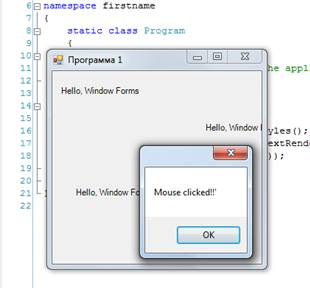
3. Обработка событий правой и левой кнопки мыши
namespace firstname
{
public partial class Form1 : Form
{
float x, y;//координаты
Brush pStdBrush;//кисть
Graphics poGraphics;
public Form1()
{
InitializeComponent();
x = 10;
y = 20;
pStdBrush = new SolidBrush(Color. Black);
poGraphics = this. CreateGraphics();
this. Text = "Программа 1";
this. Show();
//добавление обработчиков сбытий нажатия кнопки мыши
this. MouseClick+=new MouseEventHandler(this. Form1_MouseClick);
this. MouseClick+=new MouseEventHandler(this. ShowClick);
//вывод строки в позиции х, у
poGraphics. DrawString("Hello, Window Forms", this. Font, pStdBrush, x, y);
}
private void Form1_MouseClick(object sender, MouseEventArgs e)
{//если левая кнопка
if (e. Button == System. Windows. Forms. MouseButtons. Left)
{
//координаты точки щелчка мыши
x = (float)e. X;
y = (float)e. Y;
//вывод строки в позиции х, у
poGraphics. DrawString("Hello, Window Forms", this. Font, pStdBrush, x, y);
}
}
void ShowClick(object pSender, MouseEventArgs e)
{//если правая кнопка
if (e. Button==System. Windows. Forms. MouseButtons. Right)
MessageBox. Show("Mouse clicked!!'");
}
}
}
namespace firstname
{
static class Program
{
/// <summary>
/// The main entry point for the application.
/// </summary>
[STAThread]
static void Main()
{
Application. EnableVisualStyles();
Application. SetCompatibleTextRenderingDefault(false);
*****n(new Form1());
}
}
}
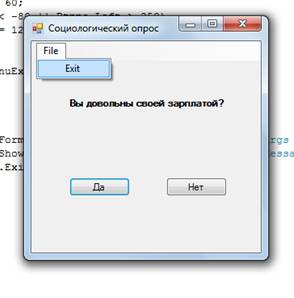
4. Компоненты
using System;
using System. Collections. Generic;
using ponentModel;
using System. Data;
using System. Drawing;
using System. Linq;
using System. Text;
using System. Windows. Forms;
namespace SocOpros
{
public partial class Form1 : Form
{
public Form1()
{
InitializeComponent();
}
private void Btnyes_Click(object sender, EventArgs e)
{
MessageBox. Show("Мы и не сомневались, что вы так думаете!");
}
//В обработчике связываем движение мыши с координатами кнопки
//и устанавливаем координаты, куда она будет возвращаться, если
//во время движения выйдет за указанную область
private void Btnno_MouseMove(object sender, MouseEventArgs e)
{
Btnno. Top -= e. Y;
Btnno. Left += e. X;
if (Btnno. Top < -10 || Btnno. Top > 100)
Btnno. Top = 60;
if (Btnno. Left < -80 || Btnno. Left > 250)
Btnno. Left = 120;
}
private void MenuExit_Click(object sender, EventArgs e)
{
Close();
}
private void Form1_FormClosing(object sender, FormClosedEventArgs e){
if (MessageBox. Show("Do you want to close", "SocOpros", MessageBoxButtons. YesNo, MessageBoxIcon. Question) == System. Windows. Forms. DialogResult. Yes)
Application. Exit();
}
}
}
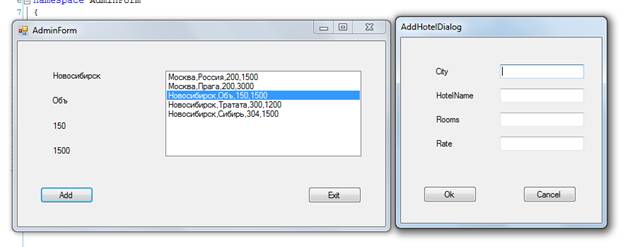
5. Создание модального диалога
using System;
using System. Collections. Generic;
using ponentModel;
using System. Data;
using System. Drawing;
using System. Linq;
using System. Text;
using System. Windows. Forms;
namespace AdminForm
{
public partial class Form1 : Form
{
List<Hotel> list = new List<Hotel>();
public Form1()
{
InitializeComponent();
}
private void cmdAdd_Click(object sender, EventArgs e)
{
AddHotelDialog dlg = new AddHotelDialog();
dlg. ShowDialog();
if (dlg. HotelName!= "") {
label1.Text = dlg. City;
label2.Text = dlg. HotelName;
label3.Text = dlg. Rooms. ToString();
label4.Text = dlg. Rate. ToString();
String s = dlg. City + "," + dlg. HotelName + ","
+ dlg. Rooms. ToString() + "," + dlg. Rate. ToString();
hotellist. Items. Add(s);
Hotel ob = new Hotel(dlg. City, dlg. HotelName, dlg. Rooms, dlg. Rate);
list. Add(ob);
} else {
MessageBox. Show("Введите данные", "Hotel Broker Administration", MessageBoxButtons. OK,
MessageBoxIcon. Exclamation);
return;
}
}
private void cmdExit_Click(object sender, EventArgs e)
{
if (MessageBox. Show("Do you want to close", "Warning",
MessageBoxButtons. YesNo, MessageBoxIcon. Question) ==
System. Windows. Forms. DialogResult. Yes)
{
Application. Exit();
}
}
private void Form1_Load(object sender, EventArgs e)
{
Hotel ob1=new Hotel("Москва","Россия",200,1500);
list. Add(ob1);
Hotel ob2=new Hotel("Москва","Прага",200,3000);
list. Add(ob2);
Hotel ob3=new Hotel("Новосибирск","Объ",150,1500);
list. Add(ob3);
Hotel ob4=new Hotel("Новосибирск","Тратата",300,1200);
list. Add(ob4);
hotellist. Items. Clear();
if (list == null) { return; }
foreach(Hotel hotel in list)
{
// строка для записи в элемент ListBox hotellist
String city = hotel. City. Trim();
String name = hotel. HotelName. Trim();
String rooms = hotel. Rooms. ToString();
String rate = hotel. Rate. ToString();
String str = city + "," + name + "," + rooms + "," + rate;
hotellist. Items. Add(str);
}
}
private void hotellist_SelectedIndexChanged(object sender, EventArgs e)
{
if (hotellist. SelectedIndex!= -1) {
String selected = hotellist. SelectedItem. ToString();
String[] fields;
fields = selected. Split(','); // поля разбить;
label1.Text = fields[0];
label2.Text = fields[1];
label3.Text = fields[2];
label4.Text = fields[3];
}
else
{
label1.Text = "";
}
}
}
}
namespace AdminForm
{
public partial class AddHotelDialog : Form
{
public AddHotelDialog()
{
InitializeComponent();
}
public String City
{
get { return txtCity. Text; }
set { txtCity. Text = value; }
}
public String HotelName
{
get { return (txtHotelName. Text); }
set { txtHotelName. Text = value; }
}
public int Rooms
{
get { return Convert. ToInt32(txtNumberRooms. Text); }
set { txtNumberRooms. Text = value. ToString(); }
}
public double Rate
{
get { return Convert. ToDouble(txtRate. Text); }
set { txtRate. Text = value. ToString(); }
}
private void cmdOk_Click(object sender, EventArgs e)
{ Close(); }
}
}
namespace AdminForm
{
class Hotel
{
public Hotel(String city, String name, int r, double m)
{
City = city; HotelName = name;
Rooms = r; Rate = m;
}
public String City, HotelName;
public int Rooms;
public double Rate;
}
}
2. Задание
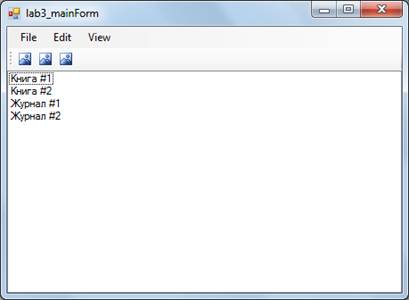
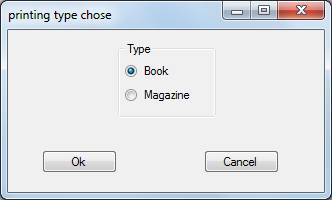
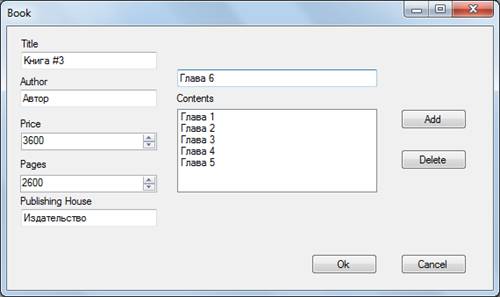
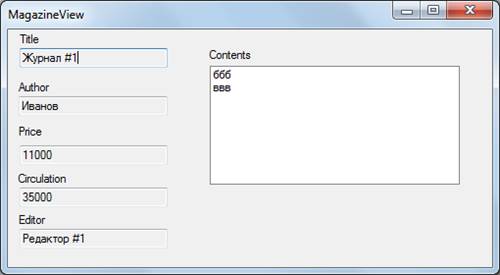
1. Создать учебные примеры (программы 2–5) и разобрать принцип их работы. Поместите в отчет примеры работы программ, их код с комментариями.
2. Создать SDI-приложение (Single Document Interface, одно-документный интерфейс) с элементами ввода и отображения полей класса из задания к лабораторной работе 2. Для этого используйте различные элементы управления: текстовые поля, списки, независимые и радиокнопки, а также панели и менеджеры компоновки.
3. Ввод новых данных осуществлять через дополнительную диалоговую форму.
4. При изменении данных запрашивать подтверждение через окно диалога. В случае неполных данных сообщать об ошибке.
5. Объекты сохранять в коллекции.
6. Реализовать просмотр всей коллекции объектов через список. Для редактирования выбранного объекта создать дополнительную форму модального диалога.
7. Добавить на форму меню, позволяющее работать с пунктами: добавить, просмотреть, удалить, редактировать, справка.
8. Дублировать основные операции панелью инструментов.
3. Результат работы
4. Исходный текст программы
MainForm
using System;
using System. Collections. Generic;
using ponentModel;
using System. Data;
using System. Drawing;
using System. Linq;
using System. Text;
using System. Windows. Forms;
using lab2;
namespace lab3
{
public partial class MainForm : Form
{
private List<Printing> prints = new List<Printing>(); // список объектов
public MainForm()
{
InitializeComponent();
printListViewer. Columns. Add("Title", 0, HorizontalAlignment. Center);
printListViewer. Columns. Add("Price", 0, HorizontalAlignment. Center);
Test();
}
private void Test() // тестовые данные
{
String cont1 = "ааа";
String cont2 = "ббб";
String cont3 = "ввв";
Printing print1 = new Book("Книга #1", "Петров", 10000, 2, new List<String> { cont1, cont2 }, 350, "Издательство #1");
Printing print2 = new Book("Книга #2", "Сидоров", 6000, 1, new List<String> { cont2 }, 250, "Издательство #2");
Printing print3 = new Magazine("Журнал #1", "Иванов", 11000, 2, new List<String> { cont2, cont3 }, 35000, "Редактор #1");
Printing print4 = new Magazine("Журнал #2", "Смирнов", 15000, 3, new List<String> { cont1, cont2, cont3 }, 50000, "Редатор #2");
prints. AddRange(new[] { print1, print2, print3, print4 });
prints. ForEach(AddMenuItem);
}
private void AddMenuItem(Printing print) // создание нового элемента меню
{
var item = new ListViewItem(print. Title);
item. SubItems. Add(print. Price. ToString());
printListViewer. Items. Add(item);
}
private void listView1_SelectedIndexChanged(object sender, EventArgs e)
{
}
private void MainForm_Load(object sender, EventArgs e)
{
}
private void close(object sender, EventArgs e) // закрытие программы
{
Application. Exit();
}
private void NewObj(object sender, EventArgs e) // создание нового объекта
{
var select = new TypeChose(); // вызов диалогового окна с выбором типа
int printType = select. GetPrintType(this);
if (select. DialogResult == DialogResult. Cancel) return;
Printing print = ShowInsertDialog(printType); // вызов диалогового окна для заполнения полей нового объекта
if (print!= null)
{
prints. Add(print); // добавление нового объекта в список
AddMenuItem(print);
RefreshListView();
}
}
private Printing ShowInsertDialog(int printType)
{ // вызов диалогового окна в зависимости от типа выбранного объекта
if (printType == 1)
{
BookDialog printDialog = new BookDialog();
return printDialog. ShowDialog(this) == DialogResult. Cancel? null : printDialog. book;
}
else if (printType == 2)
{
MagazineDialog printDialog = new MagazineDialog();
return printDialog. ShowDialog(this) == DialogResult. Cancel? null : printDialog. magazine;
}
else
{
MessageBox. Show("ERROR", "Error", MessageBoxButtons. OK, MessageBoxIcon. Error);
return null;
}
}
private void EditObj(object sender, EventArgs e)
{ // редактирование выбранного объекта
if (printListViewer. SelectedIndices. Count == 0)
{
MessageBox. Show("Select object");
return;
}
int selected = printListViewer. SelectedIndices[0];
Printing selectedPrint = prints[selected];
ShowEditDialog(selectedPrint);
RefreshListView();
}
private void RefreshListView()
{ // обновление списка объектов
printListViewer. Items. Clear();
prints. ForEach(AddMenuItem);
}
private void ShowEditDialog(Printing selectedPrint)
{ // вывод окна редактирования в зависимости от выбранного объекта
if (selectedPrint is Book)
{
BookDialog printDialog = new BookDialog((Book)selectedPrint);
printDialog. ShowDialog(this);
}
else if (selectedPrint is Magazine)
{
MagazineDialog printDialog = new MagazineDialog((Magazine)selectedPrint);
printDialog. ShowDialog(this);
}
else
{
MessageBox. Show("Unknown type", "Error", MessageBoxButtons. OK, MessageBoxIcon. Error);
return;
}
}
private void ShowViewForm(Printing selectedPrint)
{ // вывод окна для вывода данных об объекте
if (selectedPrint is Book)
{
BookView printView = new BookView((Book)selectedPrint);
printView. ShowDialog(this);
}
else if (selectedPrint is Magazine)
{
MagazineView printView = new MagazineView((Magazine)selectedPrint);
printView. ShowDialog(this);
}
else
{
MessageBox. Show("Unknown type", "Error", MessageBoxButtons. OK, MessageBoxIcon. Error);
return;
}
}
private void DelObj(object sender, EventArgs e)
{ // удаление объекта
if (printListViewer. SelectedIndices. Count == 0)
{
MessageBox. Show("Select object");
return;
}
int selected = printListViewer. SelectedIndices[0];
var confirmResult = MessageBox. Show("Do you want to delete this object?", "Confirmation dialog",
MessageBoxButtons. YesNo, MessageBoxIcon. Question);
if (confirmResult == DialogResult. Yes)
{
prints. RemoveAt(selected);
printListViewer. Items. RemoveAt(selected);
}
}
private void TileClick(object sender, EventArgs e)
{
printListViewer. View = View. Tile;
}
private void ListClick(object sender, EventArgs e)
{
printListViewer. View = View. List;
}
private void carListViewer_SelectedIndexChanged(object sender, EventArgs e)
{
}
private void ViewClick(object sender, EventArgs e)
{
int selected = printListViewer. SelectedIndices[0];
Printing selectedPrint = prints[selected];
ShowViewForm(selectedPrint);
}
}
}
MagazineDialog
using System;
using System. Collections. Generic;
using ponentModel;
using System. Data;
using System. Drawing;
using System. Linq;
using System. Text;
using System. Windows. Forms;
using lab2;
namespace lab3
{
public partial class MagazineDialog : Form
{
public Magazine magazine { get; set; }
public MagazineDialog()
{
InitializeComponent();
magazine = new Magazine();
}
public MagazineDialog(Magazine magg)
{
InitializeComponent();
magazine = magg;
InitializeFromContent();
}
private void InitializeFromContent()
{ // инициализация объекта из полей формы
Title. Text = magazine. Title;
Price. Value = magazine. Price;
Author. Text = magazine. Author;
for (int i = 0; i < magazine. GetNumbOfContents(); i++)
{
String content = magazine[i];
contentsListBox. Items. Add(content);
}
Circulation. Value = magazine. Circulation;
Editor. Text = magazine. Editor;
}
private void AddClick(object sender, EventArgs e)
{ // добавление даты
contentsListBox. Items. Add(contentForm. Text);
}
private void DelClick(object sender, EventArgs e)
{ // удаление даты
try
{
contentsListBox. Items. RemoveAt(contentsListBox. SelectedIndex);
}
catch (ArgumentOutOfRangeException) { }
}
private void listBox1_SelectedIndexChanged(object sender, EventArgs e)
{
}
private void LorryDialog_Load(object sender, EventArgs e)
{
}
private void dateTimePicker1_ValueChanged(object sender, EventArgs e)
{
}
private void OkClick(object sender, EventArgs e)
{ // проверка полей объекта и его сохранение
try
{
if (Title. Text!= null && Price. Value!= 0 && Author. Text!= null && Circulation. Value!= 0 && Editor. Text!= null)
{
magazine. Title = Title. Text;
magazine. Price = (int)Price. Value;
magazine. Author = Author. Text;
foreach (String date in contentsListBox. Items)
{
magazine. NewContents(date);
}
magazine. Circulation = (int)Circulation. Value;
magazine. Editor = Editor. Text;
this. DialogResult = DialogResult. OK;
Close();
}
else MessageBox. Show("Any form not fill");
}
catch (Exception exc)
{
MessageBox. Show(exc. Message, "Error", MessageBoxButtons. OK, MessageBoxIcon. Error);
}
}
private void CancelClick(object sender, EventArgs e)
{
Close();
}
private void MagazineDialog_Load(object sender, EventArgs e)
{
}
}
}
MagazineViewer
using System;
using System. Collections. Generic;
using ponentModel;
using System. Data;
using System. Drawing;
using System. Linq;
using System. Text;
using System. Windows. Forms;
using lab2;
namespace lab3
{
public partial class MagazineView : Form
{
public Magazine magazine { get; set; }
public MagazineView()
{
InitializeComponent();
}
public MagazineView(Magazine magg)
{
InitializeComponent();
magazine = magg;
InitializeFromContent();
}
private void InitializeFromContent()
{
Title. Text = magazine. Title;
Price. Text = magazine. Price. ToString();
Author. Text = magazine. Author;
for (int i = 0; i < magazine. GetNumbOfContents(); i++)
{
String content = magazine[i];
contentsListBox. Items. Add(content);
}
Circulation. Text = magazine. Circulation. ToString();
Editor. Text = magazine. Editor;
}
private void MagazineView_Load(object sender, EventArgs e)
{
}
}
}
BookViewer
using System;
using System. Collections. Generic;
using ponentModel;
using System. Data;
using System. Drawing;
using System. Linq;
using System. Text;
using System. Windows. Forms;
using lab2;
namespace lab3
{
public partial class BookView : Form
{
public Book book { get; set; }
public BookView()
{
InitializeComponent();
}
public BookView(Book bookk)
{
InitializeComponent();
book = bookk;
InitializeFromContent();
}
private void InitializeFromContent()
{
Title. Text = book. Title;
Price. Text = book. Price. ToString();
Author. Text = book. Author;
for (int i = 0; i < book. GetNumbOfContents(); i++)
{
String content = book[i];
contentsListBox. Items. Add(content);
}
Pages. Text = book. Pages. ToString();
Company. Text = book. PublishingHouse;
}
private void BookView_Load(object sender, EventArgs e)
{
}
}
}
Вывод
Ознакомилась и научилась применять механизм событий, научилась создавать графический интерфейс при помощи Windows Forms в среде Visual Studio, ознакомилась с имеющимися компонентами, формами, их свойствами и событиями, научилась создавать диалоговые окна и передавать данные между ними.
