

Партнерка на США и Канаду по недвижимости, выплаты в крипто
- 30% recurring commission
- Выплаты в USDT
- Вывод каждую неделю
- Комиссия до 5 лет за каждого referral
UserЎЇs manual
general information.. 2
description. 2
appearance. 2
installation. 4
Supported vehicles. 4
FUNCTION.. 6
MFD THE FIRST TIME OF USING MFD. 6
display under idle state. 9
display under running state. 9
alarm function. 11
MENU INTERFACE. 12
SYSTEM UPDATE. 24
HOW TO CONNECT. 24
LIST OF UPDATE TOOLS 24
HOW TO UPDATE. 25
DESCRIPTION
ЎЈTHE CAR MULTIFUNCTION INFO DISPLAYЈЁABBREVIATED ASЈєЈНЈЖЈДЈ©is a multifunctional, omnidirectional Car info display device special designed for MFD, the users can not only know most of the car information, but also can setup the inner function of their car to make it more personalized and humanized.
MFD is not only a car info display system but also a powerful device for car fault code scanning, the car user can find out if their car exist any fault through MFD. The system can show the fault info in details so that the car user can remove the hidden trouble for their car, especially, it will protect the interests for the car user when the car in the warranty time.
Product Appearance
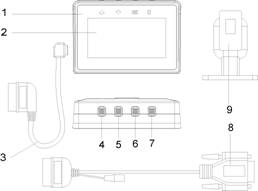
components of MFDЈє
1. The main device
2. LCD SCREEN: 240*120 Lattice LCD
3. Diagnostic cable: the cable connect MFD and the car
4. [Ўь] up: Roll up button
5. [Ўэ] down: roll down button
6. [OK]OK: Confirm button
7. [C]C: Return button
8. update cable: cable for update
9. Mount tool
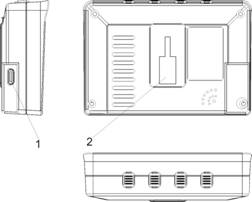
MFD main deviceЈє
1. diagnostic cable connect port
2. the mount place
Installation
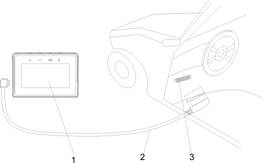
Connect MFD and car
1. Mount the vacuum cup on the car windshield
2. Connect MFD to the Vacuum holder, adjust it to a best angle
3. Connect the cable, the V-screen and OBDII port of the car correctly
Note: The length of the diagnostic cable is 1.0M, please decide the mount and wire laying according to the length of the cable.
Car mode supported
Support all cars with standard OBDII
To solve the environmental pollution problem caused by the vehicle exhaust, all of the world's main automobile manufacturing companies manufacture the standard OBDII cars so that to reduce the auto-exhaust. The OBDII and itЎЇs spanding standard was firstly developed by SAE and adopted by EPA. After that, it was spreaded in Europe, Asia, Oceania, and other area. And now in China, it was by force that all of the cars produced in China must reach the OBDII international standard.
The OBDII international standard support the following functions:
1. If there exist any fault with the car, the indicator light on the dashboard will be on to remind the driver that the car has malfunction and it is unsafe if go on driving.
2. to read the info under dynamic state
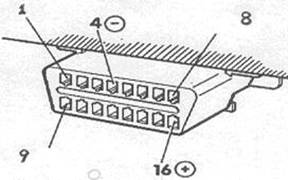
3. [OBD-16] Generally, the diagnostic connector is located under the steering column, on the inner side of the console. For some of the cars, the diagnostic connector is located on the bottom left of the dashboard or inside the dust guard, and for some other cars, the OBDII diagnostic connector is installed below the storage box of the co-driver position.
Function
The first time of using MFD
When using the product for the first time, the customers was requested to do initial setting for MFD, and it will display the following picture(the top right shows the software version)
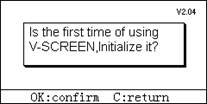
To operate according to the screen prompts, Choose OK to go on the next step
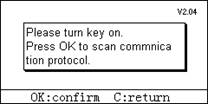
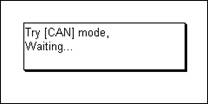
MFD will scan the five kinds of Standard OBDII communication models[ISO15765 CAN BUS, ISO14230 KWP2000, J1850PWM, J1850 VPW, ISO914-2] automatically.
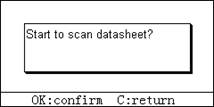
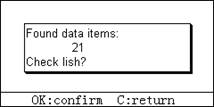
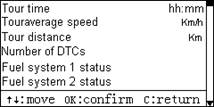
ЎЈEnter[C] to exit, choose the car model by ЎѕЎьЎїЎѕЎэЎї, choose ЎѕOKЎїto confirm, the system will setup the car model. insure MFD to awake and display the car model ico.
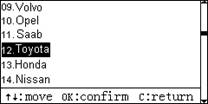
EnterЎѕCЎїto exit, the users may choose the system default display interface. ChooseЎѕOKЎї, the users can setup the display interface by themselves(for this function, will describe in details inЎѕINSTRUMENT SETTINGЎїЎѕRESET MENUЎї
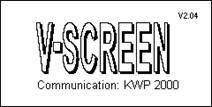
When the system is acquiring the data, the screen will not show any information for seconds

The nearside of above picture is the Logo of Car manufacturer, The picture displaying on the right side is Ў° please buckle up, Drive with caution! wish you a happy journey! Ў±. The users may reset the picture according to their own favorite throughЎѕsystem updateЎї
display under idle state:
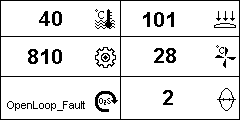
Idle mode
Idle mode is the first interface displaying under the state of key-on or idle. For the content shows above, the users can modify it freely.(Please refer toЎѕINSTRUMENT SETTINGЎїЎѕRESET MENUЎїfor the information in details.
The system default setting as below:
Upper left side: water temperature
Middle left side: Rotate speed
Lower left side: State of oxygen sensors
Upper right side: air intake pressure
Middle right side: air intake temperature
Lower right side: TP Throttle Position
Display under running state
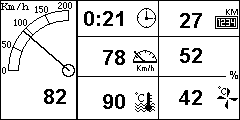
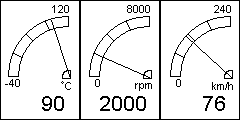
ЎѕAthletics modeЎї
When the car begin to run, the system will appear the above interfaceЎѕCruise modeЎї ЎѕAthletics modeЎїThe users can change the interface by ЎѕЎьЎїЎўЎѕЎэЎї.
Data of ЎѕCruise modeЎї
The left side shows the actual running speed(it is more accurate than the speed shows on dashboard)
Upper of the first line, right side: the running time of this driving(
Middle of the first line, right side: the average speed of this driving
Lower of the first line, right side: the current water temperature
Upper of the second line, right side: the total mileage of this driving(this date will be cleared from the beginning of next start-up)
Middle of the second line, right side: the current engine load
Lower of the second line, right side: the current intake air temperate
The users can change the data displayed under the cruise mode(for the detailed information, please refer to
ЎѕINSTRUMENT SETTINGЎїЎѕRESET MENUЎї
Data of Athletics mode:
The screen displays 3 dials which shows the current water temperature, the engine rotate speed and running speed with fingers and numbers.
alarm function
The multi directional Alarm function makes the safety guaranteed. During the course of driving, MFD will offer the information of different safety grade.
Over speed reminding
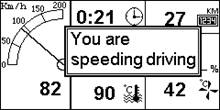
The userЎЇs can setting the top speed reminding according to the different instance. When the driving speed is reaching or over the top speed, the system will open window automatically with a reminding: You are driving over speed!
Drowsy driving reminding
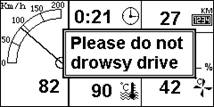
Before long - distance driving, the driver can setting Ў°drowsy driving remindingЎ± to assure the system to remind the driver
not to drive
malfunction Alarm
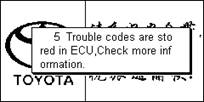
After setting the Ў° malfunction alarmЎ±, every time when run the car, MFD will inspect automatically for the electronic control system of the engine. If there exist any malfunction, it will remind the driver at once.
Shift remind
In order to reduce the carЎЇs abrasion, prolong the carЎЇs life and correct the bad driving habit, the driver can setting the corresponding value of rotate speed when shift. When the rotate speed arrived at the set value, the MFD will give an alarm with Voice.
Menu interface
ChooseЎѕOKЎї to enter Ўѕmenu interfaceЎїunder the Ў°idle stateЎ± or Ў°running stateЎ±.
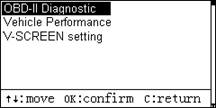
MENU INTERFACE
ЎѕOBDII DiagnoseЎїfunction
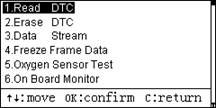
By this function, The customer may know the carЎЇs operation condition correctly and timely. The screen displays the menu of diagnose function, choose the function by the key of [Ўь]Ўў[Ўэ]: Ўѕ1.read fault codesЎїЎѕ2.Erase fault codesЎїЎѕ3.read data streamЎїЎўЎѕ4. data of freeze frameЎїЎѕ5. Oxygen Sensor testЎїЎѕ6.monitoring data of manufacturerЎїЎўЎѕ7. system request onlineЎїЎѕ8.information of ECUЎї.
select Ўѕ1.read fault codeЎї
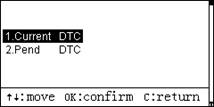
Ўѕcurrent fault codeЎї: shows the fault codes which obtained by MFD
Ўѕthe Fault code under pendingЎїЈєshows the fault code which appear intermittent during several cycles.
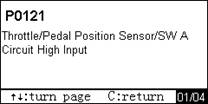
If the system has any fault code, the screen will show the number of the fault code and the description for the fault code(as the picture show above), to read the different fault content through the keysЎѕЎьЎїЎѕЎэЎї. On the lower right corner displays ЎЇ01/04ЎЇ, that means thereЎЇs 4 fault codes and currently shows the first fault code.
select Ўѕ2. erase fault codesЎї
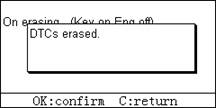
This function can switch the malfunction indicator light, and clear the fault codes which was stored in the memory of control cell. Test condition: Please turn the key ON and turnoff the engine.
select[3.read data stream]
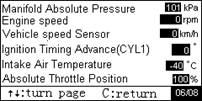
The screen will show the instantaneous value of data stream and the driver can check the run status for engine. Please read the instantaneous value on previous screen or next screen by the keyЎѕЎьЎїЎѕЎэЎї.
selectЎѕ4. data of freeze frameЎї
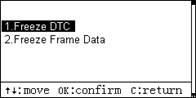
Ўѕfault codes of freeze frameЎїЈє shows the fault codes which was recorded by ECU at the same time of occurring malfunction.
ЎѕDATA of Freeze frameЎїЈєShows the parameter of operation condition which was recorded by ECU at the same time of occurring malfunction. This can help the repairer to find out the reason of malfunction so that to repair the car in time.
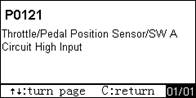
ЎѕFault codes of freeze frameЎїЈє check the fault codes which caused the data of freeze frame and the content of malfunction.
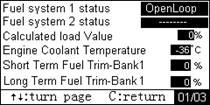
Ўѕdata of freeze frameЎї: shows the parameter of operation condition when the car has malfunction.
Please read the instantaneous value on previous screen or next screen by the keyЎѕЎьЎїЎѕЎэЎї.
selectЎѕ5. Oxygen Sensor testЎї
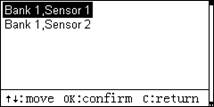
By testing, the screen will display the configuration of Oxygen Sensor. To choose Ўѕsection 1,Sensor 2( B1S2)Ўїas the example.
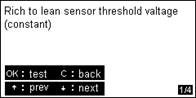
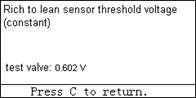
Ў®1/4ЎЇ on the lower right corner, means this Oxygen Sensor offers 4 kinds of test function, and currently shows the first one. Please choose different function to test by the key ЎѕЎьЎїor ЎѕЎэЎї. Enter [OK] to begin the test. The screen will display different test result if you choose different test function.
select Ўѕ6. monitoring data of manufacturerЎї
Test the car according to TID defined by car manufacturer.
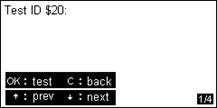
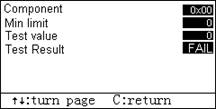
To control the request online system, test by the online testing command. For the nonstandard TID, please refer to the automobile maintenance document.
Select Ўѕ8.ECU INFOЎї
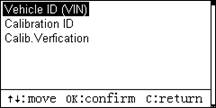
The screen will display the car manufacturerЎЇs information, the ECU manufacturerЎЇs information, the version of the software and hardware for ECU(the function may not support some old cars)
Ўѕperformance testing Ўї function
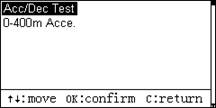
MFD offers the performance testing for the car so that the driver can know the carЎЇs Dynamical performance in details.
Select Ўѕspeedup/speed-down testingЎї
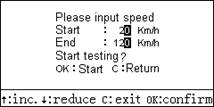
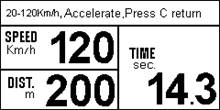
The users can setting the beginning speed and ending speed freely, and the MFD will monitor and control the speed during the course of running speedup or speed-down. It will show the running distance and for how long time taking for this distance, so that the userЎЇs know the carЎЇs dynamical performance.
Select Ўѕ0-400m speedupЎї
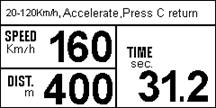
How long time it takes when the userЎЇs speed the car up and when it runs to a distance of 400m? By this information, the userЎЇs can know the carЎЇs dynamical performance.
ЎѕsetupЎї function
Ўѕover speed alarm Ўї
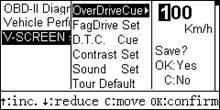
The users can setup the function of over-speed alarm so that to remind the driver when he drive over speed unconsciously.
ЎѕDrowsy driving alarm Ўї
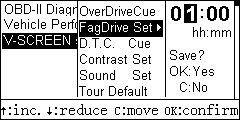
Before long - distance driving, the driver can setting Ў°drowsy driving remindingЎ± to assure the system to remind the driver
not to drive
Malfunction alarm
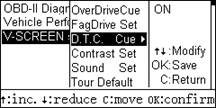
To open up this function, MFD will inspect automatically for the electronic control system of the engine. If there exist any malfunction, it will remind the driver at once.
contrast setting
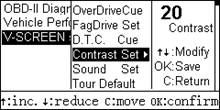
The users can setting the contrast of LCD according to their preference so that to get the best vision effect.
sound setting
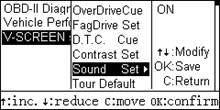
The users can open or close the buzzer according to their preference.
running menu default
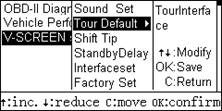
The users can set it by themselves to make the system under ЎѕCruise modeЎїor ЎѕAthletics modeЎї
Ўѕshift remindingЎї
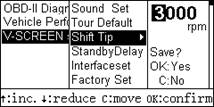
In order to reduce the dissipation during driving, prolong the carЎЇs life, and correct the bad driving habit, the users can set the corresponding value of engine rotate speed when the shift was required. When the rotate speed arrived at set value, MFD will alarm by sound to remind the driver to shift.
ЎѕSTANDBY DELAYЎї
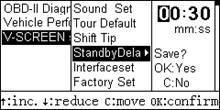
The tool will be in a status of standby in 30 seconds after key off. The users can set the time by themselves, generally, not less than 10 seconds.
ЎѕRESET MENUЎї
The EFI vehicle support plenty of data, but the volume and content of the data should be different for the cars from different manufacturer, so the users can configure the information under different mode according to their personal preference.
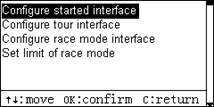
l configure idle mode
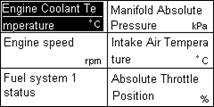
To choose the item which need to modify by ЎѕЎьЎїЎѕЎэЎї and choose ЎѕOKЎїto confirm, then enter the interface showing the car supporting data(different cars may show different data)
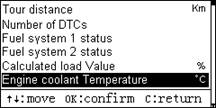
To choose the data by ЎѕЎьЎїЎѕЎэЎї and enter by ЎѕOKЎї, for example: choose Ў°number of DTCSЎ±, and under the idle mode, it will show Ў°number of DTCsЎ± on the place where it showed Ў°cooling fluid temperatureЎ± previously.
l configure cruise mode (please refer to Ў°configure idle modeЎ±)
l configure athletics mode(please refer to Ў°configure idle modeЎ±)
l the range of athletics mode
Setting the range of each pointer meter under the athletics mode.
ЎѕRestore factory settingЎї
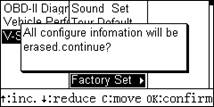
If the user set this function, the system will restore to the factory state and all of the configure information will be erased. When the driver start the car next time, the system will restore to the state ofЎѕfirst time of using MFDЎї
update
connect
The product can be updated by connect MFD to PC,. it need the special update cable to connect MFD to PC and update the system with special software.
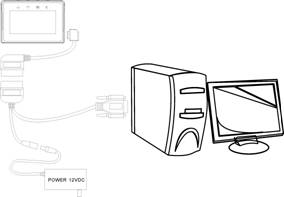
Update tools
1. Update cable
2. 12V powerЈ»
3. Update software and bin file(from distributors)Ј»
4. Special update program for MFD
How to update
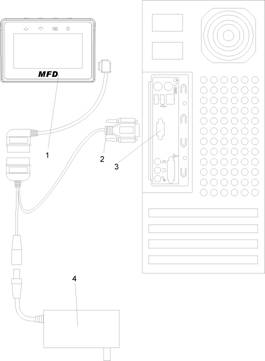
how to connect MFD to PC
Please operate strictly according to the followingЎѕUpdate procedureЎї:
1. Connect MFD and the diagnostic cable
2. connect the update cable and diagnostic cable
3. connect the update cable to COM 1 port of PC
4. connect the round connector of update cable to the 12V power adapter
5. run the special update program in PC
6. plug the 12V power adapter to the 220V electricity.
run the special update program for MFD
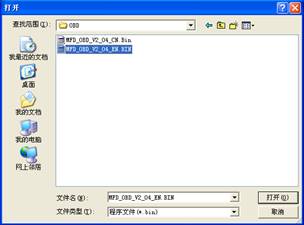
To choose update data packet, and click the button Ў° unfoldЎ±
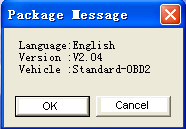
The software shows the information of the data packet. Please choose Ў° OKЎ± after confirmed the correct language, version and car mode
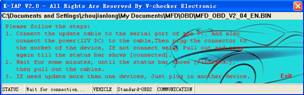
To continue the sixth step of Ўѕupdate procedureЎї, plug the 12v power adapter to the 220v electricity so that to supply power for MFD. The system begin to read-in update data and the status bar will show the progress. Please wait for a few minutes until the status bar shows Ў° read-in finishedЎ±. Now we finished the update.
