


Партнерка на США и Канаду по недвижимости, выплаты в крипто
- 30% recurring commission
- Выплаты в USDT
- Вывод каждую неделю
- Комиссия до 5 лет за каждого referral
Russian Trading System
RTS Plaza Online
API Specification
Document requisites
Authors: U. I. Somov, L. A Pustoutova., V. P. Kopylov,
M. M. Shotin
Trading system version: 9.20
Module version: 1.92.014
Date: 14.07.2011
Company : RTS Stock Exchange, NP
38, bld. 1, Dolgorukovskaya st.,
Moscow, 125267 Russia
Contents
Document requisites 1
Accepted abbreviations 4
1. Changes 4
2. Function 5
3. The RTS customer’s software configuration 5
4. Setup of online connection with RTS Plaza 6
munication protocol initialization file 6
4.2. Specific features of launching in the local connection mode 6
4.3. Specific features of launching in the autonomous connection mode 7
munication protocol ini-file settings required for the connection with the trading system server 7
4.5. Setup of the gateway modules interconnection 8
4.6. Launching 9
5. The ini-files settings for SQL server operation 10
6. Cryptosystem setup 10
7. The RTS Plaza messages 12
7.1. Function 12
7.2. The MsgOrder message 12
7.2.1. Note regarding deleting of orders 14
7.2.2. Note regarding the fields filling for the T+0 market instruments 14
7.2.3. Note regarding the fields filling for the T+4 market instruments 15
7.2.4. Note regarding system reply 15
7.2.5. Notes regarding the order processing during the evening trading session 16
7.3. The MsgQuoteS message 17
7.4. The MsgTrade message 19
7.4.1. Notes regarding the fields filling in the bilateral trades on the classic and T+4 markets. 21
7.4.2. Notes regarding the fields filling in the trade-by-quote reports of the classic market. 21
7.4.3. Notes regarding the fields filling in the bilateral trades on the T+0 market. 21
7.4.4. Notes regarding the fields filling in the REPO and T+N trades on the T+0 market. 22
7.4.5. Notes regarding the fields filling in the OTC-reports 22
7.4.6. Notes regarding the processing of the bilateral trades during the evening session 22
7.5. The MsgAssetOut message 23
7.5.1. Notes regarding the asset withdrawal to main accounts 23
7.5.2. Notes regarding the asset withdrawal to delivery register 23
7.6. The MsgRepoQuotes message 23
7.7. Сообщение MsgLimit 24
7.8. The MsgReply message 26
7.9. Addition 26
8. Appendices 27
8.1. The T+4 market order status transaction diagram 27
8.2. T+0 market order and trade status transaction diagram 28
8.3. REPO trades status diagram 29
8.4. List of possible tables indexes 30
8.5. The trading system responses codes 30
9. References 53
Accepted abbreviations
API | Application Programmers Interface |
TS | RTS Plaza Trading system |
WKS | RTS Plaza user’s workstation |
WKS GUI | RTS Plaza user’s workstation graphic interface |
DB | Database |
GTS | Guaranteed Trading System (T+0 market) |
EDS | Electronic digital signature |
1. Changes
01.10.2002 | The ISIN field is added to MsgOrder and MsgTrade. |
11.10.2002 | The mm field, new order_type=2 (“closing_session”) is added to MsgOrder. |
28.01.2003 | Description of peculiarity of operation with several signature keys is added to Section 6. |
29.01.2003 | Change in the MsgOrder, MsgTrade, MsgAssetOut messages structure: the ISIN field is deleted, the i_code_s and i_code fields are added. |
13.02.2003 | The i_code_s fields are deleted from the MsgOrder, MsgTrade, MsgAssetOut messages. |
27.02.2004 | The agent_principal is deleted from the MsgOrder message. The leave field is added to the MsgOrder message. The description of the quote_order field is changed in the MsgOrder message. The agent_principal is deleted from the MsgTrade message. The “Scheme of the anonymous trade on the classical market” section is added to the Appendix. |
28.06.2004 | The reply_num field is added to the MsgReply. |
01.07.2004 | The change_catalyst and type_catalyst fields are deleted from the MsgOrder message description. |
15.07.2004 | The leave field description is changed in the MsgOrder message (see Section 7.2). |
13.08.2004 | The “Appendix 8.5. Trading System Replies codes” section is added. |
06.09.2004 | Descriptions of the following trading system replies codes are added: 413, 414, 415, 416, 417, 418, 419. |
14.07.2005 | The MsgQuoteS message description is added. Notes regarding filling of the order and trade fields on the stock, OTC and anonymous markets are added to the MsgOrder, MsgTrade messages descriptions. |
21.07.2005 | Alterations in accordance with the new TS messages structure, version 8.0 |
07.11.2005 | Alterations in accordance with the new TS messages structure, version 8.1 – the res_qty field is added to the MsgOrder message. |
13.02.2006 | Field ‘visible’ is added to the MsgOrder and MsgQuoteS messages. |
29.12.2006 | Added OTC-reports chapter |
31.03.2007 | Added chapters about the orders and trades in secured trading modes. Added the Repo quote message description. |
21.08.2007 | The field ‘block_issues_sign’ is added to the MsgOrder message The field ‘block_issues_sign_sell’ is added to the MsgTrade message |
17.02.2008 | The field e_s is added to the MsgQuote, MsgOrder messages. The evening trading session chapter is added. |
18-Jan-2010 | The field block_issues_sign deleted from MsgQrder message The field block_issues_sign_sell deleted from MsgTrade message |
05-May-2010 | The message MsgLimit has been described The list of system reply has been updated MsgOrder description was corrected– field paycond added |
04-Feb-2011 | Plaza 9.2 features was described The list of system reply has been updated |
14-Jul-2011 | MsgAssetOut was detailed descripted |
2. Function
RTS Plaza Online API is used for developing application programs interacting in the Online mode with RTS Plaza software. This allows an RTS customer to query/view data from trading system database, to send messages (quotes entering/withdrawal, trades confirmation, assets withdrawal from the settlement accounts) signed by «Verba-ОW» cryptosystem, and some other functions.
The public API is based on RTS Plaza software internal interfaces. At present two libraries are supported in RTS to be used by the customers independently:
1. RTS Online (RTSOnl. dll) is a dynamic library, providing a set of functions called from the user’s program. The library is described in the "TS_RTSOnline_API_ModDescrip_Public. doc" file.
2. "DSServer" RTSOnX[nn].dll OLE objects library, where nn is a feature-set variant. The "TS_RTSOnlX_API_ModDescrip_Public. doc" file.
Note: The document describes only those libraries functions that are supported by RTS for usage by its customers.
3. The RTS customer’s software configuration
RTS Plaza software provides RTS customers with Trading System (TS) data access online. To gain the access a customer should be registered in the system and have a user’s account given by an RTS administrator (a user’s name and password). If you intend to send messages to the TS using application software, you should set up the “Verba-ОW” cryptoprotection software on your computer (see Chapter 5 “Cryptosystem Setup”). A user only receives the data, the access to which is guaranteed for his login.
The data is transmitted in RTS using the transport protocol implemented by the RTSComm communication server (the RTSComm. dll dynamic library). DataServer process (rtsds. exe) is a data provider for a program using the RTSOnline interface. It implements replication and obtains online data of the Trading System. Both modules are included into the RTS Plaza Workstation and RTS DSServer distributions.
To use the RTSOnline libraries place the RtsOnl. dll и RTSComm. dll files in one catalog with the program calling them or make them available through the PATH environment variable.
To operate the DSServer library the following things are required:
1. If you plan to use the IDataSource interface, install the Microsoft Data Access Components (MDAC) software, version 2.5 or higher, on the computer. In the Microsoft Windows 2000 the MDAC component is set up by default at the system installation.
2. Copy the RtsOnl. dll и RTSComm. dll to one catalog with the caller or make them available through the PATH environment variable.
3. Register the OLE objects library in the system using the regsvr32 RTSOnX[nn].dll command.
Note: Reregister the library if the RTSOnX[nn].dll file is transferred to another catalog.
Note: Steps 2 and 3 performed by RTS DSServer installer application.
Any of the modules using RTSComm directly or through RTSOnline can connect with the TS. Accordingly, two variants of connection are possible:
· Autonomous (see Figure 1 Autonomous connection ). A user’s (third-party) application program itself connects with the TS and transmits the login. The others, for example, DataServer, if they are necessary, connect with it.
· Local (see Figure 2 Local connection). The connection with the TS is established by any of the RTS Plaza software standard modules, for example: GUI WKS or DataServer and the third-party application connects with it (without indicating the login in the TS).
User site |
|
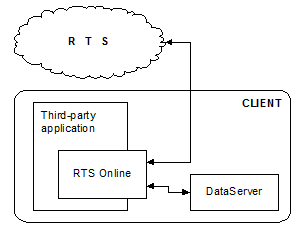
Figure 1. Autonomous connection
User site |
|
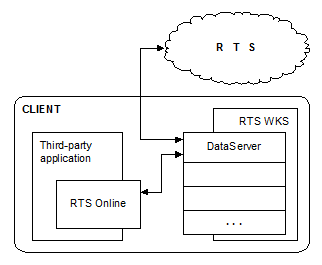
Figure 2 Local connection
4. Setup of online connection with RTS Plaza
4.1. Communication protocol initialization file
Communication server parameters are set up through the configuration settings, specified in certain sections of the ini-file the name of which is transmitted to the communication server at the communication opening. In the absence of some parameters RTSComm uses their values set up by default.
The «RTSComm communication server» document (the “TS_RTSComm_ModDescrip_Public. doc” file) describes in detail the communication server and the file of its settings.
Attention! All changes in the ini-files comes info effect upon program restart.
4.2. Specific features of launching in the local connection mode
The application that establishes connection with the TS should be launched primarily in the local mode. The application, which maintains a connection to RTS (for example - DataServer) and third-party application can be run from different catalogs or on different computers (also see section 4.5.).
Example of an ini-file of a user’s program for operation in the local mode:
[COMMSERV]
LEVEL=1
LOGFILE=<app>.log
[RPC]
SECTION=RPC*LRPC
[RPC*LRPC]
ENDPOINT=<app>
[CONNECT]
PRIMARY=CONNECTLRPC
RETRYTIME=5
[CONNECTLRPC]
TYPE=RPC
SECTION=RPC*LRPC
ENDPOINT=<master_app>
Here app is a random name of the master_app – endpoint of the module that establishes connection with the TS.
4.3. Specific features of launching in the autonomous connection mode
Example of an ini-file of a third-party application for operation in the autonomous connection mode.
[COMMSERV]
LEVEL=1
LOGFILE=<app>.log
[RPC]
SECTION=RPC*LRPC
[RPC*LRPC]
ENDPOINT=<master_app>
[CONNECT]
PRIMARY=CONNECTTCP
[CONNECTTCP]
TYPE=WINSOCK
NETWORKADDRESS=beta. *****
REMOTEPORT=2041
, where beta. ***** is the test trading system address.
Note. rts-plaza. ***** is the production trading system address.
The modules in their turn connecting with the application use an ini-file analogous to one given in the previous section.
4.4. Communication protocol ini-file settings required for the connection with the trading system server
Include the information described in the section to the ini-file applications that establishes connection with the TS. In case of the autonomous connection mode it is a file of user’s application settings, in case of local connection mode it is a ini-file of Data Server module.
The connection settings are located in several sections of the ini-file.
The [CONNECT] section. It should contain at the least the PRIMARY variable in which the section name with settings of connection with the most preferable server is indicated. Example:[CONNECT]
PRIMARY=CONNECTTCP
To set up a redundant connection, one or more SECONDARY variables can be included in [CONNECT] section. These variables gives alternate connection settings, if primary connection will fail. Example:
[CONNECT]
PRIMARY=CONNECTMEMBERINTER
SECONDARY=CONNECTRTS
The sections with settings of connection the name of which is indicated in the PRIMARY or SECONDARY variables of the [CONNECT] section. It may have different sets of variables depending on the type of connection. To connect with the servers it should have the following variables: TYPE=WINSOCK – type of connection – using TCP/IP; NETWORKADDRESS – ip-address or the name of the server with which it is necessary to connect; REMOTEPORT – number of TCP port on which the RTS software operates on the server. Example:[CONNECTTCP]
TYPE=WINSOCK
NETWORKADDRESS=beta. *****
REMOTEPORT=2041
The server with information about authentication in the TS, comprising the trading system user’s name and password. For the rtsds. exe module and using default settings of the RTSOnX libraries the information is contained in the [APPLICATION] section. Example:[APPLICATION]
NAME=FIRM@USER
PASSWORD=<user’s password>
EXTRAPASSWORD=<user’s extra password>
4.5. Setup of the gateway modules interconnection
The gateway in RTS consists of at least two applications – the DataServer (rtsds. exe) modules and the third-party application. They can be connected using the LRPC and TCP protocols.
The connection using LRPC does not demand additional settings, as compared with default settings. If this protocol is used, the applications using it are supposed to operate on the same computer. To set up connection in the ini-files indicate the enpoints of the LRPC protocol. Example of ini-files with comments (only the sections related to the LRPC setting are shown):
ini-file of a program maintains connection with RTS central site:
[RPC]
; indicate the section with settings of a concrete RPC-protocol in the SECTION variable
SECTION=RPC*LRPC
[RPC*LRPC]
; the endpoint of the LRPC protocol – character’s string, Case sensitive
ENDPOINT=DSServClient
ini-file of a program establishing local connection:
; the [RPC] and [RPC*LRPC] sections – indicate the RPC protocol type and the endpoint of the program that uses the ini-file
; [RPC]
SECTION=RPC*LRPC
[RPC*LRPC]
ENDPOINT=ONLINESRV
[CONNECT]
PRIMARY=CONNECTDS
; connection setup – indicate the RPC connection type and the
; endpoint of the program we want to connect with
[CONNECTDS]
TYPE=RPC
SECTION=RPC*LRPC
ENDPOINT=DSServClient
The connection using TCP allows to run DataServer and third-party applications on different computers and, accordingly, to distribute computation load in the network and to ensure flexible computer security system. Unlike LRPC, using TCP-connection the program establishing local connection is authenticated locally (i. e. without queries to the main trading system server). To establish connection you should:
Indicate the connecting TCP port in the ini-file of the program maintains connection with RTS central site, adding the [WINSOCK] section:[WINSOCK]
; listen at port 2049
LISTENER=2049
Register authentication information of the modules using local connection though TCP in the ini-file of the program maintains connection with the RTS central site. Do it using the servpassw. exe utility included in the gateway distribution. The launching format:Servpassw <ini-file> <service_name> <password> <extra_password>, where,
ini-file is the ini-file name; service_name is the name of the RTSComm service, under which the connecting module operates (for the programs using RTS Online API it is indicated in the ini-file, in the servicename variable of the [ONLINE] section); password and extrapassword are the service password and additional password. Example:
Servpassw rtsds. ini online 12345 extra
Before running ServPassw application, maintains connection with the RTS central site must be stopped. After the command execution in the indicated ini-file the [PASSWORDS] section of the following contents should appear:
[PASSWORDS]
<service_name>=<encrypted password>
Specify the information about authentication and connection settings in the ini-file of the program that establishes the local connection. The information about authentication is either specified programmatically or registered in the [APPLICATION] section:[APPLICATION]
; the name variable is not indicated, as the connection is local
password=<password>
extrapassword=<extra_password>
the connection settings:
[CONNECT]
PRIMARY=CONNECTTCP
[CONNECTTCP]
TYPE=WINSOCK
; the address or the name of the computer with an application connecting with the TS
NETWORKADDRESS=RTSGATECOMP
; the port indicated in the LISTENER variable (see clause 1)
REMOTEPORT=2049
4.6. Launching
At local connection both DataServer and third-party applications must be launched. In this case the authentication in the TS is performed by DataServer and the third-party application connects with the modules locally without authentication in the TS.
The example of commands, starting the recommended configuration of software is as follows:
net start RTSDSSERVER
app. exe app. ini, where
the first command is the launching of the Windows NT service, in which rtsds. exe operates
- app. exe is a user’s application (for example, the gateway for orders sending or market information reading). app. ini is an initialization of the user’s application communication protocol (determines the parameters of the LRPC-connection with rtsds. exe).
Example of launching (using RTS Plaza Workstation):
rts. exe
app. exe app. ini, где
- rts. exe is a loader of RTS Plaza Workstation. It launches GUI and DataServer (DataServer sets up connection with the trading system and performs authentication in it) app. exe is a third-party application (for example, the gateway for orders sending or market information read operation) app. ini is a file of communication protocol settings (determines the parameters of the LRPC-connection with the execution manager)
At autonomous connection mode a user should launch DataServer and third-party application. In this case the third-party application is authenticated itself in the TS and DataServer connects with it locally, which does not require authentication in the TS.
Example of launching (autonomous connection):
app. exe app. ini
rtsds. exe rtsds. ini, where
- app. exe is a third-party application, for example, the gateway for orders sending or market information read operation (establishes communication with the trading system and is authenticated in it). app. ini is a file of the third-party application communication protocol settings(determines the parameters of TCP connection with the RTS central site). rtsds. exe is a RTS dataserver (performs replication of RTS DB tables). rtsds. ini is an initialization of RTS dataserver communication protocol (determines the parameters of the LRPC-connection with the user’s application and the database parameters).
5. The ini-files settings for SQL server operation
There is a version of the rtsds. exe module, supporting storage in the SQL database. At present the following DBMS can be used: MS SQL2000, MS SQL 7.0, MS SQL 6.5, Oracle, MS Access 97. Officially supported version of rtsds is a version using MS SQL 2000.
Setup of rtsds for SQL database operation:
1. Copy the rtsds module, supporting the functionality.
2. Copy an additional ini-file, depending on the used DBMS: db-mssql. ini, db-mssql65.ini, db-oracle. ini, db-msacc. ini.
3. Create a database on the server to use its rtsds. For MS SQL 2000 it is recommended to determine initial volume of the database file – 10 MB, initial volume of the transactions log - 3 MB, and the possibility of the automatic increase of the file size. It is also recommended to specify the "Truncate log on checkpoint” database option. Create the database user, under which the rtsds. exe will operate. The user should have permissions to create, change and delete tables in the database and permissions to read/write data in the database.
4. Create ODBC source, indicating the database created in paragraph 3.
5. Alter the rtsds. ini file in the following way:
· Register the file=db-mssql. ini or the ini-file name required for the used DBMS to the [$include] section.
[$include] is inclusion of additional ini-files to the given one (for example, of the db-mssql. ini or db-msacc. ini files at database operation in the MS SQL or MS Access format).
Row example | Description |
file=<filename> | <filename> ‑ the name and, if necessary, the pathname for an ini-file. For example: |
· Register connect=dsn=<name of the source created at step 4>[;uid=< name of DBMS user >;pwd=<password for DBMS>] in the [database] section; you may not indicate uid and pwd, in this case default connection parameters are used. For MS SQL it is either Trusted connection or 'sa' user with empty password.
[database] is the setup of the DSN name and options for the nttbl level at operation with ODBC.
Row example | Description |
connect=dsn=<DSNname> | Specifies parameters of connection with ODBC source. General format: <DSName>::=<DataSourceName>[;UID=<UserName>;PWD=<password>[;ConnectOpts]] |
· Register flat_file=0 in the[cache] section.
[cache] is the specific parameters for the ctbl level.
Row example | Description |
flat_file=1 | Setup of the option using the database in the form of flatfile in a special format. Takes on the values: |
[repl] is the replication parameters setup.
Row example | Description |
client_trans_mode=<A|B> | Transaction mode setup: |
rtsds rtsds. ini –createdb
6. Cryptosystem setup
To use the orders digital signature functions a user should install the “Verba-OW” information cryptoprotection system on the computer. Besides, it is necessary to have the following materials and information:
The key floppy disk with open and private keys of digital signature. Certificate number of the digital signature open key, given to you by RTS representatives. Then the number is indicated in the CertId parameter of the cryptosystem initialization function.Before cryptosystem functions operation start the user should initialize the cryptosystem and load the digital signature private key to the computer’s memory using the asrkeyw. exe utility (located in the %SYSTEMROOT%\System32 directory). Besides, it is recommended to copy the information content of the key floppy disk HD1 catalog to the HDD. Then indicate the pathname to the directory with files from HD1 in the KeyDir parameter of the cryptosystem initialization function method. At each signature operation the cryptosystem refers to the files from the directory, therefore reference to the key disk directly decreases productivity sufficiently. If you plan to use several keys of cryptoprotection system then copy the HD1 directory information content of each key floppy disk to the relevant subdirectory. The directories structure at the HDD should be as follows:
...\key
\900395
the directory HD1 information content of key floppy disk 1
\900728
the directory HD1 information content of key floppy disk 2
. . .
Where...\key is a root directory for open key storage (user can select any name. Full path to this directory should be indicated in the KeyDir parameter), and the next level subdirectories names correspond to the used key series number (6 figures from 5th to 10th, in the example , 900395 is a signature key number). If there are several keys of the same series, copy all the files to the directory series.
When using multiple keys simultaneously, load all the used keys at the cryptosystem initialization.
It should be kept in mind that for operation with the functions using the signature key number (these are the ‘OpenCryptoSystemEx’, ‘SetCryptoSystemSignParamEx’ functions of the RTSOnlX library), the keys loading order is not sensitive. In other cases the first loaded key is used.

|
Из за большого объема этот материал размещен на нескольких страницах:
1 2 3 4 5 6 7 |
