

Партнерка на США и Канаду по недвижимости, выплаты в крипто
- 30% recurring commission
- Выплаты в USDT
- Вывод каждую неделю
- Комиссия до 5 лет за каждого referral
Bernstein - the Memory of Paper
A Multilingual Portal for Watermark Research
Emanuel Wenger
Austrian Academy of Sciences, Donau-City Strasse 1, 1220 Vienna, Austria
emanuel. *****@***ac. at
Abstract: Bernstein is a project which was funded by the EU in the program eConentPlus. Its goal is the creation of a European integrated digital environment about paper history and expertise. The project connects European watermark databases and thus offers a comprehensive and significant information source about paper. The databases are augmented by specialized image processing tools for measuring, authenticating and dating papers and by a plenitude of contextual data with bibliographical and geographical contents. A substantial further project goal is the dissemination of the achieved results to a broad audience in the form of an easily installable software package.
This paper presents the multilingual internet portal (www. memoryofpaper. eu) which gives access to the watermark data available in the Bernstein databases and the paper bibliography provided by Deutsche Nationalbibliothek. The portal has five components (Catalogue, Atlas, Bibliography, Expertise, Kit). The Catalogue allows to search for watermarks by keywords and/or paper characteristics. The search result can be shown as result list and summarized in statistics parameters, The Atlas allows the creation of maps of paper distribution in space and time. The Bibliography contains more than 31.000 bibliographic records of publications about historical, technological, social, commercial, and other aspects of pre-modern paper published until today. The Expertise component contains software tools for the extraction and measurement of watermarks. Last but not least the Kit provides the download of the Bernstein Paper Studies Kit (PSK), a collection of ready-to-use programs and data that gives the user the possibility to set up an own watermark database[1].
1. Introduction
Multi-lingual support for all Bernstein resources is considered an important issue in the project. We selected the languages representing an active community in paper research and which have developed an own terminology for watermark classification. These are the following six languages: German (e. g. Piccard [13], WZMA [9]), English (WILC [8]), French (Briquet [10]), Italian (Zonghi [14]), Russian (Likhachev [11]), and Spanish (Oriol Valls i Subirà [12]). Although two Dutch partners are in the Bernstein consortium, Dutch was omitted from the number of supported languages due to two reasons: no specific Dutch terminology for watermark research and classification exists, and furthermore, our Dutch partners (KB and DUT) stated that neither a Dutch translation of the watermark terms nor such of the user interface is necessary and would makes sense.
Multilinguality is implemented in all areas of the Bernstein portal. The most obvious is the user interface, i. e. the web-pages of the portal. ‘Help’-buttons on the web-pages provide information also in the selected six languages. The Browse Motif-function offers the classification of the watermarks in three levels and six languages.
Finally, the Bernstein project has generated a vocabulary (“Watermark Terms – Vocabulary for Watermark Description”) with all watermark terms standardized in six languages. This vocabulary is used for searching in the catalogues in different languages. The specification of a watermark motif in one language is translated automatically to all other languages. All multi-lingual features are designed in such a way that makes it easy to add additional languages.
2. User Interface (Bernstein Portal)
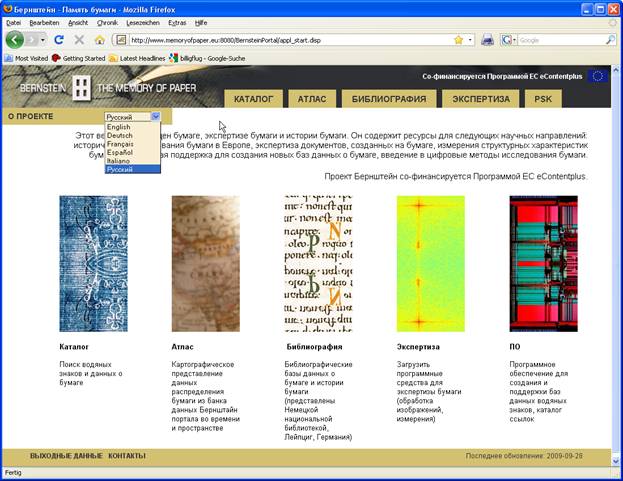
The Bernstein portal is the access point to all Bernstein resources. The default language is English. The language can be changed on each page to any of the six supported languages. A drop-down list for the selection of the language can be found on left hand side in the upper part of each page (see Figure 1). The selected language is used for all user interface texts.
|
Figure 1: Start page of the integrated workspace (Bernstein web portal), language selection by a drop down menu. |
The Catalogue’s sub-pages Simple Search, Advanced Search and Browse Motif provide a check box which allows the user to choose if the Bernstein watermark terms list (vocabulary for watermark description) should be applied for a motif search or not. The check box is ‘on’ by default. On means in this special case that the watermark terms list is used according to the selected language. If the motif is specified in the selected language, the search engine uses the appropriate translations taken from the six-language Bernstein vocabulary for the search in the Bernstein databases.
Let’s take an example, in order to explain this functionality more precisely. In case the selected language is Italian, the motif has to be specified in Italian, too. A search for ‘testa di bue’ will be translated into a search for ‘Ochsenkopf’ (WZMA, PO [7]), and a search for ‘bull’s head’ (WILC, NIKI [6]). If there were databases in French, Spanish, and Russian, the search would be extended also to ‘tête de boeuf’ (French), ‘cabeza de toro’ (Spanish), and ‘голова быка’ (Russian). This functionality allows the researcher to specify his motif search in his/her language and watermark research tradition.
|
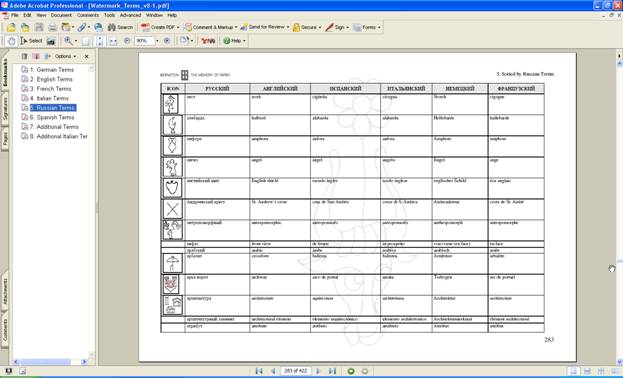
Figure 2: One page of the list of the Bernstein watermark terms |
3. Help Functions
The workspace developers implemented a Help Center which enables the central administration of all help information and a uniform appearance of the help window. All help functions are designed in the way that the help texts can be easily translated into the six languages mentioned above. Changes and additions to the Help Center can be done by a group of registered developers. Here, we describe only that feature of the Help Center which concerns the multilinguality. This is the Edit window of the Help Center which provides six text fields, one for each language. The help text is chosen according to the selected language. Not all translations of all help texts into the six languages are already available.
4. Bernstein Watermark Terms
The Bernstein list of watermark terms (“Watermark Terms – Vocabulary for Watermark Description”) was wrongly called ‘thesaurus’ in its first version. The first version of this word list provided four languages (English, French, German, Italian). It has been extended to six languages, adding Spanish and Russian. The Spanish version was made by Marisa Ferrando Cusì (Instituto Valenciano de Concervación y Restauración de Bienes Culturales, Laboratorio de Restauración, Universitat de València, Spain) and the Russian one by Elena Oukhanova (State Historical Museum, Moscow, Russia). The list of watermark terms is available on the project’s Twiki website [3].
|
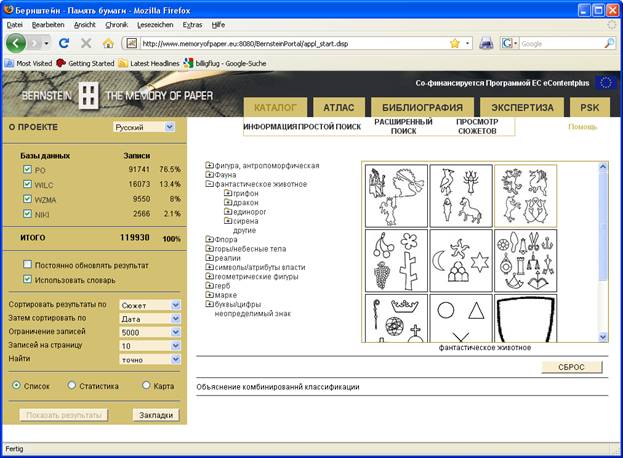
Figure 3: Browse Motifs in Russian |
The list of watermark terms fulfils two main goals: it unifies the nomenclature in each language and provides a dictionary between the six languages. As described in section 2 (user interface) the vocabulary is used by the Bernstein portal for the multi-lingual search in all databases. Furthermore, it is the basis for the watermark classification in the Browse Motif search.. This list is continuously updated and new terms are added.
5. Browse Motif, Bernstein systematics
The Browse Motif function implements the watermark classification scheme [4] based on the databases PO, WILC, WZMA, and watermark repertories. It allows the browsing through the classification hierarchy by names or icons. Nine levels are defined, three of them are implemented in the portal. The classification is formulated in the six Bernstein languages based on the Bernstein watermark terms. An easy to edit Excel file contains the multi-lingual and hierarchically organized information.
6. References
[1] Rückert, Peter; Hodecek, Sandra; Dietz, Georg; Wenger, Emanuel (eds.), Bull's Head and Mermaid; Stuttgart and Wien, 2009.
[2] Bernstein watermark terms, http://www. bernstein. oeaw. ac. at/products/watermark_terms. pdf
[3] Bernstein development page, http://www. bernstein. oeaw. ac. at/twiki/bin/view/Main/WebHome
[4] Bernstein systematics, http://www. bernstein. oeaw. ac. at/products/Bernstein_systematics. pdf
[5] Bernstein portal, http://www. memoryofpaper. eu
[6] NIKI - Dutch University Institute for Art History, http://www. iuoart. org/wmdb. htm
[7] PO – Piccard Online, http://www. piccard-online. de/start. php
[8] WILC - Watermarks in Incunabula printed in the Low Countries, http://www. kb. nl/bc/incun/watermerken-en. html
[9] WZMA – Wasserzeichen des Mittelalters, http://www. ksbm. oeaw. ac. at/wz/wzma. php
[10] Charles-Moïse Briquet: Les Filigranes. Dictionnaire historique des marques du papier dès leurs apparition vers jusqu’en 1600, 4 Vol. Paris etc. 1907, 2. Aufl. Leipzig 1923. – C.-M. Briquet, Les Filigranes. The New Briquet, Jubilee Edition. Ed. Allan Stevenson, 4 Vol., Amsterdam 1968.
[11] Likhachev’s watermarks, ed. J. S. G. Simmons, Bé van Ginneken-van de Kasteele (Monumenta Chartae Papyraceae Historiam Illustrantia XV), Amsterdam 1994.
[12] Oriol Valls i Subirà: Paper and watermarks in Catalonia (Monumenta chartae papyraceae historiam illustrantia XII), 2 Bde., Amsterdam 1970.
[13] Piccard, G.: Findbücher der Wasserzeichenkartei Piccard im Hauptstaatsarchiv Stuttgart, 17 Bde. (Veröffentlichungen der Staatlichen Archivverwaltung Baden-Württemberg), Stuttgart 1961 – 1997.
[14] Zonghi, A.: Le Marche principali delle Carte Fabrianesi dal 1293 al 1599, Fabriano 1881.
