Партнерка на США и Канаду по недвижимости, выплаты в крипто
- 30% recurring commission
- Выплаты в USDT
- Вывод каждую неделю
- Комиссия до 5 лет за каждого referral
№ 4. Электронные инструменты
в обучении английскому языку:
Wordle, PhoTransEdit, Transl8it
Данный документ дополняет описание материалов, посвящённых использованию электронных инструментов в обучении английскому языку, которые были подробно рассмотрены в предыдущих частях.
Здесь Вы узнаете про электронные средства, которые помогают работать с лексикой, делая акцент на орфографической форме слова (spelling), звуковой (транскрипция) и на комбинации слов внутри текста.
Каждый раз, работая над новой темой, учитель готовит определённое количество слов, которые должны стать опорой при чтении, говорении, аудировании или письме. И от того, как учащиеся усвоят эту лексику, зависит эффективность речевых навыков.
Здесь Вы найдёте инструмент, который предлагает заменить привычные всем списки слов на облака слов необычной формы. А также как сделать процесс написания транскрипции увлекательным и лёгким. Вашим ученикам обязательно понравится трансформировать обычный текст в тот, который подходит для передачи его в СМС по телефону или краткого письменного сообщения и наоборот.
Попробуйте использовать хотя бы один из этих приёмов/инструментов и сделайте Ваши уроки более необычными и привлекательными.
 Wordle
Wordle at www. is a small Internet tool to create word clouds.
Who can use it? Literally, everyone but it is recommended for teachers mostly.
What can we use it for? You can use this tool to create handouts to introduce new lexis or revise the old ones. Use word clouds instead of word lists to help your students memorize them with more fun.
Where can we use it? You can create your word clouds at home to let your students use them both in class and at home.
How can I use it? The site requires no registration to use the too, so go on line, open site home page and click Create to start working.
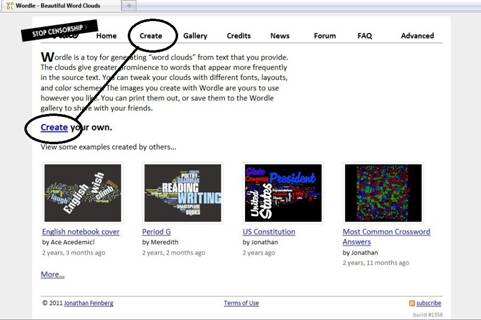
Now copy a digital version of the text, you need a word cloud for, and insert it into the form.
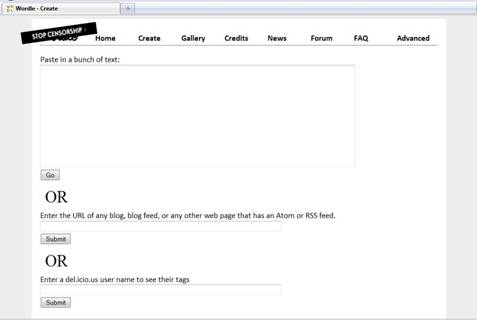
Click Go button and enjoy the result.
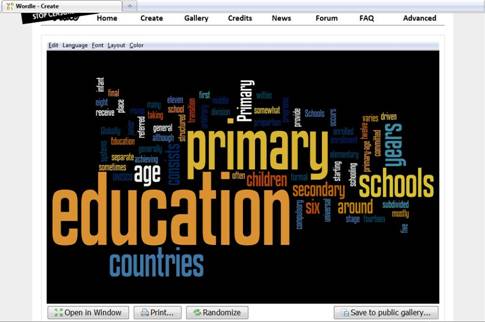
If you are not satisfied with the result, you can change setting, looking for the perfect word cloud. Just use Edit, Language, Font, Layout and Colour settings.
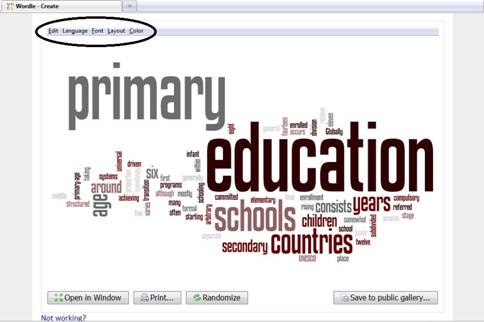
Photransedit

www. is a site where you can easily transform the whole text into phonetics. You don’t need to copy-paste separate word’s transcription any more to transcribe the whole text.
Who can use it? Anyone, who has an Internet access. What is more, the site allows you to download the program on your PC in order to provide you with permanent 24/7 access to the world of transcription.
What can we use it for? You can mostly use it to make your students accustomed to the transcription. Some practice will master their skills in reading it and they will use dictionaries more willingly to find out how this or that word is read.
Where can we use it? You can use this tool for in-class activity, but I don’t recommend showing the students the link in the very beginning as they can convert transcription into text with it. Let them practice a little and then let them do transcription by themselves.
It also might be a good idea to use transcription in a chart. It is easier to read short transcribed sentences than a whole text. Moreover, your students will have to read it to keep the conversation going.
By the way, you can use this tool to demonstrate the difference between Received Pronunciation and General American.
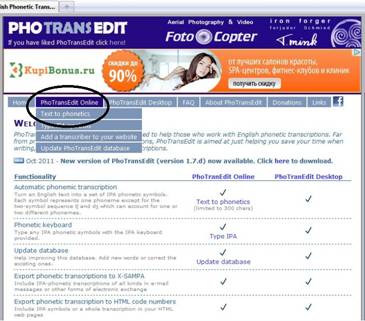
How can I use it? Go to www. and choose PhoTransEdit Online – Text into Phonetics.
Then print in the text you want to transcribe or copy it from another file. Choose between RP or GA if you need to.
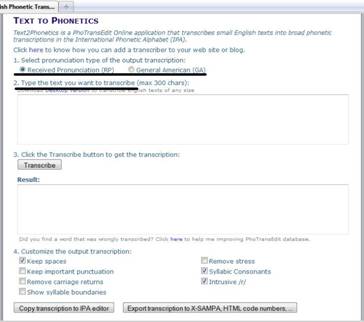
Click Transcribe button and enjoy the result.
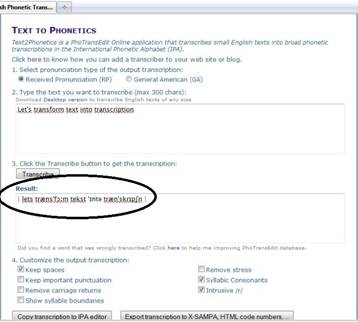
Now you can copy the transcription and insert it in any file or document you would like to. Or insert it as your blog post comment or a chart post.
Transl8it

As texting became extremely popular nowadays, special sites transferring usual text into a shorter version appeared, and www. is one of them.
Who can use it? The site is created for everyday use, so anyone can use it. It claims no registration, just Internet access.
What can we use it for? Encoding texting is a great way to practice spelling and homophones discrimination. It can also work for words often confused. Just give your students a piece of texting, tell them you can’t get it and enjoy how they apply their spelling and phonetic knowledge.
Where can we use it? You can use texting in a class or as a home task. We don’t recommend giving your students the link as it makes the task a simple copy-paste practice, but you can use the site beforehand to get ready for your lessons.
It is also a good idea to use texting for chart messages or teacher’s comments. Healthy curiosity will help your students to deal with it.
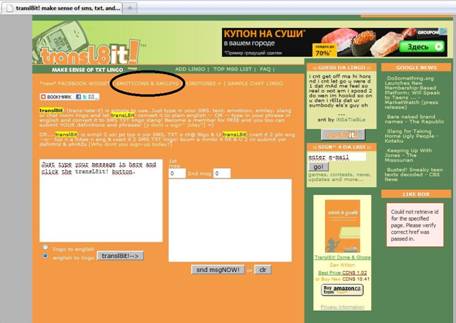
How can I use it? As a first step, open www. site, and see that it is extremely simple in use.
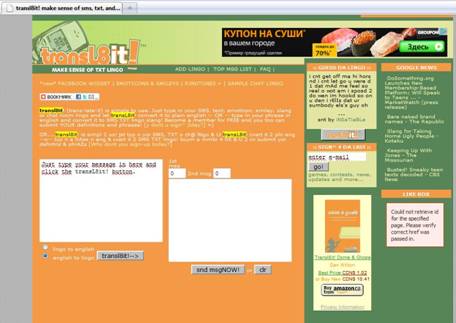
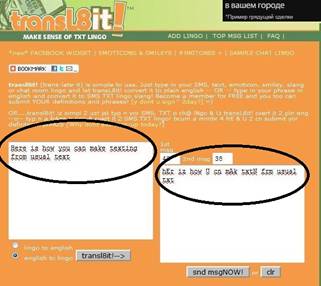
Now type in the text you want to become texting into the first white field and click transl8it!--> button. See the result in the next field.
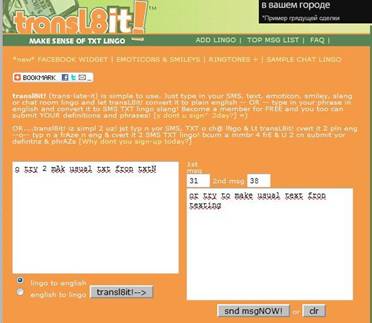
You can also try to transfer texting into usual text. Just chose Lingo to English and enter texting into left field. Once again click transl8it!--> button and check the result in the right field.
As a cute bonus, this site has a special section with commonly used smiles. Go to Emotions & Smiles section to find out more about them and then ask your students about what a smile means. Choose one to three smiles for each lesson to make your student practice their oral skills.