


Internet RFCs Supported by Windows Server 2003 TCP/IP
Requests for Comments (RFCs) are a constantly evolving series of reports, proposals for protocols, and protocol standards used by the Internet community. You can obtain RFCs from http://www. ietf. org/rfc. html.
Table 2. RFCs supported by Windows Server 2003 TCP/IP
RFC | Title |
768 | User Datagram Protocol (UDP) |
783 | Trivial File Transfer Protocol (TFTP) |
791 | Internet Protocol (IP) |
792 | Internet Control Message Protocol (ICMP) |
793 | Transmission Control Protocol (TCP) |
816 | Fault Isolation and Recovery |
826 | Address Resolution Protocol (ARP) |
854 | Telnet Protocol (TELNET) |
862 | Echo Protocol (ECHO) |
863 | Discard Protocol (DISCARD) |
864 | Character Generator Protocol (CHARGEN) |
865 | Quote of the Day Protocol (QUOTE) |
867 | Daytime Protocol (DAYTIME) |
894 | IP over Ethernet |
919, 922 | IP Broadcast Datagrams (broadcasting with subnets) |
950 | Internet Standard Subnetting Procedure |
959 | File Transfer Protocol (FTP) |
1001, 1002 | NetBIOS Service Protocols |
1065, 1035, 1123, 1886 | Domain Name System (DNS) |
1042 | A Standard for the Transmission of IP Datagrams over IEEE 802 Networks |
1055 | Transmission of IP over Serial Lines (IP-SLIP) |
1112 | Internet Group Management Protocol (IGMP) |
1122, 1123 | Host Requirements (communications and applications) |
1144 | Compressing TCP/IP Headers for Low-Speed Serial Links |
1157 | Simple Network Management Protocol (SNMP) |
1179 | Line Printer Daemon Protocol |
1188 | IP over FDDI |
1191 | Path MTU Discovery |
1201 | IP over ARCNET |
1256 | ICMP Router Discovery Messages |
1323 | TCP Extensions for High Performance |
1332 | PPP Internet Protocol Control Protocol (IPCP) |
1518 | Architecture for IP Address Allocation with CIDR |
1519 | Classless Inter-Domain Routing (CIDR): An Address Assignment and Aggregation Strategy |
1534 | Interoperation Between DHCP and BOOTP |
1542 | Clarifications and Extensions for the Bootstrap Protocol |
1552 | PPP Internetwork Packet Exchange Control Protocol (IPXCP) |
1661 | The Point-to-Point Protocol (PPP) |
1662 | PPP in HDLC-like Framing |
1748 | IEEE 802.5 MIB using SMIv2 |
1749 | IEEE 802.5 Station Source Routing MIB using SMIv2 |
1812 | Requirements for IP Version 4 Routers |
1828 | IP Authentication using Keyed MD5 |
1829 | ESP DES-CBC Transform |
1851 | ESP Triple DES-CBC Transform |
1852 | IP Authentication using Keyed SHA |
1994 | PPP Challenge Handshake Authentication Protocol (CHAP) |
1995 | Incremental Zone Transfer in DNS |
1996 | A Mechanism for Prompt DNS Notification of Zone Changes |
2018 | TCP Selective Acknowledgment Options |
2085 | HMAC-MD5 IP Authentication with Replay Prevention |
2104 | HMAC: Keyed Hashing for Message Authentication |
2131 | Dynamic Host Configuration Protocol |
2136 | Dynamic Updates in the Domain Name System (DNS UPDATE) |
2181 | Clarifications to the DNS Specification |
2236 | Internet Group Management Protocol, Version 2 |
2308 | Negative Caching of DNS Queries (DNS NCACHE) |
2401 | Security Architecture for the Internet Protocol |
2402 | IP Authentication Header |
2406 | IP Encapsulating Security Payload (ESP) |
2581 | TCP Congestion Control |
3208 | PGM Reliable Transport Protocol Specification |
3376 | Internet Group Management Protocol, Version 3 |
New Features for TCP/IP in Windows Server 2003 Service Pack 1
The features and improvements of TCP/IP that are new for Windows Server 2003 Service Pack 1 include the following:
· Windows Firewall
· The Netstat –b option
· Netsh commands for Windows Sockets
· SYN attack protection is enabled by default
· SYN attack notification IP Helper APIs
· Registry parameter for ICMP host routes
· Smart TCP port allocation
Windows Firewall
Windows Firewall replaces the Internet Connection Firewall provided with Windows Server 2003 with no service packs installed. Windows Firewall is a stateful firewall that drops unsolicited incoming traffic that does not correspond to either traffic sent in response to a request of the computer (solicited traffic) or unsolicited traffic that has been specified as allowed (excepted traffic). Windows Firewall provides a level of protection from malicious users and programs that rely on unsolicited incoming traffic to attack computers.
For more information about Windows Firewall in Windows Server 2003 Service Pack 1, see the Microsoft Windows Server 2003 Windows Firewall TechCenter.
The Netstat –b option
The Netstat tool displays a variety of information about active TCP connections, ports on which the computer is listening, Ethernet statistics, the IP routing table, and IPv4 and IPv6 statistics. In Windows Server 2003 Service Pack 1, the Netstat tool supports a new –b option that displays the set of components that are listening on each open TCP and UDP port.
With Windows Server 2003 with no service packs installed, you can use the –o option to display the set of ports being listened on and the corresponding process ID (PID). You can then lookup the PID in the display of the tasklist /svc command to discover the name of the process that owns the port. However, in some cases, there are multiple services within a single process and it is not possible to determine which service within the process owned the port.
With the –b option, Netstat displays the TCP or UDP port, the file names corresponding to the components of the service that owns the port, and the PID. From the file names and PID, you can determine which of the services in the display of the tasklist /svc command owns the port.
Netsh Commands for Windows Sockets
There are now Windows Sockets (Winsock) Netsh commands to view the set of installed Winsock Layered Service Providers (LSPs) (the netsh winsock show catalog command) and to reset the Winsock LSP catalog to a default configuration (the netsh winsock reset catalog command). The netsh winsock reset catalog command is useful for restoring the Winsock LSP catalog when it has been corrupted by programs or services that install LSPs. However, you must reinstall the programs or services that use LSPs.
SYN Attack Protection is Enabled by Default
A TCP Synchronize (SYN) attack is a denial-of-service attack that exploits the retransmission and time-out behavior of the Synchronize-Acknowledgement (SYN-ACK) segment during the TCP three-way handshake to create a large number of half-open TCP connections. Depending on the TCP/IP protocol implementation, a large number of half-open TCP connections could do any of the following:
· Use all available memory.
· Use all possible entries in the TCP Transmission Control Block (TCB), an internal table used to track TCP connections. Once the half-open connections use all the entries, further connection attempts are responded to with a TCP connection reset.
· Use all available half-open connections. Once all the half-open connections are used, further connection attempts are responded to with a TCP connection reset.
To create a large number of TCP half-open connections, attackers send a large number of SYN segments, each from a spoofed IP address and TCP port number. Each spoofed IP address and TCP port number are for a process that does not respond to the SYN-ACKs being sent by the attacked host. SYN attacks are typically used to render Internet servers inoperative.
To mitigate the impact on a host experiencing a SYN attack, TCP/IP minimizes the amount of resources devoted to incomplete TCP connections and reduces the amount of time before abandoning the half-open connection. When a SYN attack is detected, TCP/IP in Windows Server 2003 and Windows XP lowers the number of retransmissions of the SYN-ACK segment and does not allocate memory or table entry resources for the connection until the TCP three-way handshake has been completed.
You can control SYN attack protection through the SynAttackProtect registry entry at HKEY_LOCAL_MACHINE\System\CurrentControlSet\Services\Tcpip\Parameters (type REG_DWORD). You set SynAttackProtect to 0 to disable SYN attack protection and to 1 to enable it.
For TCP/IP in Windows XP (all versions) and Windows Server 2003 with no service packs installed, SynAttackProtect is set to 0 by default. For TCP/IP in Windows Server 2003 Service Pack 1, SynAttackProtect is set to 1 by default.
SYN Attack Notification IP Helper APIs
To allow an application to notify network administrators that a SYN attack is taking place, the IP Helper API supports new SYN attack notification APIs named NotifySecurityHealthChange and CancelSecurityHealthChangeNotify. For information about these new APIs, see the Microsoft Developer Network (MSDN).
Registry Parameter for ICMP Host Routes
TCP/IP for Windows Server 2003 SP1 supports a new registry parameter that restricts the number of host routes that can be added to the local IP route table by receiving ICMP Redirect messages. The new registry parameter is HKEY_LOCAL_MACHINE\SYSTEM\CurrentControlSet\Services\Tcpip\Parameters\ MaxICMPHostRoutes (REG_DWORD type). MaxICMPHostRoutes has a default value of 1000. You should not change this value unless the computer needs to be able to add a large number of host routes by receiving ICMP Redirect messages.
Smart TCP Port Allocation
When a TCP peer initiates a TCP connection termination and the connection termination completes, the TCP connection enters the TIME-WAIT state. Once the TIME-WAIT state is reached, TCP must wait twice the maximum segment lifetime (MSL) before a connection with the same set of socket addresses can be created. The set of socket addresses consist of the combination of the source and destination IP addresses and source and destination TCP ports. The MSL is the maximum amount of time a TCP segment can exist in an internetwork, and its recommended value is 120 seconds. This delay prevents a new connection’s TCP segments that are using the same set of socket addresses from being confused with duplicated TCP segments of the old connection.
The TCP port for a connection in the TIME-WAIT state is considered an available port and can be assigned for use by an application. This can lead to the following situation:
1. An application requests any available TCP port.
2. TCP/IP assigns a TCP port to use for the application socket.
3. The application attempts to open a socket with a specific destination IP address.
4. The application establishes a TCP connection and sends data.
5. The application terminates the TCP connection.
6. TCP/IP places the application's TCP connection in the TIME-WAIT state until twice the MSL has passed.
7. The same application requests another available TCP port.
8. TCP/IP assigns a TCP port to use for the application socket. Because the port for the connection in the TIME-WAIT state is considered open, it can be chosen as the next port to assign to the requesting application.
9. Assuming that TCP/IP assigns the same TCP port number, the application attempts to open a socket with the same destination IP address.
10.Because the connection is using the same set of socket addresses as the connection in the TIME-WAIT state, TCP/IP indicates an error to the application.
You can mitigate this situation through the following:
· Setting the MaxFreeTWTcbs registry entry at HKEY_LOCAL_MACHINE\System\CurrentControlSet\Services\Tcpip\Parameters (REG_DWORD type) to a lower value. The value of MaxFreeTWTcbs controls the number of connections that can be in the TIME-WAIT state. Once this number is exceeded, the oldest connection is automatically removed from the TIME-WAIT state.
· Setting the TcpTimedWaitDelay registry entry at HKEY_LOCAL_MACHINE\System\CurrentControlSet\Services\Tcpip\Parameters (REG_DWORD type) to a lower value. The value of TcpTimedWaitDelay determines the length of time that a connection stays in the TIME-WAIT state.
However, lowering the value of these registry entries is contrary to the original design of TCP and the MSL.
To prevent an application from creating a connection with the same set of socket addresses of a connection that is in a TIME-WAIT state, TCP/IP in Windows Server 2003 Service Pack 1 has implemented a smart TCP port allocation algorithm. When an application requests any available TCP port, TCP/IP first attempts to find an available port that does not correspond to a connection in the TIME-WAIT state. If a port cannot be found, then it picks any available port.
This new behavior makes it much more unlikely that an application will be assigned a TCP port that is in the TIME-WAIT state when connecting to the same destination. You no longer need to modify the values of the MaxFreeTWTcbs and TcpTimedWaitDelay registry values.
Architectural Model
Overview
The Windows TCP/IP suite contains core protocol elements, services, and the interfaces between them. The Transport Driver Interface (TDI) and the Network Device Interface Specification (NDIS) are public, and their specifications are available from Microsoft.[1] In addition, there are a number of higher-level interfaces available to user-mode applications. The most commonly used are Windows Sockets, remote procedure call (RPC), and NetBIOS.
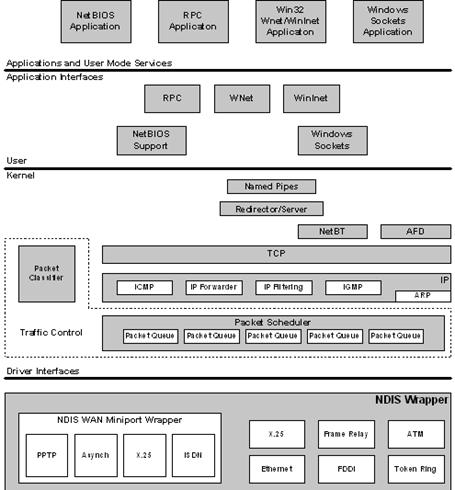
Figure 1. The Windows Server 2003 TCP/IP architectural model
Note Figure 1 does not show the IPsec components. For more information, see How IPSec Works.
Sending and Receiving IP Packets
When the source sends an IP packet, the following components analyze or change the packet in the following order:
1. Routing and Remote Access service IP packet filters
2. IPsec
When a router running Windows Server 2003 forwards an IP packet, the following components analyze or change the packet in the following order:
1. Internet Connection Sharing of the Network Connections folder or the NAT/Basic Firewall component of the Routing and Remote Access service
2. Routing and Remote Access service IP packet filters
3. IPsec
When an IP packet is received for forwarding, the following components analyze or change the packet in the following order:
1. IPsec
2. Routing and Remote Access service IP packet filters
3. Internet Connection Sharing of the Network Connections folder or the NAT/Basic Firewall component of the Routing and Remote Access service
When an IP packet is received that is destined for the local host, the following components analyze or change the packet in the following order:
1. IPsec
2. Routing and Remote Access service IP packet filters
3. Internet Connection Firewall (for Windows Server 2003 with no service packs installed), Windows Firewall (for Windows Server 2003 with Service Pack 1), or the NAT/Basic Firewall component of the Routing and Remote Access service
4. TCP/IP filters
This discussion only includes components that are provided with Windows Server 2003. This does not include any Windows Sockets layered service providers or NDIS intermediate miniport drivers.
Plug and Play
Windows Server 2003 includes support for Plug and Play. Plug and Play has the following capabilities and features:
· Automatic and dynamic recognition of installed hardware. This includes initial system installation, recognition of static hardware changes that may occur between boots, and response to run-time hardware events, such as dock or undock, and insertion or removal of cards.
· Streamlined hardware configuration in response to automatic and dynamic recognition of hardware, including dynamic hardware activation, resource arbitration, device driver loading, drive mounting, and so on.
· Support for particular buses and other hardware standards that facilitate automatic and dynamic recognition of hardware and streamlined hardware configuration, including Plug and Play ISA, PCI, PCMCIA, PC Card/CardBus, USB, and IEEE 1394. This includes promulgation of standards and advice about how hardware should behave.
· An orderly Plug and Play framework in which driver writers can operate. This includes infrastructure, such as device information (INF) interfaces, APIs, kernel-mode notifications, executive interfaces, and so on.
· Mechanisms that allow user-mode code and applications to learn of changes in the hardware environment so that they can take appropriate actions.
Plug and Play operation does not require Plug and Play hardware. To the degree possible, the first two bullets above apply to legacy hardware, as well as Plug and Play hardware. In some cases, orderly enumeration of legacy devices is not possible because the detection methods are destructive or inordinately time-consuming.
The primary impact that Plug and Play support has on protocol stacks is that network interfaces can come and go at any time. Windows Server 2003 TCP/IP and related components have been adapted to support Plug and Play.
The NDIS Interface and Below
Microsoft networking protocols use the Network Device Interface Specification (NDIS) to communicate with network card drivers. Much of the OSI model link layer functionality is implemented in the protocol stack. This makes development of network card drivers much simpler.
Network Driver Interface Specification (3.1 through 5.1)
NDIS 3.1 supports basic services that allow a protocol module to send raw packets over a network device and allow that same module to be notified of incoming packets received by a network device.
NDIS 4.0 added the following new features to NDIS 3.1:
· Out-of-band data support (required for Broadcast PC)
· WirelessWAN Media Extension
· High-speed packet send and receive (a significant performance win)
· Fast IrDA Media Extension
· Media Sense (required for the Designed for Windows logo in PC 97 and later Hardware Design Guide). The Windows Server 2003 TCP/IP stack utilizes media sense information, which is described in the “Automatic Client Configuration” section of this paper.
· All local packet filter (prevents Network Monitor from monopolizing the CPU)
· Numerous new NDIS system functions (required for miniport binary compatibility across Windows 98, Windows Millennium Edition, Windows NT 4.0, Windows 2000, Windows XP, and Windows Server 2003)
NDIS 5.0 includes all functionality defined in NDIS 4.0, plus the following extensions:
· NDIS power management (required for Network Power Management and Network Wake-up)
· Plug and Play
· Support for Windows Management Instrumentation (WMI), which provides Web-based Enterprise Management (WBEM)–compatible instrumentation of NDIS miniports and their associated adapters
· Support for a single INF format across Windows operating systems. The INF format is based on the Windows 98 INF format.
· Deserialized miniport for improved performance
· Task offload mechanisms, such as TCP and UDP checksum and Fast Packet Forwarding
· TCP segmentation offload, also known as large-send offload (LSO)
· Broadcast Media Extension (needed for Broadcast Services for Windows)
· Connection-oriented NDIS (required to support Asynchronous Transfer Mode [ATM], Asymmetric Digital Subscriber Line [ADSL], and Windows Driver Model–Connection Streaming Architecture [WDM-CSA])
· Support for Quality of Service (QoS)
· Intermediate Driver Support (required for Broadcast PC, Virtual LANs, Packet Scheduling for QoS, and NDIS support of IEEE 1394 network devices)
Note You can disable a NIC's use of task offload capabilities on the Advanced tab of the properties of the NIC driver in Control Panel-Network or Device Manager.
NDIS 5.1 enhancements for Windows Server 2003 include:
· Plug and Play and Power Event Notification – Enables NIC miniport drivers to be notified of power or Plug and Play events. This results in cleaner system operation during these events.
· Support for Send Cancellation – Allows network protocols to avoid having to wait lengthy amounts of time for network packet send requests to complete.
· Increased Statistics Capacity (64-bit statistic counters) – This enhancement enables accurate network statistic displays, even on today’s high-speed network media.
· Performance Enhancements – Several enhancements were made to speed up critical network data paths and avoid unnecessary packet copies.
· Wake on LAN Change – A change was made to Wake on LAN to allow you to limit wake up packets to just magic packets (instead of protocol registered packet patterns). This is now configurable on the Power Management tab from the properties of a NIC driver.
· Miscellaneous Changes – Several additional changes have been made to support common needs or requests from driver developers or to improve driver integrity.
Remote NDIS is also included as part of the Windows Server 2003 family. Remote NDIS enables the support of USB-attached network devices without the installation of third party drivers. Microsoft supplies the drivers required to communicate with the network devices. This results in easier installation and a lessened chance of system failure because of a poorly built or tested driver.
For more information about NDIS 5.1 and Remote NDIS, see the Windows DDK and the following Web pages:
· http://www. /whdc/hwdev/tech/network/NDIS51.mspx
· http://www. /whdc/hwdev/tech/network/rmNDIS. mspx
NDIS can power down network adapters when the system requests a power level change. Either the user or the system can initiate this request. For example, the user may want to put the computer in sleep mode, or the system may request a power level change based on keyboard or mouse inactivity. In addition, disconnecting the network cable can initiate a power-down request if the network interface card (NIC) supports this functionality. In this case, the system waits a configurable time period before powering down the NIC because the disconnect could be the result of temporary wiring changes on the network, rather than the disconnection of a cable from the network device itself.

|
Из за большого объема этот материал размещен на нескольких страницах:
1 2 3 4 5 6 7 8 9 |
