- 30% recurring commission
- Выплаты в USDT
- Вывод каждую неделю
- Комиссия до 5 лет за каждого referral
TB-707A and TB-709A Service Manual



 microphone TF card earphone Reset




 Power on USB socket DC socket key
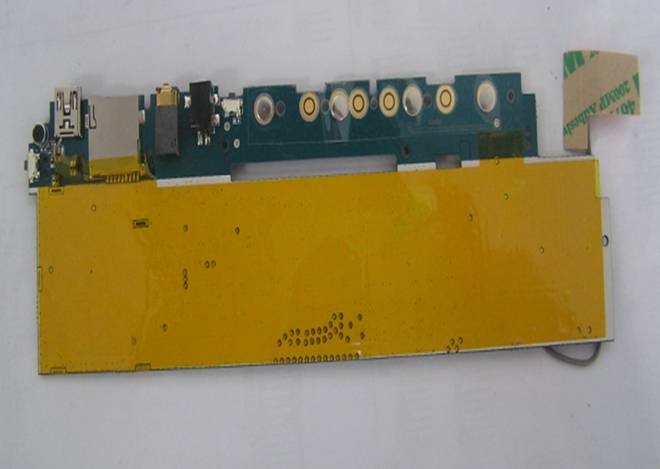
WIFI antenna
Audio codec
 Clock IC NAND flash DRRII





 Audio amplifier Touch IC Cipher IC Microchip
 G-Senser















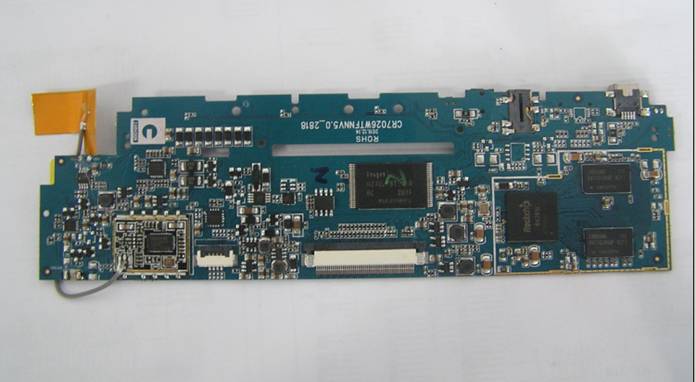
U8 VCCA backlight
Battery WIFI module T3.3V 3V 1.8v
Charge IC wifi 3.3v TP socket T10.2V LCD socket 1.4v
TROUBLE SHOOTING
Device can not power on
Please press short power on button
|
|
YES


 NO
NO
Please plug in DC adapter
|
|
YES


NO
NO DC, Check battery voltage 3.5-4.2V
|
|
NO

YES
If one voltage is fail, please replace it
|
|
Check main voltage 1.8v, 3.0v, 1.4v
|
|
 NO
NO
YES
If one is problem, please replace it
|
|
Check Y2 and U39 pin3 is low lever
|
|
NO

YES
Please refer to upgrade step and upgrade SW
|
|
Upgrade fail
If failed to upgrade the FW. please remove the battery, then connect USB cable with computer, please short-circuit current of any two parts of NAND FLASH (like 29-30 or 41-42), and try to upgrade the software again follow above upgrading method. ЎЈ
|
|
Device do not touch pannle
Check touch socket or plug in touch FPC repeat
|
|
YES

NO
Check touch IC pin 13 lever ЧЄ»» when touch panle or plug in touch FPC repeat
|
|
NO
Touch IC or touch panle is fail
|
|
Do not connect wireless internet
Do not connect wireless internet
|
|
NO
Check wifi module or antenna
|
|
Check voltage of U8 pin4 is 5V and pin 1 lever is 3v
|
|


NO NO
Replace module or antenna
|
|
please pay more attention to the antenna place. End of the antenna cannot be with metal material.
|
|
Key do not respond
any key terminal is short, lever is o voltage
|
|
Check voltage of any key terminal
|
|
YES


Please clear key with alcohol liquid Јand install the key again
|
|
Check U13 pin5 AVCC and L6 , to see if the voltage is correct
|
|
YES YES
YES
If no, please use new ones to replace
|
|
Speaker without sound
Knocking audio amplifier pin 4 , listen if the speak with sounds or not
|
|
Please check audio amplifier or speaker
|
|
Speaker without sound coming out
|
|
NO


YES NO
Please check if with the earphone,
|
| Please check Audio codec is correct or not.
|
| If one is problem, please replace it
|
|
YES

YES
Check U13 pin5 AVCC and L5, if the voltage is correct
|
|
If not, please change to the right one.
|
|
NO
NO
If not, please change to the right one.
|
|
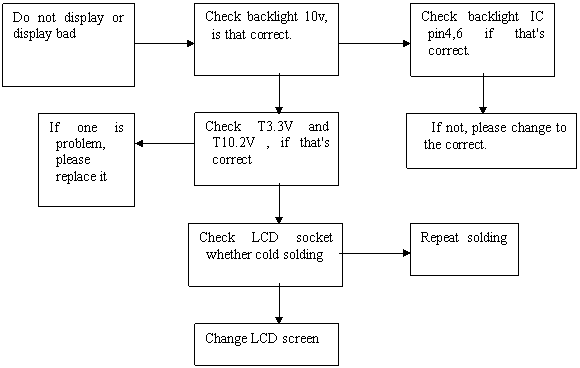
Do not display or display bad