Партнерка на США и Канаду по недвижимости, выплаты в крипто
- 30% recurring commission
- Выплаты в USDT
- Вывод каждую неделю
- Комиссия до 5 лет за каждого referral
GPS/GPRS/GSM Vehicle Tracker
User Manual
UT01
1 System Function Introduction
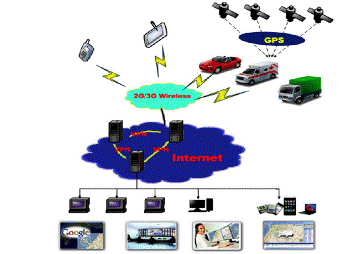
This vehicle tracker has combined GPS and GSMЈЁGPRSЈ© functions. Location information will be send by SMS or GPRS. You can enquiry where the vehicle is on Google map and its history. You can control the vehicle the engine remotely by SMS or internet.
2 Product Description
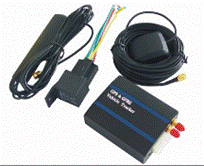
GSM module:
l Band:850/900/1800/1900MHz
l Max RF Output: 33.0dBmЎА2dBm
l Dynamic Input Range: -15 ~ -102dBm
GPS module:
l GPS chip set: SiRF Star III
l Frequency: L1, 1575.42 MHz
l Number of Channel: 20
Battery:
l Voltage:3.7V
l Charge:<4.2V
l Li-ion: 450mAh
Input Voltage: DC 6~36V
Operating Temperature:-45~65 Ўж
1. Use Google map, Global free
2. Real-time locating / inquiry
3. SOS button/Power-cut Alarm
4. Listen by telephone
5. E-fence/Over-speed Alarm
patible original anti-theft
7. Remote control engine
3 Installation Instructions
The One side:

No. | Description | No. | Description |
1 | DC+ (6~36V) | 6 | GND |
2 | Extend port0 | 7 | SOS button |
3 | GND | 8 | Extend port1 |
4 | ACC | 9 | Extend port2 |
5 | Engine cut_off control | 10 | Extend port3 |
The other side
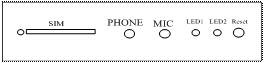
1ЎўSIM: Port for SIM card
2ЎўPHONE: Connect to Microphone
3ЎўMIC: Connect to earphone
4ЎўLED1: Power light
5ЎўLED2: Status light
6ЎўReset
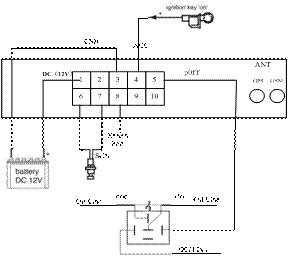
Please test after installation. If you donЎЇt need some functions, you can disconnect corresponding interface. Please make sure ACC, DC, GND installed correctly. Otherwise, the device cannot work. Please check the device status through signal light after power on:
Ø LED1 is off which indicates there is no power.
Ø LED2 flashes for one second which indicates GSM registers successfully.
Ø LED2 flashes three seconds once which indicates GPS is obtaining orientation
Ø LED2 is on which indicates work successfully that GSM has registered and GPS has obtained the orientation.
Ø If LED 2 is on 0.1 second then off 0.1 second for more than 3 minutes, please make sure SIM card inserts well. Without SIM card, the device cannot work.
4 SMS Operation Instruction
SMS Format: A******,cmd, param1,param2Ў
1. ******is the password, Initial Password is 000000
2. cmd is the command ID.
3. Param is the command parameter. Different cmd use different parameters. All the parameters must use half-angle symbol. Wrong SMS format or wrong password, it will not respond.
1. Google Map reply Message format: A******,000
e. g. A000
Reply: http://maps. /maps? q=22.54079,113.93923 17:38:30 Speed:20
you can just open the link from your cell to view the map.
2. Detailed Address Name reply Message format: A******,100
e. g. A100
Reply: 42 Xiacheng North Rd, Wujin, Changzhou, Jiangsu, China
Message formatЈєA******,001,New Password
e. g. A001,123456
Note:000000 is the old password,123456 is the new password.
ReplyЈєSet Password OK!
Message formatЈєA******,002, XXX
XXX=0 is for STOP, value of XXX is within [15~64800] seconds.
e. g. A002,30
Message replied after successful setting: Set time interval (30) OK!Message contains position information will be sent in every 30 seconds after successful setting.
Message formatЈєA******,003,P, TelNumber
P=1 is for SOS and listen
P=2 or 3 is the second\ the third listen number.
e. g. A003,1,136xxxxxxxx
Message replied after successful settingЈєSet Telephone OK!
Keep pressing SOS button for 2 seconds. The device will send emergency SMS and dial the number you set as SOS number.
Reply: SOS Pos: Longitude E114.04577 Latitude N22.32:38:30,
If you dial with your listen number, it can be connected automatically after the 7th ring. Then you can listen the voice in the vehicle.
Message formatЈє A******,005,XXX
XXX=[000,200] (unit: km/h)XXX=00 is close the function.
e. g. A005,020
Message replied after successful setting: Set Over speed (20) KM OK!
If the vehicle is over speed you set, it will send alarm SMS to SOS mobile number. 20 KM/H Over speed!
Message formatЈєA******,006,XX
XX =[00-50] (Unit:100m) .
When XX=0, e-Fence is OFF. And the maximum limited value of XX is 50*100=5000m. e. g. A006,10
Reply: Set Distance (1000)M OK!When user is out of the bound region (e. g. 1020m), a prompt message will be sent to the user: 1020m is further than 1000m!
Message format: A******,007,X
X=0 cut off engine, x=1 resume engine, For security, this command will execute when the speed less than 20Km / h or the ACC is off .
e. g. A007,0
5 GPRS Communication Settings
Message format: A******,012,APN
Length of APN is limited within 100 characters, E. g:A012,cmnet
Ў°cmnetЎ±is the APN of China Mobile
Message format: A******,010,IP, PORT
e. g. A010,121.37.58.10,6900
121.37.58.10 is the IP of GPRS_server, 6900 is the port of GPRS_Server application (be in communication with GPS Vehicle tracker)
Message format: A******,011,X
(note:x=1 open GPRS, X=0 close GPRS)
e. g. A011,1
GPRS function will be open, and Vehicle tracker will send data to Internet, Users can turn off this function though send SMS: A011,0
If the device can not be see on the internet, you will check the APN/IP/PORT and the GPRS function of SIM card. You can send message to check the GPRS setting.
Message format: A******,004
The device will send back GPRS setting parameters. You can check whether the parameter sets correctly by it.

ЈЁ1Ј©Device ID
ЈЁ2Ј©APN (China Mobile is CMNET, China Unicom is UNINET)
ЈЁ3Ј©Server IP address
ЈЁ4Ј©Server port
ЈЁ5Ј©GPRS open statusЈЁ0- off Ј1- onЈ©
ЈЁ6Ј©GPRS connecting statusЈЁ0- Internet is badЈ1- work wellЈ©
ЈЁ7Ј©GSM signal valueЈЁ1~31Ј©Јif value<10 is too weak to work well.
6 GPS tracking system on website
Google Map can support many different languages. It can change language for local language by itself.
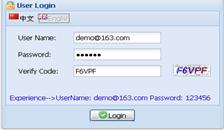
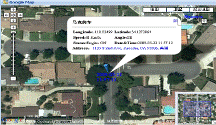
Choose vehicle in the vehicle list on the left. Then right-click, it will show a menu. Choose the menu Go to Vehicle Current Location. If there are location record of the choose vehicle, it could skip to the latest vehicle location. If the location is not in the scope of map, the system will set it in middle automatically and show the Remind message box.
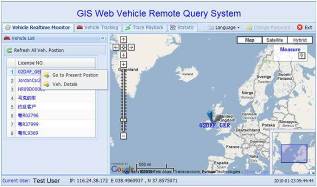
1 choose vehicle Ё¤2 map mode Ё¤ 3.vehicle state, Google map have 3 model: map mode, satellitic mode and Hybrid mode
Map mode satellites modeЈє
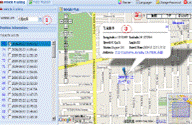
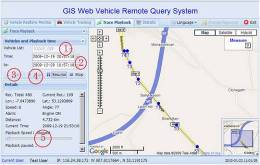
Please point run history review page
1 choose vehicle Ё¤2 start time Ё¤ 3 inquire time Ё¤ 4.setup review speed Ё¤5 start review process you can know that time date, speed, way and distance sum.