


Партнерка на США и Канаду по недвижимости, выплаты в крипто
- 30% recurring commission
- Выплаты в USDT
- Вывод каждую неделю
- Комиссия до 5 лет за каждого referral
Міністерство освіти і науки України
Дружківський технікум ДДМА
Методична розробка
заняття з дисципліни
«Іноземна мова (за професійним спрямуванням)»
з теми «Комп’ютери в нашому житті»
для спеціальності 5.05010301
«Розробка програмного забезпечення»
Підготувала викладач Ісаєва О. В.
Дисципліна: Іноземна мова (за професійним спрямуванням).
Тема: Комп’ютери в нашому житті
Мета заняття:
Методична: удосконалити методику проведення практичних занять з самостійною роботою студентів в групах, використанням ТЗН та проектної роботи студентів.
Дидактична:
- активізувати використання термінології та лексики з теми «Комп’ютер»;
- удосконалювати навички читання іншомовного тексту, діалогічного та монологічного мовлення;
- формувати вміння концентруватися та обирати головне із загального об’єму інформації та іншомовного мовлення;
- розвивати навички групової взаємодії, самостійної роботи, фонематичний слух, мовну здогадку;
Виховна:
- спонукати до пізнавальної творчої діяльності,
- сприяти формуванню поважного відношення до товаришів, почуття відповідальності.
Вид заняття: практичне.
Тип заняття: комбінований з роботою студентів в групах, елементами бесіди та проектної роботи студентів.
Міждисциплінарні зв’язки:
забезпечуючі: українська мова, інформатика.
забезпечувані: основи програмування.
Методичне забезпечення: тексти для роботи в групах, картки для індивідуального опитування, проекти студентів.
Обладнання: засоби мультимедіа.
Література:
1. Кубарьков без проблем. – Донецк: «БАО», 2006р.
2. , Збірник тренувальних завдань з англ.. мови для підготовки до ЗНО. – Харків: ПП «Торсінг плюс», 2008 р.
Хід заняття
1. Початок заняття
1.1 Організаційний момент: перевірка присутності студентів, готовності аудиторії до заняття.
1.2 Повідомлення теми, мети заняття, мотивація навчання:
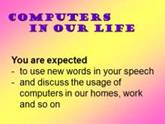
Since September we have been speaking of a computer to be a complex machine. We know now that it can do a lot of jobs, it consist of some elements and use different number systems and languages of programming. So I can say you know a lot of a computer as a machine. But computers have swiftly and firmly come into our life. Today’s lesson is the step for you to realize the fact that computers are everywhere around us, and that without people who design programs and make computerized equipment work we can not live. And you – future programmers – must understand the importance of your knowledge, your profession. So today I want to speak with you about computers as our helpers. Today we’ll see where they are used and how they help us. Well, look at the blackboard. The topic of today’s lesson is “Computers in our life”. By the end of the lesson I expect you to be able to use new words in your speech and discuss the usage of computers in our homes, work and so on. Open your note books and write it. Слайд | З вересня ми розмовляємо про комп’ютер як про складну машину. Він може виконувати багато різної роботи, він складається з декількох елементів та використовує різні числові системи та мови програмування. Тому, я можу сказати, що ви знаєте багато про комп’ютери. Але ж комп’ютери швидко та впевнено увійшли в наше життя. Сьогоднішнє заняття – крок до розуміння того, що комп’ютери скрізь навколо нас, що без людей, які розробляють програми та змушують комп’ютерне обладнання працювати, ми прожити сьогодні не можемо. І ви, майбутні програмісти, повинні розуміти важливість ваших знань та вашої професії. Тому, сьогодні я хочу поговорити про комп’ютери як наших помічників. Ми побачимо, де вони викорис-товуються та як допомагають нам. Погляньте на дошку. Тема нашого заняття «комп’ютери в нашому житті». Наприкінці заняття я очікую, щоб ви вміли вживати нові слова в розмові та обговорювати уживання комп’ютерів в наших домівках, на роботі та ін. |
2. Основна частина заняття
2.1 Актуалізація опорних знань.
Мета: ввести студентів в іншомовне середовище, дати можливість пригадати головну інформацію про комп’ютери, термінологію з вивчених тем та згадати граматичні форми дієприкметників (Participle I/II)
Форма проведення: мовна розминка, фронтальне опитування з граматики.
а) введення в іншомовне середовище
Listen to the definitions and name the terms: - a machine that can store and process data (a computer); - the element of a comp. system which is represented by programs written for the system (the software element); - the element that is represented by the machinery (the hardware element); - programming languages that don’t depend on the computer (machine-independent languages); - the number system that uses only two digits (binary number system). | Прочитайте визначення та назвіть терміни: - машина, яка зберігає та обробляє інформацію (комп’ютер); - елемент комп. системи, представлений програмами, написаними для системи (ел. прогр. забезпечення); - елемент, який представлений обладнанням(ел. апар. забезпечення); - мови програмування, які не залежать від комп’ютера (машино-незалежні мови); - числова система, яка використовує два знаки (двоїчна числова система.) |
б) надання необхідної інформації з граматики:
- фронтальне опитування теорії.
In technical texts some grammar forms are used especially often. They are Participle I and II. Let’s remember them. Answer my questions. | В технічних текстах деякі граматичні форми вживаються особливо часто. Це дієприкметники теперішнього та минулого часів. Дайте відповіді на запитання. |
1. Що таке дієприкметник теперішнього/минулого часу? (безособові форми дієслова)
2. Яке значення має Р I? (активна та незакінчена дія)
Р II? (пасивна та закінчена дія)
3. Як утворюється Р I? (від основи інфінітива + - ing)
Р II? (від основи інфінітива + - ed)
- індивідуальне опитування. (два студенти у дошки)
Look at the blackboard at the sentences. Let’s listen to ___. Be ready to correct the mistakes. 1. The students working at the computers must store the information. (P I - working) 2. The data processed and stored by the group was very important. (P II – processed, stored) 3. When working with a computer you should remember some rules and be careful. (P I - working) | Подивіться на дошку на речення. Давайте послухаємо ____. Будьте готові виправити помилки. 1.Студенти, працюючі (які працюють) за комп’ютерами повинні зберегти інформацію. 2.Дані, які обробили та зберегли студенти, бели дуже важливими. 3. Під час роботи з комп’ютером ви повинні пам’ятати декілька правил та бути уважним. |
Рефлексія:
You are active. You know the basic terms and grammar forms of P I/II, and are ready to go further – to speak of the computer usage. | Ви активні. Ви знаєте основні терміни та граматичні форми дієприкметників, та готові йти далі – розмовляти про використання комп’ютерів. |
2.2 Робота з текстами (додаток А)
Мета: надати необхідну інформацію з теми заняття, ознайомити та опрацювати нову лексику, удосконалювати навички читання та перекладу іншомовного тексту з охватом основного змісту, розвивати вміння концентруватися та обирати головне із загального об’єму інформації, розвивати навички групової взаємодії.
Форма проведення: робота в групах з подальшою презентацією результатів та їх обговорення.
2.2.1 Oзнайомлення та опрацьовування нової лексики (додаток А): слайди 
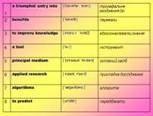
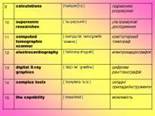
- Look at the words on the screen. Let’s read them and translate. - Repeat all together after me and give the translation. - Rewrite these words from the blackboard into your note-books. You have 5 minutes. … Let’s check it up. - Find in the text sentences with these words, read them and translate. You have two minutes. … Let’s check it up. | - Подивіться на слова на екрані. Давайте прочитайте їх та перекладемо. - Повторіть за мною всі разом та дайте переклад. - Перепишіть ці слова у зошити. У вас 5 хвилин. … Давайте перевіpемо. - Знайдіть у тексті речення зі словами, прочитайте їх та перекладіть. У вас є дві хвилини. …Давайте перевіримо. |
Рефлексія:
You’re working good. And now I see you know the words and I’m sure you’ll manage with the next task. | Ви добре працюєте. Я бачу, що ви запам’ятали слова і впевнена, що ви впораєтесь з наступним завданням. |
2.2.2 Pобота з текстами по групах (додаток Б 1-3):
а) повідомлення завдання:
The task of each group is to read the text and understand the general idea. Be ready: 1) to represent the reading (2 men); 2) to give the general translation; 3) to give answers to the questions after the text; 4) to fill in the table on the blackboard You have 10 minutes to do the tasks. | Завдання кожної групи – прочитати текст та зрозуміти загальний зміст. Будьте готові: 1) презентувати читання (2 чол.); 2) передати загальний зміст; 3) дати відповіді на запитання після тексту; 4) заповнити таблицю на дошці (додаток В) У вас 10 хвилин на виконання завдань. |
б) виконання студентами завдання;
в) перевірка виконання; - Слайд 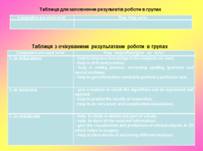
г) рефлексія:
You’ve managed with the tasks very good. You know now that computers are used in … and they help us a lot. | Ви впоралися із завданнями дуже добре. Ви знаєте зараз, що комп’ютери використовуються в… та багато нам допомагають. |
2.3 Презентація самостійної роботи студентів (додаток Г, презентація):
Мета: - розвивати творчі здібності та зацікавленність у вивченні англійської мови, розвивати навички самостійної роботи та вміння працювати з комп’ютером, удосконалювати навички читання та монологічного мовлення (для тих, хто готував проекти),
- розвивати фонематичний слух, мовну здогадку, удосконалювати навички аудіювання, формувати вміння уловлювати основний зміст іншомовного мовлення (key-words) та навички монологічного мовлення на рівні речення (для решти групи).
Форма проведення: презентація проекту, бесіда.
________ have prepared some more information about where and how computers are used. Your task is: -to watch and to listen to their story, -to catch the key-words of the story and write them down. The key-words are the sphere of a computer usage and how they help us. | ______ приготували ще інформацію про те, де і як використовуються комп’ютери. Ваше завдання: - продивіться та прослухати їх інформацію, - уловити ключові слова кожної розповіді та записати їх. Ключові слова це сфера використання та як використовуються. |
а) прослуховування та обговорення проекту (20 слайдів), - 
 …
… 
б) рефлексія:
______, you’ve prepared very interesting project and have presented it very good. It is useful for everybody. Thanks a lot. | _______, ви приготували цікавий проект та представили його гарно. Це корисно для кожного. Спасибі. |
3. Закінчення заняття
3.1 Підведення підсумків заняття:
Well, you’ve worked hard today. And you’ve learnt and remembered some words. You’ve trained yourselves with Participle I and II. You’ve got and discussed a lot of information about the usage of computers in our life and how they help us. And I suppose you understand the importance of your future profession. So, …… were very good and get “excellent”. …… made some mistakes but were good, they got “good”. ……. were not active, made mistakes, so they get “sat”. | Ви дуже старанно попрацювали. Ви вивчили декілька слів. Ви згадали дієприкметники. Ви отримали та обговорили інформацію щодо використання комп’ютерів в нашому житті та як вони нам допомагають. Я сподіваюсь, ви розумієте важливість вашої майбутньої професії. Тому, ….. відповідали добре та отримують «відмінно». …… робили помилки, але відповіді були добрими, вони отримують «добре». …… були неактивними, робили помилки та отримують «задовільно». |
3.2 Домашнє завдання:
So for the next lesson you should: - repeat words of the lesson, grammar forms of P I/II; - prepare a story on the topic “Computers in our life” based on today’s information and your conspect - or make your own project on the topics “Computers in Industry”, “Computers and Television” and so on. | На наступне заняття вам необхідно: - повторити слова заняття, форми P I/II, - підготувати розповідь «Комп’ютери в нашому житті», використовуючи інформацію тексту та конспекту - або підготувати проект з тем «Комп’ютери в промисловості», «Комп’ютери та телебачення» і т. п. |
Додаток А
L e x i c a l M a t e r i a l
1 | a triumphal entry into | [ trai'Λmfəl 'entri ] | тріумфальне входження до |
2 | benefits | [ 'benefit ] | переваги |
3 | to improve knowledge | [ im'pru:v 'nolidڑ ] | вдосконалювати знання |
4 | a tool | [ tu:l ] | інструмент |
5 | principal medium | [ 'prinsәpәl 'mi:diəm] | головний засіб |
6 | applied research | [ ə'plaid ri'sə:t∫] | прикладне дослідження |
7 | algorithms | [ 'ælgәriðəmz ] | алгоритм |
8 | to predict | [ pri'dikt ] | передбачати |
9 | calculations | ['kəlkjulei∫nz ] | підрахунки, розрахунки |
10 | supersonic researches | [ 'su:pəzounik ] | ультразвукові дослідження |
11 | computed tomographic scanner | [ kəm'pju:tid təmo'græfik 'skænә ] | комп’ютерний томограф |
12 | electrocardiography | [ i'lektroka:di'ogrəfi ] | електрокардіографія |
13 | digital X-ray graphics | [ 'didﮊi təl 'græfiks ] | цифрова рентгенографія |
14 | complex tools | [ 'kompleks tu:lz ] | складні прилади/інструменти |
15 | the capability | [ keipə'biləti ] | можливість |
Додаток Б-1
Computers in Medicine
Because of the great amount of information medicine today needs the use of computers and computer technologies: at laboratories at searching different analyses, at supersonic researches, at computed tomographic scanner, at electrocardiography and so on.
It is becoming a usual fact that every stomatological policlinic has computers with systems of digital X-ray graphics. These systems make it possible to study in details any part of a tooth or paradont, to make bigger or smaller the size or contrasting of a photograph, to store all the received information and with the help of a printer output it on paper and so on.
One of the trends within the Scientific Computing is Medical Graphics. This trend concernes the visualisation and production of clinical objects in 3D. The group had developed many complex tools for 3D visualisation and has the capability to generate models of scanned ch models can be used for planning surgery.
Planning and development of systems for Medical Informatics require insight into both healthcare and computer sciences. The Group performs a variety of service activities and undertakes specific programs for: the Hospital, the Academic Department of Medical Physics, the Medical School, and others.
supersonic researches – ультразвукові дослідження
computed tomographic scanner – комп’ютерний томограф
electrocardiography - електрокардіографія
digital X-ray graphics – цифрова рентгенографія
complex tools – складні прилади/інструменти
the capability – можливість
Answer the questions:
1. Where can computers be used in medicine?
2. What do digital X-ray graphics help to study?
3. What had Medical Graphics developed?
Додаток Б-2
Computers in Education
Computers have made a triumphal entry into education in the past decade and they have brought significant benefits to teachers and students alike. There are a lot educational programs today that allow students improve their knowledge in the subjects they want. The computer is very good at what is known as drill and practice; it will present the learner with questions and announce if the answer is right or wrong. The most important role of the computer is its use as a writing tool. It plays a significant part in the introduction of the writing process, correcting spelling, grammar and lexical mistakes. The Internet is the principal medium, by which students can communicate with others at a distance (by e-mail or by participating in discussion forums). So computers have the following main roles in the educational process:
- computer as a teacher teaches students different subjects by means of educational programs,
- computer as a tester checks students’ knowledge,
- computer as a tool assists students to do certain tasks,
- computer as a data source provides students with the information they need to perform a particular task,
- computer as a communication facilitator allows students to communicate with others in different locations.
a triumphal entry into – тріумфальне входження до
benefits – переваги
to improve knowledge – вдосконалювати знання
a tool – інструмент
principal medium – головний засіб
Answer the questions:
1. When have computers come into education?
2. What do educational programs allow students to do?
3. What are the main roles of a computer in the educational process?
Додаток Б-3
Computers in Science
Research and development comprises three types of activity—basic research, applied research, and development. Basic research is conducted to further scientific knowledge. This sort of research typically involves a high level of theory.
Applied research is the bridge between science and business. It is directed toward solving some general problems. Development is generally oriented toward manufacturing. Nearly everything we use, from antibiotics to lenses, is a product of basic research, applied research, and development.
And in all these stages people can use computers and computer technologies, because
scientific laws give algorithms for determining how systems behave. And the computer program is a medium in which the algorithms can be expressed and applied. Physical objects and mathematical structures can be represented as numbers and symbols in a computer. So a computer may predict the results of researches and do very exact and complicated calculations.
applied research - прикладне дослідження
a medium – засіб
algorithms – алгоритм
to predict – передбачати
calculations – підрахунки, розрахунки
Answer the questions:
1. What are the types of research and development?
2. What is applied research directed toward?
3. What can be presented as numbers and symbols in a computer?
Додаток В
Таблиця для заповнення результатів роботи в групах
Computers are used in/at: | They help us to: |
Таблиця з очікуваними результатами роботи в групах
Computers are used in/at: | They help/allow/give us to/in: |
1. in education | - help to improve knowledge in the subjects we want; - help in drill and practice; - help in writing process, correcting spelling, grammar and lexical mistakes; - help to get information needed to perform a particular task. |
2. in science | - give a medium in which the algorithms can be expressed and applied; - help to predict the results of researches; - help to do very exact and complicated calculations. |
3. in medicine | - help to study in details any part of a body; - help to store all the received information; - give the visualisation and production of clinical objects in 3D which helps in surgery; - help at laboratories at searching different analyses. |
Додаток Г
Computers in Everyday Life
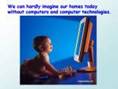
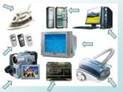
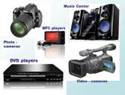
And we can hardly imagine our homes today without computers and computer technologies. At home we use some devices which include electronic circuits, chips and different programs. We usually call them domestic technique. They are produced to let people (mostly women) spend more time with the families and friends. We are surrounded with different kinds of domestic technique: washing machines, dishwashing machines, microwave stoves, coffee makers, hair-driers, photo - and video cameras, DVD and MP3 players and others. Some homes (mostly rich people homes) are equipped with cameras for Indoor/Outdoor watching. And of cause no one can live without mobiles today.
How wonderful and easy our life is with these domestic technique: equipped kitchen lets us prepare and store meals, modern photo - and video cameras imprint the best moments of our life, DVD and MP3 players enable us to listen and to see our favourite music and movies, a personal computer is a mine of information and is very useful in everyday use and for education especially.
domestic technique – побутові прилади
to be surrounded – бути оточеним
to imprint – відображати
to enable – давати можливість
