Партнерка на США и Канаду по недвижимости, выплаты в крипто
- 30% recurring commission
- Выплаты в USDT
- Вывод каждую неделю
- Комиссия до 5 лет за каждого referral
Kids Tracker Watch Instruction
Please read the instruction manual carefully before using in order to install properly and use instantly. For the watchЎЇs color, please check the real product.
I. Before using
Check if the unit is corresponding to package and all accessories are included.
Install a SIM Card and choose GSM network. For details, please refer to the seller's advice. (Attention: Please shut down the watch before card installation)
SIM card terminals must have GPRS and Caller ID function.
Install an Apk / App into Smart-phone. For the Apk / App, please check with your seller.
Bar-code or QR code for users registration
II. Features
1. GPS+LBS dual ways locating
2. Remote control by smart phone
3. GPRS real-time locating, tracking and monitoring;
4. intercom
5. Health
6. Track back
7. Alarm
8. Safety zone
9. SOS emergency alarm
10.Remove alarm
11. Low-battery alarm
12.Remote shutting down
III. Watch keys function
|
|
|
|


|



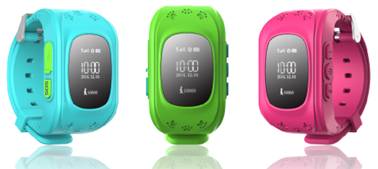
1. USB port: Charging and data transportation
2. SOS: SOS alarm and answer phone calls
3. Vol - during phone conversation. Hold for more than 3 seconds it will dial pre-loaded phone number 1
4. Power key and hang up phone calls
5. Vol+ during phone conversation. Hold for more than 3 seconds it will dial pre-loaded phone number 2
ўф
|
|
|


ўх.APP instruction
5.1 APP registration
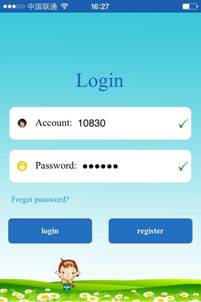
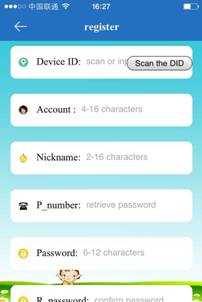
Before log in, you will need to manually register the account/ID. You can either scan the bar code or manually put the ID, the user name should be no less than 4 characters (letters or numbers), the ID and user name is unique and unrepeatable. The other information, user can manually put in, password can be changed. The registration interface is like below:
5.2 Log-in
5.2.1 APP functions menu
After you finish the registration, put in the correct account name and password, click log-in, you will find the home interface like below:
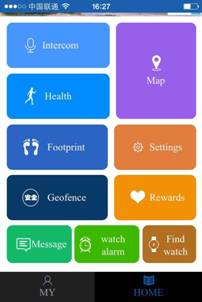
Functions Description:
ўЕ walkie-talkieЈєby this function, you can have voice conversation between smart watch and app
Send voice message over app: when the recording is initiated, the app will automatically record and send the recordings to the watch, maximum 15 seconds. On the watch, short press sos button to play the recordings.
Watch recording: long press the power button to record, recordings will be sent when hands released, max. recording duration is 15 seconds. The app will receive an alert when the voice message is received(the timing before you can receive the message is depending on your network operator)
ўЖMap: real-time location can be viewed on the watch
The watch and app mobile device location can be found on the map, press "postioning" the watch will start to locate your device for 3 mins, the uploading interval is 10 seconds, after 3 mins it will restore to the default working mode. On the map, you can find the watch postioning way real-time. If the position icon is red, it is GPS positioning mode, blue, is LBS position, green is wifi positioning.
ўЗ Settings: you can set the parameters in this menu
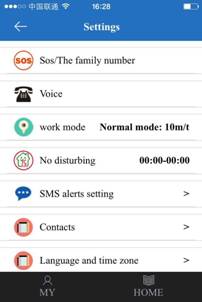
ўЩSchool location period: the four sections is only for Monday till Friday, in the set period, the watch will initiate the GPS and retrieve the location, out of the period will not retrieve any location.
ўЪWeekend location period: these 2 sections is only for Saturday and Sunday. In the set period, the watch will initiate the GPS and retrieve the location, out of the period will not retrieve any location.
ўЫDo not disturb period: All calls will be silenced in these 3 periods
ўЬSMS alert settings: alert when the watch is low power, SOS button is pressed, or take off the watch
ўЭKids contact:you can set 10 numbers to call in the list
ўЮRestore to default working mode: when the default mode is activated, the GPS will be enabled 24 hours, the location retrieving interval is 10 mins
ўЯSet SOS numbers: can set 3 numbers, in emergency, alert will be activated by press and holding the SOS button for 3 seconds. It will call the 3 set numbers in a loop. If not answered, calling will be stopped after 2 loops
ўИSafety zone: the min. fence radius is within 500 meters, if the watch user walked out of the range, you will receive an alert
ўЙLove rewards: on the app, choose the red-heart numbers, click confirm it will send to the watch immediately, the watch screen will show the love and numbers
ўКWatch alarm: can set 3 alarms, you can set the alarm mode to your needs
ўЛFind the watch: if the watch is not nearby, send this command, the watch will start to ring for 1 mins so that you can easily find it, press any button will stop the ringer
For other functions, you can find a brief description in the "My account-help" menu
5.2.2 My account:
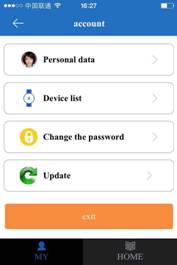
For more detailed description for all functions, you can refer to the Ў°helpЎ± section
5.3 Watch alert description
The app device will receive the push alert message if the watch initiate the alert. You can click alert on your app device to enter the home screen, for detailed alert info, click the information center.
ўцЎўWatches Work Pattern
Three basic working pattern as below, normal mode and the power saving mode, real-time positioning mode.
The different working pattern will be within different upload interval, real-time positioning mode will be worked in setting up the mode of "the school localization period" and "the weekend localization period" . Except this situation , the customer can be according to their requirements to set up working pattern.
Normal mode: upload interval of 600 seconds;
Power saving mode: upload interval of 3600 seconds;
Real-time positioning mode: upload interval to 10 seconds;
ўч.Instructions
7.1 SOS Emergency Alarm
Long press the SOS button for 3 seconds, watch will circularly dial three SOS number two rounds. If no answer, device will keeping calling till two circles calling finished. Watch can also send SMS Alert to monitering nubmers (default off) and also show on the APP.
7.2 Anti-lost Alarm
Watch strap with sensor switch, watch to wear at least 3 minutes, remove the strap will generate alarm, watch will send alarm messages to monitoring number(default closed), and send the APP alarm notice.
7.3 Low power Alarm
Watch will send SMS Alert (default off) to monitering numbers and also send alarm notification to the app when battery power is lower than 20%.
7.4 Health Care
7.4.1 Pedometer
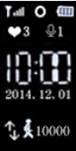
Watch is equipped with 3D sensor which will calculate the user step when walking or running, the user can know your movements through the APP side.
7.4.2 Sleep Monitering
According to watch rotating frequency and amplitude to determine the user's quality of sleep, default detection time from 10:00 p. m. to 7:00 in the morning the following day, user can check related data through the APP.
7.4.3 Sport Function
Computing by step number, step pitch and weight, step pitch and weight can be set up.
7.5 Intercom System
Long press the power button to start recording, after releasing the power button to send the voice message to the APP.
If watch got voice messages from APP, there would be notification on the display. Press SOS button to play the voice massages.
7.6 Voice Monitering
Watch must preset monitering numbers, when given order command from watch user, device will make one way call to monitering numbers.
7.7 Power Off
Power off is permitted without SIM card installed or remote controlled by APP and no power.
7.8 Family Number
Watch has two affection dial key, long press to dail, the family number 1 corresponding sos1, family number 2 corresponding to the family number 2.
7.9 Contact List
App side preset 10 Numbers which permit to call the watch to implement two-way conversation.
ўш. Troubleshooting
When turning on the watch first time, App within off -line after landing. Please check:
i. Check whether SIM card is installed properly and whether the screen display is normal. please follow the reference pictures.
ii. Check whether SIM card is fees owned, whether data traffic opened and whether signal is normal.
iii. Check whether the GPRS service is canceled.
iv. Consult your supplier whether the parameters of the terminal server has been set, and check the relevant parameters. The customer can use their mobile phone text commands sent to the watch phone card: pw, 123456, ts# .The watch will be sent parameters to the Mobile phone.