

Партнерка на США и Канаду по недвижимости, выплаты в крипто
- 30% recurring commission
- Выплаты в USDT
- Вывод каждую неделю
- Комиссия до 5 лет за каждого referral
PURPOSE:
The objective of financial preset “98_Munlin_Travel_conversion” is working only in OSISA and can be used to book Munlin travel conversion: received foreign currency and closing conversion difference to exchange gain/loss.
LOCATION:
Financial presets for Munlin conversion is located under Financials module à Presets à Preset Wizards: “98_Munlin_Travel_conversion”.

PREREQUISITES:
1. General parameter `accMunlin17801` is defined to Receivable in ZAR (corp. 17801)
2. General parameter `defaultT8Munlin` is defined to beneficiary code of Munlin Travel
3. General parameter `accExchGain` is defined to local Revenue account (corp. 69300)
4. General parameter `accExchGain` is defined to local Revenue account (corp. 69300) [GP1]
LOGIC of preset for Check reconciliation:
Preset contains 3 pages (steps) for booking conversion from Munlin.
Page 1. Select accounts:
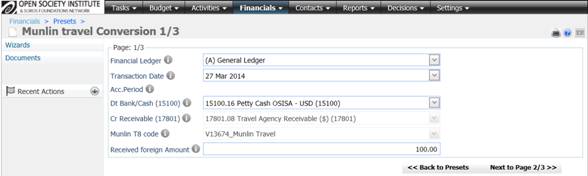
1. Financial ledger {A or C}
2. Transaction date {by default is today, however subject to change}
3. Debit Bank/Cash account {list of local accounts in foreign currency mapped to 15100}
4. Credit Receivable { R/O local account taken from general parameter `accMunlin17801`}
5. Munlin T8 code {R/O Beneficiary code : general parameter `defaultT8Munlin`}
6. Received foreign amount
Page 2. Select Funding Item:
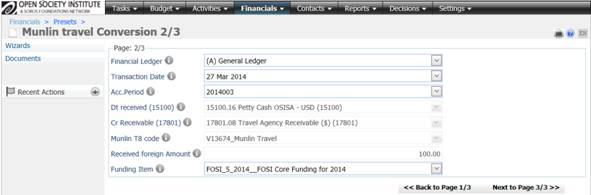
7. Accounting Period {List with open periods – according to transaction date}
8. Funding Item [GP2] {list of all Funding Items for the chosen transaction year : initialized with general parameter `DefaultBudgetType`}
Page 3. Select Activity for commission and Received ZAR amount:
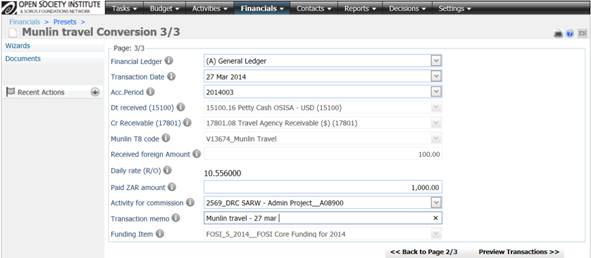
9. Paid ZAR amount
10. Activity for commission {list of activities with remaining budget in chosen budget year and for funding item}
VALIDATIONS before transaction generation:
Following validations take place:
1. Ledger should be chosen
2. Transaction date should be chosen but cannot be any future date (bigger than today)
3. Check bank/cash account where foreign currency were received should be chosen
4. Receivable account should be chosen
5. On 2nd page of preset:
a. Funding item should be chosen
b. Accounting Period should be chosen
6. On 3rd page of preset:
a. Activity for commission should be chosen
b. Memo of transaction should be entered
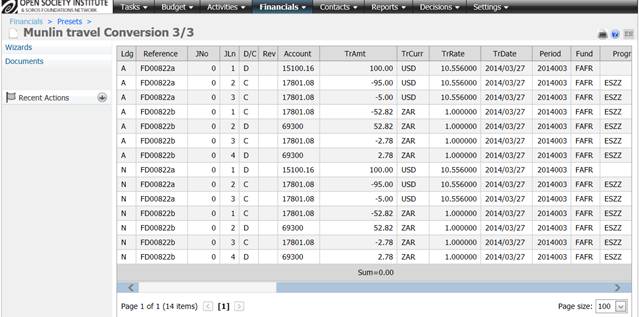
Generated Transactions (visualized on pre-posting screen):
1. Received foreign amount in foreign currency accordingly to chosen bank account:
Dt Bank account without any analytic
Cr 17801 many lines with full analytics taken from remaining funds of chosen activity
2. Gain/Loss from conversion in ZAR:
System calculates a difference in ZAR amount between ZAR equivalent in 1st JE and received ZAR amount (entered on page 3 of preset). Usually this difference is positive (Loss from conversion), but in some rate cases can be negative. Following example shows a loss from conversion:
Cr 17801 many lines with full analytics taken from remaining funds of chosen activity
Dt 69300 many lines with full analytics (as per the identified Operational Activity)
For negative difference – use local Revenue account (general parameter `accExchGain`)
Note: JE is generated in ledger A+N or C+P. Amount equivalents are calculated using daily rates
Pre-posting screen from above example:
[GP1]If OSISA wants to keep track of the FOREX incurred during the FOREX purchase from Munlin Travel, prior to using the preset go to Settings > Module Settings and change the expense account from local 69300 to 69300.01_FOREX (Munlin) http://gmsnet. osisa. org/GMSNET/Objects/Settings/ModuleSettings. aspx
[GP2]Even though the financial user is asked to specify one Funding Item (T4) in particular – the resulting FOREX expense (corp. 69300) is going to be split by the respective T4 codes, as per the identified Operational Activity.
