Партнерка на США и Канаду по недвижимости, выплаты в крипто
- 30% recurring commission
- Выплаты в USDT
- Вывод каждую неделю
- Комиссия до 5 лет за каждого referral
PURPOSE:
The objective of financial preset “19_Reclass Expenses without budget” is to re-classify expenses booked in chosen fiscal year without budget (as a result from grant savings, revaluation, etc.). Procedure can preserve original oper. activity and funding item OR change any of these with General admin T6
LOCATION:
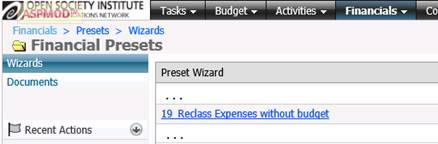
Financial presets for reclassification of wrongly booked expenses is located in module FINANCIALS àPresets à Preset Wizards: “19_Reclass Expenses without budget”)
PREREQUISITES:
1. General parameter `Default Activity` is properly set to General admin activity within needed fiscal year.
LOGIC of preset for Check reconciliation:
Preset contains 3 pages (steps).
Page 1. Select transaction date:

1. Transaction date – to be used for JE date and fiscal year for BvA calculations
Page 2. Select Overspending and way to deal with it:
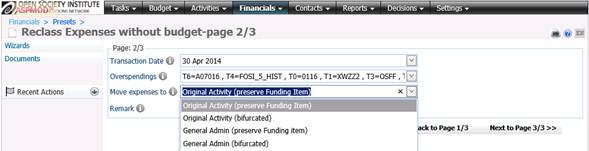
2. Overspending line: combination of all analytics with expenses booked without budget
3. New Expenses to: select an option to reclassify expenses (preserving original T6 / T4 or booking it under general admin)
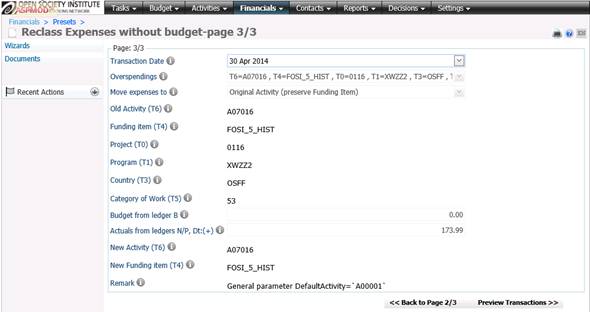
Page 3. : Last visual control of all chosen analytics and total of expenses wrongly booked
VALIDATIONS before transaction generation:
Transaction date is selected … and not a future date (will be used for cut-off transactions)
Overspendings to be reclassified are selected
The way to move expenses is selected (4 options available)
Generated Transactions (visualized on pre-posting screen):
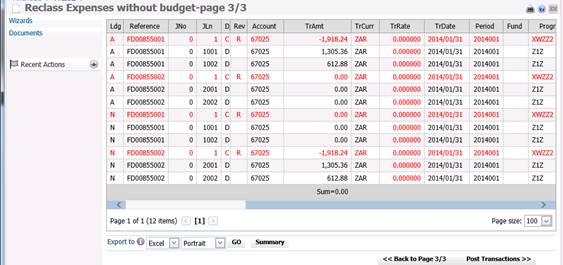
Step 1. Analyze of wrongly booked expenses:
- Analyze all expenses in all ledgers except B-ledger for fiscal year according to chosen transaction date excluding journals Sxxxxx and Zxxxxx.
- Grouping is following: Ledger, Month([Date]), Account, All local and HO T-codes
- Summary of Main, Local, Native and T6amt amounts
Step 2. Analyze remaining budget of activity (original one OR general admin) and Funding item accordingly to chosen way to move expenses and chosen fiscal year (via Transaction date)
- If there is no budget into chosen fiscal year à rise error message
Step 3. Generate JEs – based on each combination of wrongly booked expenses (from step 1):
- Reverse wrongly booked expense with JL=1 (preserve all amounts)
- Split Above combination accordingly to chosen way to move expenses
Note: each combination generates a separate set of lines (i. e. different reference field that leads to posting as different journal into ledgers) with preserving all equivalents. In case if ledger A combination is being analyzed à system generated also a blank lines with ledger N and zero amounts (this will keep consistent counters in ledger A and N)