

Партнерка на США и Канаду по недвижимости, выплаты в крипто
- 30% recurring commission
- Выплаты в USDT
- Вывод каждую неделю
- Комиссия до 5 лет за каждого referral
Pop-up Shop and Portable Site Specifications
Definition
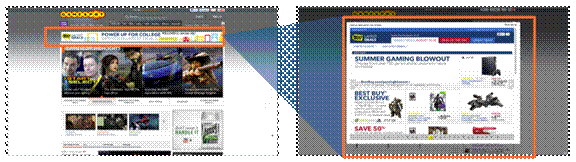
The Pop-up Shop and other Portable Site ads are turnkey ad units which pull in a retailer’s entire fully functioning website. A 970x66 base unit expands on mouse hover with 3-second delay to reveal full experience in a Lightbox treatment. Advertisers can leverage functionality on their website within the ad unit such as featuring localized offers, gift guides, etc.
CBS Interactive offers this unit through our approved Third-party vendor.
Pop-up Shop/Portable Site Example:
Technical Specification
I. 970x66 Base Unit Specifications | |
Item | Specification |
Dimensions | 970w x 66h pixels |
File Format | HTML5 GIF/JPG: Default image required for 970x66 |
Maximum Size | GIF/JPG: 50k HTML5: 200k |
Animation | HTML5: 30 seconds maximum |
Frame Rate | 24 frames per second maximum |
Audio | Not allowed |
Video | Not allowed |
Rollover Expand | Lightbox expand panel is triggered upon mouse rollover. Must contain a 3 second delay to expand. Third-party vendor will add countdown timer to visualize the ad expansion. |
CPU Consumption | Should consume no more than 25% of users CPU resources on an average system. |
Z-index Guideline | Set ad to z-index between 1000 and 4999. |
Third-Party Serving | Available through our approved Third-party vendor Flashtalking only |
II. Lightbox Expand Panel Specifications | |
Item | Specification |
Dimensions | Lightbox expand panel: 980w x 800h pixels |
Site Link | An active URL must be provided for the site landing page within the Portable Site panel. CBS Interactive recommends a unique URL for tracking ad-related referrals to an advertiser’s site. Users interact with existing site functionality within the Portable Site. The URL that is expanded may not serve any pop-up or pop-under content/ads for the duration of the campaign. The URL of the expanded site is loaded in to an iFrame. Some websites (such as Facebook and Pinterest) prevent pages from serving into an iFrame. If you are unsure whether your client's site can be loaded in to an iFrame, please contact your CBS Interactive representative. |
Close Button | Must contain a Close button in the upper right hand corner of the Portable Site. Close button is included by Third-party vendor, and must be user-initiated by click. |
Third-Party Serving | Available through our approved Third-party vendor Flashtalking only |
III. Checklist |
Pop-up Shop/Portable Site
Default GIF/JPG
|
Testing
All creative must function uniformly on both Windows and Mac OS X operating systems as well as the following browsers: Internet Explorer, Firefox, Google Chrome and Safari for Mac OS X.
Third-Party Serving Guidelines
- Third-party tags must serve a default GIF/JPG for browsers that do not support rich media. CBS Interactive must approve all creative prior to launch. CBS Interactive prohibits creative substitution or modification, via the Third-party vendor, to existing campaigns without prior approval.
If creative is changed through the Third-party vendor without prior approval, campaigns will be immediately inactivated until creative complies with our specifications.
- "Fourth-party" serving is not supported.
Note: If the submitted creative does not conform to the above specifications, it will not be placed online and may result in a delayed launch date
Deadlines
Kick-Off call is required 15 business days prior to launch date.
All creative assets must be submitted 10 business days prior to launch date.
Contacts | |
Questions about this opportunity | Please contact your CBS Interactive representative. |
Technical questions about your creative | E-Mail *****@***com. |
