

Партнерка на США и Канаду по недвижимости, выплаты в крипто
- 30% recurring commission
- Выплаты в USDT
- Вывод каждую неделю
- Комиссия до 5 лет за каждого referral
Programming Logic and Design, 8th Edition
Chapter 1
Review Questions
puter programs also are known as _____.
a. hardware
b. software
c. data
d. information
2. The major computer operations include _____.
a. hardware and software
b. input, processing, and output
c. sequence and looping
d. spreadsheets, word processing, and data communications
3. Visual Basic, C++, and Java are all examples of computer _____.
a. operating systems
b. hardware
c. machine languages
d. programming languages
4. A programming language’s rules are its _____.
a. syntax
b. logic
c. format
d. options
5. The most important task of a compiler or interpreter is to _____.
a. create the rules for a programming language
b. translate English statements into a language such as Java
c. translate programming language statements into machine language
d. execute machine language programs to perform useful tasks
6. Which of the following is temporary, internal storage?
a. CPU
b. hard disk
c. keyboard
d. memory
7. Which of the following pairs of steps in the programming process is in the correct order?
a. code the program, plan the logic
b. test the program, translate it into machine language
c. put the program into production, understand the problem
d. code the program, translate it into machine language
8. A programmer’s most important task before planning the logic of a program is to _____.
a. decide which programming language to use
b. code the problem
c. train the users of the program
d. understand the problem
9. The two most commonly used tools for planning a program’s logic are _____.
a. flowcharts and pseudocode
b. ASCII and EBCDIC
c. Java and Visual Basic
d. word processors and spreadsheets
10. Writing a program in a language such as C++ or Java is known as _____ the program.
a. translating
b. coding
c. interpreting
piling
11. An English-like programming language such as Java or Visual Basic is a _____ programming language.
a. machine-level
b. low-level
c. high-level
d. binary-level
12. Which of the following is an example of a syntax error?
a. producing output before accepting input
btracting when you meant to add
c. misspelling a programming language word
d. all of the above
13. Which of the following is an example of a logical error?
a. performing arithmetic with a value before inputting it
b. accepting two input values when a program requires only one
c. dividing by 3 when you meant to divide by 30
d. all of the above
14. The parallelogram is the flowchart symbol representing _____.
a. input
b. output
c. either a or b
d. none of the above
15. In a flowchart, a rectangle represents _____.
a. input
b. a sentinel
c. a question
d. processing
16. In flowcharts, the decision symbol is a _____.
a. parallelogram
b. rectangle
c. lozenge
d. diamond
17. The term “eof” represents _____.
a. a standard input device
b. a generic sentinel value
c. a condition in which no more memory is available for storage
d. the logical flow in a program
18. When you use an IDE, as opposed to a simple text editor, to develop a program, _____.
a. the logic is more complicated
b. the logic is simpler
c. the syntax is different
d. some help is provided
19. When you write a program that will run in a GUI environment as opposed to a command-line environment, _____.
a. the logic is very different
b. some syntax is different
c. you do not need to plan the logic
d. users are more confused
20. As compared to procedural programming, with object-oriented programming, _____.
a. the programmer’s focus differs
b. you cannot use some languages, such as Java
c. you do not accept input
d. you do not code calculations; they are created automatically
Programming Exercises
1. Match the definition with the appropriate term.
1. | Computer system devices | a. | compiler |
2. | Another word for programs | b. | syntax |
3. | Language rules | c. | logic |
4. | Order of instructions | d. | hardware |
5. | Language translator | e. | software |
Answer:
1. | Computer system equipment | → | d. | hardware |
2. | Another word for programs | → | e. | software |
3. | Language rules | → | b. | syntax |
4. | Order of instructions | → | c. | logic |
5. | Language translator | → | a. | compiler |
2. In your own words, describe the steps to writing a computer program.
Answer:
The programmer must understand the problem that the user is trying to solve. Next, the programmer plans the logic, often using a flowchart or pseudocode. Then, the program is coded in a language, such as Visual Basic or Java, and translated to machine language using a compiler or interpreter. Finally, the program is tested and then put into production and maintained over the ensuing months or years.
3. Match the term with the appropriate shape.
Answer:
1. | Input | → | B. | |
2. | Processing | → | A. | |
3. | Output | → | B. | |
4. | Decision | → | D. | |
5. | Terminal | → | C. |
4. Draw a flowchart or write pseudocode to represent the logic of a program that allows the user to enter a value. The program divides the value by 2 and outputs the result.
Answer:
Flowchart
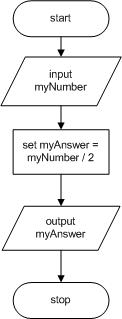
Pseudocode
start
input myNumber
set myAnswer = myNumber / 2
output myAnswer
stop
5. Draw a flowchart or write pseudocode to represent the logic of a program that allows the user to enter a value for one edge of a cube. The program calculates the surface area of one side of the cube, the surface area of the cube, and its volume. The program outputs all the results.
Answer:
Flowchart

Pseudocode
start
input edge
set sideArea = edge * edge
set surfaceArea = 6 * sideArea
set volume = edge * edge * edge
output sideArea
output surfaceArea
output volume
stop
6. Draw a flowchart or write pseudocode to represent the logic of a program that allows the user to enter two values. The program outputs the product of the two values.
Answer:
Flowchart
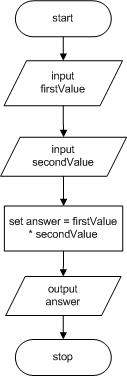
Pseudocode
start
input firstValue
input secondValue
set answer = firstValue * secondValue
output answer
stop
7. a. Draw a flowchart or write pseudocode to represent the logic of a program that allows the user to enter values for the width and length of a room’s floor in feet. The program outputs the area of the floor in square feet.
Answer:
Flowchart
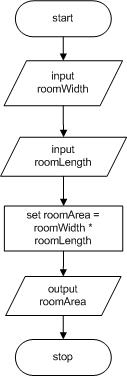
Pseudocode
start
input roomWidth
input roomLength
set roomArea = roomWidth * roomLength
output roomArea
stop
b. Modify the program that computes floor area to compute and output the number of 6-inch square tiles needed to tile the floor.
Answer:
Flowchart
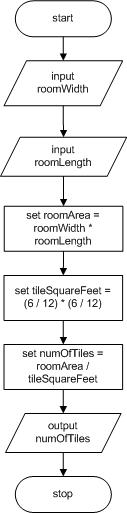
Pseudocode
start
input roomWidth
input roomLength
set roomArea = roomWidth * roomLength
set tileSquareFeet = (6 / 12) * (6 / 12)
set numOfTiles = roomArea / tileSquareFeet
output numOfTiles
stop
(Please note that the student could also have the size of the tile in inches entered by the user, rather than hard code the value 6; this was not specified in the exercise)
8. a. Draw a flowchart or write pseudocode to represent the logic of a program that allows the user to enter values for the width and length of a wall in feet. The program outputs the area of the wall in square feet.
Answer:
Flowchart
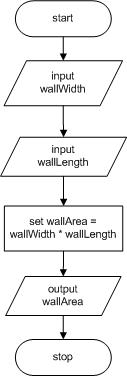
Pseudocode
start
input wallWidth
input wallLength
set wallArea = wallWidth * wallLength
output wallArea
stop
b. Modify the program that computes wall area to allow the user to enter the price of a gallon of paint. Assume that a gallon of paint covers 350 square feet of a wall. The program outputs the number of gallons needed and the cost of the job. (For this exercise, assume that you do not need to account for windows or doors, and that you can purchase partial gallons of paint.)
Answer:
Flowchart
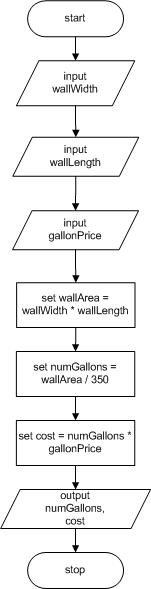
Pseudocode
start
input wallWidth
input wallLength
input gallonPrice
set wallArea = wallWidth * wallLength
set numGallons = wallArea / 350
set cost = numGallons * gallonPrice
output numGallons, cost
stop
c. Modify the program that computes paint cost to allow the user to enter the number of doorways that do not have to be painted. Assume each doorway is 14 square feet. Output the number of gallons needed and the cost of the job.
Answer:
Flowchart
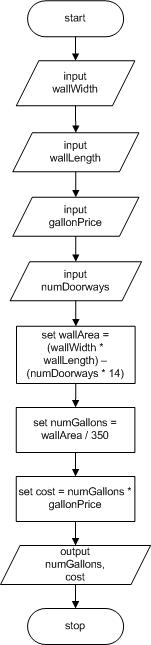
Pseudocode
start
input wallWidth
input wallLength
input gallonPrice
input numDoorways
set wallArea = (wallWidth * wallLength) –
(numDoorways * 14)
set numGallons = wallArea / 350
set cost = numGallons * gallonPrice
output numGallons, cost
stop
9. Research current rates of monetary exchange. Draw a flowchart or write pseudocode to represent the logic of a program that allows the user to enter a number of dollars and convert it to Euros and Japanese yen.
Answer:
Flowchart
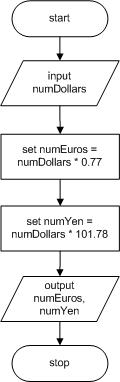
Pseudocode
start
input numDollars
set numEuros = numDollars * 0.77
set numYen = numDollars * 101.78
output numEuros, numYen
stop
(Please note that these exchange rates are valid as of the time of this writing)
10. Draw a flowchart or write pseudocode to represent the logic of a program that allows the user to enter values for a salesperson’s base salary, total sales, and commission rate. The program computes and outputs the salesperson’s pay by adding the base salary to the product of the total sales and commission rate.
Answer:
Flowchart
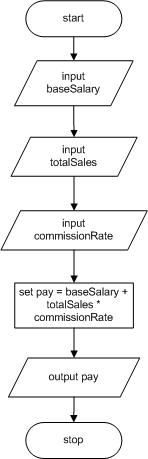
Pseudocode
start
input baseSalary
input totalSales
input commissionRate
set pay = baseSalary + totalSales * commissionRate
output pay
stop
11. A consignment shop accepts a product for sale and sets an initial price. Each month that the item doesn’t sell, the price is reduced by 20 percent. When the item sells, the item’s owner receives 60 percent of the sale price, and the shop gets 40 percent. Draw a flowchart or write pseudocode to represent the logic of a program that allows the user to enter an original product price. The output is the sale price, the owner’s cut, and the shop’s cut each month for the first three months the item is on sale.
Answer:
Flowchart
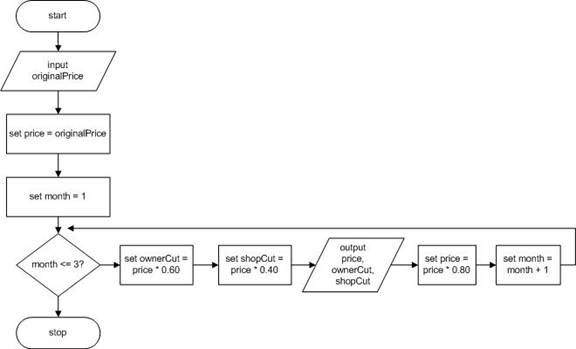
Pseudocode
start
input originalPrice
set price = originalPrice
set month = 1
while month <= 3
set ownerCut = price * 0.60
set shopCut = price * 0.40
output price, ownerCut, shopCut
set price = price * 0.80
set month = month + 1
endwhile
stop
12. A mobile phone app allows a user to press a button that starts a timer that counts seconds. When the user presses the button again, the timer stops. Draw a flowchart or write pseudocode that accepts the elapsed time in seconds and displays the value in minutes and remaining seconds. For example, if the elapsed time was 130 seconds, the output would be 2 minutes and 10 seconds.
Answer: (Please note this solution assumes minutes is an integer and has been truncated.)
Flowchart
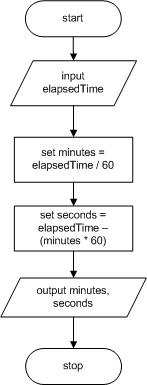
Pseudocode
start
input elapsedTime
set minutes = elapsedTime / 60
set seconds = elapsedTime – (minutes * 60)
output minutes, seconds
stop
Performing Maintenance
1. In this chapter you learned that some of the tasks assigned to new programmers frequently involve maintenance—making changes to existing programs because of new requirements. A file named MAINTENANCE01-01.txt is included with your downloadable student files. Assume that this program is a working program in your organization and that it needs modifications as described in the comments (lines that begin with two slashes) at the beginning of the file. Your job is to alter the program to meet the new specifications.
Answer:
// This program accepts a user's monthly pay
// and rent, utilities, and grocery bills
// and displays the amount available for discretionary spending
// (which might be negative)
// Modify the program to output the pay and the total bills
// as well as the remaining discretionary amount
start
input pay
input rent
input utilities
input groceries
set bills = rent + utilities + groceries
set discretionary = pay - bills
output pay
output bills
output discretionary
stop
Find the Bugs
1. Your downloadable files for Chapter 1 include DEBUG01-01.txt, DEBUG01-02.txt, and DEBUG01-03.txt. Each file starts with some comments (lines that begin with two
slashes) that describe the program. Examine the pseudocode that follows the
introductory comments, then find and correct all the bugs.
Answer:
DEBUG01-01
// This pseudocode is intended to describe
// computing the price of an item on sale for 20% off
start
input origPrice
set discount = origPrice * 0.20 // use origPrice instead of price
set finalPrice = origPrice – discount // use discount instead of discnt
output finalPrice
stop
DEBUG01-02
// This pseudocode is intended to describe computing
// the number of miles per gallon you get with your automobile.
start
input milesTraveled
input gallonsOfGasUsed
set milesPerGallon = milesTraveled / gallonsOfGasUsed
// milesPerGallon is computed using division
output milesPerGallon
// the P is milesPerGallon should be uppercase
stop
// Program should end with stop
DEBUG01-03
// This pseudocode is intended to describe
// computing the per day cost of your rent
// in a 30-day month
start
input rent
set costPerDay = rent / 30
// Comment indicates 30-day month
output costPerDay
// output should be costPerDay
stop
2. Your downloadable files for Chapter 1 include a file named DEBUG01-04.jpeg that contains a flowchart that contains syntax and/or logical errors. Examine the flowchart and then find and correct all the bugs.
Answer:
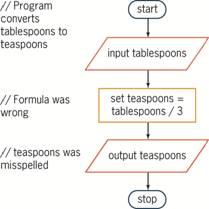
Game Zone
1. Create the logic for a Mad Lib program that accepts five words from input, then creates and displays a short story or nursery rhyme that uses them.
Answer:
Students’ answers will vary. But a simple solution could be:
start
input word1
input word2
input word3
input word4
input word5
output “Jack and Jill went up the ”, word1,
“ to fetch a pail of ”, word2,
“. “Jack ”, word3, “ down and broke his ”, word4,
“ and Jill came ”, word5, “ after.”
stop
Up for Discussion
1. Which is the better tool for learning programming—flowcharts or pseudocode? Cite any educational research you can find.
Answer:
Answers will vary. Many educators like the visual feedback flowcharts provide. This article contains research results:
http://portal. acm. org/citation. cfm? id=322609.323168&dl=GUIDE&dl=ACM&type=series&idx=SERIES251&part=Proceedings&WantType=Proceedings&title=ACM%20Annual%20Computer%20Science%20Conference
2. What is the image of the computer programmer in popular culture? Is the image different in books than in TV shows and movies? Would you like that image for yourself?
Answer:
The programmer is often seen as an anti-social nerd with tape around his glasses, a pocket protector, and the inability to form social relationships. In some movies however, the computer-savvy programmer can save the day. High school aged programmers, in particular, are often portrayed as Robin Hood-type rebels. Movie plots tend to concentrate on “good” programmers versus “evil” programmers. The programmer is virtually always seen as smart.
