

Партнерка на США и Канаду по недвижимости, выплаты в крипто
- 30% recurring commission
- Выплаты в USDT
- Вывод каждую неделю
- Комиссия до 5 лет за каждого referral
PeopleSoft Payroll for North America
Tax Update 16-B
Tax Update Notes - Release 9.1
PeopleSoft Payroll for North America Tax Update 16-B includes updates to U. S. and Canadian tax and garnishment tables, COBOL program changes, object changes, and redelivered SQRs for U. S. and Canadian payroll reporting. These tax update notes include:
· Instructions for updating your system’s tables and a summary of the table changes.
- A list of COBOL program changes A summary of the SQRs delivered with this tax update An appendix listing the object changes delivered with this tax update
For Release 9.1, the tax update package also includes the following documentation files:
UPD924782_INSTALL. htm | “PeopleSoft Application Update Installation Instructions” |
UPD924782_CODECHANGES. rtf | PS Print Project Report for Release 9.1 |

Follow the instructions in the UPDxxxxxx_INSTALL. htm document to apply this tax update. Before applying Tax Update 16-B, you must apply all previous tax updates.
Unless otherwise indicated by a specific posting date, patch numbers referenced in these tax update notes have not been posted to My Oracle Support.
Copyright © 2016, Oracle and/or its affiliates. All rights reserved.
This software and related documentation are provided under a license agreement containing restrictions on use and disclosure and are protected by intellectual property laws. Except as expressly permitted in your license agreement or allowed by law, you may not use, copy, reproduce, translate, broadcast, modify, license, transmit, distribute, exhibit, perform, publish, or display any part, in any form, or by any means. Reverse engineering, disassembly, or decompilation of this software, unless required by law for interoperability, is prohibited.
The information contained herein is subject to change without notice and is not warranted to be error-free. If you find any errors, please report them to us in writing.
If this is software or related documentation that is delivered to the U. S. Government or anyone licensing it on behalf of the U. S. Government, the following notice is applicable:
U. S. GOVERNMENT RIGHTS Programs, software, databases, and related documentation and technical data delivered to U. S. Government customers are "commercial computer software" or "commercial technical data" pursuant to the applicable Federal Acquisition Regulation and agency-specific supplemental regulations. As such, the use, duplication, disclosure, modification, and adaptation shall be subject to the restrictions and license terms set forth in the applicable Government contract, and, to the extent applicable by the terms of the Government contract, the additional rights set forth in FAR 52.227-19, Commercial Computer Software License (December 2007). Oracle America, Inc., 500 Oracle Parkway, Redwood City, CA 94065.
This software or hardware is developed for general use in a variety of information management applications. It is not developed or intended for use in any inherently dangerous applications, including applications that may create a risk of personal injury. If you use this software or hardware in dangerous applications, then you shall be responsible to take all appropriate fail-safe, backup, redundancy, and other measures to ensure its safe use. Oracle Corporation and its affiliates disclaim any liability for any damages caused by use of this software or hardware in dangerous applications.
Oracle and Java are registered trademarks of Oracle and/or its affiliates. Other names may be trademarks of their respective owners.
Intel and Intel Xeon are trademarks or registered trademarks of Intel Corporation. All SPARC trademarks are used under license and are trademarks or registered trademarks of SPARC International, Inc. AMD, Opteron, the AMD logo, and the AMD Opteron logo are trademarks or registered trademarks of Advanced Micro Devices. UNIX is a registered trademark of The Open Group.
This software or hardware and documentation may provide access to or information on content, products, and services from third parties. Oracle Corporation and its affiliates are not responsible for and expressly disclaim all warranties of any kind with respect to third-party content, products, and services. Oracle Corporation and its affiliates will not be responsible for any loss, costs, or damages incurred due to your access to or use of third-party content, products, or services.
Updating Your Tables
Tax Update 16-B includes the following files for updating the tables in your PeopleSoft system.
File | Contents |
upd924782_01.dat | U. S. tax table updates |
upd924782_02.dat | Canadian tax table updates |
upd924782_03.dms | Database stamp |
upd924782_04.dat | Canadian garnishment table updates |
upd924782_05.dat | U. S. garnishment table updates |
The DataMover script (.dms) files identify the input data file (.dat) as well as the output log message file.
The directory where DataMover looks for the input data file and the log file is specified in your Configuration Manager.
Special Note – Canada
Quйbec Fondaction Non-Tax Credit Rate
Tax Update 16-B delivers COBOL modifications to change the taxation treatment of the Quйbec labour-sponsored shares to use a single rate effective June 1, 2016. This single tax credit rate of 15% is delivered as a tax table change.
As a result of the Quйbec budget announcement on March 17, 2016, further changes will be required to accommodate the extension of the temporary increase to 20% (from 15%) of the tax credit for shares purchased through Fondaction (CSN) for two additional years beginning June 1, 2016. These changes will be individually posted to My Oracle Support through Patch 22505730 as soon as possible, as well as delivered with Tax Update 16-C.
Please note that the tax credit rate of 15% is still valid for the FTQ shares.
For more information, see the entries for Patch 22505141 in the later sections of this document COBOL and Store Statement Changes for Release 9.1 and Canadian Changes for descriptions of the COBOL program changes delivered in Tax Update 16-B in conjunction with the delivery of the new Quйbec LCP Rate on the Canadian Tax Table.
(Patch 22505141)
Special Notes – U. S.
Maryland Quarterly Wage Reporting
Tax Update 16-B delivers an updated version of TAX810MD. SQR for creating the file to electronically report quarterly state unemployment wage and tax data to Maryland. In conjunction with the modifications to TAX810MD. SQR, the separate run control page for Maryland quarterly wage reporting is removed, since the only enterable fields on the page are no longer used.
For more information on the Maryland quarterly wage reporting changes, see the entry for TAX810MD. SQR in the later section of this document describing U. S. SQRs delivered in Tax Update 16-B for Release 9.1.


Create Quarterly Wage File (for Maryland) BEFORE Tax Update 16-B: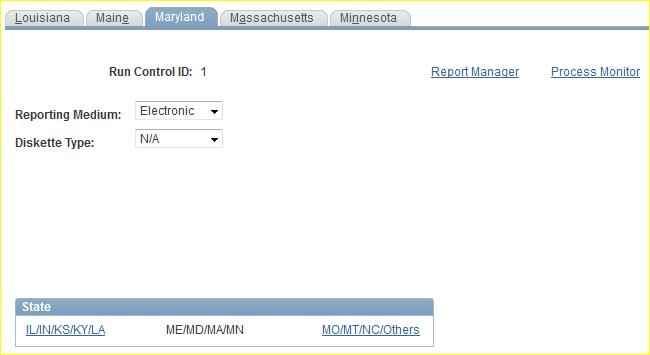
AFTER Tax Update 16-B, the separate Create Quarterly Wage File page for Maryland is removed: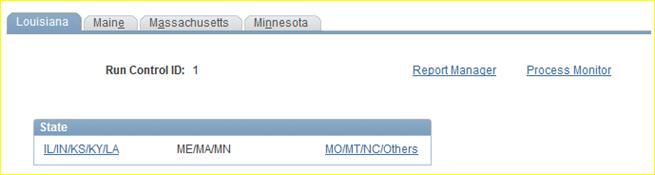

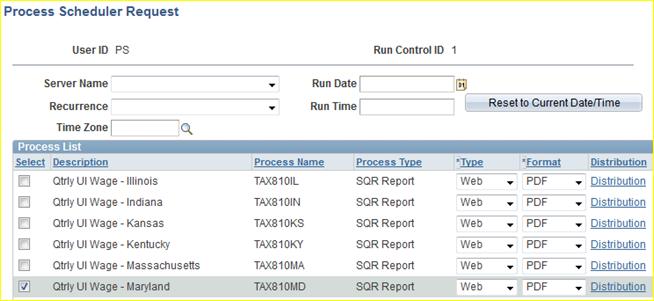
(Patch 21273408)
 |
 |
 |
 |
Future-Dated Paychecks in Employee Self-Service
Tax Update 16-B delivers product modifications to correct two issues related to viewing paychecks in employee self-service:
1. New functionality is added to hide future-dated non-PDF paychecks and deposit advices (created using PAY003.SQR and DDP003.SQR) from employee self-service views, based on the Paycheck Availability data on the Paycheck Options Table.
2. New functionality is added to hide future-dated PDF paychecks and deposit advices (created using
BI Publisher) from employee self-service views in accessibility mode.
Process Status | Before the modifications | After the modifications |
Payroll Confirmation is run. | Sighted and non-sighted users can view all future-dated checks in employee self-service. | (no change) |
Non-PDF paychecks and deposit advices are created using PAY003.SQR and DDP003.SQR, and Paycheck Availability is specified on Paycheck Options Table. | Sighted and non-sighted users can view all future-dated checks in employee self-service. | All future-dated checks are hidden from sighted and non-sighted users in employee self-service. (Tax Update 16-B adds new functionality to look at Paycheck Availability data on Paycheck Options Table.) |
PDF paychecks and deposit advices are created using BI Publisher, and Paycheck Availability is specified on Paycheck Options Table. | All future-dated checks are hidden from sighted users in employee self-service. | (no change) |
All future-dated checks are displayed to non-sighted users in employee self-service. | All future-dated checks are hidden from non-sighted users in employee self-service. * |
* Note: In accessible mode, checks and advices are always displayed on a PeopleSoft page (and not in a PDF file), regardless of the PDF settings used when creating the checks with BI Publisher. As a result, Paycheck Options Table settings are ignored when using employee self-service in accessible mode. (No change is made to this existing functionality.)
(Patch 21802756)
U. S. Year-End Form ID LSR03P Discontinued
Effective beginning with tax year 2016, U. S. year end Form ID LSR03P will no longer be supported. (Used for printing Form W-2, Form ID LSR03P was used to create a PDF version of the standard laser form, printing two forms per page.)
Employers who have previously used Form ID LSR03P should make arrangements to use one of the other supported Form IDs listed below for tax year 2016:

|
Из за большого объема этот материал размещен на нескольких страницах:
1 2 3 4 5 6 |
