


Партнерка на США и Канаду по недвижимости, выплаты в крипто
- 30% recurring commission
- Выплаты в USDT
- Вывод каждую неделю
- Комиссия до 5 лет за каждого referral
System. out. println("The database connection is " +
databaseConnection);
прежде, чем запустить программу, мы должны создать источник данных ODBC. В нашем случае в качестве СУБД мы используем MS Access. База данных размещается в каталоге The database is located in a file called c:\com\mycomputer\TicketRequest. mdb.
Откройте панель управления на Вашем компьютере, затем выберете Администрирование. Вы увидите иконку, помеченную «Источники ODBC». Двойной щелчок на иконке откроет окно, показанное на рис. 19.3.
Рис. 19.3. Менеджер ODBC позволяет указать источник данных для JDBC.
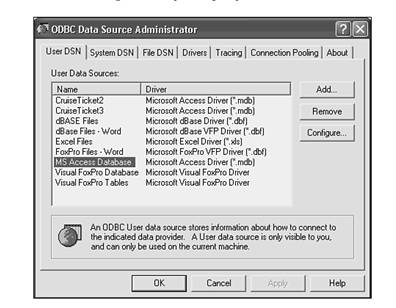
Нажмите на кнопку Добавить, откроется окно, показанное на рис. 19.4.
Рис. 19.4. Выбор типа базы данных.
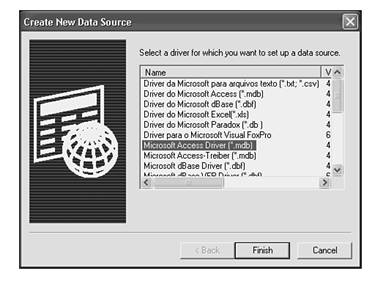
В этом случае база данных - MS Access, поэтому Вы выбираете драйвер и нажимаете кнопку «Закончить». Это приведет к открытию окна, показанного на рис. 19.5.
Рис. 19.5. Задание расположения базы данных.
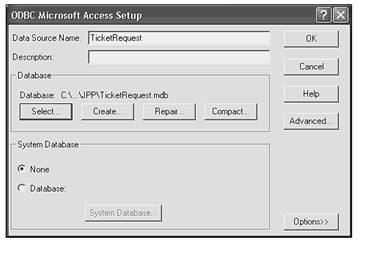
Вы можете ввести любое имя источника, которое Вам нравится. В нашем случае файл с базой данных находится в c:\com\mycomputer\. После нажатия кнопки «OK» Вы увидите окно, показанное на рис. 19.6.
Рис. 19.6. Имя источника базы данных используется в программах.
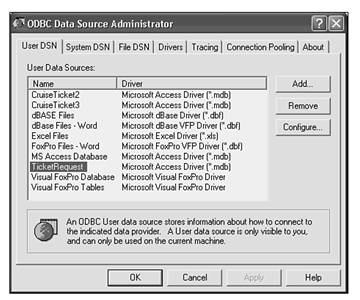
Так что нет ничего волшебного или непонятного в имени TicketRequest. Вы могли бы ввести XYZ, и все бы работало.
Запросы к базе данных
Теперь у нас есть база данных и определенный источник данных. Мы можем извлечь данные из базы и вывести их. Листинг 19.2 показывает, как это сделать.
Листинг 19.2 TestTicketRequest. java
/*
* TestTicketRequest. java
*/
import java. sql.*;
import java. util.*;
public class TestTicketRequest implements java. io. Serializable
{
//information about the customer
private int custID;
private String lastName;
private String firstName;
//information about the cruise
private int cruiseID;
private String destination;
private String port;
private String sailing;
private int numberOfTickets;
public TestTicketRequest()
{
}
public String toString()
{
String outString;
outString = "-------------------------------------------" + "\n";
//information about the customer
outString += "custID = " + this. custID + "\n";
outString += "lastName = " + this. lastName + "\n";
outString += "firstName = " + this. firstName + "\n";
outString += "-------------------------------------------" + "\n";
//information about the cruise
outString += "cruiseID = " + this. cruiseID + "\n";
outString += "destination = " + this. destination + "\n";
outString += "port = " + this. port + "\n";
outString += "sailing = " + this. sailing + "\n";
outString += "numberOfTickets = " + this. numberOfTickets + "\n";
outString += "-------------------------------------------" + "\n";
return outString;
}
public String retrieveFromDB()
{
java. sql. Connection dbConn = null;
Statement statement1 = null;
String createStatement;
String insertStatement;
try
{
// ============== Make connection to database ==================
//load the driver class
Class. forName("sun. jdbc. odbc. JdbcOdbcDriver");
//Specify the ODBC data source
String sourceURL = "jdbc:odbc:TicketRequest";
//get a connection to the database
dbConn = DriverManager. getConnection(sourceURL);
//If we get to here, no exception was thrown
System. out. println("The database connection is " + dbConn);
System. out. println("Making connection...\n");
//Create the statement
statement1 = dbConn. createStatement();
//Populate
String getString =
"SELECT * FROM TicketRequest ";
ResultSet results = statement1.executeQuery(getString);
while (results. next())
{
custID = results. getInt("custID");
lastName = results. getString("lastName");
firstName = results. getString("firstName");
cruiseID = results. getInt("cruiseID");
destination = results. getString("destination");
port = results. getString("port");
sailing = results. getString("sailing");
numberOfTickets = results. getInt("numberOfTickets");
System. out. println(this);
}
return "Successful Retrieval";
} catch (Exception e)
{
System. out. println("Exception was thrown: " + e. getMessage());
return "UnSuccessful Retrieval";
} finally
{
try
{
if (statement1 != null)
statement1.close();
if (dbConn!= null)
dbConn. close();
} catch (SQLException sqle)
{
System. out. println("SQLException during close(): " +
sqle. getMessage());
}
}
}
public static void main(String[] args)
{
TestTicketRequest ttr = new TestTicketRequest();
System. out. println("The contents of the database:");
System. out. println(ttr. retrieveFromDB());
}
}
Самая интересная часть примера – это получение данных из базы. Сначала мы соединяемся с базой, как это было сделано в предыдущем примере.
dbConn = DriverManager. getConnection(sourceURL);
Объект типа Connection используется для создания объекта типа Statement.
//Create the statement
statement1 = dbConn. createStatement();
Создадим запрос SQL как строку:
//Populate the bean
String getString =
"SELECT * FROM TicketRequest ";
Теперь получим результат, выполнив запрос:
ResultSet results = statement1.executeQuery(getString);
Мы получим набор записей. Для каждой записи мы получаем значение переменной, преобразуем ее в строку с помощью метода toString() и выводим на дисплей:
while (results. next())
{
custID = results. getInt("custID");
lastName = results. getString("lastName");
firstName = results. getString("firstName");
cruiseID = results. getInt("cruiseID");
destination = results. getString("destination");
port = results. getString("port");
sailing = results. getString("sailing");
numberOfTickets = results. getInt("numberOfTickets");
System. out. println(this);
Результат запуска примера показан ниже:
The contents of the database:
The database connection is sun. jdbc. odbc. *****@***
Making connection...
-------------------------------------------
custID = 1001
lastName = Carter
firstName = Joseph
-----------------------------------------
cruiseID = 2001
destination = Alaska
port = Vancouver
sailing = 1/1/1993
numberOfTickets = 3
-----------------------------------------
-------------------------------------------
custID = 12345
lastName = Joe
firstName = Cocomo
-----------------------------------------
cruiseID = 3001
destination = Caribbean
port = Miami
sailing = 1/1/2004
numberOfTickets = 3
-----------------------------------------
-------------------------------------------
custID = 13
lastName = Beasley
firstName = Demarcus
-----------------------------------------
cruiseID = 3001
destination = Caribbean
port = Miami
sailing = 1/1/2004
numberOfTickets = 3
-----------------------------------------
-------------------------------------------
custID = 17
lastName = Glance
firstName = Harvey
-----------------------------------------
cruiseID = 3001
destination = Caribbean
port = Miami
sailing = 1/1/2004
numberOfTickets = 3
-----------------------------------------
-------------------------------------------
custID = 29
lastName = White
firstName = Byron
-----------------------------------------
cruiseID = 20010
destination = South America
port = San Juan
sailing = 10/3/02
numberOfTickets = 3
-----------------------------------------
Successful Retrieval
Заметим, что данные посылаются на терминал, как только они извлекаются из базы.
Если Вы хотите извлечь только одну запись из базы, программу надо изменить, чтобы выбрать действительно одну запись. Листинг 19.3 показывает пример выбора одной строки по идентификатору пользователя customer ID.
Листинг 19.3 TestTicketRequest. java
/*
* TestTicketRequest2.java
*/
import java. sql.*;
import java. util.*;
public class TestTicketRequest2 implements java. io. Serializable
{
//information about the customer
private int custID;
private String lastName;
private String firstName;
//information about the cruise
private int cruiseID;
private String destination;
private String port;
private String sailing;
private int numberOfTickets;
public TestTicketRequest2()
{
}
public String toString()
{
String outString;
outString = "------------------------------------------" + "\n";
//information about the customer
outString += "custID = " + this. custID + "\n";
outString += "lastName = " + this. lastName + "\n";
outString += "firstName = " + this. firstName + "\n";
outString += "------------------------------------------" + "\n";
//information about the cruise
outString += "cruiseID = " + this. cruiseID + "\n";
outString += "destination = " + this. destination + "\n";
outString += "port = " + this. port + "\n";

|
Из за большого объема этот материал размещен на нескольких страницах:
1 2 3 4 |
