


Партнерка на США и Канаду по недвижимости, выплаты в крипто
- 30% recurring commission
- Выплаты в USDT
- Вывод каждую неделю
- Комиссия до 5 лет за каждого referral
- Press TIMER button to set the operating hours you desired (1 to 12 hours - the timer indicator lights up). When the set time is up, the machine will turn off automatically. The display window shows the hour(s) you set when you press TIMER button. If the timer button is not pressed, the unit will work continuously. Setting the timer but without pressing the other modes’ buttons, you can PRE-SET the time for the machine to start working. For example, if you press the timer to '2', the unit will start working automatically in 2 hours.
“SLEEP” function
- By pressing SLEEP button, the set temperature will increase at 1oC at the 1st hour, another 1oC at the second hour, then keeps the reached temperature. Re-press the SLEEP button, the temperature will return to the pre-selected one. The unit will stop working automatically after the SLEEP function running for 12 hours.
All the above functions can also be performed with the supplied remote control. This remote control requires 2 pcs AAA batteries to operate. The remote control is supplied without batteries.
UV light and ionizer function.
- To start the UV and Ionizer function, please press UV/Ionizer button. The blue light inside the air vent lights up, the ionizer starts working.
Regulating of air flow direction
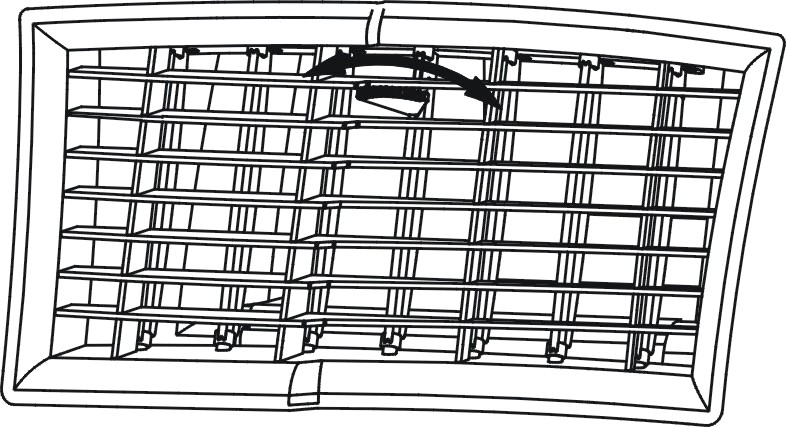
Turn the roller of the air vent to the right or to the left to control the air flow direction.
NOTICE!
- To prolong the compressor's life, after switch-off of the unit, please wait for 3 minutes (at least) before re-switch. The cooling mode switches off if the room temperature is lower than the set one. The ventilation, however, keeps working on the set level. If the room temperature rises above the selected level, the cooling system switches on accordingly. On the contrary, the heating mode switches off if the room temperature is higher than the set one (still, the ventilation keeps working on the set level). As the room temperature drops below the selected level, the heating starts working again. This machine has got the ANTI-FROST function. While using the heating mode when the temperature in the room is low, sometimes the heating stops for a while in order to melt the frost. When it happens, wait for the heating starts working. While switching on the heating mode the ventilation stops working for 15-20 sec. in order to warm up the appliance.
Drainage system
When the appliance is working for cooling, the moisture
is absorbed from the air and the water fills in the water tank inside of the unit.
If the water tank inside of the unit is full of water then the “Water full” indicator lights up.
Drainage
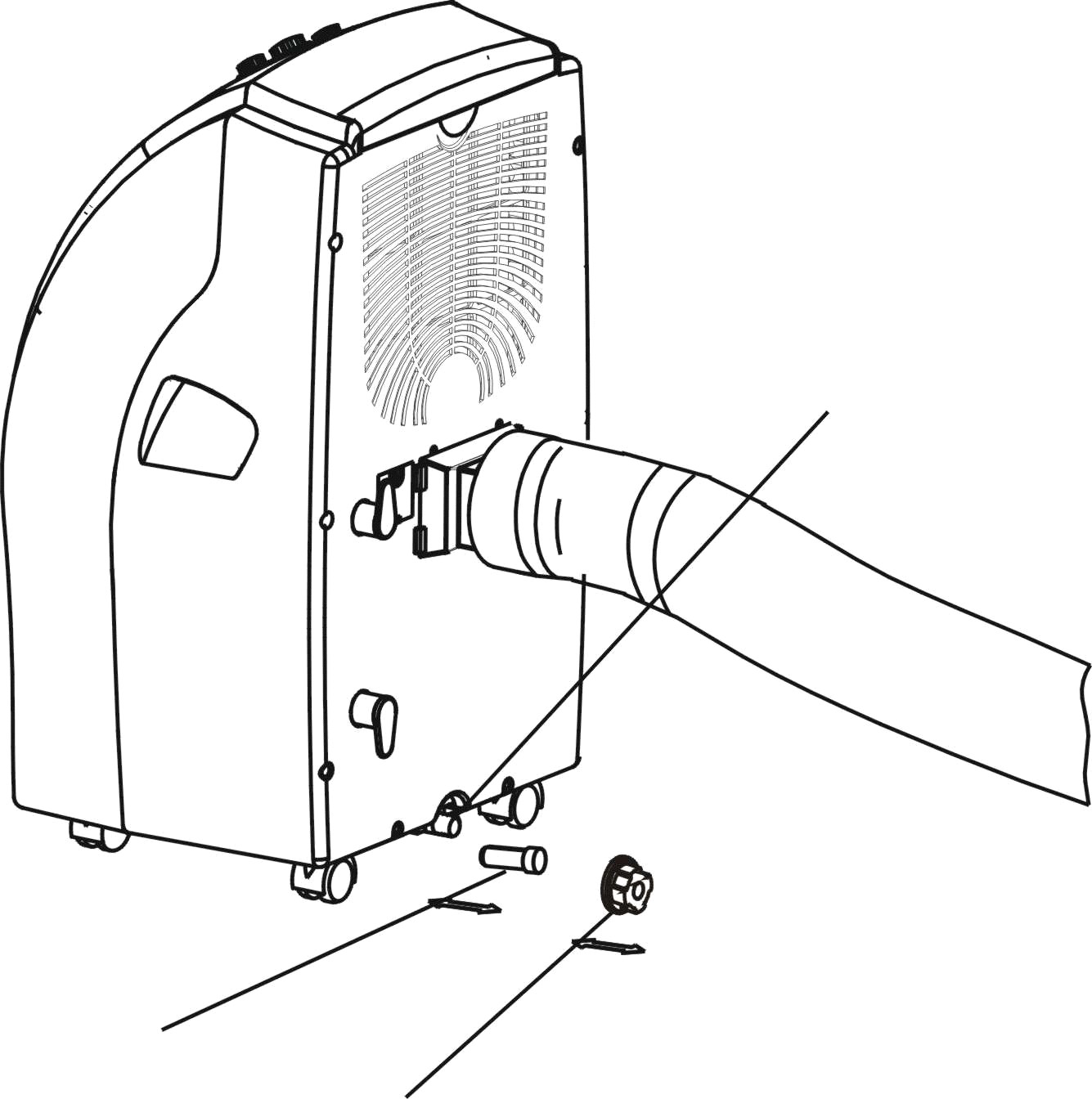
- Turn off the air conditioner and avoid moving it when the water tank is full. Put a container (a water tray for example) underneath the drain hole. Remove the drain knob & rubber plug from the drain hole and allow the water to drain out. When the container is almost full, place the rubber plug in the drain hole and empty the water tray. Repeat until the water tank is empty. Insert the rubber plug and tighten the drain knob firmly. Switch on the unit - the “Water full” should stop lighting.
Drain tube usage
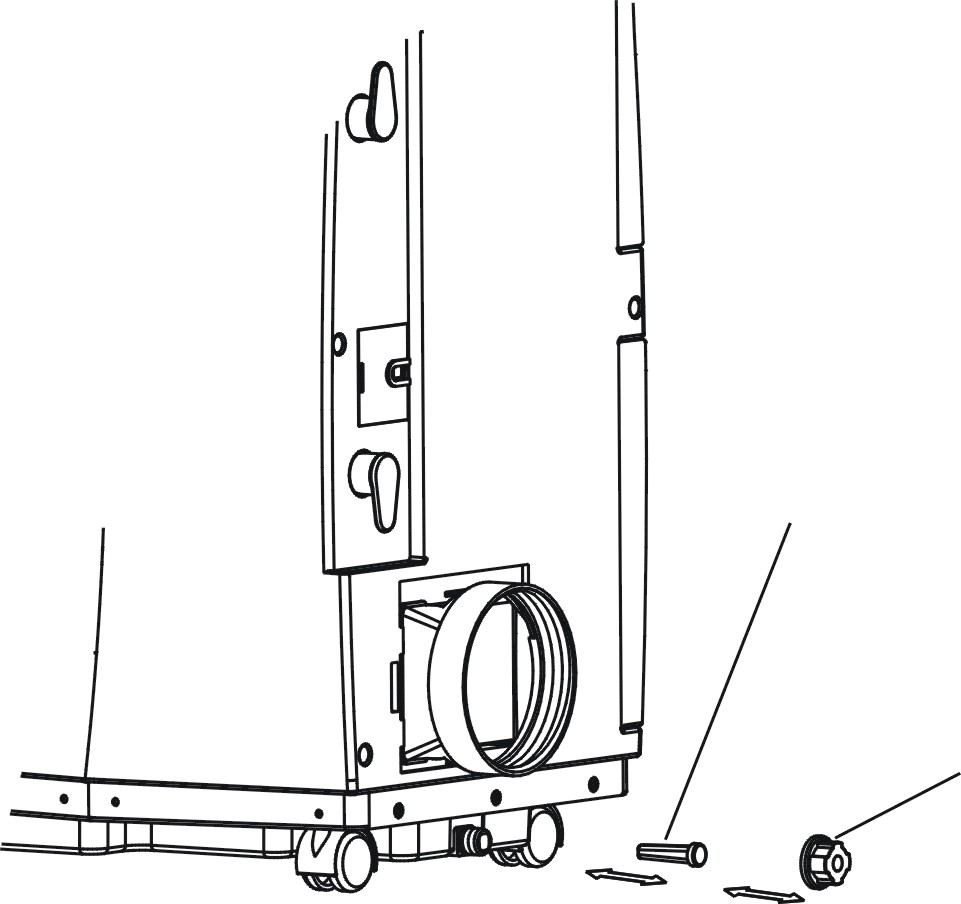
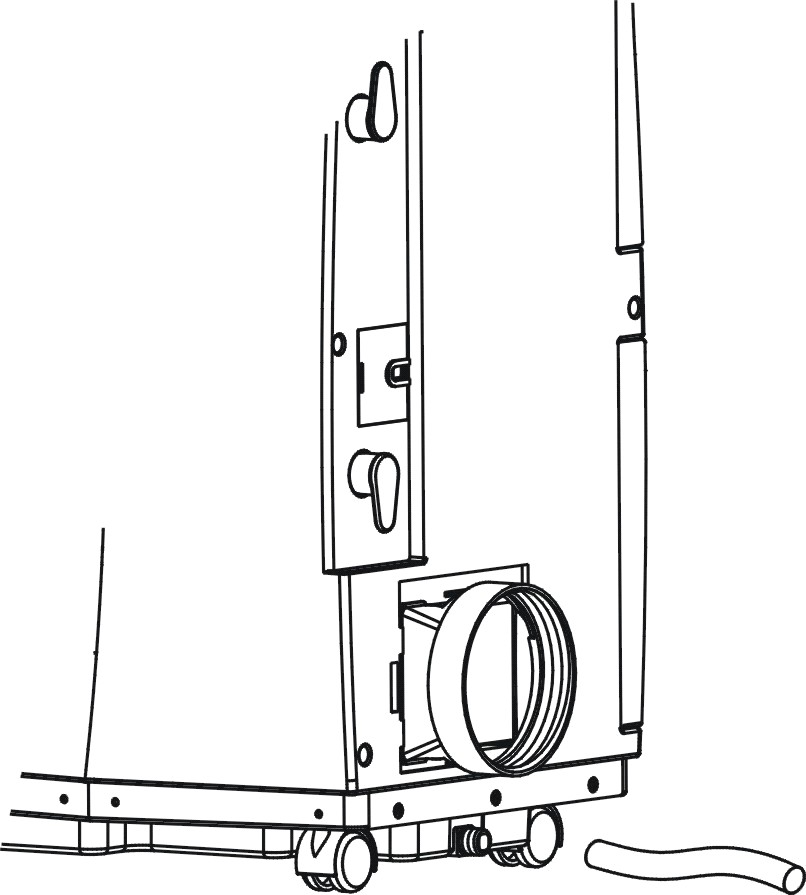
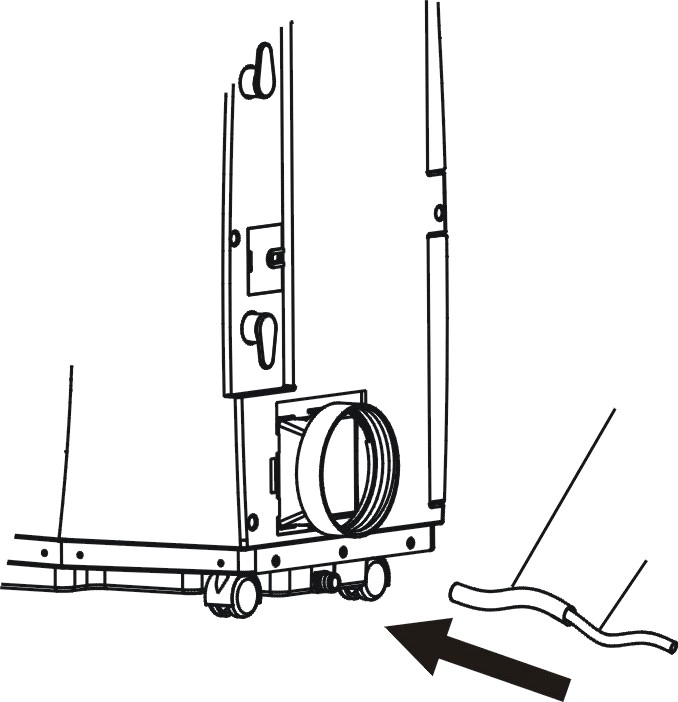
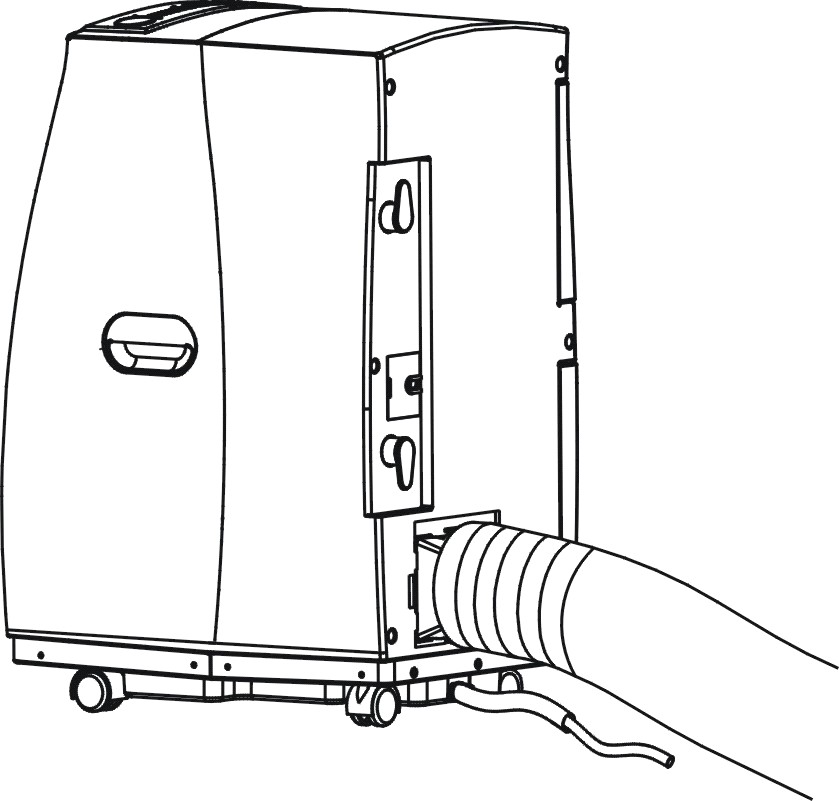
- Remove the drain knob and rubber plug from the drain hole. Connect the drain tube supplied with the unit to the water outlet as shown and put the other end into any container. In that case the water drains automatically.
- If you want to extend the water tube, you can do it with the help of another tube (OD: 18mm)
- The drain tube must be at or below the outlet level. If you use this method the “Water full” indicator should not light or flashing.
.
VI. Technical maintenance
Always unplug the air conditioner from the mains before cleaning.
To maximize the efficiency of the air conditioner clean it regularly.
Cleaning the housing
- Use a soft, damp cloth to wipe the body clean. Never use aggressive chemicals, gasoline, detergents, chemically treated cloths, or other cleansing solutions. These all could hurt the body of the unit.
Cleaning the filter
- Use a vacuum cleaner or tap the filter lightly to remove loose dust and dirt from it and then rinse thoroughly under running water (no hotter than 40C). Dry thoroughly before replacing. Notice! Never use the unit without filter.
End of season storage
- Unplug the air conditioner from the mains.
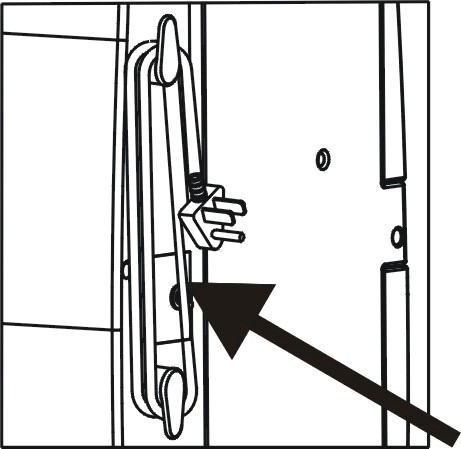
- Drain all the water from the water tank inside of the unit. In sunny day switch on the appliance and let it work for some hours choosing the fan mode. It is necessary for drying the inside parts of the unit. Clean or change the filter
- Store the power cord as shown on the picture Put the unit in the original carton or cover for storage.
VII. Fault check list
PROBLEM | SOLVING THE PROBLEM |
The air conditioner does not run |
|
The machine seems to do little |
|
The machine seems to do nothing. |
|
Too noisy |
|
The compressor doesn’t run. |
|
VIII. Technical data
Model | PMH 1405 SЕ-Рi |
Cooling/heating capacity | 12000 BTU / h (3600 W) |
Input power for cooling | 1230W |
Input power for heating | 1200W |
Air flow | 500 м3 / h |
Humidity removal capacity | 1,8 l / h |
Cooling/heating area | 24 м2 |
Voltage | 220-240V~ 50 Hz /1 phase |
Compressor | Rotary |
Refrigerant | R410А |
Refrigerant volume | 770 g |
Fan speed | 3 |
Timer | 1 – 24 hours for the models |
Working temperature | 18 – 32ОС |
Net weight | 37 kg |
Dimensions | 365х548х746 mm (W хDхH) |
Note: Some differences between the user’s manual and the article are possible to exist, according to the permanent process of technological modernization. We do hope that it will not cause you any inconveniences.
IX. Guarantee information
The article was certificated under the normative documents of Russian Federation.

Projected service life of the article: 3 years
Length of warranty: 1 year from the acquisition date
Manufacturer:
Texton Corporation LLC
1201 Market Street, Wilmington de.19801, State of Delaware, USA
Guarantee Bond
Article: Portable Air Conditioner Model: PMH 1405SE-Pi.
The guarantee is offered by manufacturer in addition to customer’s rights of Russian Federation and does in no way restrict them.
The guarantee is valid in term of 12 months from the acquisition date. It ensures warranty service in case of flaw location of materials or manufacture. In that case the customer has the right, among others, to have free repair of the product. The guaranty is valid in case of following the next clause:
The article must be bought on the territory of Russia and it is intended for household use only. The article should be used in strict accordance with the manual instruction and safety regulations. Warranty services are only to fulfill by authorized dealers of manufacturer in official service centers on the territory of Russia. The insurance arrangements are not valid if the purchase had been made from unauthorized dealers, they are to respond to consumers on their own, which is regulated under the Russian Legislation. The guaranty is not valid in the following cases:- Chemical, mechanical damage of the article or any other kind of impact, as well as penetration of outside objects into the body of the article; The abuse as a result of a wrong use, which conflicts with the manual instruction, as well as incorrect installation and non-observance of safety regulations; Wear-out of parts of decoration, lamps, cells, protecting screen, dustbins, straps and other dated parts; Repairs made by unauthorized firms and dealers *;
Please contact us if you have any question about warranty services
* You are welcome to our website, where you can find addresses of authorized service centers: www. polar. ru
–

|
Из за большого объема этот материал размещен на нескольких страницах:
1 2 3 4 5 |
