


· nis.
· nisc.
· wuarchive. wustl. edu
· src. doc. ic. ac. uk
· normos. org
Table 2. RFCs supported by this version of Microsoft TCP/IP
RFC | Title |
768 | User Datagram Protocol (UDP) |
783 | Trivial File Transfer Protocol (TFTP) |
791 | Internet Protocol (IP) |
792 | Internet Control Message Protocol (ICMP) |
793 | Transmission Control Protocol (TCP) |
816 | Fault Isolation and Recovery |
826 | Address Resolution Protocol (ARP) |
854 | Telnet Protocol (TELNET) |
862 | Echo Protocol (ECHO) |
863 | Discard Protocol (DISCARD) |
864 | Character Generator Protocol (CHARGEN) |
865 | Quote of the Day Protocol (QUOTE) |
867 | Daytime Protocol (DAYTIME) |
894 | IP over Ethernet |
919, 922 | IP Broadcast Datagrams (broadcasting with subnets) |
950 | Internet Standard Subnetting Procedure |
959 | File Transfer Protocol (FTP) |
1001, 1002 | NetBIOS Service Protocols |
1065, 1035, 1123, 1886 | Domain Name System (DNS) |
1042 | A Standard for the Transmission of IP Datagrams over IEEE 802 Networks |
1055 | Transmission of IP over Serial Lines (IP-SLIP) |
1112 | Internet Group Management Protocol (IGMP) |
1122, 1123 | Host Requirements (communications and applications) |
1144 | Compressing TCP/IP Headers for Low-Speed Serial Links |
1157 | Simple Network Management Protocol (SNMP) |
1179 | Line Printer Daemon Protocol |
1188 | IP over FDDI |
1191 | Path MTU Discovery |
1201 | IP over ARCNET |
RFC | Title |
1256 | ICMP Router Discovery Messages |
1323 | TCP Extensions for High Performance (see the TCP1323opts registry parameter) |
1332 | PPP Internet Protocol Control Protocol (IPCP) |
1518 | Architecture for IP Address Allocation with CIDR |
1519 | Classless Inter-Domain Routing (CIDR): An Address Assignment and Aggregation Strategy |
1534 | Interoperation Between DHCP and BOOTP |
1542 | Clarifications and Extensions for the Bootstrap Protocol |
1552 | PPP Internetwork Packet Exchange Control Protocol (IPXCP) |
1661 | The Point-to-Point Protocol (PPP) |
1662 | PPP in HDLC-like Framing |
1748 | IEEE 802.5 MIB using SMIv2 |
1749 | IEEE 802.5 Station Source Routing MIB using SMIv2 |
1812 | Requirements for IP Version 4 Routers |
1828 | IP Authentication using Keyed MD5 |
1829 | ESP DES-CBC Transform |
1851 | ESP Triple DES-CBC Transform |
1852 | IP Authentication using Keyed SHA |
1886 | DNS Extensions to Support IP Version 6 |
1994 | PPP Challenge Handshake Authentication Protocol (CHAP) |
1995 | Incremental Zone Transfer in DNS |
1996 | A Mechanism for Prompt DNS Notification of Zone Changes |
2018 | TCP Selective Acknowledgment Options |
2085 | HMAC-MD5 IP Authentication with Replay Prevention |
2104 | HMAC: Keyed Hashing for Message Authentication |
2131 | Dynamic Host Configuration Protocol |
2136 | Dynamic Updates in the Domain Name System (DNS UPDATE) |
2181 | Clarifications to the DNS Specification |
2205 | Resource ReSerVation Protocol (RSVP) -- Version 1 Functional Specification |
2236 | Internet Group Management Protocol, Version 2 |
2308 | Negative Caching of DNS Queries (DNS NCACHE) |
2401 | Security Architecture for the Internet Protocol |
2401 | Security Architecture for the Internet Protocol |
2402 | IP Authentication Header |
2406 | IP Encapsulating Security Payload (ESP) |
2581 | TCP Congestion Control |
Architectural Model |
Overview
The Microsoft TCP/IP suite contains core protocol elements, services, and the interfaces between them. The Transport Driver Interface (TDI) and the Network Device Interface Specification (NDIS) are public, and their specifications are available from Microsoft.[1] In addition, there are a number of higher-level interfaces available to user-mode applications. The most commonly-used are Windows Sockets, remote procedure call (RPC), and NetBIOS.
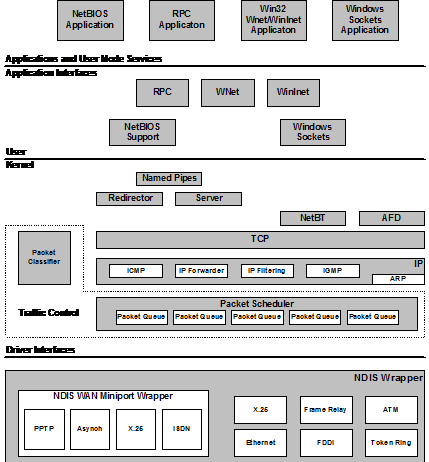
Figure 1. The Windows 2000 TCP/IP network model
Plug and Play
Windows 2000 introduces support for Plug and Play. Plug and Play has the following capabilities and features:
· Automatic and dynamic recognition of installed hardware. This includes initial system installation, recognition of static hardware changes that may occur between boots, and response to run-time hardware events, such as dock or undock, and insertion or removal of cards.
· Streamlined hardware configuration in response to automatic and dynamic recognition of hardware, including dynamic hardware activation, resource arbitration, device driver loading, drive mounting, and so on.
· Support for particular buses and other hardware standards that facilitate automatic and dynamic recognition of hardware and streamlined hardware configuration, including Plug and Play ISA, PCI, PCMCIA, PC Card/CardBus, USB, and 1394. This includes promulgation of standards and advice about how hardware should behave.
· An orderly Plug and Play framework in which driver writers can operate. This includes infrastructure, such as device information (INF) interfaces, APIs, kernel-mode notifications, executive interfaces, and so on.
· Mechanisms that allow user-mode code and applications to learn of changes in the hardware environment so that they can take appropriate actions.
Plug and Play operation does not require Plug and Play hardware. To the degree possible, the first two bullets above apply to legacy hardware, as well as Plug and Play hardware. In some cases, orderly enumeration of legacy devices is not possible because the detection methods are destructive or inordinately time-consuming.
The primary impact that Plug and Play support has on protocol stacks is that network interfaces can come and go at any time. The Windows 2000 TCP/IP stack and related components have been adapted to support Plug and Play.
The NDIS Interface and Below |
Microsoft networking protocols use the Network Device Interface Specification (NDIS) to communicate with network card drivers. Much of the OSI model link layer functionality is implemented in the protocol stack. This makes development of network card drivers much simpler.
Network Driver Interface Specification (3.1 through 5.0)
NDIS 3.1 supports basic services that allow a protocol module to send raw packets over a network device and allow that same module to be notified of incoming packets received by a network device.
NDIS 4.0 added the following new features to NDIS 3.1:
· Out-of-band data support (required for Broadcast PC)
· WirelessWAN Media Extension
· High-speed packet send and receive (a significant performance win)
· Fast IrDA Media Extension
· Media Sense (required for the Designed for Windows logo in PC 97 and later Hardware Design Guide). The Microsoft Windows 2000 TCP/IP stack utilizes media sense information, which is described in the “Automatic Client Configuration” section of this white paper.
· All local packet filter (prevents Network Monitor from monopolizing the CPU)
· Numerous new NDIS system functions (required for miniport binary compatibility across Windows 95, Windows 98, Windows NT, and Windows 2000)
NDIS 5.0 includes all functionality defined in NDIS 4.0, plus the following extensions:
· NDIS power management (required for Network Power Management and Network Wake-up)
· Plug and Play. (Windows 95 NDIS had Plug and Play support already; therefore, this change applies to Windows 2000 network drivers only.)
· Support for Windows Management Instrumentation (WMI), which provides Web-based Enterprise Management (WBEM)–compatible instrumentation of NDIS miniports and their associated adapters
· Support for a single INF format across Windows operating systems. The new INF format is based on the Windows 98 INF format.
· Deserialized miniport for improved performance
· Task offload mechanisms, such as TCP and UDP checksum and Fast Packet Forwarding
· Broadcast Media Extension (needed for Broadcast Services for Windows)
· Connection-oriented NDIS (required to support Asynchronous Transfer Mode [ATM], Asymmetric Digital Subscriber Line [ADSL], and Windows Driver Model–Connection Streaming Architecture [WDM-CSA]
· Support for Quality of Service (QoS)
· Intermediate Driver Support (required for Broadcast PC, Virtual LANs, Packet Scheduling for QoS, and NDIS support of IEEE 1394 network devices)
NDIS can power down network adapters when the system requests a power level change. Either the user or the system can initiate this request. For example, the user may want to put the computer in sleep mode, or the system may request a power level change based on keyboard or mouse inactivity. In addition, disconnecting the network cable can initiate a power-down request if the network interface card (NIC) supports this functionality. In this case, the system waits a configurable time period before powering down the NIC because the disconnect could be the result of temporary wiring changes on the network, rather than the disconnection of a cable from the network device itself.
NDIS power management policy is no network activity–based. This means that all overlying network components must agree to the request before the NIC can be powered down. If there are any active sessions or open files over the network, the power-down request can be refused by any or all of the components involved.
The computer can also be awakened from a lower power state, based on network events. A wakeup signal can be caused by:
· Detection of a change in the network link state (for example, cable reconnect)
· Receipt of a network wakeup frame
· Receipt of a Magic Packet. (For more information, see www. .)
At driver initialization, NDIS queries the capabilities of the miniport to determine if it supports such things as Magic Packet, pattern match, or link change wakeups, and to determine the lowest required power state for each wakeup method. The network protocols then query the miniport capabilities. At run time, the protocol sets the wakeup policy, using object identifiers (OIDs), such as Enable Wakeup, Set Packet Pattern, and Remove Packet Pattern.
Currently, Microsoft TCP/IP is the only Microsoft protocol stack that supports network power management. It registers the following packet patterns at miniport initialization:
· Directed IP packet
· ARP broadcast for the station’s IP address
· NetBIOS over TCP/IP broadcast for the station's assigned computer name
NDIS-compliant drivers are available for a wide variety of NICs from many vendors. The NDIS interface allows multiple protocol drivers of different types to bind to a single NIC driver and allows a single protocol to bind to multiple NIC drivers. The NDIS specification describes the multiplexing mechanism used to accomplish this. Bindings can be viewed or changed from the Windows Network Connections folder.
Windows 2000 TCP/IP provides support for:
· Ethernet (and 802.3 SNAP)
· FDDI
· Token Ring (802.5)
· ATM (LANE and CLIP)
· ARCnet
· Dedicated wide area network (WAN) links such as Dataphone Digital Service (DDS) and T-carrier (Fractional T1, T1, and T3)
· Dial-up or permanent circuit switched WAN services such as analog phone, ISDN, and xDSL
· Packet switched WAN services such as X.25, Frame Relay, and ATM
The goals for these new features include the following:
· Increasing ease-of-use and reducing total cost of ownership (TCO)
· Improving performance
· Enabling new media types, services, and applications
· Improving flexibility in the driver architecture
Link Layer Functionality
Link layer functionality is divided between the network interface card/driver combination and the low-level protocol stack driver. The network card/driver combination filters are based on the destination media access control (MAC) address of each frame.
Normally, the hardware filters out all incoming frames except those containing one of the following destination addresses:
· The address of the adapter
· The all ones broadcast address (FF-FF-FF-FF-FF-FF)
· Multicast addresses that a protocol driver on this host has registered interest in, using an NDIS primitive
Because this first filtering decision is made by the hardware, the NIC discards any frames that do not meet the filter criteria without incurring any CPU processing. All frames (including broadcasts) that pass the hardware filter are then passed up to the NIC driver through a hardware interrupt.[2] The NIC driver is software that runs on the computer, so any frames that make it this far require some CPU time to process. The NIC driver brings the frame into system memory from the interface card. Then the frame is indicated (passed up) to the appropriate bound transport driver(s). The NDIS 5.0 specification provides more detail on this process.
Frames are passed up to all bound transport drivers in the order that they are bound.
As a packet traverses a network or series of networks, the source media access control address is always that of the NIC that placed it on the media, and the destination media access control address is that of the NIC that is intended to pull it off the media. This means that, in a routed network, the source and destination media access control address changes with each hop through a network-layer device (router or Layer 3 switch).
Maximum Transmission Unit (MTU)
Each media type has a maximum frame size that cannot be exceeded. The link layer is responsible for discovering this MTU and reporting it to the protocols above. NDIS drivers may be queried for the local MTU by the protocol stack. Knowledge of the MTU for an interface is used by upper layer protocols, such as TCP, that optimize packet sizes for each media automatically. For details, see the discussion of TCP Path Maximum Transmission Unit (PMTU) discovery in the “Transmission Control Protocol (TCP)” section of this paper.
If a NIC driver—such as an ATM driver—uses LAN emulation mode, it may report that it has an MTU that is higher than what is expected for that media type. For example, it may emulate Ethernet but report an MTU of 9180 bytes. Windows NT and Windows 2000 accept and use the MTU size reported by the adapter, even when it exceeds the normal MTU for a given media type.
Sometimes the MTU reported to the protocol stack may be less than what would be expected for a given media type. For instance, use of the 802.1p standard for QoS over Ethernet often (this is hardware dependent) reduces the MTU reported by 4 bytes due to larger link-layer headers.
Core Protocol Stack Components and the TDI Interface |
The core protocol stack components are those shown between the NDIS and TDI interfaces in figure 1. They are implemented in the Windows 2000 Tcpip. sys driver. The Microsoft stack is accessible through the TDI interface and the NDIS interface. The Winsock2 interface also provides some support for direct access to the protocol stack.
Address Resolution Protocol (ARP)
ARP performs IP address-to-Media Access Control (MAC) address resolution for outgoing packets. As each outgoing IP datagram is encapsulated in a frame, source and destination media access control addresses must be added. Determining the destination media access control address for each frame is the responsibility of ARP.
ARP compares the destination IP address on every outbound IP datagram to the ARP cache for the NIC over which the frame will be sent. If there is a matching entry, the MAC address is retrieved from the cache. If not, ARP broadcasts an ARP Request Packet on the local subnet, requesting that the owner of the IP address in question reply with its media access control address. If the packet is going through a router, ARP resolves the media access control address for that next-hop router, rather than the final destination host. When an ARP reply is received, the ARP cache is updated with the new information, and it is used to address the packet at the link layer.
ARP Cache
You can use the ARP utility to view, add, or delete entries in the ARP cache. Examples are shown below. Entries added manually are static and are not automatically removed from the cache, whereas dynamic entries are removed from the cache (see the “ARP Cache Aging” section for more information).
The arp command can be used to view the ARP cache, as shown here:
C:\>arp –a
Interface: 199.199.40.123
Internet Address Physical Address Type
199.199.4c-1a-eb-c5 dynamic
199.199.40.dd5 dynamic
Interface: 10.57.8.190
Internet Address Physical Address Type
10.57.9.af-1d-2b-91 dynamic
The computer in this example is multihomed—has more than one NIC—so there is a separate ARP cache for each interface.
In the following example, the command arp –s is used to add a static entry to the ARP cache used by the second interface for the host whose IP address is 10.57.10.32 and whose NIC address is 00608C0E6C6A:
C:\>arp - s 10.57.10c-0e-6c-6a 10.57.8.190
C:\>arp - a
Interface: 199.199.40.123
Internet Address Physical Address Type
199.199.4c-1a-eb-c5 dynamic
199.199.40.dd5 dynamic
Interface: 10.57.8.190
Internet Address Physical Address Type
10.57.9.af-1d-2b-91 dynamic
10.57.10c-0e-6c-6a static
ARP Cache Aging
Windows NT and Windows 2000 adjust the size of the ARP cache automatically to meet the needs of the system. If an entry is not used by any outgoing datagram for two minutes, the entry is removed from the ARP cache. Entries that are being referenced are removed from the ARP cache after ten minutes. Entries added manually are not removed from the cache automatically. A new registry parameter, ArpCacheLife, was added in Windows NT 3.51 Service Pack 4 to allow more administrative control over aging. This parameter is described in Appendix A.
Use the command arp –d to delete entries from the cache, as shown below:
C:\>arp - d 10.57.10.32
C:\>arp - a
Interface: 199.199.40.123
Internet Address Physical Address Type
199.199.4c-1a-eb-c5 dynamic
199.199.40.dd5 dynamic
Interface: 10.57.8.190
Internet Address Physical Address Type
10.57.9.af-1d-2b-91 dynamic
ARP queues only one outbound IP datagram for a specified destination address while that IP address is being resolved to a media access control address. If a User Datagram Protocol (UDP)-based application sends multiple IP datagrams to a single destination address without any pauses between them, some of the datagrams may be dropped if there is no ARP cache entry already present. An application can compensate for this by calling the iphlpapi. dll routine SendArp() to establish an ARP cache entry, before sending the stream of packets. See the Microsoft Knowledge Base article Q193059 or the Platform SDK for IP Helper API details.
Internet Protocol (IP)
IP is the mailroom of the TCP/IP stack, where packet sorting and delivery take place. At this layer, each incoming or outgoing packet is referred to as a datagram. Each IP datagram bears the source IP address of the sender and the destination IP address of the intended recipient. Unlike the media access control addresses, the IP addresses in a datagram remain the same throughout a packet’s journey across an internetwork. IP layer functions are described below.
Routing
Routing is a primary function of IP. Datagrams are handed to IP from UDP and TCP above, and from the NIC(s) below. Each datagram is labeled with a source and destination IP address. IP examines the destination address on each datagram, compares it to a locally maintained route table, and decides what action to take. There are three possibilities for each datagram:
· It can be passed up to a protocol layer above IP on the local host.
· It can be forwarded using one of the locally attached NICs.
· It can be discarded.
The route table maintains four different types of routes. They are listed below in the order that they are searched for a match:
1. Host (a route to a single, specific destination IP address)

|
Из за большого объема этот материал размещен на нескольких страницах:
1 2 3 4 5 6 7 8 9 10 |
