


2. Subnet (a route to a subnet)
3. Network (a route to an entire network)
4. Default (used when there is no other match)
To determine a single route to use to forward an IP datagram, IP uses the following process:
1. For each route in the routing table, IP performs a bit-wise logical AND between the destination IP address and the netmask. IP compares the result with the network destination for a match. If they match, IP marks the route as one that matches the destination IP address.
2. From the list of matching routes, IP determines the route that has the most bits in the netmask. This is the route that matches the most bits to the destination IP address and is therefore the most specific route for the IP datagram. This is known as finding the longest or closest matching route.
3. If multiple closest matching routes are found, IP uses the route with the lowest metric. If multiple closest matching routes with the lowest metric are found, IP can choose to use any of those routes.
You can use the route print command to view the route table from the command prompt, as shown below:
C:\>route print
===========================================================================
Interface List
0x1 ........................... MS TCP Loopback interface
0x2 ...00 a0 24 e9 cfCom 3C90x Ethernet Adapter
0x3 ..00 ...... NDISWAN Miniport
0x4 ..00 ...... NDISWAN Miniport
0x5 ..00 ...... NDISWAN Miniport
0x6 ..00 ...... NDISWAN Miniport
===========================================================================
===========================================================================
Active Routes:
Network Destination Netmask Gateway Interface Metric
0.0.9.99.
10.99.90 10.99.9
10.99.97.0.0.1 1
10.255.255.0.99.99.1 1
127.0.7.0.
224.0..99.9
255.255.255.0.99.99.1 1
Default Gateway: 10.99.99.254
===========================================================================
Persistent Routes:
None
The route table above is for a computer with the class A IP address of 10.99.99.1, the subnet mask of 255.255.255.0, and the default gateway of 10.99.99.254. It contains the following eight entries:
· The first entry, to address 0.0.0.0, is the default route.
· The second entry is for the subnet 10.99.99.0, on which this computer resides.
· The third entry, to address 10.99.99.1, is a host route for the local host. It specifies the loopback address, which makes sense because a datagram bound for the local host should be looped back internally.
· The fourth entry is for the network broadcast address.
· The fifth entry is for the loopback address, 127.0.0.0.
· The sixth entry is for IP multicasting, which is discussed later in this document.
· The final entry is for the limited broadcast (all ones) address.
The Default Gateway is the currently active default gateway. This is useful to know when multiple default gateways are configured.
On this host, if a packet is sent to 10.99.99.40, the closest matching route is the local subnet route (10.99.99.0 with the mask of 255.255.255.0). The packet is sent via the local interface 10.99.99.1. If a packet is sent to 10.200.1.1, the closest matching route is the default route. In this case, the packet is forwarded to the default gateway.
The route table is maintained automatically in most cases. When a host initializes, entries for the local network(s), loopback, multicast, and configured default gateway are added. More routes may appear in the table as the IP layer learns of them. For instance, the default gateway for a host may advise it of a better route to a specific network, subnet, or host, using ICMP, which is explained later in this white paper. Routes also may be added manually using the route command, or by a routing protocol. The -p (persistent) switch can be used with the route command to specify permanent routes. Persistent routes are stored in the registry under the registry key
HKEY_LOCAL_MACHINE
\SYSTEM
\CurrentControlSet
\Services
\Tcpip
\Parameters
\PersistentRoutes
Windows 2000 TCP/IP introduces a new metric configuration option for default gateways. This metric allows better control of which default gateway is active at any particular time. The default value for the metric is 1. A route with a lower metric value is preferred to a route with a higher metric. In the case of default gateways, the computer will use the one with the lowest metric unless it appears to be inactive, in which case dead gateway detection may trigger a switch to the next lowest metric default gateway in the list. Default gateway metrics can be set using TCP/IP Advanced Configuration properties. DHCP servers provide a base metric, and a list of default gateways. If a DHCP server provides a base of 100, and a list of three default gateways, the gateways will be configured with metrics of 100, 101, and 102 respectively. A DHCP-provided base does not apply to statically configured default gateways.
Most Autonomous System (AS) routers use a protocol such as Routing Information Protocol (RIP) or Open Shortest Path First (OSPF) to exchange routing tables with each other. Windows 2000 Server includes support for these protocols. Windows 2000 Professional includes support for silent RIP.
By default, Windows-based systems do not behave as routers and do not forward IP datagrams between interfaces. However, the Routing and Remote Access service is included in Windows 2000 Server. It can be enabled and configured to provide full multiprotocol routing services.
To administer the Routing and Remote Access
1. On the Start menu, point to Programs.
2. Point to Administrative Tools, and then click Routing and Remote Access.
When running multiple logical subnets on the same physical network, the following command can be used to tell IP to treat all subnets as local and to use ARP directly for the destination:
route add 0.0.0.0 MASK 0.0.0.0 <my local ip address>
Thus, packets destined for non-local subnets are transmitted directly onto the local media instead of being sent to a router. In essence, the local interface card can be designated as the default gateway. This can be useful where several class C networks are used on one physical network with no router to the outside world, or in a proxy-ARP environment.
Duplicate IP Address Detection
Duplicate address detection is an important feature. When the stack is first initialized or when a new IP address is added, gratuitous ARP requests are broadcast for the IP addresses of the local host. The number of ARPs to send is controlled by the ArpRetryCount registry parameter, which defaults to 3. If another host replies to any of these ARPs, the IP address is already in use. When this happens, the Windows-based computer still boots; however, the interface containing the offending address is disabled, a system log entry is generated, and an error message is displayed. If the host that is defending the address is also a Windows-based computer, a system log entry is generated, and an error message is displayed on that computer. In order to repair the damage possibly done to the ARP caches on other computers, the offending computer re-broadcasts another ARP, restoring the original values in the ARP caches of the other computers.
A computer using a duplicate IP address can be started when it is not attached to the network, in which case no conflict would be detected. However, if it is then plugged into the network, the first time that it sends an ARP request for another IP address, any Windows NT–based computer with a conflicting address detects the conflict. The computer detecting the conflict displays an error message and logs a detailed event in the system log. A sample event log entry is shown below:
The system detected an address conflict for IP address 199.199.40.123 with the system having network hardware address 00:DD:01:0F:7A:work operations on this system may be disrupted as a result.
DHCP-enabled clients inform the DHCP server when an IP address conflict is detected and, instead of invalidating the stack, they request a new address from the DHCP server and request that the server flag the conflicting address as bad. This capability is commonly known as DHCP Decline support.
Multihoming
When a computer is configured with more than one IP address, it is referred to as a multihomed system. Multihoming is supported in three different ways:
· Multiple IP addresses per NIC
o To add addresses for an interface, on the Start menu, point to Settings, and then click Network and Dial-up Connections. Right-click Local Area Connection, and click Properties. Select Internet Protocol (TCP/IP), click Properties, and then click Advanced. In the Advanced Settings dialog box, click Add on the IP Settings tab to add IP addresses.
o NetBIOS over TCP/IP (NetBT) binds to only one IP address per interface card. When a NetBIOS name registration is sent out, only one IP address is registered per interface. This registration occurs over the IP address that is listed first in the user interface (UI).
· Multiple NICs per physical network. There are no restrictions, other than hardware.
· Multiple networks and media types. There are no restrictions, other than hardware and media support. See the section, “The NDIS Interface and Below” for supported media types.
When an IP datagram is sent from a multihomed host, it is passed to the interface with the best apparent route to the destination. Accordingly, the datagram may contain the source IP address of one interface in the multihomed host, yet be placed on the media by a different interface. The source media access control address on the frame is that of the interface that actually transmitted the frame to the media, and the source IP address is the one that the sending application sourced it from, not necessarily one of the IP addresses associated with the sending interface in the Network Connections UI.
When a computer is multihomed with NICs attached to disjoint networks (networks that are separate from and unaware of each other, such as a remote access-connected network and a local connection), routing problems may arise. It is often necessary to set up static routes to remote networks in this situation.
When configuring a computer to be multihomed on two disjoint networks, the best practice is to set the default gateway on the main or largest and least-known network. Then, either add static routes or use a routing protocol to provide connectivity to the hosts on the smaller or better-known network. Avoid configuring a different default gateway on each side; this can result in unpredictable behavior and loss of connectivity.
Note: There can only be one active default gateway for a computer at any moment in time.
More details on name registration, resolution, and choice of NIC on outbound datagrams with multihomed computers are provided in the “Transmission Control Protocol (TCP),” “NetBIOS over TCP/IP,” and “Windows Sockets” sections of this paper.
Classless Interdomain Routing (CIDR)
CIDR, described in RFCs 1518 and 1519, removes the concept of class from the IP address assignment and management process. In place of predefined, well-known boundaries, CIDR allocates addresses defined by a starting address and a range, which makes more efficient use of available space. The range defines the network part of the address. For example an assignment from an ISP to a corporate client might be expressed as 10.57.1.128 /25. This would result in a 128-address block for local use, with the upper 25 bits being the network identifier part of the address. A legacy, class-full allocation would be expressed as <net>.0.0.0 /8, <net>.<net>.0.0 /16, or <net>.<net>.<net>.0 /24. As these are reclaimed, they will be reallocated using classless CIDR techniques.
Given the installed base of class-full systems, the initial implementation of CIDR was to concatenate pieces of the Class C space. This process was called supernetting. Supernetting can be used to consolidate several class C network addresses into one logical network. To use supernetting, the IP network addresses that are to be combined must share the same high-order bits, and the subnet mask is shortened to take bits away from the network portion of the address and add them to the host portion. For example, the class C network addresses 199.199.4.0, 199.199.5.0, 199.199.6.0, and 199.199.7.0 can be combined by using a subnet mask of 255.255.252.0 for each:
NET 199.1900.0
NET 199.1901.0
NET 199.1910.0
NET 199.1911.0
MASK 255.255.2500.0
When routing decisions are made, only the bits covered by the subnet mask are used, thus making all these addresses appear to be part of the same network for routing purposes. Any routers in use must also support CIDR and may require special configuration. Windows 2000 TCP/IP includes support for 0's and 1's subnets as described in RFC 1878.
IP Multicasting
IP multicasting is used to provide efficient multicast services to clients that may not be located on the same network segment. Windows Sockets applications can join a multicast group to participate in a wide-area conference, for instance.
Windows 2000 is level-2 (send and receive) compliant with RFC 1112. IGMP is the protocol used to manage IP multicasting, which is described later in this document.
IP over ATM
Windows 2000 introduces support for IP over ATM. RFC 1577 (and successors) define the basic operation of an IP over ATM network, or more precisely, a Logical IP Subnet over an ATM network. A Logical IP Subnet (or LIS) is a set of IP hosts that can communicate directly with each other. Two hosts belonging to different Logical IP Subnets can communicate only through an IP router that is a member of both subnets.
ATM Address Resolution
Because an ATM network is non-broadcast, ARP broadcasts (as used by Ethernet or Token Ring) are not a suitable solution. Instead, a dedicated Address Resolution Protocol server (or ARP server) is used to provide IP-to-ATM address resolution.
One of the stations in a LIS is designated as an ARP server (and the ARP server software is loaded on it). Stations that use the services of the ARP server are referred to as ARP clients. All IP stations within a LIS are ARP clients. Each ARP client is configured with the ATM address of the ARP server. When an ARP client starts up, it makes an ATM connection to the ARP server, and sends a packet to the server that contains the client’s IP and ATM addresses. The ARP server builds a table of IP-address-to-ATM-address mappings. When a client has an IP packet to be sent to another client (whose IP address is known but whose ATM address is unknown), it first queries the ARP server for the ATM address of the desired client. When it receives a reply that contains the desired ATM address, the client establishes a direct ATM connection to the target client and sends IP packets for that client on this connection.
The clients close any ATM connection, including the connection to the server, if the connections are inactive. All clients refresh their IP and ATM address information with the server periodically (the default is 15 minutes). An entry that is not refreshed after 20 minutes (by default) is purged by the server. The ATM ARP client and ARP server both support a number of adjustable registry parameters, which are listed in Appendix A.
Internet Control Message Protocol (ICMP)
ICMP is a maintenance protocol specified in RFC 792 and is normally considered part of the IP layer. ICMP messages are encapsulated within IP datagrams, so that they can be routed throughout an internetwork. Windows NT and Windows 2000 use ICMP to:
· Build and maintain route tables.
· Perform router discovery.
· Assist in Path Maximum Transmission Unit (PMTU) discovery.
· Diagnose problems (ping, tracert, pathping).
· Adjust flow control to prevent link or router saturation.
ICMP Router Discovery
Windows 2000 can perform router discovery as specified in RFC 1256. Router discovery provides an improved method of configuring and detecting default gateways. Instead of using manually - or DHCP-configured default gateways, hosts can dynamically discover routers on their subnet. If the primary router fails or the network administrators change router preferences, hosts can automatically switch to a backup router.
When a host that supports router discovery initializes, it joins the all-systems IP multicast group (224.0.0.1), and then listens for the router advertisements that routers send to that group. Hosts can also send router-solicitation messages to the all-routers IP multicast address (224.0.0.2) when an interface initializes to avoid any delay in being configured. Windows 2000 sends a maximum of three solicitations at intervals of approximately 600 milliseconds.
The use of router discovery is controlled by the PerformRouterDiscovery and SolicitationAddressBCast registry parameters, and it defaults to DHCP controlled in Windows 2000.
Setting SolicitationAddressBCast to 1 causes router solicitations to be broadcast, instead of multicast, as described in the RFC.
Maintaining Route Tables
When a Windows-based computer is initialized, the route table normally contains only a few entries. One of those entries specifies a default gateway. Datagrams that have a destination IP address with no better match in the route table are sent to the default gateway. However, because routers share information about network topology, the default gateway may know a better route to a given address. When this is the case, then upon receiving a datagram that could take the better path, the router forwards the datagram normally. It then advises the sender of the better route, using an ICMP Redirect message. These messages can specify redirection for one host, a subnet, or for an entire network. When a Windows-based computer receives an ICMP redirect, a validity check is performed to be sure that it came from the first-hop gateway in the current route, and that the gateway is on a directly connected network. If so, a host route with a 10-minute lifetime is added to the route table for that destination IP address. If the ICMP redirect did not come from the first-hop gateway in the current route, or if that gateway is not on a directly connected network, the ICMP redirect is ignored.
Path Maximum Transmission Unit (PMTU) Discovery
TCP employs Path Maximum Transmission Unit (PMTU) discovery, as described later in the “Transmission Control Protocol (TCP)” section of this paper. The mechanism relies on ICMP Destination Unreachable messages.
Use of ICMP to Diagnose Problems
· The ping command-line utility is used to send ICMP echo requests to an IP address and wait for ICMP echo responses. Ping reports on the number of responses received and the time interval between sending the request and receiving the response. There are many different options that can be used with the ping utility. Ping is explored in more detail in the troubleshooting section of this paper.
· Tracert is a route-tracing utility that can be very useful. Tracert works by sending ICMP echo requests to an IP address, while incrementing the Time to Live (TTL) field in the IP header, starting at 1, and analyzing the ICMP errors that are returned. Each succeeding echo request should get one hop further into the network before the TTL field reaches 0 and the router attempting to forward it returns an ICMP Time Exceeded error message. Tracert prints out an ordered list of the routers in the path that returned these error messages. If the -d (do not do a DNS inverse query on each IP address) switch is used, the IP address of the near-side interface of each router is reported. The example below illustrates using tracert to find the route from a computer dialed in over Point-to-Point Protocol (PPP) to an Internet provider in Seattle to www. whitehouse. gov.
C:\>tracert www. whitehouse. gov
Tracing route to www. whitehouse. gov [128.102.252.1]
over a maximum of 30 hops:
1 300 ms 281 ms 280 ms roto. [199.181.164.100]
2 300 ms 301 ms 310 ms [144.228.192.65]
3 300 ms 311 ms 320 ms sl-stk-5-F0/ [144.228.40.5]
4 380 ms 311 ms 340 ms icm-fix-w-H2/ [144.228.10.22]
5 310 ms 301 ms 320 ms arc-nas-gw. arc. nasa. gov [192.203.230.3]
6 300 ms 321 ms 320 ms n254-ed-cisco7010.arc. nasa. gov [128.102.64.254]
7 360 ms 361 ms 371 ms www.whitehouse. gov [128.102.252.1]
· Pathping is a command-line utility that combines the functionality of ping and tracert as well as introducing some new features. Along with the tracing functionality of tracert, pathping will ping each hop along the route for a set period of time and show you delay and packet loss, which will help determine if there is a weak link in the path.
Quality of Service (QoS) and
Resource Reservation Protocol (RSVP)
Another new feature in Windows 2000 is support for QoS. Windows 2000 supports several QoS mechanisms such as the Resource reServation Protocol (RSVP), Differentiated Services (DiffServ), IEEE 802.1p, ATM QoS, and so on. The QoS mechanisms supported in Windows 2000 are abstracted through a simple Generic QoS (GQoS) API. An overview of support for QoS from the stack and related system components is presented here.
The GQoS API is an extension to the Winsock programming interface. It includes APIs and system components that provide applications with a method of reserving network bandwidth between client and server. Windows 2000 automatically maps GQoS requests to QoS mechanisms such as RSVP, Diffserv, 802.1p or ATM QoS. RSVP is a layer 3 signaling protocol that is used to reserve bandwidth for individual flows on a network. RSVP is a per-flow QoS mechanism because it sets up a reservation for each flow. Diffserv is another layer 3 QoS mechanism. Diffserv defines 6 bits in the IP header that determine how the IP packet is prioritized[3]. Diffserv traffic can be prioritized into 64 possible classes known as Per Hop Behaviors (PHBs). 802.1p, on the other hand, is a layer 2 QoS mechanism that defines how layer 2 devices such as Ethernet switches should prioritize traffic. 802.1p defines 8 priority classes ranging from 0 to 7. DiffServ and 802.1p are called aggregate QoS mechanisms because they classify all traffic into a finite number of priority classes.
The following sequence of events characterize an application’s interaction with GQoS:
1. The application requests QoS in abstract terms via GQoS.
2. The application’s request translates into RSVP signaling messages. RSVP signaling messages go out onto the network and reserve bandwidth on all RSVP-aware nodes in the network path.
3. In addition to setting up reservations, RSVP messages are subject to scrutiny by policy servers on the network. Policy servers can reject the RSVP request if it is in violation of network policy. This gives the network administrator a means of enforcing who gets QoS.
4. Once the RSVP reservation has been installed, Windows 2000 starts marking all outgoing packets for that flow with the appropriate DiffServ class and 802.1p priority.
5. As the traffic from the flow makes its way through the network, it gets the benefit of 802.1p prioritization in 802.1p-enabled Ethernet switches, the benefit of RSVP reservations in RSVP-enabled routers, and the benefits of DiffServ prioritization in DiffServ-enabled clouds in the network.
There are several other QoS mechanisms—such as Integrated Services over ATM (ISATM), which automatically maps GQoS requests to ATM QoS on Classical IP over ATM networks. Integrated Services Over Low Bit Rate (ISSLOW) is another QoS mechanism that improves latency for prioritized traffic on slow WAN links. In addition to the GQoS API, a control or management application has access to traffic control functionality via the Traffic Control (TC) API. The TC API allows a control or management application to assist in providing some quality of service for non-QoS-enabled applications. Windows 2000 also provides a policy server called the QoS Admission Control Service (QoS ACS). The QoS ACS allows network administrators to control who gets QoS on the network. The QoS ACS also exposes an API called the Local Policy Module (LPM) API. The LPM API allows ISVs to build customized policy modules that add to the policy enforcement functionality in the QoS ACS.
Figure 2, below, illustrates the system components involved in QoS and RSVP. GQoS is a QoS provider that can invoke RSVP signaling, trigger traffic control, and provide notification of events to the application. Rsvp. exe is responsible for RSVP signaling to or from the network, and for invoking Traffic. dll to add flows and filters to the stack. The packet classifier is responsible for classifying packets according to the packet filters indicated by Traffic. dll. The packet scheduler maintains separate queues for each classification of traffic and includes a conformance analyzer, shaper, and packet sequencer. The shaper manages flows into the packet queues at the agreed-upon rate, and the sequencer feeds packets to the network interface in the order of priority from the queues that it manages. Traffic that has no QoS specification goes into the best effort queue, which is lowest in priority.
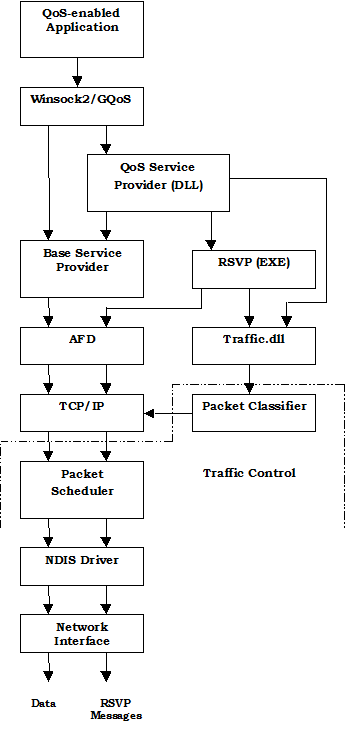
Figure 2. QoS/RSVP architecture
The flowchart in figure 2 illustrates how an application uses QoS RSVP to deliver a flow of data to a client or clients. The application is an audio server, and it needs 1 megabit-per-second of reliable bandwidth to provide acceptable audio quality to a client. RSVP supports both unicast and multicast flows. This example uses a unicast flow to a single client.
The application initializes and completes a structure to be provided to GQoS. This structure includes a sending and receiving flow specification. Flow specifications include parameters such as peak bandwidth, latency, delay variation, service type, and so on. Examples of service types include Best Effort and Guaranteed.
The application then calls WSAConnect to connect to the client. A call to this function triggers a number of events. RSVP is invoked to signal the network by sending special path messages. A path message is sent to the same destination IP address that the flow goes to; however, it is intended to set up the routers in the flow and to identify the flow. A router receiving a path message inserts its own IP address into the path message’s last hop and forwards the message to the next router in the path until it reaches the client. This gives the client the ability to understand the path between the sender and itself and to reserve bandwidth along that path for the application. The client returns a reservation request (again describing the desired flow) back along the same path. The routers along the path are responsible for examining the resources available to them and determining if they can accept the reservation. If all of the routers along the path agree to accept the reservation, the application can count on having the desired network bandwidth and other characteristics available.
Because networks are dynamic and the server or client could mistakenly abandon their resources without notifying the network, both path messages and reservation requests must be refreshed frequently. If there were no changes in the network, additional path messages and reservations refresh only the existing path. However, if a new route appears, the path taken by the flow could change on the fly as the network makes adjustments.
When a server application is used to multicast to many clients, a similar sequence of events occurs. One interesting difference is that when routers receive reservation requests from various clients referencing the same flow, they can merge reservation requests, rather than maintaining individual reservations for the same information flow.
For more, detailed information on these topics, see the Winsock2 specification and RFC 2205.
IP Security (IPSec)
IP Security (IPSec) is another new feature in Windows 2000. IPSec features and implementation details are very complex and are described in detail in a series of RFCs and IETF drafts and in other Microsoft white papers. IPSec uses cryptography-based security to provide access control, connectionless integrity, data origin authentication, protection against replays, confidentiality, and limited traffic-flow confidentiality. Because IPSec is provided at the IP layer, its services are available to the upper-layer protocols in the stack and, transparently, to existing applications.
IPSec enables a system to select security protocols, decide which algorithm(s) to use for the service(s), and establish and maintain cryptographic keys for each security relationship. IPSec can protect paths between hosts, between security gateways, or between hosts and security gateways. The services available and required for traffic are configured using IPSec policy. IPSec policy may be configured locally on a computer or can be assigned through Windows 2000 Group Policy mechanisms using the Active Directory™ services. When using the Active Directory, hosts detect policy assignment at startup, retrieve the policy, and then periodically check for policy updates. The IPSec policy specifies how computers trust each other. IPSec can use either certificates or Kerberos as an authentication method. The easiest trust to use is the Windows 2000 domain trust based on Kerberos. Predefined IPSec policies are configured to trust computers in the same or other trusted Windows 2000 domains.
Each IP datagram processed at the IP layer is compared to a set of filters that are provided by the security policy, which is maintained by an administrator for a computer that belongs to a domain. IP can do one of three things with any datagram:
· Provide IPSec services to it.
· Allow it to pass unmodified.
· Discard it.
An IPSec policy contains a filter, filter action, authentication, tunnel setting, and connection type. For example, two stand-alone computers in the same Windows 2000 domain can be configured to use IPSec between them and activate the secure server policy. If the two computers are not members of the same or a trusted domain, trust must be configured using a certificate or preshared key in a secure server mode by:
· Setting up a filter that specifies all traffic between the two hosts
· Choosing an authentication method
· Selecting a negotiation policy (secure server in this case, indicating that all traffic matching the filter(s) must use IPSec)
· Specifying a connection type (LAN, dial-up, or all)
Once the policy has been put in place, traffic that matches the filters uses the services provided by IPSec. When IP traffic (including something as simple as a ping in this case) is directed at one host by another, a Security Association (SA) is established through a short conversation over UDP port 500, through Internet Key Exchange service (IKE), and then the traffic begins to flow. The following network trace illustrates setting up a TCP connection between two such IPSec-enabled hosts. The only parts of the IP datagram that are unencrypted and visible to Netmon after the SA is established are the media access control and IP headers:
Source IP Dest IP Prot Description
davemac-ipsec calvin-ipsec UDP Src Port: ISAKMP, (500); Dst Port: ISAKMP (500); Length = 216 (0xD8)
calvin-ipsec davemac-ipsec UDP Src Port: ISAKMP, (500); Dst Port: ISAKMP (500); Length = 216 (0xD8)
davemac-ipsec calvin-ipsec UDP Src Port: ISAKMP, (500); Dst Port: ISAKMP (500); Length = 128 (0x80)
calvin-ipsec davemac-ipsec UDP Src Port: ISAKMP, (500); Dst Port: ISAKMP (500); Length = 128 (0x80)
davemac-ipsec calvin-ipsec UDP Src Port: ISAKMP, (500); Dst Port: ISAKMP (500); Length = 76 (0x4C)
calvin-ipsec davemac-ipsec UDP Src Port: ISAKMP, (500); Dst Port: ISAKMP (500); Length = 76 (0x4C)
davemac-ipsec calvin-ipsec UDP Src Port: ISAKMP, (500); Dst Port: ISAKMP (500); Length = 212 (0xD4)
calvin-ipsec davemac-ipsec UDP Src Port: ISAKMP, (500); Dst Port: ISAKMP (500); Length = 172 (0xAC)
davemac-ipsec calvin-ipsec UDP Src Port: ISAKMP, (500); Dst Port: ISAKMP (500); Length = 84 (0x54)
calvin-ipsec davemac-ipsec UDP Src Port: ISAKMP, (500); Dst Port: ISAKMP (500); Length = 92 (0x5C)
davemac-ipsec calvin-ipsec IP ID = 0xC906; Proto = 0x32; Len: 96

|
Из за большого объема этот материал размещен на нескольких страницах:
1 2 3 4 5 6 7 8 9 10 |
