

Партнерка на США и Канаду по недвижимости, выплаты в крипто
- 30% recurring commission
- Выплаты в USDT
- Вывод каждую неделю
- Комиссия до 5 лет за каждого referral
e. Resource Name Quick Guide
Unacceptable Naming Configurations: | Examples of Unacceptable Names: | Examples Acceptable Names: |
· No company types (i. e., LLC, Inc.) | Jefferson Corporation Solar; Jefferson Inc. Solar | Jefferson Solar |
· No duplications over four iterations (i. e., Blythe, Borrego, Marsh) | To be determined by ISO | |
· No megawatt values (MW) | Nash Power Plant 20MW | Nash Power Plant |
· Use of more than two digits | Nash 103 | Nash 10 |
· No Roman numerals | Nash Power Plant I; Nash Power Plant II | Nash Power Plant 1; Nash Power Plant 2 |
· No acronyms unless describing technology (i. e., PV) | FRV Windwood Solar | Windwood Solar |
· Names cannot be in all caps as all caps implies an acronym. | NASH POWER PLANT | Nash Power Plant |
· No special characters | Nash Power Plant #1 | Nash Power Plant 1 |
· No abbreviations similar to those used by CAISO | See Tariff Appendix A: Others be determined by ISO | |
· No re-use of names currently in CAISO systems | NO EXCEPTIONS | |
· No use of the word “Phase” (numbers only); however, when numbers are used for units they must be for the same facility / owner and no more than four iterations | Nash Power Plant Phase 1 | Nash Power Plant 1 |
· No use of the word “Expansion” or “increase” unless used in an incoming Interconnection Request for the purpose of increasing MW to an existing facility | Nash Power Plant Expansion | Nash Power Plant 2 |
· No “license plate” looking configurations (Dispatchers must be able to easily call out/pronounce a name!) | HJK23RJ | |
· Names cannot begin with numbers | 3 Solar | Sand Solar |
· Numbers cannot be spelled out | Canyon Solar Three | Canyon Solar 3 |
· No use of “Cluster number; C1” | Nash Power Plant C3; Nash Power Plant Cluster 3 | Nash Power Plant |
f. Project Details Form
The Project Details Form shall be used to create a new project OR update the information for an existing project.
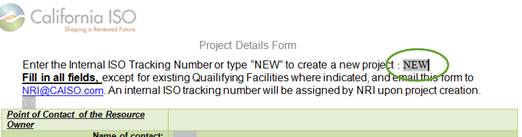
To create a new project type “NEW” and complete all the required information in the form:
Within the form, we ask that the free tool be used to find the latitude and longitude coordinates of the project.
It is very important that Interconnection Customers inform NRI of the Scheduling Coordinator’s contact information, Scheduling Coordinator’s Identification Number (SCID), and effective date as soon as possible in the process.
If not already completed, the Interconnection Customer shall submit an updated Project Details Form V9 that includes the designated SC contact information, SCID and SC Association Effective Date, Legal Entity and address, and Primary and Secondary contracts contact information, and Signatory contact.
Note: Please note that if your proposed project requires more than one market resource ID you will need to create one project per resource ID. For example, if the project is a large solar resource requiring two market resource IDs, two Project Details Forms will be required.
Once it has been processed by NRI, an email will be sent to the generator owner and other listed Points of Contact with an attachment that contains the project number that all files and email subject lines will need in order to process your required information.
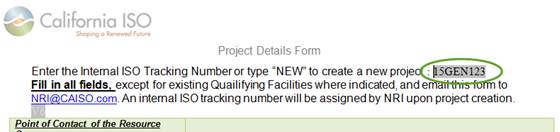
To update information on an existing project enter the project number and make the desired changes to project:
g. Temporary Point of Contact (POC)
Only Authorized Point of Contact(s) are approved to submit and receive project files. The email addresses for Authorized POCs must be listed on the Project Details form in the field labeled “Authorized Point of Contact(s) Email Addresses.” Multiple email addresses must be separated with a semi colon “;”
h. Resource Interconnection Management System guidelines
It will be required to have user access to RIMS starting in the third quarter of 2016.
1. Establish a User Access Administrator (UAA) with the ISO Client Relations Department. If you are unsure whether a UAA has been established with the CAISO please contact Client Relations Department at *****@***com. Use the link below and complete steps 1 (Designate UAA) and step 2 (Complete web-based User Access Administrator Agreement) of the UAA guide.
2. Once your UAA has been established or is established, complete steps 3-5 using the UAA Guide link listed below.
3. Users will need to be provisioned by the UAA for each NRI project, including meter replacement and RIG reconfiguration project types.
http://www. /participate/Pages/UserAccessAdministratorGuide/Default. aspx
i. Email Subject Line and File Naming Convention and Version Control Standards
Interconnection Customers should include their Internal ISO Project Number and Project Name in the subject line of all emails sent to *****@***com.
All files submitted to NRI should be clearly labeled. Please use the New Resource Implementation Checklist’s deliverables names in Column B “Document Title” of the spreadsheet along with your CAISO project number and version number in the file name. Any file submitted with special characters in the file name will be rejected. These characters include:
~, #, %, & , @, * , { , } , : , ; , < , > , ? , / ,\ , | , [ , ] , - , “ ,
The Interconnection Customer has the responsibility to submit documents using the correct file naming convention standards. Below is an example of how a file shall be submitted to NRI.
Filename guideline for submittal attachments
ISO Project Number: ISOPN
Document Title: DT (Column A in NRI Checklist Spreadsheet)
Version Number: VerX (X = Number)
Example: ISOPN DT VerX
Example: 13GEN123 SLD Ver1
Examples of Bad Document Titles
13GEN123_SLD_Ver1
13GEN123 SLD 3LD Ver1
Email Subject Line
Email subject lines must include the Project Number and must be isolated from any other text or characters.
Example of good email subject lines:
13GEN123 SLD 3LD
13GEN123
Examples of bad email subject lines:
13GEN123: SLD
13GEN123_SLD
j. New Resource Implementation Checklist
The New Resource Implementation Checklist outlines all deliverables by Buckets and their corresponding approval dates.
k. Quick Reference Email Subject Lines
Quick Reference Email Subject Lines to be sent to *****@***com | |
Request for QF Conversion for [Project Name] 14GEN1234 | QF Conversion Request see Section 4.d |
14GEN1234 Pretesting Notification | Pretest Notification see Section 7.h |
14GEN1234 RIG P2P Testing Request | P2P Testing Request see Section 7.i |
14GEN1234 Request for Initial Synchronization | Initial Sync Request see Section 8.c |
COM Request Approval for [Project Name] 14GEN1234 | COM Request for Approval see Section 10.c |
COD Request Approval for [Project Name] 14GEN1234 | COD Request for Approval see Section 10.c |
14GEN1234 SENDREPORT | Obtain FNM update report |
l. Quick Reference FileName Convention
Quick Reference FileName Conventions | |
Bucket 1 | |
Interconnection Agreement | 14GEN1234 IA Ver1 |
Metering Scheme Overview | 14GEN1234 MeteringOverview Ver1 |
Communication Block Diagram | 14GEN1234 CommBlock Ver1 |
Three Line Drawing | 14GEN1234 3LD Ver1 |
Single Line Drawing | 14GEN1234 SLD Ver1 |
Remote Intelligent Gateway Details Form | 14GEN1234 RIGDetails Ver1 |
Topographical Map for Wind Resources | 14GEN1234 TopoMap Ver1 |
Site Information Form for Wind Resources | 14GEN1234 SiteInfo Ver1 |
Generator Dynamic Model File | 14GEN1234 DYNGEN Ver1 |
Generator Positive Sequence Load Flow Data | 14GEN1234 PSLF Ver1 |
Network Application Information | 14GEN1234 NetAppInfo Ver1 |
Bucket 2 | |
Topographical Map for Solar Resources | 14GEN1234 TopoMap Ver1 |
Site Information Form for Solar Resources | 14GEN1234 SiteInfo Ver1 |
Meter Configuration Worksheet | 14GEN1234 MeterConfig 347698 Ver1 |
Generator Resource Data Template Initial Spreadsheet | 14GEN1234 InitialGRDT Ver1 |
Bucket 3 | |
Participating Intermittent Resource Letter of Intent | 14GEN1234 PIRPLOI Ver1 |
Ca Energy Commission (CEC) – Pre-certification | 14GEN1234 CECPreCert Ver1 |
Control and Protection Documentation | 14GEN1234 ControlProtection Ver1 |
(AC) Selection Letter | 14GEN1234 SCAcceptance Ver1 |
(SC) Selection Letter | 14GEN1234 SCSelection Ver1 |
24/7 Contact Information form | 14GEN1234 24HourContact Ver1 |
CPS Subscribers Agreement for (RIGs) | 14GEN1234 CPSAgreement Ver1 |
Energy Control Network Connectivity (ECN) | 14GEN1234 ECNAgreement Ver1 |
Meter Exemption Request | 14GEN1234 MeterExemption 5912345 Ver1 |
Distribution Correction Factor Supporting Documentation | 14GEN1234 DCF Ver1 |
Bucket 4 | |
Interconnection Approval Letter from (PTO) | 14GEN1234 PTO Sync Approval Ver1 |
Bucket 5 | |
Meter and Site Verification Sheet | 14GEN1234 MSVS 123456 Ver1 |
Meter Calculation to Point Of Receipt Document | 14GEN1234 PORCalc 123456 Ver1 |
Final Control & Protection Documentation | 14GEN1234 FinalControlProtection Ver1 |
PTO Sync Approval Letter | 14GEN 1234 PTO Sync Approval Ver1 |
Bucket 6 | |
PTO Final COD Approval Letter | 14GEN1234 PTO COD Approval Ver1 |
COD Declaration Letter | 14GEN1234 CODDeclaration Ver1 |
COM Declaration Letter | 14GEN1234 COMDeclaration Ver1 |
COM Implementation Plan | 14GEN1234 COMPlan Ver1 |
3. CAISO Bucket Dates
The bucket dates are not cutoff dates, but the final dates by which deliverables must be accepted by the ISO. This means that submissions must be given a sufficient amount of time (no less than 10-15 business days) to be reviewed and accepted. The generator owner should also give adequate time to resubmit corrected deliverables so that the CAISO is able to review and comment on the resubmission.

|
Из за большого объема этот материал размещен на нескольких страницах:
1 2 3 4 5 6 7 8 |
