


Партнерка на США и Канаду по недвижимости, выплаты в крипто
- 30% recurring commission
- Выплаты в USDT
- Вывод каждую неделю
- Комиссия до 5 лет за каждого referral
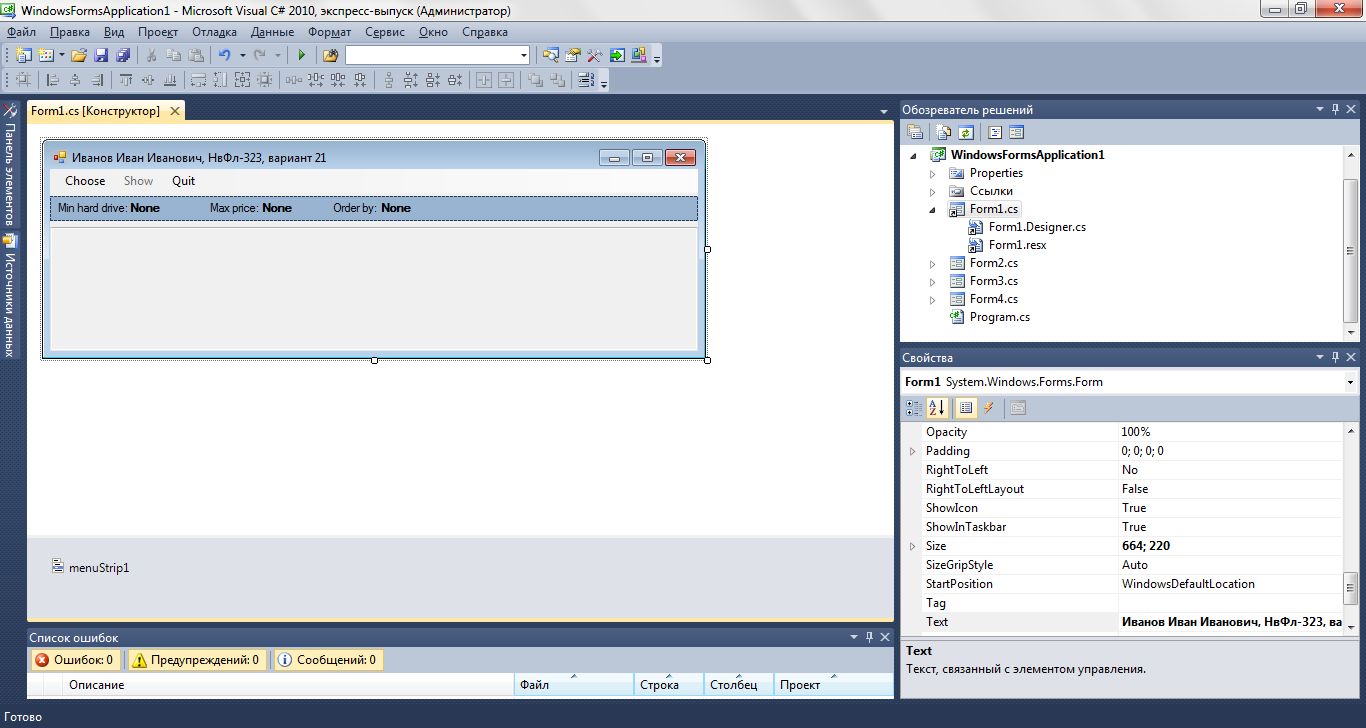
Теперь добавим в проект еще одну форму, которая будет появляться после щелчка по пункту меню «Choose» в главной форме:
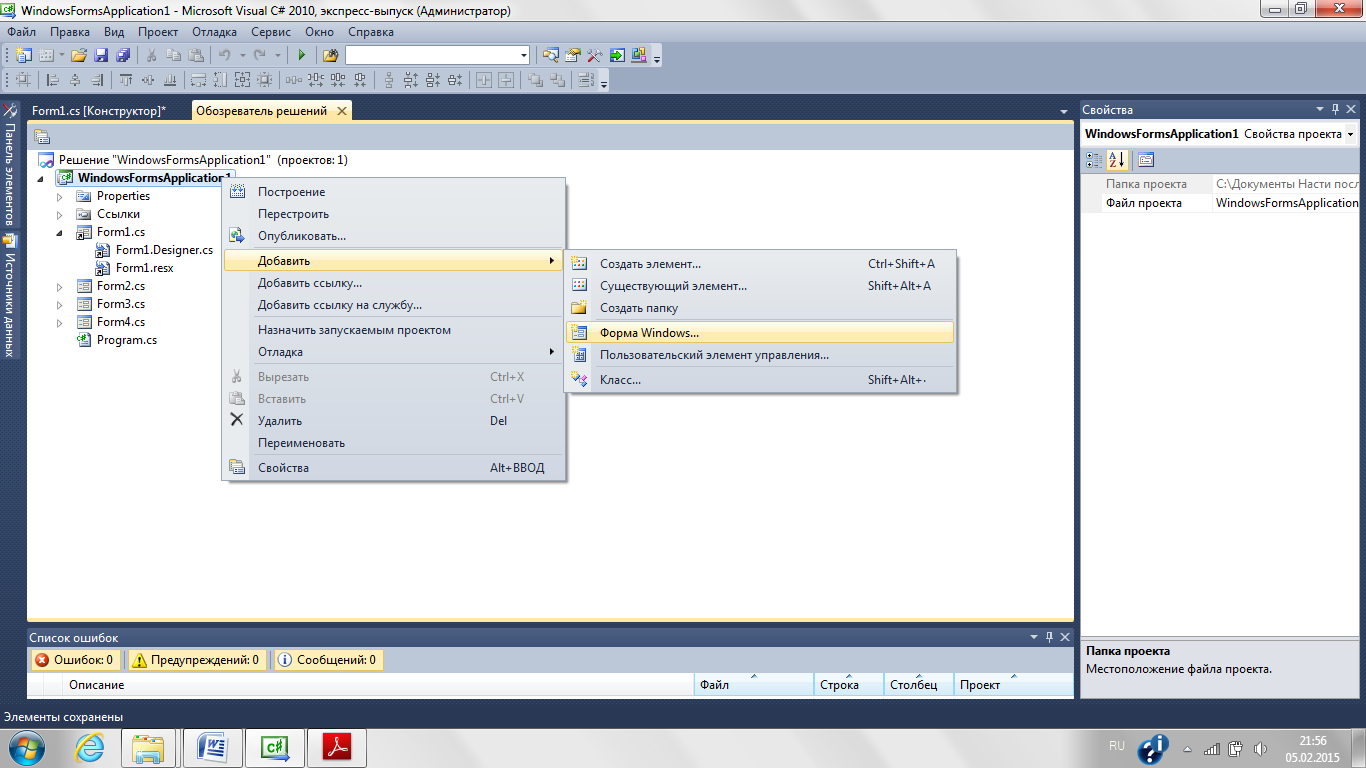
Для новой формы задаем следующие свойства:
Свойства | Значения |
(Name) | Form2 |
Size | 220; 230 |
StartPosition | CenterParent |
Text | Choose |
Затем на этой форме разместим две метки (Label) со следующими свойствами:
Свойства | Значения для первой метки | Значения для второй метки |
(Name) | label1 | label2 |
Location | 3; 23 | 3; 48 |
Text | Min hard drive: | Max price: |
На той же форме расположим два поля для ввода (TextBox) со следующими свойствами:
Свойства | Значения для первого поля | Значения для второго поля |
(Name) | TBMinHardDrive | TBMaxPrice |
Anchor | Top, Left | Top, Left |
Enabled | True | True |
Location | 80; 20 | 80; 45 |
Multiline | False | False |
ReadOnly | False | False |
ScrollBars | None | None |
Size | 120; 20 | 120; 20 |
Text |
Разместим элемент управления «GroupBox» (панель группировки) со следующими свойствами:
Свойства | Значения |
(Name) | GBOrder |
Anchor | Top, Left |
Location | 6; 70 |
Size | 194; 67 |
В группирующей панели разместим два переключателя (RadioButton):
Свойства | Значения для первого переключателя | Значения для второго переключателя |
(Name) | RBHardDrive | RBPrice |
Checked | False | False |
Location | 6; 18 | 6; 41 |
Расположим на форме две кнопки (Button) со следующими свойствами:
Свойства | Значения для первой кнопки | Значения для второй кнопки |
(Name) | ButtonOK | ButtonCancel |
DialogResult | OK | Cancel |
Location | 12; 156 | 117; 156 |
Size | 75; 23 | 75; 23 |
Text | OK | Cancel |
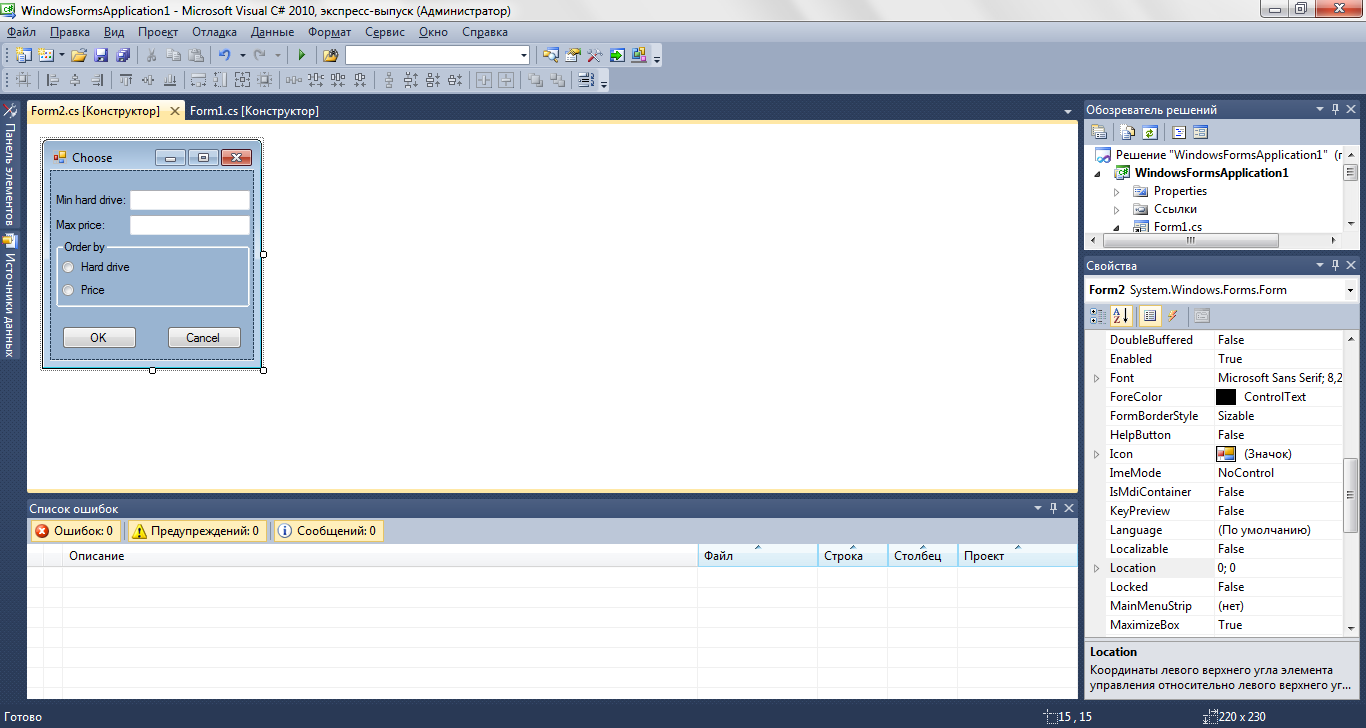
В результате получится форма с интерфейсом, изображенным на рисунке:
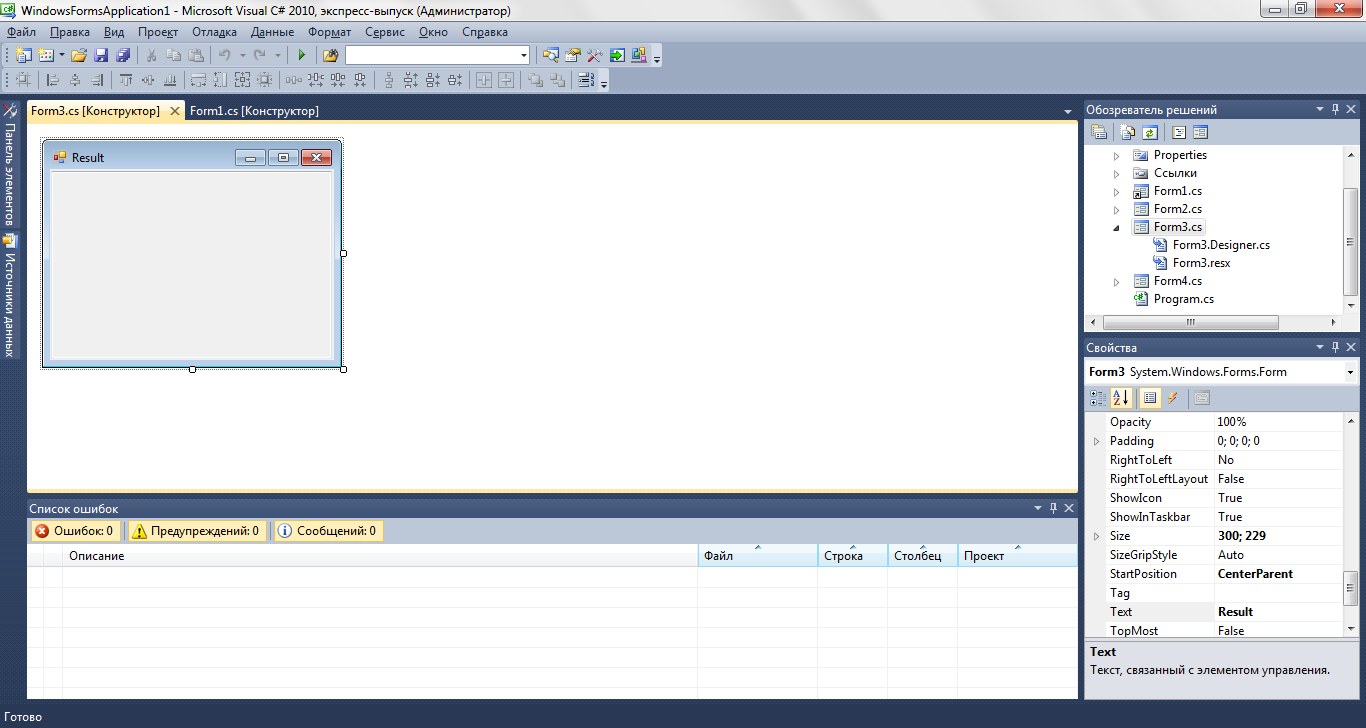
Добавим в проект еще одну форму, которая будет появляться после щелчка по пункту меню «Show» в главной форме:
Свойства | Значения |
(Name) | Form3 |
Size | 300; 230 |
StartPosition | CenterParent |
Text | Result |
На этой форме расположим поле для ввода (TextBox) со следующими свойствами:
Свойства | Значения для первого поля |
(Name) | textBox1 |
Anchor | Top, Bottom, Left, Right |
Enabled | True |
Location | 1; 2 |
Multiline | True |
ReadOnly | True |
ScrollBars | Both |
Size | 280; 190 |
Text |
Далее добавим в проект форму, которая будет выводить пользователю сообщения при исключениях:
Свойства | Значения |
(Name) | Form4 |
Size | 432; 166 |
StartPosition | CenterParent |
Text | Exeption |
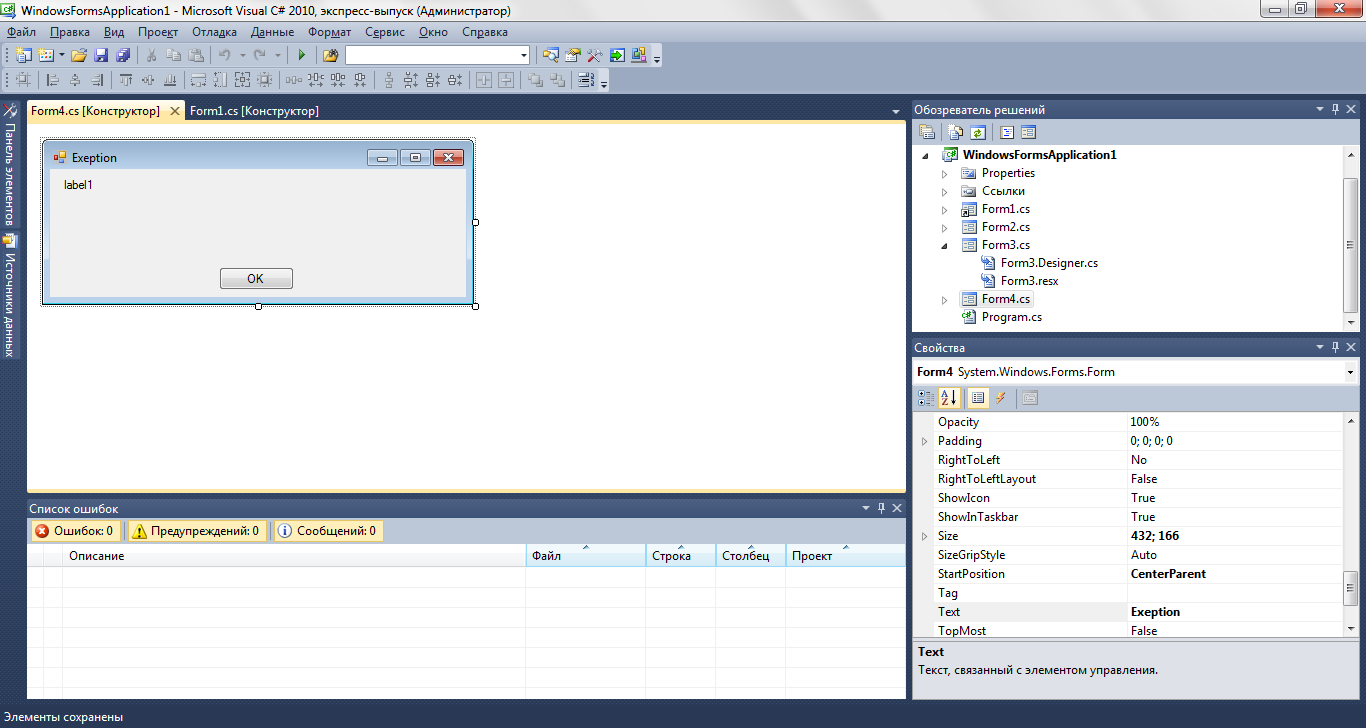
В этой форме разместим метку со свойствами:
Свойства | Значения для метки |
(Name) | label1 |
Anchor | Top, Left, Right |
AutoSize | False |
Location | 12; 9 |
Size | 392; 86 |
Text | label1 |
и кнопку:
Свойства | Значения для кнопки |
(Name) | button1 |
DialogResult | OK |
Location | 169; 98 |
Size | 75; 23 |
Text | OK |
2.2 Код программы
Код программы в файле «Form1.Designer. cs»:
namespace WindowsFormsApplication1 { partial class Form1 { /// <summary> /// Требуется переменная конструктора. /// </summary> private ponentModel. IContainer components = null; /// <summary> /// Освободить все используемые ресурсы. /// </summary> /// <param name="disposing">истинно, если управляемый ресурс должен быть удален; иначе ложно.</param> protected override void Dispose(bool disposing) { if (disposing && (components!= null)) { components. Dispose(); } base. Dispose(disposing); } #region Код, автоматически созданный конструктором форм Windows /// <summary> /// Обязательный метод для поддержки конструктора - не изменяйте /// содержимое данного метода при помощи редактора кода. /// </summary> private void InitializeComponent() { this. Label1 = new System. Windows. Forms. Label(); this. menuStrip1 = new System. Windows. Forms. MenuStrip(); this. chooseToolStripMenuItem = new System. Windows. Forms. ToolStripMenuItem(); this. showToolStripMenuItem = new System. Windows. Forms. ToolStripMenuItem(); this. quitToolStripMenuItem = new System. Windows. Forms. ToolStripMenuItem(); this. panel1 = new System. Windows. Forms. Panel(); this. LOrderBy = new System. Windows. Forms. Label(); this. Label3 = new System. Windows. Forms. Label(); this. LMaxPrice = new System. Windows. Forms. Label(); this. Label2 = new System. Windows. Forms. Label(); this. LMinHardDrive = new System. Windows. Forms. Label(); this. textBox1 = new System. Windows. Forms. TextBox(); this. menuStrip1.SuspendLayout(); this. panel1.SuspendLayout(); spendLayout(); // // Label1 // this. Label1.AutoSize = true; this. Label1.Location = new System. Drawing. Point(5, 5); this. Label1.Name = "Label1"; this. Label1.Size = new System. Drawing. Size(77, 13); this. Label1.TabIndex = 6; this. Label1.Text = "Min hard drive:"; // // menuStrip1 // this. menuStrip1.Items. AddRange(new System. Windows. Forms. ToolStripItem[] { this. chooseToolStripMenuItem, this. showToolStripMenuItem, this. quitToolStripMenuItem}); this. menuStrip1.Location = new System. Drawing. Point(0, 0); this. menuStrip1.Name = "menuStrip1"; this. menuStrip1.Size = new System. Drawing. Size(684, 24); this. menuStrip1.TabIndex = 8; this. menuStrip1.Text = "menuStrip1"; // // chooseToolStripMenuItem // this. chooseToolStripMenuItem. Name = "chooseToolStripMenuItem"; this. chooseToolStripMenuItem. Size = new System. Drawing. Size(59, 20); this. chooseToolStripMenuItem. Text = "Choose"; this. chooseToolStripMenuItem. Click += new System. EventHandler(this. chooseToolStripMenuItem_Click); // // showToolStripMenuItem // this. showToolStripMenuItem. Enabled = false; this. showToolStripMenuItem. Name = "showToolStripMenuItem"; this. showToolStripMenuItem. Size = new System. Drawing. Size(48, 20); this. showToolStripMenuItem. Text = "Show"; this. showToolStripMenuItem. Click += new System. EventHandler(this. showToolStripMenuItem_Click); // // quitToolStripMenuItem // this. quitToolStripMenuItem. Name = "quitToolStripMenuItem"; this. quitToolStripMenuItem. Size = new System. Drawing. Size(42, 20); this. quitToolStripMenuItem. Text = "Quit"; this. quitToolStripMenuItem. Click += new System. EventHandler(this. quitToolStripMenuItem_Click); // // panel1 // this. panel1.Anchor = ((System. Windows. Forms. AnchorStyles)(((System. Windows. Forms. AnchorStyles. Top | System. Windows. Forms. AnchorStyles. Left) | System. Windows. Forms. AnchorStyles. Right))); this. panel1.BackColor = System. Drawing. SystemColors. ActiveCaption; this. panel1.Controls. Add(this. LOrderBy); this. panel1.Controls. Add(this. Label3); this. panel1.Controls. Add(this. LMaxPrice); this. panel1.Controls. Add(this. Label2); this. panel1.Controls. Add(this. LMinHardDrive); this. panel1.Controls. Add(this. Label1); this. panel1.Location = new System. Drawing. Point(0, 30); this. panel1.Name = "panel1"; this. panel1.Size = new System. Drawing. Size(680, 25); this. panel1.TabIndex = 9; // // LOrderBy // this. LOrderBy. AutoSize = true; this. LOrderBy. Font = new System. Drawing. Font("Microsoft Sans Serif", 8.25F, System. Drawing. FontStyle. Bold, System. Drawing. GraphicsUnit. Point, ((byte)(204))); this. LOrderBy. Location = new System. Drawing. Point(330, 5); this. LOrderBy. Name = "LOrderBy"; this. LOrderBy. Size = new System. Drawing. Size(37, 13); this. LOrderBy. TabIndex = 11; this. LOrderBy. Text = "None"; // // Label3 // this. Label3.AutoSize = true; this. Label3.Location = new System. Drawing. Point(280, 5); this. Label3.Name = "Label3"; this. Label3.Size = new System. Drawing. Size(53, 13); this. Label3.TabIndex = 10; this. Label3.Text = "Order by: "; // // LMaxPrice // this. LMaxPrice. AutoSize = true; this. LMaxPrice. Font = new System. Drawing. Font("Microsoft Sans Serif", 8.25F, System. Drawing. FontStyle. Bold, System. Drawing. GraphicsUnit. Point, ((byte)(204))); this. LMaxPrice. Location = new System. Drawing. Point(215, 5); this. LMaxPrice. Name = "LMaxPrice"; this. LMaxPrice. Size = new System. Drawing. Size(37, 13); this. LMaxPrice. TabIndex = 9; this. LMaxPrice. Text = "None"; // // Label2 // this. Label2.AutoSize = true; this. Label2.Location = new System. Drawing. Point(160, 5); this. Label2.Name = "Label2"; this. Label2.Size = new System. Drawing. Size(59, 13); this. Label2.TabIndex = 8; this. Label2.Text = "Max price: "; // // LMinHardDrive // this. LMinHardDrive. AutoSize = true; this. LMinHardDrive. Font = new System. Drawing. Font("Microsoft Sans Serif", 8.25F, System. Drawing. FontStyle. Bold, System. Drawing. GraphicsUnit. Point, ((byte)(204))); this. LMinHardDrive. Location = new System. Drawing. Point(80, 5); this. LMinHardDrive. Name = "LMinHardDrive"; this. LMinHardDrive. Size = new System. Drawing. Size(37, 13); this. LMinHardDrive. TabIndex = 7; this. LMinHardDrive. Text = "None"; // // textBox1 // this. textBox1.Anchor = ((System. Windows. Forms. AnchorStyles)((((System. Windows. Forms. AnchorStyles. Top | System. Windows. Forms. AnchorStyles. Bottom) | System. Windows. Forms. AnchorStyles. Left) | System. Windows. Forms. AnchorStyles. Right))); this. textBox1.Location = new System. Drawing. Point(0, 58); this. textBox1.Multiline = true; this. textBox1.Name = "textBox1"; this. textBox1.ReadOnly = true; this. textBox1.ScrollBars = System. Windows. Forms. ScrollBars. Both; this. textBox1.Size = new System. Drawing. Size(680, 204); this. textBox1.TabIndex = 10; // // Form1 // this. AutoScaleDimensions = new System. Drawing. SizeF(6F, 13F); this. AutoScaleMode = System. Windows. Forms. AutoScaleMode. Font; this. ClientSize = new System. Drawing. Size(684, 262); this. Controls. Add(this. textBox1); this. Controls. Add(this. panel1); this. Controls. Add(this. menuStrip1); this. MainMenuStrip = this. menuStrip1; this. Name = "Form1"; this. StartPosition = System. Windows. Forms. FormStartPosition. CenterScreen; this. Text = ", НвФл-323, вариант 21"; this. menuStrip1.ResumeLayout(false); this. menuStrip1.PerformLayout(); this. panel1.ResumeLayout(false); this. panel1.PerformLayout(); this. ResumeLayout(false); this. PerformLayout(); } #endregion private System. Windows. Forms. Label Label1; private System. Windows. Forms. MenuStrip menuStrip1; private System. Windows. Forms. ToolStripMenuItem chooseToolStripMenuItem; private System. Windows. Forms. ToolStripMenuItem showToolStripMenuItem; private System. Windows. Forms. ToolStripMenuItem quitToolStripMenuItem; private System. Windows. Forms. Panel panel1; private System. Windows. Forms. TextBox textBox1; private System. Windows. Forms. Label LOrderBy; private System. Windows. Forms. Label Label3; private System. Windows. Forms. Label LMaxPrice; private System. Windows. Forms. Label Label2; private System. Windows. Forms. Label LMinHardDrive; private string HeadStr; private struct Computer { public string CompType; public double Price; public double HardDrive; }; private Computer[] mas; } } |
Код в файле «Form1.cs»:

|
Из за большого объема этот материал размещен на нескольких страницах:
1 2 3 4 5 |
