

Партнерка на США и Канаду по недвижимости, выплаты в крипто
- 30% recurring commission
- Выплаты в USDT
- Вывод каждую неделю
- Комиссия до 5 лет за каждого referral
display 1
OpEraTION Menu


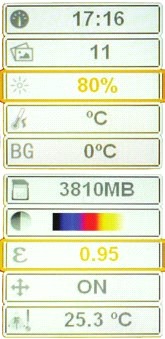
switch on the product. press to enter menu. use
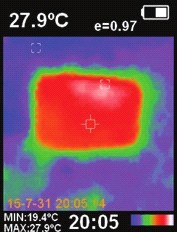
3 2 to select appropriate menu option. the selected option is framed in yellow. description of menu options is below.
6
4
5 8
7
1 – battery power 2 – emissivity
3 – temperature in the crosshair 4 – crosshair
5 – minimum and maximum temperature of investigated object 6 – marking of hot/cold spot temperature (if the function in ON) 7 – current time
8 – color palette

10 11
Thermal imager
| IR-CAM 2 CONDTROL |

User manual
Thermal imager | IR-CAM 2 CONDTROL |
User manual


to change settings press , by pressing install necessary value, Temperature of reflective background
press to save changes.

to exit menu press .
date and time setting
date and time format: - year, month, date;

- hour, minute.
when emissivity of investigated object is low, thermal radiation of surrounding objects and reflective background can influence measuring accuracy. to compensate such influence, set the temperature of reflective background within 0-36 °С.
Color palette
Available color palettes:

iron red

rainbow

rainbow high contrast

Grey scale (palette 1)

Grey scale (palette 2)
correctly selected color palette provides more correct and informative image.


to switch between the fields use , to change the value use .
Emissivity
to return to menu press .
units of temperature
the product displays the temperature in units of °c or °F.

12
All objects emit thermal energy. emitted energy quantity depends on the surface temperature and object emissivity. the product can measure emission on the surface of object and calculate object temperature. objects with different surfaces but with the same temperature can emit different quantity of thermal energy. Many objects (e. g. coated metal, wood, water, skin and texture) possess high emissivity (0,9 and more), and emit more energy than glossy surfaces and uncoated metal, because their emissivity is less than 0,6. Adjustment of emissivity helps to take this feature into consideration and minimize inaccuracy of temperature measurement.
13
Thermal imager
| IR-CAM 2 CONDTROL |
User manual
Emissivity of some materials
Material | Emissivity | Material | Emissivity |
Asphalt | 0.90~0.98 | black cloth | 0.98 |
concrete | 0.94 | human skin | 0.98 |
cement | 0.96 | bubble | 0.75~0.80 |
sand | 0.90 | charcoal dust | 0.96 |
soil | 0.92~0.96 | paint | 0.80~0.95 |
water | 0.92~0.96 | Matte paint | 0.97 |
ice | 0.96~0.98 | black rubber | 0.94 |
snow | 0.83 | plastic | 0.85~0.95 |
Glass | 0.90~0.95 | wood | 0.90 |
ceramic | 0.90~0.94 | paper | 0.70~0.94 |
Marble | 0.94 | chromic oxide | 0.81 |
Gypsum | 0.80~0.90 | copper oxide | 0.78 |
Mortar | 0.89~0.91 | Ferric oxide | 0.78~0.82 |
brick | 0.93~0.96 | texture | 0.90 |
Marking of hot/cold spot temperature
if the function is on, the areas of hottest and coldest temperature will be marked on the display.

14
Thermal imager | IR-CAM 2 CONDTROL |
User manual
Elimination of infrared camera noise
put infrared imaging sensor closer to flat surface with homogeneous temperature.

press and hold until you see «adjust» on the display.
lEd light
to turn on/oFF the led light press and hold the trigger.
display modes


use to choose display mode. the product possesses 5 variants of mixing visible
and infrared images.
Image capture and storage
direct the product on the object. press the trigger.
the image and processing settings of the object will be captured. to save the image on memory


card press , to continue taking measures without saving the image press
or the trigger. Micro SD memory card (4 Gb) which is included in the set can store up to 25000
images. if memory card is not installed or full, you will see «NO Sd» or «Full» on the display.
15
Thermal imager
| IR-CAM 2 CONDTROL |


User manual
display/delete images
Thermal imager | IR-CAM 2 CONDTROL |
User manual
SaFETy INSTruCTIONS
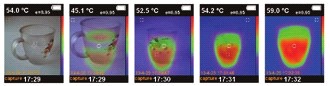
select option «saved images» in menu, press . A list of saved images will appear on
the display (see picture below).
attention! this product is an accurate optical and electronic device and requires delicate handling. unintended use of the product can be dangerous for human’s health! the user manual should be read carefully before you use the product for the first time. if the product is given to somebody for temporary use, be sure to enclose user manual to it.
press or to select image. to view image press

|
Из за большого объема этот материал размещен на нескольких страницах:
1 2 3 4 5 6 7 |
