

Партнерка на США и Канаду по недвижимости, выплаты в крипто
- 30% recurring commission
- Выплаты в USDT
- Вывод каждую неделю
- Комиссия до 5 лет за каждого referral
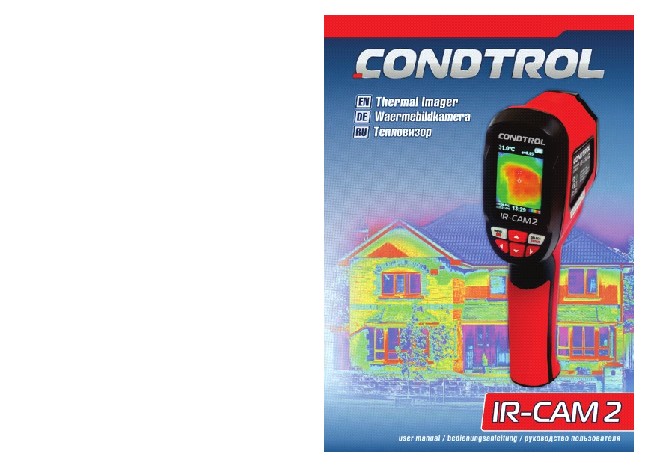
Thermal imager | IR-CAM 2 CONDTROL |
User manual
CONTENTS
Functions/ApplicAtions 6 set 6 speciFicAtions 7 insert/replAce bAtteries 8 switch on/oFF the product 8
product description 9 display 10
operAtion 11 Menu 11 date and time setting 12 units of temperature 12 temperature of reflective background 13 color palette 13 emissivity 13 emissivity of some materials 14 Marking of hot/cold spot temperature 14 elimination of infrared camera noise 15 led light 15 display modes 15 image capture and storage 15 display/delete images 16
sAFety instructions 17 utilizAtion 18 wArrAnty 19

3
WдrmeBildkamera | IR-CAM 2 CONDTROL |
Bedienungsanleitung
INhalT
ТЕПЛОВИЗОР | IR-CAM 2 CONDTROL |
Руководство пользователя
СОДЕРЖАНИЕ
bestiMMunGsGeMAesser GebrAuch lieFeruMFAnG
technische dAten bAtterie einsetzen
einschAlten/AbschAlten des Gerдtes
20 НазНачеНие прибора 34
20 КомплеКтация 34 21 теХНичеСКие Х араКтериСтиКи 35
22 УСтаНовКа/замеНа элеме Нтов пита Ния 36
22 вКлючеНие/выКлючеНие прибора 36
GerAetbeschreibunG display
23 опиСаНие прибора 37
24 Дисплей 38
bedienunG des GerAetes Menuefunktionen
Manuelle zeit-und datum-einstellung einstellung der temperatureinheiten umgebungstemperatur
Farbpalette emissionsgrad
emissionsgrad verschiedener Materialen Min/Max-temperaturmarkierung reduzierung des rauschens beleuchtung
Anzeigemodus
bild aufnehmen und speichern bilder anzeigen und lцschen
25 работа С прибором 39
25 меню 39 26 Настройка даты и времени 40
26 единицы измерения температуры 40 27 температура среды 41
27 цветовая палитра 41
27 Коэффициент теплового излучения 41
28 Коэффициент излучения различных материалов 42
28 маркеры точек с максимальной/минимальной температурой 42 29 минимизация шума и К камеры 43
29 подсветка 43 29 режимы вывода изображения 43
29 Фиксация и сохранение изображения 43 30 просмотр и удаление изображений 44
sicherheitshinweise
entsorGunG
31 правила безопа СНоСти 45
32 Утилизация 46
GArAntie 33 ГараНтийНые обязательСтва / СервиС иКоНСУльтациоННыеУСлУГи


4 5
Thermal imager | IR-CAM 2 CONDTROL |
User manual
congratulations on your purchase of thermal imager ir-cAM2 condtrol.
Safety instructions can be found in the end of this user manual and should be carefully read before you use the product for the first time.
FuNCTIONS/applICaTIONS
thermal imager ir-cAM2 is designed to measure surface temperature and visualize temperature distribution on the surface of investigated object by noncontact method.
the product allows to capture visible and infrared images along with measured/additional data and store them on memory card for subsequent data analysis and to generate reports.
the function of marking of hot/cold spot temperature simplifies the process of taking measures.
SET
thermal imager ir-cAM2 1 pc. Powersupply( аа) 4 pcs. Micro SD memory card (4 Gb) 1 pc. pouch 1 pc. user manual 1 pc.

6
Thermal imager | IR-CAM 2 CONDTROL |
User manual
SpECIFICaTIONS
display | wide viewing angle high resolution color screen, 2,4 inches |
resolution of infrared image | 60х60 (3600) pixels |
resolution of visible image | 0,3 mega pixels |
Field angle/ shortest focal distance | 20°x20°/0,5 m |
thermal sensitivity | 0,15 °С |
range of temperature measurement | -20 °С …+300 °С |
Accuracy of temperature measurement | ±2%/ ±2 °С (±2%/±4 °F) |
emissivity | 0.1-1.0 |
image capturing frequency | 6 hz |
range of wave length | 8-14 µm |
Focal distance | Fixed |
color palette | iron red, rainbow, rainbow high contrast, grey scale (2 palettes) |
Vision option | 5 variants |
Memory card | Micro sd 4 Gb |
File format | bmp |
power supply | 4 x 1,5 V AA |
battery life | 6 h |
Auto power-off time | 12 min |
Authentication | CE (EN61326-1:2006) |
dimensions of product | 212mm*95mm*62 mm |
weight | 320 g |
warranty period | 1 year |
operating temperature | -5 °С…+40 °С |
storage temperature | -20 °С…+50 °С |
relative humidity | 10%...80% |
7
Thermal imager
| IR-CAM 2 CONDTROL |


User manual
INSErT/rEplaCE baTTErIES
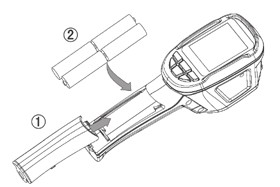
remove the battery cover: slide out the battery cover and remove it. insert the batteries, observing the polarities. slide the cover back until a click is heard.
Thermal imager | IR-CAM 2 CONDTROL |
User manual
prOduCT dESCrIpTION
SwITCh ON/OFF ThE prOduCT
to switch on the product press and hold
the product is ready to work.
to switch off the product press and hold

8
for 5 seconds.
for 5 seconds.
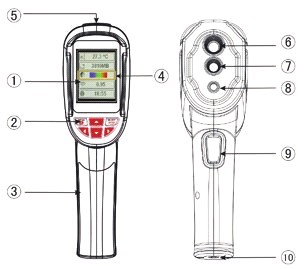
1 - color lcd 2 - Keypad:

- switch on/switch off/enter menu/exit
- select/enter


- navigation buttons: up/down/left/right
3 - battery cover
4 - yellow option box 5 - Memory card slot
6 - infrared camera
7 - Visible light camera 8 - led light
9 - trigger
10- interface for the installation of tripod 1/4’’
9
Thermal imager | IR-CAM 2 CONDTROL |
User manual
Thermal imager | IR-CAM 2 CONDTROL |
User manual

|
Из за большого объема этот материал размещен на нескольких страницах:
1 2 3 4 5 6 7 |
