


Партнерка на США и Канаду по недвижимости, выплаты в крипто
- 30% recurring commission
- Выплаты в USDT
- Вывод каждую неделю
- Комиссия до 5 лет за каждого referral
«ПЕРЕВОД ПРОФЕССИОНАЛЬНОГО ТЕКСТА»
Время, отводимое на выполнение задания – 1 час (академический = 45 минут)
Максимальное количество баллов – 10 баллов.
Задача 1. Выполните перевод предложенного текста (Приложение 1 – английский язык, Приложение 2- немецкий язык)
Задача 2. Ответьте на поставленные вопросы (Приложение 1 – английский язык, Приложение 2- немецкий язык)
Условия выполнения задания
Вы – сотрудник образовательной организации, реализующей подготовку студентов среднего профессионального образования по специальности в области информационных технологий. Вам необходимо предоставить возможность руководителю практического обучения оценить целесообразность использования нового электронного устройства для обучения студентов и предоставлено описание данного устройства.
Приложение 1
Asus Tinkerboard: Strong competition for Raspberry Pi
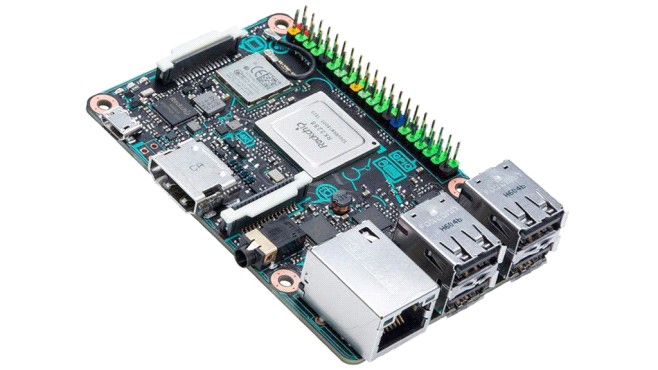
Whe liked tinkering its own technology gadgets or a self-built media center operates, usually attacks to single board computers. Mini-PCs in credit card format are the ideal solution for driving self-configured systems and executing applications programmed by the user. The leader in this segment is the Raspberry Pi. The device was developed in the context of inspiring young people for programming and crafting with hardware. Therefore, the installed technology is rather weak, but the devices are very cheap. Anyone who wants to have more rakepower for his fanatics will find the future with Asus.
Specifications Asus Tinkerboard
Specs for the Tinker Board include a quad core 1.8GHz ARM Cortex-A17 CPU, 2GB LPDDR3 RAM, four USB 2.0 ports, support for gigabit LAN and Bluetooth 4.0, 3.5mm audio jack, microSD slot, Micro USB for power, swappable 802.11 b/g/n Wi-Fi antennas, and a HDMI 2.0 port with support for 4K video.
Connecting peripherals
To connect a monitor or TV using composite video or HDMI connector. Resolution ranges from 640 Ч 350 (EGA) to 1920 Ч 1200 (WUXGA) for posite output is in PAL and NTSC formats.
Speakers or headphones are connected via a standard 3.5 mm jack. Also, the sound can be transmitted via HDMI.
Asus Tinkerboard provides 4 USB-ports, united by an internal hub. These include, among others, can connect a keyboard and mouse.
To save CPU resources, Asus Tinkerboard offers regular connection modules through the 15-pin slots:
- CSI-2 - to connect on the MIPI interface chamber; DSI - to connect the regular display.
As a low-level interfaces are available:
- 40 ports of general purpose input-output; UART (Serial); IІC / TWI; SPI with the selector between the two devices; pins Power: 3.3 V, 5 V and earth.
With the help of these ports can be connected to external sensors empower the device.
Such sensors may be:
- Analog (photo resistor, temperature sensor); Digital (accelerometer, ambient light sensor).
For adverse communication on the Asus Tinkerboard available interfaces:
- Ethernet 10/100 Mbps with access to a standard socket 8P8C (RJ45); Wi-Fi 802.11n and Bluetooth 4.1, provided the chip Broadcom BCM43438.
4K video and 24-bit audio
The manufacturer has a media report , according to recently released the single board Tinker Board. This is nearly the same size as the Raspberry Pi, but has much more powerful hardware on the board. For example, the four-core Rockchip processor RK 3288 allows the playback of video in 4K resolution as well as the output of 24-bit audio signals via the HDMI-2 connector. This makes the small computer particularly interesting for use as a media center. With 2 gigabytes of memory, Tinkerboard has twice as much RAM on board as the competition. Obviously a Gigabit Ethernet connection, WLAN and four USB 2.0 ports are installed.
Comparatively cheap
The arrangement of the connections is identical to that of the Raspberry Pi. Anyone who now feels that they have to grip deeply into their pockets to secure this piece of technology is wrong. The Tinker-Board-Calculator (Raspberry Pi from approx. 37 Euro) costs approx. 60 Euro. A Debian Linux variant is used as the operating system. The device supports the Kodi Mediaplayer. On the software side, however, the computer may have a look at the Raspberry Pi, which has been established and supported by developers for years.
Questions:
What kind of Software and Hardware does this system have? Do you like the device from the point of view of its functionality? What should be the cost of this device that it is appropriate to use in educational process? Does it make sense to equip this device with additional elements, such as sensors, or to offer these units separately? Which operating system is preferable to complete this unit?Приложение 2
Asus Tinkerboard: Starke Konkurrenz fьr Himbeer-Pi
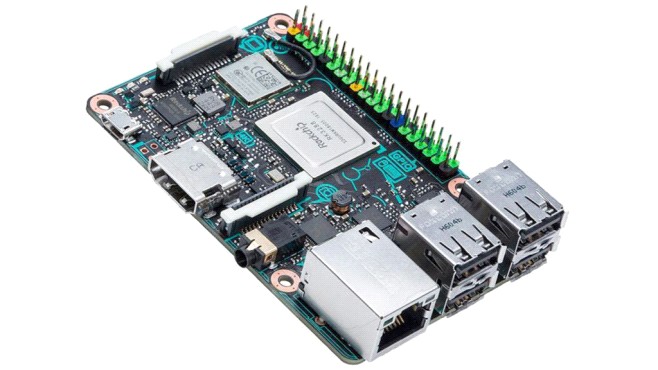
Wer gerne seine eigenen Technologie-Gadgets bastelt oder ein selbst gebautes Medienzentrum betreibt, ьblicherweise Angriffe auf einzelne Boardcomputer. Mini-PCs im Kreditkartenformat sind die ideale Lцsung, um selbst konfigurierte Systeme zu fahren und Applikationen zu programmieren, die vom Anwender programmiert werden. Der Fьhrer in diesem Segment ist die Himbeer-Pi. Das Gerдt wurde im Rahmen der Inspiration junger Menschen fьr die Programmierung und Handwerk mit Hardware entwickelt. Daher ist die installierte Technologie eher schwach, aber die Gerдte sind sehr billig. Wer noch mehr Rakepower fьr seine Fanatiker haben mцchte, findet bei Asus die Zukunft.
Technische Daten Asus Tinkerboard
Specs fьr die Tinker-Platine gehцren ein Quad-Core-1,8 GHz ARM Cortex-A17 CPU, 2 GB LPDDR3 RAM, vier USB 2.0-Ports, Unterstьtzung fьr Gigabit LAN und Bluetooth 4.0, 3,5 mm Audio-Buchse, microSD-Steckplatz, Micro USB fьr Strom, austauschbar 802.11 b / G / n Wi-Fi-Antennen und einen HDMI 2.0-Port mit Unterstьtzung fьr 4K-Video.
Peripherie anschlieЯen
So schlieЯen Sie einen Monitor oder ein Fernsehgerдt mit Composite-Video - oder HDMI-Anschluss an. Die Auflцsung reicht von 640 Ч 350 (EGA) bis 1920 Ч 1200 (WUXGA) fьr posite-Ausgang ist in PAL und NTSC-Formate.
Lautsprecher oder Kopfhцrer werden ьber eine standardmдЯige 3,5-mm-Buchse angeschlossen. Der Ton kann auch ьber HDMI ьbertragen werden.
Asus Tinkerboard bietet 4 USB-Ports, vereint durch einen internen Hub. Diese kцnnen unter anderem eine Tastatur und eine Maus verbinden.
Um CPU-Ressourcen zu sparen, bietet Asus Tinkerboard regelmдЯige Anschlussmodule ьber die 15-poligen Steckplдtze:
- CSI-2 - zum Anschluss an die MIPI-Schnittstellenkammer; DSI - zum Verbinden der normalen Anzeige.
Als Low-Level-Schnittstellen stehen zur Verfьgung:
- 40 Ports der allgemeinen Input-Output; UART (Seriell); IІC / TWI; SPI mit dem Selektor zwischen den beiden Gerдten; Pins Leistung: 3,3 V, 5 V und Erde.
Mit Hilfe dieser Ports an externe Sensoren angeschlossen werden kцnnen, ermдchtigen das Gerдt.
Solche Sensoren kцnnen sein:
- Analog (Photowiderstand, Temperaturfьhler); Digital (Beschleunigungssensor, Umgebungslichtsensor).
Fьr nachteilige Kommunikation auf dem Asus Tinkerboard verfьgbare Schnittstellen:
- Ethernet 10/100 Mbit / s mit Zugriff auf eine Standardsteckdose 8P8C (RJ45); Wi-Fi 802.11n und Bluetooth 4.1, sofern der Chip Broadcom BCM43438.
4K-Video und 24-Bit-Audio
Der Hersteller hat einen Medienbericht, nach vor kurzem verцffentlicht die Single Board Tinker Board. Dies ist fast die gleiche GrцЯe wie die Himbeer-Pi, aber hat viel leistungsfдhigere Hardware auf dem Brett. Der Vierkern-Rockchip-Prozessor RK 3288 ermцglicht beispielsweise die Wiedergabe von Video in 4K-Auflцsung sowie die Ausgabe von 24-Bit-Audiosignalen ьber den HDMI-2-Anschluss. Dies macht den kleinen Computer besonders interessant fьr den Einsatz als Medienzentrum. Mit 2 Gigabyte Speicher hat Tinkerboard doppelt so viel RAM an Bord wie die Konkurrenz. Offensichtlich sind eine Gigabit-Ethernet-Verbindung, WLAN und vier USB 2.0-Ports installiert.
Vergleichsweise billig
Die Anordnung der Verbindungen ist identisch mit der des Himbeer-Pi. Wer jetzt fьhlt, dass sie tief in ihre Taschen greifen mьssen, um dieses Stьck Technologie zu sichern, ist falsch. Der Tinker-Board-Rechner (Himbeer-Pi ab ca. 37 Euro) kostet ca. 60 Euro. Als Betriebssystem wird eine Debian-Linux-Variante verwendet. Das Gerдt unterstьtzt den Kodi Mediaplayer. Auf der Software-Seite kann jedoch der Computer einen Blick auf die Himbeer-Pi, die seit etabliert und unterstьtzt von Entwicklern fьr Jahre.
Fragen
Welche Aufgaben erfьllt dieses Gerдt Hat Ihnen das Gerдt hinsichtlich seiner Funktion gefallen? Wie muss Ihrer Meinung nach der Preis dieses Gerдtes sein, damit es zweckmдЯig ist, das Gerдt im Lernprozess einzisetzen? Ist es sinnvoll, das Gerдt mit zusдtzlichen Elementen zu ergдnzen (z. B. Meldern) oder ist es besser, sie getrennt anzubieten? Welches Betriebssystem wдre fьr dieses Gerдt vorzuziehen?ПРАКТИЧЕСКОЕ ЗАДАНИЕ I УРОВНЯ
«ЗАДАНИЕ ПО ОРГАНИЗАЦИИ РАБОТЫ КОЛЛЕКТИВА»
Время, отводимое на выполнение задания – 1 час (академический = 45 минут)
Максимальное количество баллов – 10 баллов.
Задача 1.Сформировать план подготовки к внедрению нового электронного устройства для обучения студентов. Оценить временныме и организационные затраты, сформировать коллектив и распределить функции и роли.
Задача 2 Подготовить при помощи программного продукта Microsoft Word служебную записку с предложением о внедрении нового электронного устройства для обучения студентов.
ПРАКТИЧЕСКОЕ ЗАДАНИЕ
ИНВАРИАНТНОЙ ЧАСТИ ЗАДАНИЯ II УРОВНЯ
Время, отводимое на выполнение задания – 2,5 часа (астрономических = 150 минут)
Максимальное количество баллов – 35 баллов.
Задача 1. Создание виртуальной машины (ВМ) заданной конфигурации с использованием программного продукта Oracle VirtualBox

|
Из за большого объема этот материал размещен на нескольких страницах:
1 2 3 4 5 6 7 8 9 10 11 12 13 |
