

Партнерка на США и Канаду по недвижимости, выплаты в крипто
- 30% recurring commission
- Выплаты в USDT
- Вывод каждую неделю
- Комиссия до 5 лет за каждого referral
In other words, mobile technologies change the way teachers have access to learning materials, present them, interact in the classroom and outside classroom, assess and evaluate learners' participation, they liberate learning environments from "the standardized straightjacket of the methodology (how one learns), the content (what one learns), the spaces (where one learns), the time (when one learns), and the social (with whom one learns) of the current educational paradigm" (Cavallo, 2012, p. 2).
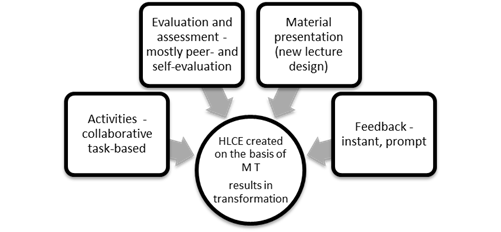
On the basis of what has been said above we came to the conclusion that a high level collaboration environment which can be created with the help of mobile network commonly results in transformation of four main constituents of any teaching process - material presentation, tasks and activities, feedback, evaluation and assessment (figure 1).
Figure 1. HLCE created on the basis of mobile technologies
Wireless Voting Tools In Educational Context
Electronic voting systems, also known as Audience Response Systems, or clickers, which directly introduce dialogue and interactivity between teacher and student, have been used successfully within the context of the classroom for the last decade (Bruff, 2009; Dangel & Wang, 2008; Fies & Marshall, 2006; Rubner, 2012). Quite a few mobile voting tools (Socrative, PollEverywhere, Xorro-Q, Mentimeter, MbClick, The SMART Response interactive response system, etc.) are currently available on the market. These tools share some common technological characteristics to facilitate material presentation and feedback: an audience can interact with the presenter’s computer and any interactive display or white board and can respond using whatever mobile device they own; there is no need for expensive and bulky devices; presenters can send questions to participants' devices who can vote and reply in different formats including a basic A, B, C style or with full text answers; questions can be created on the fly, or setup beforehand using the session leader's own web page; polling results can be presented in a variety of formats (histograms, pie charts, etc); some tools have software that allows response data to be downloaded into other spreadsheet programs or course management systems; they can be used in small group training sessions or in a large auditorium of 200 people or more.
Many researchers have analyzed the best pedagogical practices for using these tools: they allow for anonymous participation and add a game approach to the classroom environment (Martyn, 2007); initially used to promote active learning in large classrooms, they can be used successfully in small classroom as well (Gilbert, 2005); they can can turn multiple-choice questions - often seen to be as limited as assessment tools - into effective tools for engaging all students during class, students are more invested in participating in discussion and are more likely to have generated some ideas to share in that discussion (Bruff, 2009); polling results can be saved to spreadsheet programs for semester-long analyses that may inform subsequent curriculum development (Hodges, 2010); peer evaluation mediated by polling tools provides honest, constructive feedback and promotes more engaged class discussion (Bruff, 2010); can promote deep learning when teaching and questioning strategies center on higher-level thinking skills and increase student engagement providing prompt feedback (Dangel & Wang, 2008); help design formative assessment activities (Rubner, 2012). Mobile voting tools are very challenging, they require instructors to rethink their instruction to leverage their potential advantages (Tarr & Beasley, 2012). Teachers may start with just minor changes, but major pedagogical changes may also be introduced.
Student Response System that was piloted in our research is a web based mobile voting system designed by HiST (Norway) to enable asking multiple choice questions during teaching sessions in classroom or distance learning.[i] Since 2009 it has been used by university and school teachers from 17 different countries. It allows students to respond to questions asked by teachers anonymously in classroom, making every student’s voice heard at the lecture. SRS enables instructors to get instant assessment of tests, to evaluate group dynamics, to visualize group results immediately and to conduct feedback with the class by polling their opinion. Automatically generated feedback is followed by post-test activities provided by the lecturer aiming at clarification of common misconceptions. After that students may be given one more attempt to re-vote the misconception question.
The research, which has been done on pedagogical impact of SRS at HiST since 2009, showed significant improvement especially in student motivation and academic performance when SRS was implemented into language classes (Talmo, Sivertsen Korpås, Mellingsæter & Einum, 2012). SRS supported tests integrated into courses of science and engineering education department (HiST) encouraged student peer discussions and peer instruction, facilitated learners' engagement, enabled them to become actively involved in discussion improving learner academic performance and research skills (Arnesen, 2012; Nielsen, 2012).
The technological characteristics and pedagogical potential of SRS are summed up in table 1.
Table 1. Technological characteristics and pedagogical potential of SRS
Technological characteristics of SRS | Pedagogical Potential |
Immediate test assessment and feedback | · Immediate diagnosis of teaching problems · Instant feedback on learning problems in the large auditoriums · Group dynamics evaluation: the instructor can witness the students' learning progress · Any aspect of student output is under control and can immediately be drawn attention to · Increase participation of all students, not just a vocal minority · Skill practice by means of formative SRS tests |
Instant visualization of the test results | · Enhance learner motivation · Encourage peer discussions and collaborative post-test activities · Evaluation of group dynamics |
Anonymous submission of the test results | · Creation a low anxiety environment: everybody is involved, shy or reluctant students can feel relaxed and self-confident · Correction is supportive, done in a form of collaborative activities |
"Tag-It" function | · Visualization of learning materials: it enables teachers to ask multiple choice questions using multimedia material such as photos and video · Maintain students’ attention longer |
Time counter is installed into SRS | · No time for cheating |
The teacher interface for SRS forms an invisible "layer" on the top of other windows and applications on your computer | · The system is very flexible and handy - no matter what program is used to ask a question, SRS is just a click away when one wants to run voting sessions |
Equipment necessary: one Internet-enabled teacher computer and Internet-enabled student mobile devices (wireless or cable access) | · Teaching in technologically limited environments · No need for bulky costly equipment · No need for profound tech preparation |
Use of student own devices | · No need for tech instructions - familiar devices |
Methodology
Objectives Of The Research
The key objectives of a long-term research project Mobile devices in Language Classroom: theory and practice which was launched in 2011 at the Department of Foreign Languages and Area Studies, Lomonosov Moscow State University, are to evaluate learners' and instructors' preparedness to integrate mobile technologies into foreign language classroom and to work out mobile learning strategies to create collaborative language learning environment. The research results proved that the pressure for mobile device implementation came from students, that it is necessary to work out pedagogical framework of mobile technologies implementation into traditional classroom to avoid undesirable consequences of their misuse in learning experience (Titova, Talmo & Avramenko, 2013).
The next stage of our project consisted in working out sound pedagogical strategies on how to implement mobile voting tools into traditional lecture course. One of the main objectives of the international research Enhancing Technology Awareness and Usage of m-Learning in Russia and Norway was to pilot and evaluate the pedagogical impact of SRS integration into a traditional university lecture course. So the three research questions were proposed:
1. What is SRS didactic potential to create high level interactive environment?
2. How does SRS implementation enable lecturers to re-design a traditional university lecture course?
3. How does SRS supported approach change student learning and academic performance?
The general hypothesis for this research was that the students could enhance their learning following SRS supported approach implementation.
Lecture Design: From A Traditional Lecture To A Flipped Classroom
The task/enquiry based learning approach and SRS implementation are central to transformation of the lecture design as well as assessment and feedback patterns. SRS supported lecture design presents challenge for a lecturer because, first, the content material under discussion (PowerPoint presentation) has to be re-arranged into certain chunks of 5-6 slides which are followed by a short SRS supported test that consists of 4-5 statements; second, at least three SRS supported tests should be created to provide better diagnosis of learning problems and to highlight weak points of content presentation on the part of a lecturer, third, a lecturer has to be ready with some enquiry-based activities to initiate post-test group discussion or brainstorming.

|
Из за большого объема этот материал размещен на нескольких страницах:
1 2 3 4 5 |
