


Партнерка на США и Канаду по недвижимости, выплаты в крипто
- 30% recurring commission
- Выплаты в USDT
- Вывод каждую неделю
- Комиссия до 5 лет за каждого referral
Преобразовывать координату глаза выравнивают долю, чтобы отобразить пространство
1 если вид имеет планы отсечения в силе, зажим доля линии координаты xглаза к ним.
2 если перспектива включена, то, исполняет преобразование от координат глаза до перспективы.
Если вы используете polygonEye (), polygonDc (), polylineEye (), или polylineDc () функции AcGiViewportGeometry, Вы должны вызвать AcGiWorldGeometry:: setExtents () чтобы установить поле ограничения для примитива. Это позволит AutoCAD знать, сколько пространства примитив требует и используется в ZOOM Степени. SetExtents () функция обычно вызвана, когда примитив находится в мировых координатах, чтобы определить самое маленькое поле, которое будет соответствовать вокруг примитива в мировых координатах.
AsdkViewGeomSamp::AsdkViewGeomSamp() : mNumVerts(4)
{
mVerts[0] = AcGePoint3d(0.0, 0.0, 0.0);
mVerts[1] = AcGePoint3d(1.0, 0.0, 0.0);
mVerts[2] = AcGePoint3d(0.0, 1.0, 0.0);
mVerts[3] = AcGePoint3d(0.0, 0.0, 1.0);
}
Acad::ErrorStatus
AsdkViewGeomSamp::transformBy(const AcGeMatrix3d &xfm)
{
assertWriteEnabled();
for (Adesk::UInt32 i = 0; i < mNumVerts; i++) {
mVerts[i].transformBy(xfm);
}
return Acad::eOk;
}
Adesk::Boolean
AsdkViewGeomSamp::worldDraw(AcGiWorldDraw* pW)
{
// Draw a pyramid.
//
// If this is the regular AutoCAD DISPLAY mode...
//
if (pW->regenType() == kAcGiStandardDisplay) {
// From each viewport’s vantage point, figure out
// which sides of the pyramid are visible,
// then make the visible ones yellow and the hidden
// ones blue.
//
// Set the extents of the pyramid here because
// AcGiViewportGeometry’s polylineEye() doesn’t
// set extents.
//
for (Adesk::UInt32 i = 0; i < mNumVerts; i++) {
AcGePoint3d pt[2];
pt[0] = mVerts[i];
pt[1] = mVerts[(i + 1) % mNumVerts];
pW->geometry().setExtents(pt);
}
return Adesk::kFalse; // Call viewport draws.
}
// Otherwise, give HIDE, SHADE, RENDER, or proxy graphics
// a pyramid with filled faces.
//
const Adesk::UInt32 faceListSize = 16;
static Adesk::Int32 faceList[faceListSize] = {
3, 0, 1, 2,
3, 0, 2, 3,
3, 0, 3, 1,
3, 1, 2, 3
};
pW->geometry().shell(mNumVerts, mVerts, faceListSize, faceList);
return Adesk::kTrue; // Do not call viewportDraw.
}
void
AsdkViewGeomSamp::viewportDraw(AcGiViewportDraw* pV)
{
// For this viewport, draw a pyramid with yellow
// visible lines and blue hidden lines.
//
// Get this viewport’s net transform. This transform
// includes this entity’s block transforms and this
// viewport’s view transform; it does not include the
// perspective transform if we’re in perspective
// mode; that currently has to be applied separately
// when in perspective mode.
//
AcGeMatrix3d modelToEyeMat;
pV->viewport().getModelToEyeTransform(modelToEyeMat);
// Get the pyramid’s vertices.
//
AcGePoint3d A = mVerts[0];
AcGePoint3d B = mVerts[1];
AcGePoint3d C = mVerts[2];
AcGePoint3d D = mVerts[3];
// Convert them to the viewport’s eye coordinates.
//
A. transformBy(modelToEyeMat);
B. transformBy(modelToEyeMat);
C. transformBy(modelToEyeMat);
D. transformBy(modelToEyeMat);
// Save the eye coordinates.
//
AcGePoint3d AEye = A;
AcGePoint3d BEye = B;
AcGePoint3d CEye = C;
AcGePoint3d DEye = D;
// Perform the perspective transform if necessary.
//
if (pV->viewport().isPerspective()) {
pV->viewport().doPerspective(A);
pV->viewport().doPerspective(B);
pV->viewport().doPerspective(C);
pV->viewport().doPerspective(D);
}
// From that view, figure out which faces are
// facing the viewport and which are not.
//
int which_faces;
which_faces = ((C - A).crossProduct(B - A)).z > 0.0 ? 1 : 0;
which_faces |= ((D - A).crossProduct(C - A)).z > 0.0 ? 2 : 0;
which_faces |= ((B - A).crossProduct(D - A)).z > 0.0 ? 4 : 0;
which_faces |= ((B - D).crossProduct(C - D)).z > 0.0 ? 8 : 0;
// Those edges that meet between two faces that are
// facing away from the viewport will be hidden edges,
// so draw them blue; otherwise, they are visible
// edges. (This example is incomplete, as the test is
// indeterminate when the face is edge-on to the
// screen -- neither facing away nor toward the screen.)
// Draw the six edges connecting the vertices using eye
// coordinate geometry that can be clipped back and front.
//
AcGePoint3d verts[2];
Adesk::UInt16 color;
// AB
color = which_faces & 0x5 ? kYellow : kBlue;
pV->subEntityTraits().setColor(color);
verts[0] = AEye;
verts[1] = BEye;
pV->geometry().polylineEye(2, verts);
// AC
color = which_faces & 0x3 ? kYellow : kBlue;
pV->subEntityTraits().setColor(color);
verts[0] = AEye;
verts[1] = CEye;
pV->geometry().polylineEye(2, verts);
// AD
color = which_faces & 0x6 ? kYellow : kBlue;
pV->subEntityTraits().setColor(color);
verts[0] = AEye;
verts[1] = DEye;
pV->geometry().polylineEye(2, verts);
// CD
color = which_faces & 0xa? kYellow : kBlue;
pV->subEntityTraits().setColor(color);
verts[0] = CEye;
verts[1] = DEye;
pV->geometry().polylineEye(2, verts);
// DB
color = which_faces & 0xc? kYellow : kBlue;
pV->subEntityTraits().setColor(color);
verts[0] = DEye;
verts[1] = BEye;
pV->geometry().polylineEye(2, verts);
// BC
color = which_faces & 0x9 ? kYellow : kBlue;
pV->subEntityTraits().setColor(color);
verts[0] = BEye;
verts[1] = CEye;
pV->geometry().polylineEye(2, verts);
}
Пример 3: Получение Координат Окна
Этот пример показывает использование AcGiViewportDraw:: polylineDc () и AcGiViewport:: getViewportDcCorners () чтобы получить координаты дисплея области просмотра. Эта функция удобна, когда Вы рисуете графику, которые зависят от физического размещения области просмотра, типа значков и маркеров, которые изменяются с размером или границами области просмотра. Рисовавшая графика изменится с панорамированием и изменением масштаба изображения.
Пример рисует поле в правом верхнем углу области просмотра. Ширина поля и высота - всегда десятая часть самого короткого измерения области просмотра, и поле центрировано десятая часть самого короткого измерения области просмотра вниз и налево от правого верхнего угла области просмотра:
void
AsdkIconSamp::viewportDraw(AcGiViewportDraw* pV)
{
// Get the current viewport’s display coordinates.
//
AcGePoint2d lower_left, upper_right;
pV->viewport().getViewportDcCorners(lower_left, upper_right);
double xsize = upper_right. x - lower_left. x;
double ysize = upper_right. y - lower_left. y;
xsize /= 10.0;
ysize /= 10.0;
double xcenter = upper_right. x - xsize;
double ycenter = upper_right. y - ysize;
double half_xsize = xsize / 2.0;
double half_ysize = ysize / 2.0;
// Create a unit square.
//
const int num_verts = 5;
AcGePoint3d verts[num_verts];
for (int i = 0; i < num_verts; i++) {
verts[i].x = xcenter;
verts[i].y = ycenter;
verts[i].z = 0.0;
}
verts[0].x -= half_xsize;
verts[0].y += half_ysize;
verts[1].x += half_xsize;
verts[1].y += half_ysize;
verts[2].x += half_xsize;
verts[2].y -= half_ysize;
verts[3].x -= half_xsize;
verts[3].y -= half_ysize;
verts[4] = verts[0];
pV->subEntityTraits().setColor(kRed);
pV->geometry().polylineDc(num_verts, verts);
}
Пример 4: Вычисление Круга, чтобы Рисовать
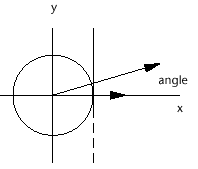
Следующий пример рисует круг модуля, центрированный в начале координат. Точный рисовавший круг зависит от взгляда области просмотра круга. Цель состоит в том, чтобы рисовать круг с полилинией, которая имеет минимальное число заметных долей. С командой VPORTS, Вы можете создавать четыре области просмотра и затем нажимать на один и раскрывать на круге, затем нажимать на другой и копировать от этого. Когда Вы REGENALL, каждая область просмотра вычисляет ее собственный минимально сегментированное представление полилинии круга.
Это - то, как пример вычисляет необходимое число долей линии в полилинии. Сначала, учитывая круг данного радиуса, который центрирован в начале координат и расположен в XY плане, и дан вертикальную линию, которая пересекает X ось в радиусе - 0.5 пикселов, определять угол между X осью и долей линии, которая простирается от начала координат к сути, где вертикальная линия пересекает круг. Два pi разделенный этим углом обеспечивает минимальное число долей, необходимых полилинией, чтобы напомнить круг. Пользователь не будет способен дифференцировать индивидуальные доли линии, которые составляют круг, потому что визуальные различия - меньше чем пиксел.
Adesk::Boolean
AsdkTesselateSamp::worldDraw(AcGiWorldDraw *pW)
{
// Draw a red 1x1 drawing-unit square centered at the
// world coordinate origin and parallel to the XY-plane.
//
const Adesk::UInt32 num_pts = 5;
AcGePoint3d verts[num_pts];
verts[0] = verts[4] = AcGePoint3d(-0.5, -0.5, 0.0);
verts[1] = AcGePoint3d( 0.5, -0.5, 0.0);
verts[2] = AcGePoint3d( 0.5, 0.5, 0.0);
verts[3] = AcGePoint3d(-0.5, 0.5, 0.0);
pW->subEntityTraits().setColor(kRed);
pW->geometry().polyline(num_pts, verts);
// If regenType is kAcGiSaveWorldDrawForProxy, return
// Adesk::kTrue, otherwise return Adesk::kFalse to trigger
// calls to viewportDraw().
//
return (pW->regenType() == kAcGiSaveWorldDrawForProxy);
}
void
AsdkTesselateSamp::viewportDraw(AcGiViewportDraw *pV)
{
static double two_pi = atan(1.0) * 8.0;
// Get the number of pixels on the X - and Y-edges of
// a unit square centered at (0.0, 0.0, 0.0), in
// world coordinates.
//
AcGePoint3d center(0.0, 0.0, 0.0);
AcGePoint2d area;
pV->viewport().getNumPixelsInUnitSquare(center, area);
// If the area values are negative, then we are in
// perspective mode and the center is too close or
// in back of the viewport.

|
Из за большого объема этот материал размещен на нескольких страницах:
1 2 3 4 5 6 7 8 9 10 11 12 13 14 15 16 17 18 19 20 21 22 23 24 25 26 27 28 29 30 31 32 33 34 35 36 37 38 39 40 41 42 43 44 45 46 47 48 49 50 51 52 53 54 55 56 57 58 59 60 61 62 63 64 65 66 67 68 69 70 71 72 73 74 75 76 77 78 79 80 81 82 83 84 85 86 87 88 89 90 91 92 93 94 95 96 97 98 99 100 101 102 103 104 105 106 107 108 109 110 111 112 113 114 115 116 117 118 119 120 121 122 123 124 125 126 127 128 129 130 131 132 |
