


Партнерка на США и Канаду по недвижимости, выплаты в крипто
- 30% recurring commission
- Выплаты в USDT
- Вывод каждую неделю
- Комиссия до 5 лет за каждого referral
SOFTWARE AND HARDWARE REQUIREMENTS
The main system requirements is a Personnel Computer are:
- 16/32 Bit or Pentium II 350Mhz Processor so that the software works smoothly. 128MB or more RAM to get better result. 10GB or more Hard disk space. 128Mb Support of Graphics Memory Operating System Window XP or 2000 or 98.
Requirements for MS Office 2003
- Operating System’s
- Windows Server 2003 or a later version Windows XP or a later version Windows 2000 Service Pack 3 (SP3) or a later version Windows Vista Windows Server 2008
- Minimum of 128 MB of RAM. An additional 8 MB of RAM are required for each office 2003 program that runs at the same time.
- Office 2003 requires 400 MB of available hard-disk space. Hard disk requirements vary ; depending on your configuration’s Office 2003 requires 400 MB of available hard-disk space. Hard disk requirements vary, depending on your configuration.
- Office 2003 requires a CD-ROM drive (or compatible DVD-ROM drive) for installation.
- A Super VGA monitor with at least 800x600 resolution and 256 colors is required.
- A Microsoft Mouse, Microsoft IntelliMouse, or compatible pointing device is required.
Solution Strategy and Acceptance Criteria:
The solution strategy for the above defined problem is to develop software which can help a school administration to improve its work ability and it can only be possible by feasibility study of the current manual system our Software is only helps to record data of the many current manual problem such that admission of a new student providing him an unique enrollment number, deposition of fees ,employee data, fee collection dept., employee type etc. in such type of system we can generate daily reports class wise, employee wise, student wise etc., If a School use our software product it’s a guarantee that they will have to done less work as they do before in manual system.
Systems Development Life Cycle (SDLC)
Identify Problems, Opportunities, and Objectives--Critical due to the fact that missing or misidentifying a problem can lead to wasted time and money. The analyst was called in to solve these problems. Opportunities are ways the analyst believes the company can improve through the use of computerized information systems. Identifying business objectives can help an analyst identify the opportunity for future success. During this phase, management is interviewed, the project scope is estimated, and a feasibility report is created which defines the problem and summarizes the objective. Management uses the report to decide whether or not to move forward with a computerized information system. Costs are factored into the decision.
Determining Information Requirements--Involves finding out what information the users need to do their jobs efficiently by taking a look at what and how information is currently being accessed. This is accomplished through interviews, questionnaires, observing decision maker's behavior, etc.
Analyzing System Needs--Involves finding out what hardware and software could allow the users to improve their efficiency. This is often accomplished through the use of data flow diagrams and the creation of a data dictionary, a descriptive list (data type, space requirements) of all the data items used in the system. During this phase the analyst analyzes the structured decisions made, those for which the conditions, alternatives, actions, and action rules can be determined. At this point, the analyst recommends a specific course of action to management.
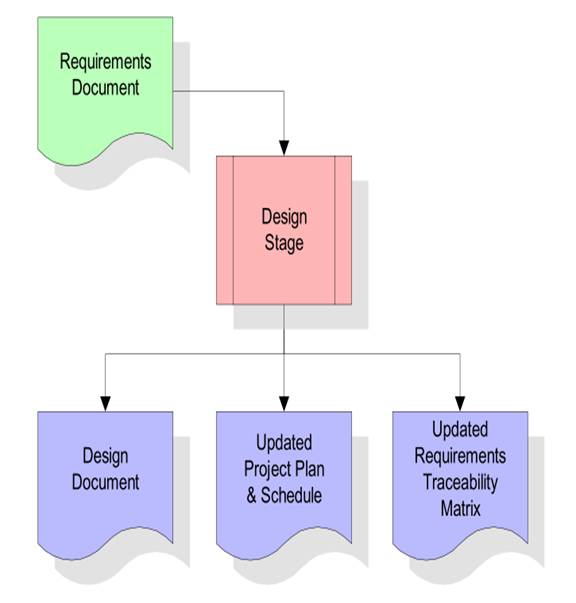
Designing the Recommended System--During this phase, data entry procedures are devised as is the user interface (both input and output). Databases that will store the business's data are also designed. A large amount of attention is given to designing an effective database since a poorly designed one can make accessing data difficult. Data back up procedures are defined as are specification packets for the programmers who will be creating the code that drives the system. The end result is a prototype of the actual system.
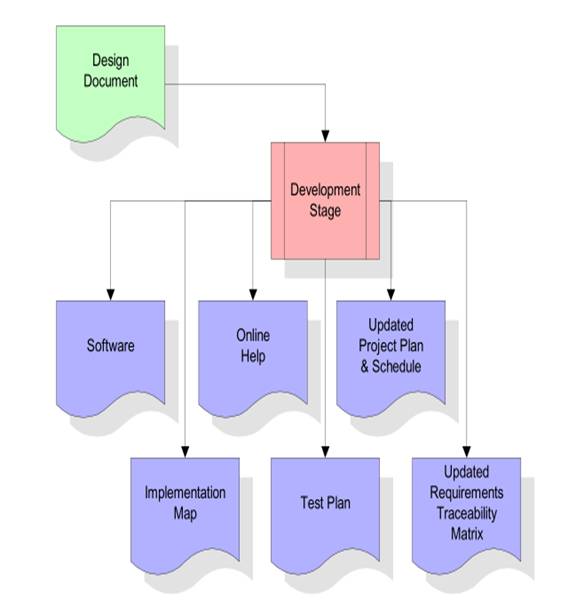
Developing and Documenting Software--The analyst works with the programmers to create the software that is needed to drive the IS. Also, the analyst works with users to create software documentation, manuals, Read Me files, and online FAQ lists. Programmers obviously play a large role in this stage of development.
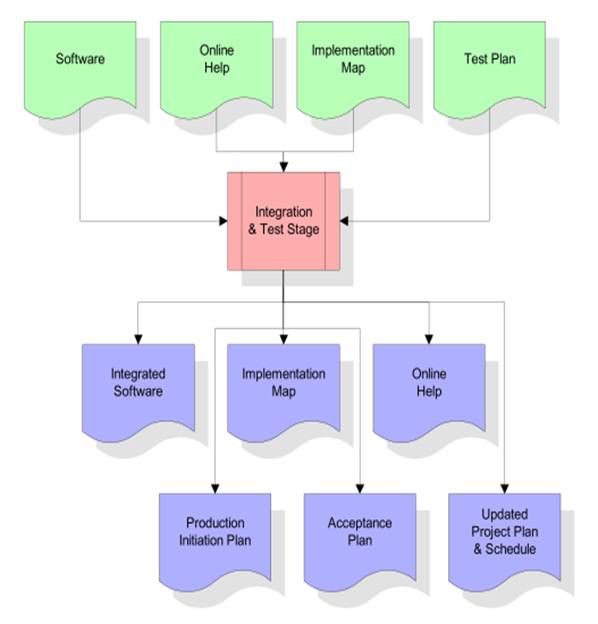
Testing and Maintaining the System-- First sample data is used, then actual data is used to simulate the actual system functions. This phase is important since it is far less costly to catch errors during this stage as opposed to catching them after the application is being used live. The system's "health" is monitored as is the documentation to ensure its accuracy.
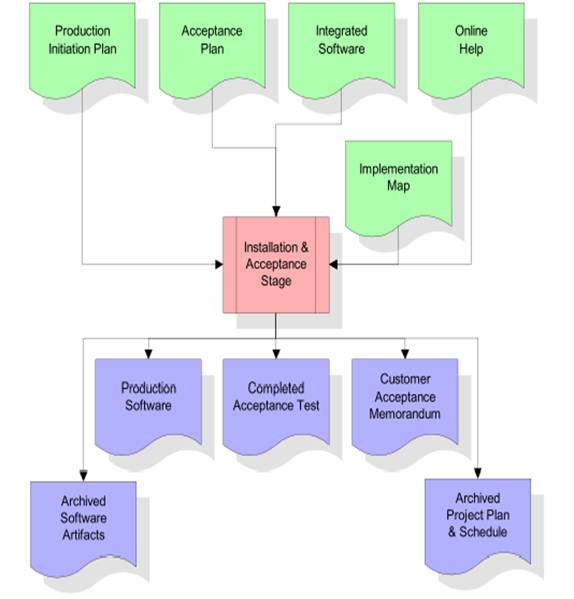
Implementing and Evaluating the System--This stage involves training users to handle the system. It is important that the transition from the old system to the new system runs smoothly. Any hardware/software installation occurs at this
point as well as any file format transfers. Soon after the system is up and running, it is then evaluated to ensure that it is actually being used. Evaluation should take place during every step in the cycle.
There are so many ways of developing a software. Almost each technology based companies have their own way of developing their software. Even though they adhere to different theories of development, they certainly follow these general stages:
1. Planning – before a program is created, they have to know what they want to create. Software development companies use this stage to determine the need of the present rveys and project proposal are common in this stage. They sit down and determine what the present market needs. Management is
often involved in this stage as they wanted to determine what the developers have to do and how it will impact the market.
2. Design – once the management has approved of the plan and the budget has been determined for this project, it’s now time to create the architecture of the program. Developers will work together and talk about the ways of developing the program. The workflow of the software is drafted in this stage. Some software development models approach this stage in a rather simple manner. The iterative development model often treats this stage as already the beginning of software’s actual creation. The initial programs are creating in this part of development model.
3. Testing – developers have to make sure their created programs will work well in different environments. The traditional way of testing usually needs testers so that the program will be exploited in different manner. On the other hand, some software developers do not use testers for their program rather developers get normal and intended users to test their program. They do not just implement the program to everyone though, they implement the program in restricted manner so that they can monitor to software’s performance and make the necessary adjustments even before the software is released for general public. The testing stage even expands to the idea of implementing the software in beta testing just to make sure it can withstand multiple users at the same time.
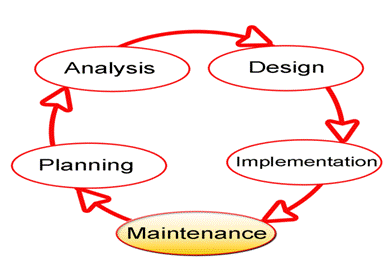
4. Implementation – once testing is finished and the software is proven good for implementation, it is released to the public or will be removed from beta version. It’s expected that on first days, developers will face serious challenge of fixing different bugs as they are discovered one by one by different users. The main difference of the implementation stage to the testing is the amount of bugs expected. Since they are implemented to the public or a wider audience, it’s already expected that it should work properly.
5. Maintenance – with the software properly implemented, developers role in this software does not end there. Instead, they will have to work reactively for this software. Instead of looking for the problems in their created software, developers will only be providing answers to their problems.

System development life cycle and its stages
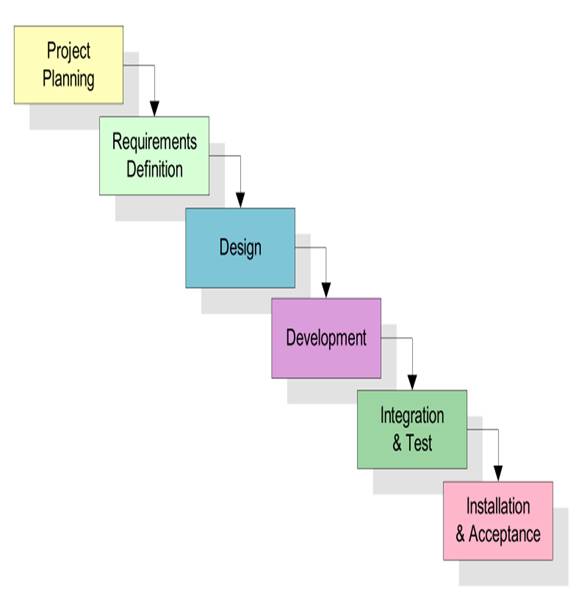
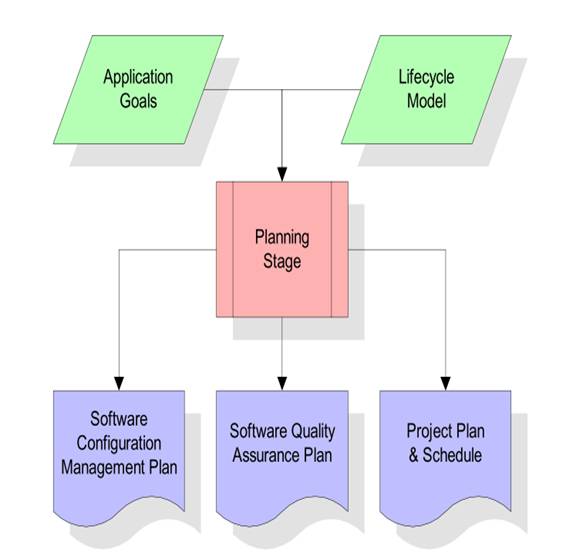
Planning Stage
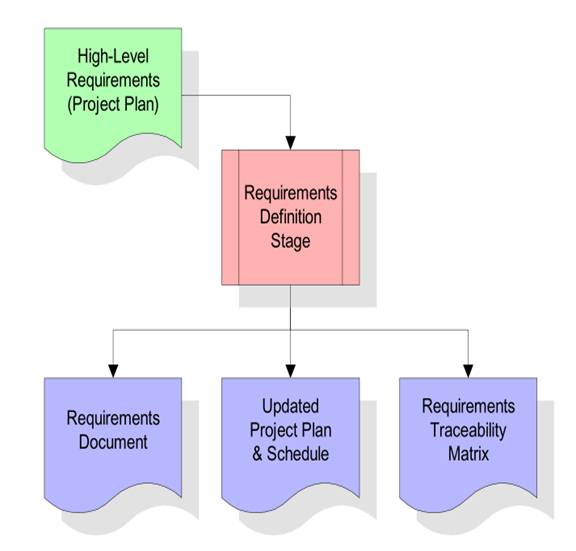
Requirement Gathering Stages
Design Stage
Development Stage
Integration and Test stage
Acceptance Stage
Feasibility Study
The feasibility study is the important step in any software development process. This is because it makes analysis of different aspects like cost required for developing and executing the system, the time required for each phase of the system and so on. If these important factors are not analyzed then definitely it would have impact on the organization and the development and the system would be a total failure. So for running the project and the organization successfully this step is a very important step in a software development life cycle process.

|
Из за большого объема этот материал размещен на нескольких страницах:
1 2 3 4 5 6 |
