


Партнерка на США и Канаду по недвижимости, выплаты в крипто
- 30% recurring commission
- Выплаты в USDT
- Вывод каждую неделю
- Комиссия до 5 лет за каждого referral
In the main window of the program AFDP the Speed bar press the button  . The window of modification of a database (Figure 2) is removed.
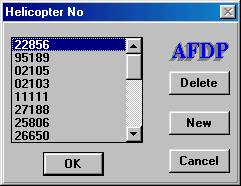
Figure 2. A window of modification of a database.
From this window the following functions are accessible:
· Deletion from a database of the program of the data of the chosen helicopter;
· Addition to a database of the new helicopter and transition to a window of input of the calibration data;
· Transition to a window of editing of the calibration data.
4.1.1. Deletion of the data.
For deletion the data:
1. In the list choose the number of the helicopter, which data are necessary to delete.
2. Press the button "Delete".
3. For confirmation of deletion of the data in a window " Deletion of data " (Figure 3) press the button "Yes", for a cancellation of operation of deletion press the button "No".
.
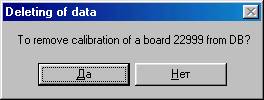
Figure 3. Dialogue of confirmation of deletion of the data.
4.1.2. Addition in a database of the new helicopter.
For addition to a database of the new helicopter:
1. Press the button "New". Thus there will be a dialogue panel of input of onboard number of the helicopter (Figure 4).
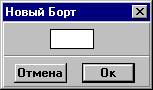
Figure 4. Dialogue of input of new onboard number.
2. Type with the help of digital keys of the keyboard onboard the number of the helicopter. A number can contain no more than five digits.
3. Press the button "ОК". Thus there will be a dialogue panel (Figure 5).
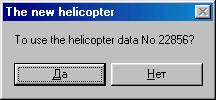
Figure 5. Dialogue of confirmation
4. If there are no the calibration data for the new helicopter press the button "Yes". In the list of helicopters there will be a new onboard number, and in a database of calibration of this helicopter there are the chosen as the standard of the helicopter.
5. If there are data for input of calibration press the button "No". In the list of helicopters there will be a new onboard number, and the data do not form in a database of calibration of this helicopter.
4.1.3. Editing of the calibration data.
For a call for an editing of a file the calibration data in the list of helicopters choose the necessary number of the helicopter and press the button "ОК". The window of editing of the calibration data (Figure 6) is unwrapped.
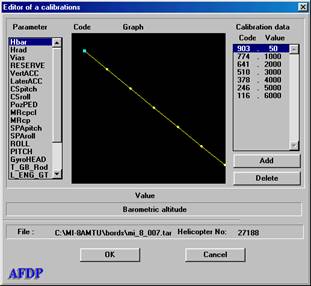
Figure 6. A window of editing of the calibration data.
In the left list there are reduced designations of analog parameters. With a choice of parameter, in the right list the table is displayed of the calibration data as pairs code - physics. Between the lists there is a diagram of calibration. The program makes the diagram according to the table data. Under the diagram there is a panel of the help, in which the complete name chosen of an analog parameter is represented.
For input of the calibration data:
1. In the left list choose the analog parameter, for which the data will be introduced.
2. Delete old the calibration data (pair code - physics). Deletion of a chosen pair data is made with pressing the button "Delete".
3. Press the button "Add". Thus there is a dialogue panel of input data " Input data of calibration ". (Figure 7.).
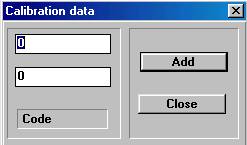
Figure 7. The panel of data input of calibrations
4. Input meaning of a code into the top field of input, and physical meaning of a parameter - in bottom. Press the button "Add".
5. After input of all calibration data of the channel press the button "Close".
6. The program returns management to the a window of editing of the calibration data. For input data of the following parameter repeat actions, described the above.
7. For an output press the button "OK" or " Cancel ".
If the input was made or the editing of the calibration data with pressing the button "OK" is unwrapped a window "Attention"! (Figure 8.), and with pressing the button "Cancel" a window "Attention"! (Figure 9).
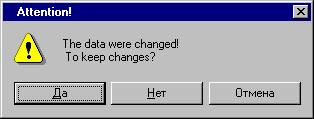
Figure 8.
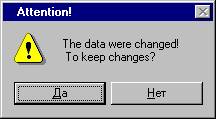
Figure 9.
If to press the button "Yes" - program will keep the made changes of the data.
If to press the button "No" - program will not keep changes.
If to press the button "Cancel" - program the Window of editing of the calibration data " comes back in.
4.2. Copying of the flight information
For copying of the flight information from the card PCMCIA of the store TBN-K-4 (TBNK) or tape drive mechanism MLP-23 (MLP) on a hard disk PC the program INPUT is intended. It forms a file, which is used for the automated processing and express train - analysis of flight.
For copying of the flight information from a card TBNK, it is necessary to establish a card in PC and then to turn on the feed PC.
For copying of the flight information from the tape drive mechanism MLP-23 you should do these things:
· With turned off the feed according to the maintenance instruction to prepare the device of reproduction UVS-3M and device of interface with PC;
· To establish MLP-23 in the device of reproduction UVS-3M;
· To turn on the feed PC and device of reproduction.
After start of the program INPUT on the screen there is a main window of the program (Figure 10).
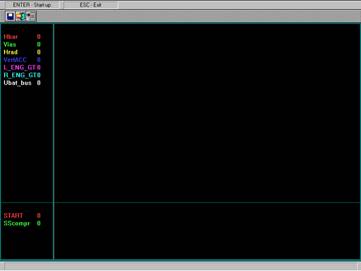
Figure 10. A main window of the program INPUT.
In the Speed bar there are the following buttons of management:
- For transition to a mode of copying of the flight information and creation of flight files;
- For an output from the program;
- For a change of the removed the list АП and РК to the screen with copying.
During reproduction and the rewritings of the flight information in the working area of a window the diagrams of analog parameters and event signals synchronously with their reading from the carrier of the flight information. It allows the operator to make a search of the necessary flight, to control the quality of record and correctly to define borders of flight.
On the diagram appear the following analog parameters: Vias – indicated airspeed, Hbar – barometric altitude, Hrad – radio altitude, L_ENG_GT – exhaust gas temperature of the left engine, R_ENG_GT - exhaust gas temperature of the right engine, UBAT. BAS – direct voltage at battery bus, VertACC - vertical acceleration and event commands (ES): SScompr – shock strut compression and START – starting button is depressed.
The operator has an opportunity to choose any combination from 8 АП and 8 РК with the help of a procedure of modification of the list of parameters. The work with a window of modification of the list of displayed parameters is described in the unit Representation of the flight information on devices of out put. A choice of parameters for an out put to the diagram.
For the transition to a mode of copying of the flight information in a main window press the button  . The window « Creation of the flight file » (Figure 11) is unwrapped.
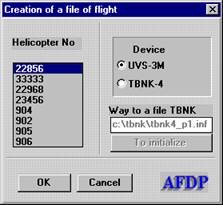
Рисунок11. A window of preparation to copy of the flight information.
With the help of this window the preparation and set-up of the program INPUT to a procedure of copying of then flight information from a card TBNK or tape drive mechanism MLP is made.
4.2.1. Input of the flight information from a card TBNK
1. In the panel a Source press the radio button «TBNK».
2. In the list « Helicopter No » make a choice of an onboard number of the helicopter, from which card the copying of the flight information will be made.
3. In the panel « Way to a file TBNK » is displayed the address of installation in PC of a card TBNK e:\tbnk _ p1.inf. ATTENTION! If the way will differ from described the program INPUT will not find a card, therefore program automatically blocks transition to rewriting FI (button ОK becomes inaccessible). For restoration into the panel « Way to a file TBNK » with the help of the keyboard introduce the text e:\tbnk _ p1.inf.
After the performance of set-up of the program for reception of the information from a card TBNK in a window « Creation of a flight file » press the button «Ok». The window of management of copying of the flight information (Figure 12) is unwrapped.
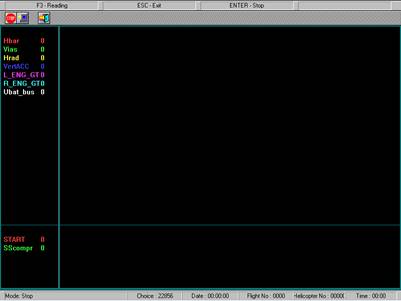
Figure 12. A window of management of copying of the flight information
In the Speed bar there are the following buttons of management:
 - For stop working of the program during copying of the flight information;
 - For start of a procedure of reproduction and copying of the flight information;

|
Из за большого объема этот материал размещен на нескольких страницах:
1 2 3 4 5 |
