


Партнерка на США и Канаду по недвижимости, выплаты в крипто
- 30% recurring commission
- Выплаты в USDT
- Вывод каждую неделю
- Комиссия до 5 лет за каждого referral
THE SPECIAL SOFTWARE OF THE AUTOMATED PROCESSING OF THE FLIGHT INFORMATION OF HELICOPTERS Mi-171 IS EQUIPPED BY SYSTEM AIRBORNE FLIGHT DATA RECORDER BUR-1-2 AND TBN-K-4
AFDP Мi-171
THE INSTRUCTION OF THE OPERATOR
THE CONTENTS
Introduction 03
Conditions of supplying of the software 03
Start and exit from the program 05
Window of the program AFDP 06
3.1. The line of a heading and menu 06
3.2. Speed bar 07
3.3. Scroll bar and lists 07
3.4. Status bar 07
3.5. Contextual - dependent menu 07
Preparation for processing of the flight information 08
4.1. Input of the calibration data of measuring channels 08
4.1.1. Deletion of the data. 08
4.1.2. Addition in a database of the new helicopter. 09
4.1.3. Editing of the calibration data. 09
4.2. Copying of the flight information 11
4.2.1. Input of the flight information from a card TBNK 13
4.2.2. Input of the flight information from MLP-23 15
4.2.3. Input and editing of passport data 16
The automated processing 17
5.1. Choice of a flight file. 17
5.2. Representation of the flight information on devices of out put 18
5.2.1. Appearance of the diagrams to the screen of the monitor 18
5.2.2. Choice of parameters for an out put to the diagram 19
5.2.3. Change of scale of display of analog parameters and places of
their situation on the screen 20
5.2.4. Creation and updating of standard sets of parameters 21
5.2.5. Output to the diagram of the given area of the flight 21
5.3. Output of the diagrams to the printer 22
5.4. Tabulared representation of the flight information 22
5.5. Printing the table 23
The express - analysis of the flight information 24
6.1. Viewing of results of the express - analysis, estimation of reliability
of the revealed events 25
6.2. Printing of the results of the express - analysis on the printer 25
Supplement.
Description of algorithms of the express - analysis information BUR-1-2 of helicopters Mi –171
Introduction
The Special Software AFDP Mi-171 is intended for a complex processing of the information registered by the system BUR-1-2 by the helicopters Mi-171.
The Special Software AFDP Mi-171 consists of two program modules:
INPUT. EXE - module of copying of the flight information on the hard disk PC;
AFDP. EXE – a module of the automated processing and the express - analysis of the flight information.
The module of copying provides the reception of the flight information from a card PCMCIA of the solid-state store TBN-K-4 or of the tape drive mechanism MLP-23 of system BUR-1-2 and formation of files flight for the subsequent processing.
The module of the automated processing provides:
· Formation of files with calibration data of transmitters of analog parameters;
· Displaying of the flight information on PC in a graphic or tabular kind.
The module of the express - analysis provides:
· Definition of stages and modes of flight (start of the engine, takeoff, a climb etc.);
· The control of functioning of systems and the equipment of the helicopter and observance of rules of its operation by the crew;
· Revealing of events of infringements of flight-operational restrictions;
· Displaying of the protocol of the express - analysis of the flight information on the screen of the monitor or printer.
The algorithms of the express - analysis were fulfilled by a principle of formation of norm of controllable process and establish the facts of an exit out of the established borders. The exit out of a controllable norm is named «EVENT»and is typed out in the protocol of results of processing as the textual message explaining the essence of revealed infringement, and also auxiliary information ensuring identification of a controllable situation and an establishment of the reasons of registration of an event.
The operating procedure with the software AFDP Mi-171 and the recommendations to the user are given in this Instruction.
The list of events controlled by program modules is given in the Supplement 1.
Conditions of supplying of the software
The Special Software AFDP Mi-171 is established by the supplier on a hard disk PC. PC is specially adapted for work AFDP Mi-171. The software completely is set - up and is ready to work in OS Windows. The installation AFDP Mi-171 on other computer is forbidden.
For restoration of the damaged or lost program components AFDP Mi-171 the distributive complete set is on floppy - disk is delivered to the User.
For restoration of the program insert into the store an install disk. Transfer to the root catalogue of a disk about a file Mi-171.exe and start it to performance. The catalogue Mi-171 is unwrapped in which there are all necessary program components AFDP Mi-171. In case of damage of the installation disks address ask for the help to the supplier AFDP Mi-171.
Start and exit from the program
Start the program
The labels AFDP and INPUT are placed in a folder Mi-171 on a working table on your computer with it installation.
It is necessary on a working table to open a folder Mi-171 and to choose a label AFDP or INPUT to start the program.
For start from the menu press the button Start-up, choose from the appeared menu item of the Program and further in item Mi-171 item AFDP or INPUT.
Exit from the program
There are some ways for an exit from the program:
· Press a combination of the buttons «ALT» + «F4». This combination can be used for any Windows programs.
· Choose a command of the menu a File - Exit.
· Press the button  at the right top corner of a window AFDP Mi-171.
Window of the program AFDP
Any program in ОS Windows is represented as a kind of a window. The window consists of a framework, lines of heading, menu, Speed bar, status bar, and the working area of a window.
In working area of a window there are the results of processing of the flight information by program components СПО AFDP Mi-171.
Let's see the elements of a window on the example of a main window of the program AFDP (Figure 1.).
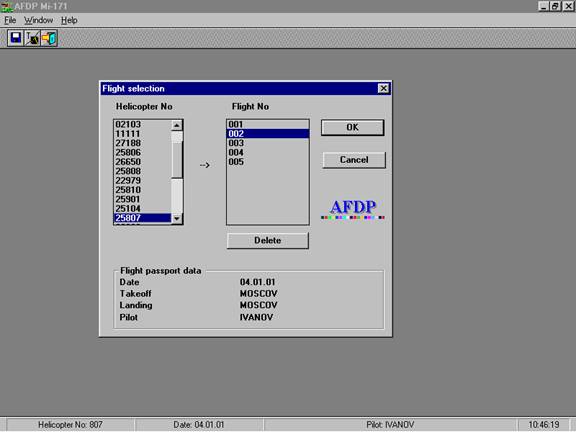
Figure 1. A main window of the program AFDP.
3.1. The line of a heading and menu
The line of heading is in the top part of a window. The following elements are located in it:
· The text of the name of the program - AFDP Mi-171;
· The button  ;
;
· The button  ;
;
· The button .
Under the line of a heading there is a line of the menu, with which help the commands of management of the program are chosen. If to choose by the mouse one items of the menu, under it there is a list of commands.
In the menu «File» there are following commands:
· Load of flight - for a choice from a database of a file of the flight information;
· Installation of the printer - for a call of a dialogue window of set-up of the printer;
· Print - for a printing of the diagram or table;
· Exit - for an exit from the program.
In the menu «Window» there are following commands: «New», «Tile», «Cascade», «Close all», «Arrange icons».
In the menu the «Help» there is a command «About..» - for a call of the identification program data.
3.2. Speed bar
Under a line of the menu there is a Speed bar. The Speed bar consists of buttons of a call of commands of management of the program. With installation of the mouse pointer on any button of the Speed bar, under it there is a text of help. The text contains the brief description of functional purpose of the given element of management.
In each program the Speed bar consists of the certain set of components. Their description will be given further with the description of work with particular program modules.
3.3. Scroll bar and lists
Purpose of Scroll bar is standard for OS Windows. The choice of an element in the list is made with the help of the mouse (one click on the appropriate element of the list) or buttons of moving of the cursor (Ý or ß).
3.4. Status bar
In the bottom part of a window of the program there is a Status bar, on which the information on a current condition of the program and current time is appeared.
Components of Status bar are defined by the program module, which at this time is working. The description of components of a line of Status bar for particular program modules will be given further.
3.5. Contextual - dependent menu
For a call of the contextual - dependent menu place the mouse pointer to the window of the diagrams or to the window of the table and press the right button of the mouse. On the screen there will be a menu with the list of commands, which can be applied to the chosen object. The description of commands for each object will be given further.
Preparation for processing of the flight information
It is necessary to do the following preliminary works for executing before the beginning of processing the flight information:
1. To input to a database of the program the data of calibration of measuring channels of the onboard device of registration a BUR - 1 -2 for the chosen helicopter;
2. To execute copying of the flight information from the intermediate carrier of the chosen helicopter on a hard disk PC.
4.1. Input of the calibration data of measuring channels
The input of calibration data is made with receipt of the new helicopter or after performance of calibration of measuring channels of analog parameters.

|
Из за большого объема этот материал размещен на нескольких страницах:
1 2 3 4 5 |
