


Партнерка на США и Канаду по недвижимости, выплаты в крипто
- 30% recurring commission
- Выплаты в USDT
- Вывод каждую неделю
- Комиссия до 5 лет за каждого referral
 - For an output from the program.
In a Status bar appear the following data:
Mode - information about the current mode of operations of the program (Stop, Reading and Record on a disk);
The choice - in it a field appears the number of the helicopter, which was chosen by the operator with preparation for copying. The number should correspond to the number in a field a Board;
Date - date, registered on the store, of flight (with reproduction);
Flight - number, registered on the store, of flight;
Board - number, registered on the store, of the helicopter;
Time - time, registered on the store.
These data should be guided by the search and identification of record of the necessary flight on the store.
For formation of flight files press the button  . The program begins to read the information from a card TBNK, consistently choosing the information from 1-st, 2-nd, 3-rd and so on turning on TBNK. Thus on the screen synchronously with sample of the information the analog parameters and event signals chosen before start of the program of rewriting are displayed.
After ending of reading of the next turning on of TBNK the program removes on the screen a window of input of nameplate data (Figure 13).
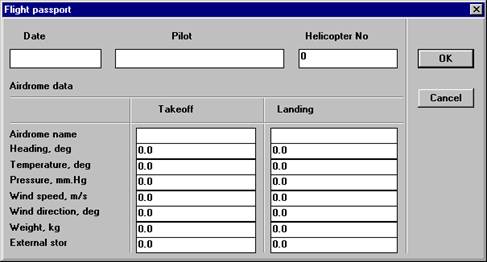
Figure 13. A window of dialogue of input of the flight passport
With work with a card TBNK the input of nameplate data at a stage of copying of the flight information may not be made. For preservation of the information, read out from a card, of the next turning on TBNK press the button "ОК".
On a card TBNK can be very short by the time interval turning on or turning off for check of serviceability TBNK (with reproduction there are not starts even starts of engines) which the objective control is not interested in. That the program did not form from turnings on flight files, after appearance of the passport press the button "Cancel". The program requests the confirmation to a cancellation of creation of a flight file reproduced before this turning on of turning on TBNK (a Figure 14).
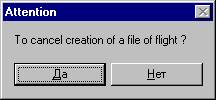
Figure 14.
With the positive answer the program the flight file does not form and passes to reproduction of the next turning on TBNK. With the negative answer the program comes back in a window of the passport.
After reproduction the last, which is, card TBNK turned on the program gives out the message (Figure 15).
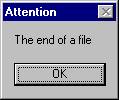
Figure 15.
The program thus comes back in a main window of the program INPUT.
That with the next deletion of a card from the helicopter not to make repeated rewriting already available of flight files make clearing a card TBNK. For it, press the button  and in the window « CREATION of a flight file » (Figure 16) press a radio button "TBNK", and then button "To initialize". The program gives out the warning message (Figure 16).
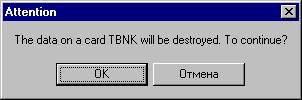
Figure 16.
After reception of conformation on clearing the program makes clearing of a card and the message « Initialization of a file TBNK» is over (Figure 17).
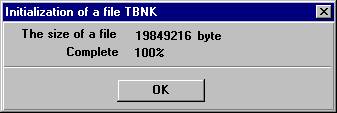
Figure 17.
Further for end of work press in the window « Creation of a flight file » the button "Cancel" and further in the main window of the program INPUT the button .
4.2.2. Input of the flight information from MLP-23
1. In the panel a Source turn on the radio button "UVS-3M".
2. In the list « Helicopter No » make a choice of the number of the helicopter, from which tape drive mechanism the copying of the flight information will be made.
3. Press the button "ОК".
The program passes into a mode of reproduction and copying FI with MLP-23 and the window of management of copying of the flight information (Figure 12) is unwrapped.
Thus the program tests the device of interface PC with UVS-3M and if it is not ready or is faulty gives out the message (Figure 18).
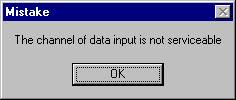
Figure 18.
After pressing the button "ОК" the program comes back in the window " Creation of a flight file". Check up connection of the device of interface and repeat actions described in the previous paragraph.
With the help of buttons of management UVS-3M make a choice of the necessary path and turn on the device in a mode of reproduction.
In a window of management of copying of the flight information press the button or the button "F3". The program passes into a mode "Reading". The operator according to the data in Status bar and character of change AP and ES makes a search of the necessary record. It is necessary to form the flight file so that the file began before start of engines and finished after their turning off. Flights executed on one flight day is possible to unite in the one file.
For transition into the mode of record it is necessary to designate the moment which will begin formation of a file. For it move the mouse pointer to the chosen section and click the left button of the mouse. In this place there will be a vertical marker of green color
After installation of a marker press the button  or the button "F2". The program passes into the mode "Record".
For end of a mode "Record" press the button  or the button "Enter" and stop UVS-3M. The program gives a window of input of passport data of flight.
After input of passport data of flight the program forms a file of flight on a disk.
4.2.3. Input and editing of passport data
After ending of copying of flight files with the help of the program AFDP to make viewing of the flight information in the received copies, to identify these records and to write down in the passport for each flight the identification data. The call of the passport is made from a window of the diagrams with the help of the button  .
.
The automated processing
Start the program module AFDP. exe. After start of the program on the screen appears the main window (Figure 1). On the Speed bar press the button  . The window of a choice of flight (Figure 19) will appear.
5.1. Choice of a flight file
The choice of a flight file is carried out from a dialogue window « Flight selection » (Figure 19).
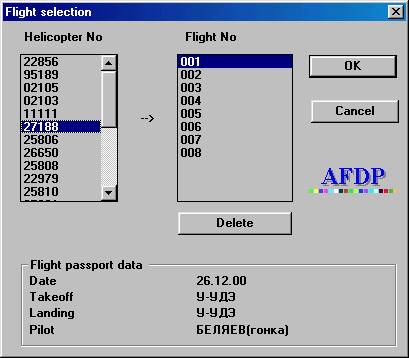
Figure 19. A window of a choice of a file a floor ё that
1. In the list « Helicopter No » capitalize the necessary helicopter.
2. In the list « Flight No » capitalize the necessary flight. With a choice in this list of particular flight in the bottom part of a window the program represents for identification the data from the passport of a flight: date of flight, the name of air station takeoff / landings and name of the helicopter of a commander.
3. After a choice of the necessary a flight press the button «OK».
4. The program makes a load of flight (Figure 20) and clearing of the information of failures. (Figure 21).
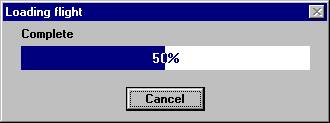
Figure 20. A window of the indicator of process of a load of a flight file.
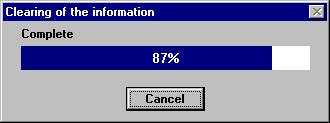
Figure 21. A window of the indicator of process of clearing of the flight information
.
5.2. Representation of the flight information on devices of out put
The flight information in AFDP Mi-171 can be submitted as the diagrams of change of analog parameters and event signals or as the table parameter - time.
Viewing the diagrams and tables are carried out on the screen of the monitor, documenting - on the printer.
5.2.1. Output of the diagrams to the screen of the monitor
After a load to the system of processing of the flight file, chosen by the operator, on the screen of the monitor is unwrapped a window of the diagrams (Figure 22).
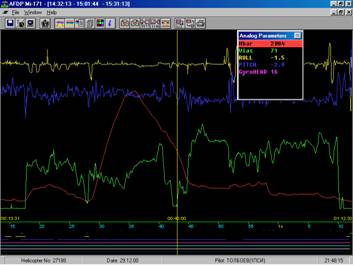
Figure 22. A window of the diagrams
In a line of heading there is the astronomical time:
· The left number corresponds to the time of the left border of a represented area of flight;
· The average corresponds to the time of a position, which there is a cursor;
· The right number corresponds to the time of the right border of a represented area of flight.
The analog parameters can be submitted as discrete meanings according to order of their registration - as separate points, and kind of contiguous lines with addition between discrete meanings calculation according to the formula of linear interpolation of meanings The switching of a mode is made by the command «Interpolation» contextual - dependent menu of a window of the diagrams. If to the left of this item there is a tick, it means, that the interpolation is made, otherwise differently - no. With viewing of the interpolated meanings they are displayed in the window «Parameters»; with viewing the diagram as discrete meanings the interval between them is not interpolated and is not out put. The event signals are interpolated before their next sample.

|
Из за большого объема этот материал размещен на нескольких страницах:
1 2 3 4 5 |
