


Партнерка на США и Канаду по недвижимости, выплаты в крипто
- 30% recurring commission
- Выплаты в USDT
- Вывод каждую неделю
- Комиссия до 5 лет за каждого referral
6. The invention of the transistor in 1947 and of related solid-state devices during the 1950's and 1960's resulted in the production of faster and more reliable electronic computers. The new machines also were smaller and less expensive than earlier models.
7. The continued miniaturization of electronic equipment during the late 1960's and 1970's led to further advances in computer technology. The development of the integrated circuit enabled engineers to design both minicomputers and high-speed mainframes with tremendous memory capacities.
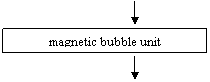
8. Researchers are seeking ways to improve memories and auxiliary storage equipment. They expect to produce an efficient magnetic bubble unit, which is faster and cheaper to operate than mechanical tape or disk units. A magnetic bubble unit is a semiconductorlike chip that stores data in tiny, cylindrically shaped areas called bubbles. Up to a million bits of information can be stored in one bubble unit.
9. Scientists are also working to increase computing speed by designing circuits that are even more densely packed and closer together. One proposed device, called a very large-scale integrated circuit (VLSI), contains hundreds of thousands of transistors and other parts. Projects also are being undertaken to devise hardware and software enabling a computer to understand ordinary speech.
III. Say whether the following statements are true or false:
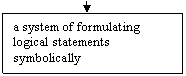
1. Charles Babbage developed the idea of an electronic digital computer. 2. George Boole devised a system of formulating logical statements symbolically. 3. The invention of the transistor in 1947 resulted in the production of faster and more reliable electronic computers. 4. Scientists are also working to decrease computing speed.
IV. Answer the following questions on paragraphs 1 and 2:
1. What did the inventions and ideas of many mathematicians and scientists lead to? 2. When were the first mechanical calculating machines invented? 3. Who developed the idea of a mechanical digital computer? 4. The technology of Babbage's time was not advanced enough, was it?
V. Find the place in paragraph 3 containing the information about Boole's invention. Share this information with your group-mate.
VI. In paragraphs 5 and 6 find the English equivalents of the following words:
вводить; улучшать (усовершенствовать); конструкция (проект); предлагать; хранить; данные (информация); изобретение; устройство (прибор); кончаться, иметь (своим) результатом; производство; надежный; дорогой (дорогостоящий).
VII. Translate paragraphs 7 and 8 into Russian.
VIII. Read paragraph 9 and say how scientists are working to increase computing speed.
IX. Write out of the text the words and word combinations for describing advances in computer technology.
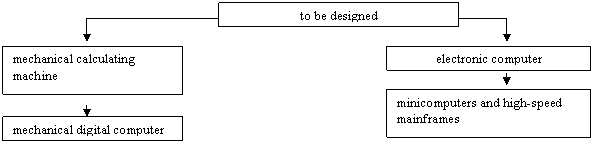
X. Fill in the boxes of the logical diagram with the Russian equivalents of the following words:
 |
 |  |
| |
 | |
XI. Divide text A into logical parts and find the topical sentences in each part.
XII. Speak about the development of computers using the topical sentences and words from the logical diagram.
LESSON THREE
I. Look through the list of English words and their Russian equivalents facilitating reading text B: to process (to handle) – обрабатывать; customer account – счет заказчика; to involve – включать; item – предмет, изделие; aid – средство; entertainment – развлечение; computerized games – компьютерные (машинные) игры; input device – устройство ввода; keyboard – клавиатура, клавишная панель; storage unit – запоминающее устройство; memory – память; control unit – устройство управления; to select – выбирать; to direct – управлять; arithmetic/logic unit – арифметическое/логическое устройство; output device – устройство вывода; meaningful – зд. понятный; to resemble – напоминать.
II. Skim through the text and say what it is about (you are given 5-10 minutes).
Text В
Computer is an electronic device that performs calculations and processes information. It can handle vast amounts of facts and figures1 and solve complicated problems at high speeds. The fastest computers are able to process millions of pieces of information in seconds.
A computer can process many kinds of information, from book titles and customer account numbers to chemical formulas and words from ancient Greek texts. It handles all such data in the form of numbers. A computer is able to solve problems involving words by changing them into problems dealing with numbers.
The ability of a computer to do so many tasks2 makes it useful for a wide variety of purposes. Industrial plants use computers to control machines that produce chemicals, steel products, and numerous other puters are used as a navigation aid on airplanes, ships, and spacecraft. They also enable scientists to analyze data returned by space puters can be used as teaching machines. They even provide entertainment in the form of computerized games.
Although a computer can do many things, it cannot think. A human operator has to instruct the computer exactly what to do with the data it ch instructions are called a program. Also, the operator must frequently check the performance of the computer and in many cases, interpret the results of the performance.
Computers differ greatly in size. The biggest ones have enough equipment to fill a large room. The smallest computers can be held in a person's hand. No matter what their size, however, all computers have certain basic parts.
The typical computer has an input device, such as an electronic keyboard, through which the operator enters instructions and data. A storage unit, also called a memory, receives this information from the input device and holds it until it is needed. A control unit selects the instructions from the memory in their proper sequence and directs the operations of an arithmetic/logic unit. The arithmetic/logic unit processes the data by means of mathematical calculations and operations involving logic. An output device then translates the processed data into a form meaningful to the operator. Typical output equipment includes automatic typewriters, high-speed printers, and visual displays4 that resemble television screens.
Notes
1. handle (process) vast amounts of facts and figures – обрабатывать большое количество фактов и цифр
2. to do so many tasks – выполнять так много задач
3. to analyze data returned by space probes – анализировать данные космических зондов
4. includes automatic typewriters, high-speed printers and visual displays – включает в себя автоматические пишущие машинки, быстродействующие печатающие устройства и дисплеи
III. Answer the following questions on the contents of the text:
1. What is a computer? 2. What can a computer do? 3. A computer cannot think, can it?
4. What has a human operator to do? 5. Do computers differ in size?
IV. Speak about the basic parts of a computer.
LESSON FOUR
I. Look through the list of English words and their Russian equivalents facilitating reading text C:
general-purpose computer – вычислительная машина общего назначения; special-purpose computer – вычислительная машина специального назначения; to restrict – ограничивать; to represent – представлять; to compare – сравнивать; binary numeration system – двоичная система счисления; decimal – десятичный; switch – переключатель; to correspond – соответствовать; quantity – величина, значение.
II. Read the following text carefully and find the information about classifying computers:
Text С
Kinds of Computers
1. Computers are frequently divided into two groups according to the jobs they perform. These groups are general-purpose computers and special-purpose computers. A general-purpose computer can handle many kinds of jobs and is not restricted to any particular user. On the other hand, a special-purpose computer is designed to do one specific job for a particular user.
2. Computers differ in the way they work as well as in what they can do. On this basis, they can be classified into three general types: (1) digital computers, (2) analog computers, and (3) hybrid computers. Digital computers are by far the most common type.
3. Digital computers solve problems and do other tasks by counting, comparing, and rearranging digits in the arithmetic/logic unit. All the data, whether in the form of numbers, letters, or symbols, are represented by digits.
4. Digital computers use the digits of the binary numeration system. Unlike the familiar decimal number system, which uses 10 digits, the binary system uses only two digits: 0 and 1. These binary digits, called bits, can be easily represented by the thousands of tiny electronic circuits of a digital computer. The circuits operate much like an ordinary electric switch. When the switch is off, it corresponds to the binary digit 0. When the switch is on, it corresponds to the digit 1.
5. Analog computers work directly with a physical quantity, such as weight, voltage, or speed, rather than with digits that represent the quantity. The computers solve problems by measuring the quantity in terms of another quantity. In a problem involving water pressure and water flow, for example, electrical voltage might serve as an analogue (likeness) for the water pressure, and electric current for the water flow. Many familiar devices, including speedometers, thermometers, and thermostats, operate on the same basic principle as analog computers. For example, a thermometer measures temperature in terms of the length of a thin line of liquid in a tube. An analog computer presents output data in a continuous form, often as a position on a scale. In some cases, the data are displayed as electrical signals on an instrument called an oscilloscope.

|
Из за большого объема этот материал размещен на нескольких страницах:
1 2 3 4 5 6 7 8 9 10 11 12 13 14 15 16 17 18 19 20 21 22 23 24 25 26 27 28 29 30 31 32 33 34 35 36 37 38 39 40 41 42 43 44 45 46 47 48 49 50 51 |
