

Fig. Parameters, the tab options
MFN | Tag | English | Russia | Element | Description | Language of localization |
000125 | 01 | Search. | Поиск | Fig. Parameters, the tab options | The list of settings of search | |
02 | Show the progress of the Search. | Показывать индикатор поиска | To remove whether or not the indicator of search | |||
03 | Display complete dictionary. | Показывать полный словарь БД | Full or not full dictionary of a Database | |||
04 | Automatically display Search Results. | Автопоказ результатов поиска | Automatically to show results of search | |||
05 | Alternate Search Result Tool Bar. | Панель инстр. результ. поиска | Alternative toolbar of search | |||
06 | Highlight Retrieved Terms. | Выделять найденные термины | To allocate the found terms | |||
07 | Foreground color: | Цвет изображения: | To specify a foreground color | |||
08 | Background color: | Цвет фона: | To specify a background color | |||
09 | Display Search Results in a Table. | Табл. форма результ. поиска | To show results of search in the tabulared form | |||
10 | Default Search Display. | Экран поиска по умолчанию | The screen of search by default | |||
000126 | 03 | Data. | Данные | Settings of the data | ||
04 | Conversion Table (Reading): | Табл. конвертации(чтение): | To specify a name of a file of the table of converting for reading | |||
05 | Unconversions table (Writing): | Табл. обр. конверт.(запись): | To specify a name of a file of the table of return converting for wrighting | |||
000127 | 02 | Automatic Inv. File Update. | Автообновл. инверт. файла | Automatically to update the inverted file | ||
03 | Display Tool Bar. | Показывать панель инстр. | To display a toolbar | |||
04 | Display Status Bar. | Показывать строку сост. | To display messages in a status bar | |||
06 | Close database confirmation. | Подтвержд. закр. БД | To demand confirmation of closing of a Database |
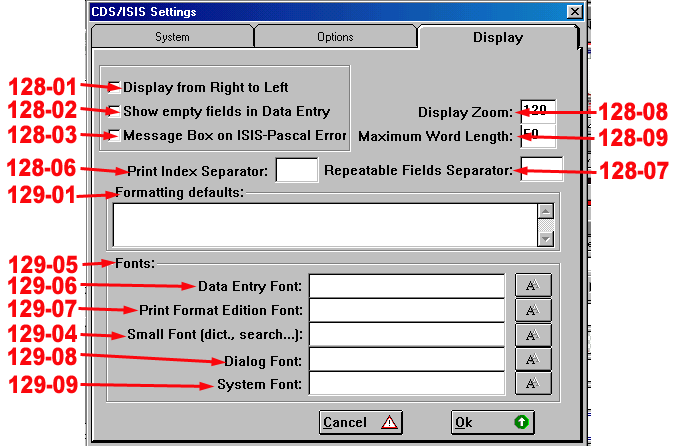
Fig. Parameters, the tab display
MFN | Tag | English | Russia | Element | Description | Language of localization |
000128 | 01 | Display from Right to Left. | Показывать справа налево | Fig. Parameters, the tab display | To display the text from right to left (specially for the Arabian languages) | |
02 | Show empty fields in Data Entry. | Пустые поля при вводе | To show whether or not empty fields at data input | |||
03 | Message Box on ISIS-Pascal Errors. | Сообщ. в формате ISIS-Pascal | To display system messages in a ISIS-Pascal format of error | |||
06 | Print Index Separator: | Разд-ль при печати: | To use a line of symbols as a separator for printing the index | |||
07 | Repeatable Fields Separator: | Разделитель повт. полей: | To use a line of symbols as a separator for repeatable fields | |||
08 | Display Zoom: | Масштаб экрана: | To specify scale of the screen | |||
09 | Maximum Word Length: | Макс. длина слова: | To specify the maximal length of a word | |||
000129 | 01 | Formatting defaults: | Форматирование по умолчанию: | To use a string of a format by default | ||
04 | Small Font (dict., search...): | Мелкий (словарь, поиск,,,): | To specify a font used for the dictionary of a Database, search, etc. | |||
05 | Fonts: | Шрифты | The list of fonts | |||
06 | Data Entry Font: | Ввод данных: | To specify a font used at data input | |||
07 | Print Format Edition Font: | Редакт. формата печати: | To specify a font used for editing of a print format | |||
08 | Dialog Font: | Диалоги: | To specify a font used in dialog boxes | |||
09 | System Font: | Системный: | To specify a font used by system | |||
10 | Winisis is about to rewrite the configuration file. Note that some changes will take effect only restarting the program. | Winisis перепишет файл конфигурации. Некоторые изменения вступят в силу только после перезагрузки программы. | The message in a window of the warning | To change whether or not a file of a configuration | ||
000130 | Reserved | |||||
000131 | ||||||
000132 | ||||||
000133 | ||||||
000134 |

|
Из за большого объема этот материал размещен на нескольких страницах:
1 2 3 4 5 6 7 8 9 10 11 12 13 14 15 16 17 18 19 20 21 22 23 |
