

The contract № 000.2
The executor: group «the Multimedia trainers»
Glossary on localization CDS\ISIS
The instruction on use
The given document contains the full list of texts of messages and options of the menu of program complex Winisis of version 1.4 and is intended for addition in a program complex of a modern language of localization. The text of messages and options of the menu is submitted in the tabulated form, where:
· The column with the name « № records » - contains unique number of record (MFN) databases of messages
· The column with the name "Tag" - contains a tag of a field in which the message is stored
· The column with the name « the English language » - contains the text of the message in English
· The column with the name "Russian" - contains the text of the message in Russian
· The column with the name "Element" - contains elements of interface Winisis or the reference to figure on which the window of program Winisis with the indication of a site of tests of messages or options of the menu is represented
· The column with the name "Description" - contains the brief description of an element of management of the corresponding message or an option of the menu
· The column with the name « Language of localization » - is intended for text translation of messages or options of the menu on other language.
For addition of a modern language in system Winisis it is necessary for you to translate texts of messages and options of the menu to this language, having filled in a column with the name «Language of localization». While translating texts should be paid special attention to length new, i. e. the translated message because in some cases at too big length of the message it will be incorrect to be deduced in window Winisis. As a reference point of length can serve both English, and the Russian text of this message, but final length is defined by practical consideration at direct use in Winisis.
Having finished translation of all messages and options of the menu, it is necessary for you with use standard operations of copying and inserting of operation system Windows to transfer texts to corresponding database Winisis.
Texts of messages Winisis
MFN | Tag | English | Russia | Element | Description | Language of localization |
000001 | 01 | English[NAME]. | Русский[NAME] | |||
02 | &Ok. | Да |
| The button for an executing of operation. | ||
03 | &Cancel. | Отмена |
| The button for a cancellation of executing of operation. | ||
04 | &Help. | Помощь |
| The button for call help topics of the program. | ||
05 | &Retry. | Повторить | The button for retry an operation | |||
06 | &Save. | Сохранить |
| The button for saving. | ||
07 | &New. | Новая |
| The button for creation new file, element, etc. | ||
08 | &Undo. | Отменить |
| The button for cancellation of the previous operation | ||
09 | &Delete. | Удалить |
| The button for deletion | ||
10 | Winisis &Help. | Winisis Помощь |
| The button for call help topics of the program | ||
000002 | Reserved | |||||
000003 | ||||||
000004 | ||||||
000005 | ||||||
000006 | ||||||
000007 | ||||||
000008 | ||||||
000009 | ||||||
000010 |








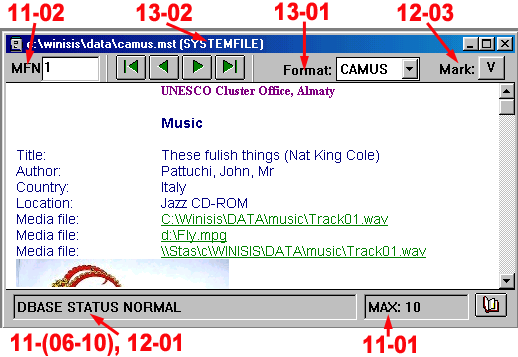
Fig. Browse Data Base
MFN | Tag | English | Russia | Element | Description | Language of localization |
000011 | 01 | MAX. | Всего | Fig. Browse Data Base | Total of records in the Database. | |
02 | MFN. | Ун.№ | The unique record number of the database (MFN). | |||
03 | ** MST ERROR **. | **Ошибка MST (Мастер файл) ** | Masseges in the window “System error” | The explanatory text | ||
04 | ** XRF ERROR **. | ** Ошибка XRF (Файл перекрестных ссылок) ** | ||||
05 | ** MFN TO BIG **. | ** Уникальный номер записи слишком велик ** | ||||
06 | STATUS NORMAL. | НОРМАЛЬНЫЙ СТАТУС | Fig. Browse Data Base | Messages signalling on the status or characteristics of current record of the database | ||
07 | RECORD LOG. DEL. | ЗАПИСЬ ЛОГ. УДАЛЕНА | ||||
08 | RECORD PHYS. DEL. | ЗАПИСЬ ФИЗ. УДАЛЕНА | ||||
09 | RECORD LOCKED. | ЗАПИСЬ БЛОКИРОВАНА | ||||
10 | DBASE STATUS NORMAL. | НОРМ. СТАТУС БД |
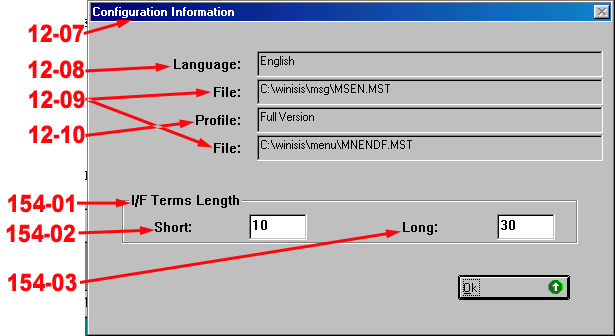

|
Из за большого объема этот материал размещен на нескольких страницах:
1 2 3 4 5 6 7 8 9 10 11 12 13 14 15 16 17 18 19 20 21 22 23 |
