


Партнерка на США и Канаду по недвижимости, выплаты в крипто
- 30% recurring commission
- Выплаты в USDT
- Вывод каждую неделю
- Комиссия до 5 лет за каждого referral
5) Product description - Clearly describe your product in terms that your audience will understand. It may be helpful to have a chart with the product components. You want to give the audience a frame of reference for the features and benefits that they are going to see. You also want them to know how your product fits into their existing environment. Show how the product interfaces with other products or systems they may be using. (1-2 slides)
6) Clearly articulated benefits as they relate to your target audience - You can use a features and benefits list or just walk through the features and benefits. Whatever you do, do not forget the benefits! They may be obvious to you because you live and breath the product, but your audience should have them clearly called out and they must relate to their needs. (1- 5 slides)
7) Examples/successes - At this point in the presentation your audience should be familiar with your product and why it is different and better. In order to drive this point home use examples of how your product is being used and how customers have benefited from the product. (1-3 slides)
8) Closing argument - This is your opportunity for a 'call to action'. You want summarize your product presentation, reiterate the point of the presentation, and ask your audience to do something, if that is the point of your presentation.
Other Important Points
Use Examples
Use examples whenever possible. Examples help to illustrate your points and provide a frame of reference for those people in your audience that don't already have one.
Simplify
Keep slides as simple as possible. Lots of text on a slide makes it difficult to read and it loses its impact. Make sure the slides will be readable from the back of the room. If you are not giving the presentation, you may feel compelled to add more text to the slides - provide speaker's notes instead.
If you are using PowerPoint, don't get carried away with colors and many different transitions. Pick a format and stick with it so that you don't draw attention away from your subject.
One of the most effective presentations that I ever saw was done with a single clip art picture in the middle of each slide. The picture makes a point without drawing attention away from the speaker.
Easy-to-Read Fonts
A san-serif font (a font that does not have the little lines at the top and bottom, as in the headings of this document) is easier to read for bullets on slides.
Style
A presentation that uses the default PowerPoint fonts and lots of different primary colors looks like a presentation that was slapped together with little thought. Not everyone is a graphic artist, but you can learn some basic principles and apply them to your slides.
Use a presentation template and then use the colors from the template (or ones in the same family) for all charts and graphs.
Use alignment carefully. If your template is left or right aligned, use that alignment throughout the presentation.
Remove harsh lines. Powerpoint always puts a dark line around any box that you draw. These lines make the drawings look crude and removing the lines your eye focuses more on the content of the box rather than the boxes themselves. Additional lines and arrows don't have to be dark either, try making them thicker and lighter so that they don't draw attention away from the point of the slide.
Provide Speaker's Notes
In order to keep the bullets on your slides concise; you may want to consider providing speaker notes to people that may be giving your presentation. If you do provide speakers notes, keep them short and concise and use bullets to make it easy to read. Remember that the more text you put on the speaker's notes, the less likely the speaker is to read it before the presentation. I can't tell you how many times I have seen a presentation where the speaker says, 'I think this slide is trying to say...'. Both the speaker and the marketing group that provides the presentation look bad.
If you are using PowerPoint, print the slides with the speaker's notes so that the presenter does not get the notes out of sync with the presentation.
Provide Handouts
You will probably handout copies of the slides. It is always nice to print the slides in a format where there is room for the audience to take notes.
You may want to use handouts in addition to providing copies of the slides. Often, to keep slides simple, you may compromise the ability for the viewer to use it as a reference later or you may have charts or back-up information that has too much detail to include in your presentation. In these cases it may help to include handouts and refer to them during your presentation.
Use Themes for Group Presentations
If there are a group of people presenting it is helpful to use a theme and weave it throughout all the presentations. This provides a sense of cohesiveness to the entire presentation.
A good agenda is an important part of group presentations. You want to introduce all the speakers and let the audience know the topic each speaker will be discussing.
Mark Confidential
If the presentation is confidential, don't forget to mark it confidential. Slides often get copied at customer sites and can easily end up in your competitors' hands.
When You are the Presenter
Practice your presentation. No one ever has the time to do it, but even if you are used to winging presentations, the following are the benefits of practice:
1) Your pitch will be more powerful, polished, and professional
2) You are more likely to accomplish your objective
3) You look better
There is nothing worse then watching a presenter bring up a slide and then try to interpret it as if this is the first time they are seeing it. The slides are to support your presentation. I will often give the presentation to a practice audience within the company first before giving it to an external audience. You will get some great suggestions from people who have a slightly different perspective. This is especially true if you can give your pitch to a different department. I have found that giving a product presentation to the engineering group will provide some great insights. Before you give your presentation to a practice audience, be sure to go over the "Points to Consider" above with your audience so that they understand your objective, target audience, and that target audience's perspective.
Additionally you should add slides that talk specifically to your audience. Identify the issues and problems that they are dealing with or tell them about how their competition is doing something. Then show them how your product will provide them with a competitive advantage.
Other helpful hints:
Use gestures to make things visual and clear.
Use an expressive voice to emphasize points and show your enthusiasm for your product.
Always stand, even when you are talking to a small audience. Standing projects more energy.
Use highlights or colors on charts to emphasize an important point. (Though don't over use this, and don't use red unless you want to set off alarms.)
Use controversy - It is sometimes useful to start your presentation with a controversial statement to grab your audience's attention.
Use metaphors to help with visualization.
Make sure you have a smooth verbal transition between slides for a very polished presentation. (This is where the practice really pays off.)
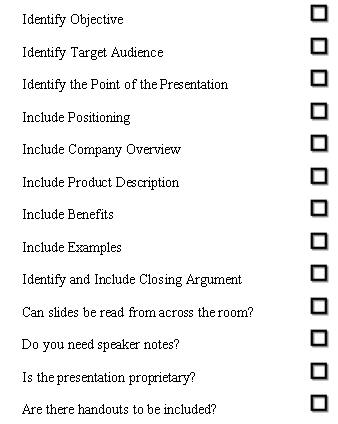
Product Presentation Checklis
Choose the right synonym
1. We'd like to change consumers'_________________ of our brand. = We would like to change how consumers see our brand.
- perception review reevaluation
2. These types of products are becoming _________________ popular. = These types of products are becoming more and more popular.
- incredibly increasingly impossibly
3. Our market researchers have determined that this is an effective approach. = Our market researchers have come to the _________________ that this is an effective approach.
- conclusion condition coincidence
4. It's not easy to _________________ the outcome of this campaign. = It's not easy to know in advance what the outcome of this campaign will be.
- pursue predict prevent
5. The next step is to ________________ the results. = The next step is to measure/evaluate the results.
- gather inquire about gauge
6. Who is going to be the lead on this project? = Who is going to be in __________________ of this project?
- head front charge
7. Which approach do you recommend? = Which approach do you ___________________?
- suggest exaggerate subdue
8. We shouldn't _______________ the importance of these recent developments. = We shouldn't overemphasize the importance of these recent developments.
- exacerbate exaggerate exercise
9. He _______________ to bring up several important issues. = He didn't bring up several important issues.
- fell folded failed
10. A new business prospect = A _________________ customer/client
- potential potent patented
Match the definition with the letter of the term:
a - target audience
b - pioneer (n.)
c - eye-catching
d - jingle (n.)
e - brand image
f - poster (n.)
g - misprint (n.)
h - brand management
i - generic brand
j - copy (n.)
1. a plainly labeled, unadvertised product ->
2. a person who does something, or thinks of something before anyone else -->
3. the people that a book, movie, or radio/TV program wants to reach -->
4. a large piece of paper, usually hung on walls to promote a product, event, etc. -->
5. an error/mistake in printing -->
6. text to be used in an advertisement -->
7. how someone sees, perceives a particular brand -->
8. the art of creating and maintaining a brand -->

|
Из за большого объема этот материал размещен на нескольких страницах:
1 2 3 4 5 6 7 8 9 10 11 12 13 14 15 16 17 18 19 20 21 22 23 24 25 26 |
